



容器
框架
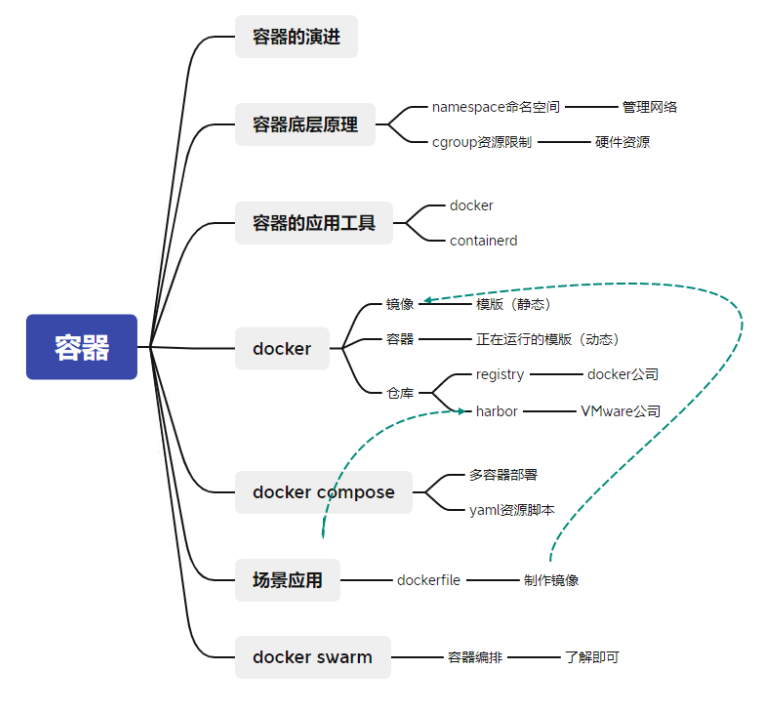
1、容器的演进
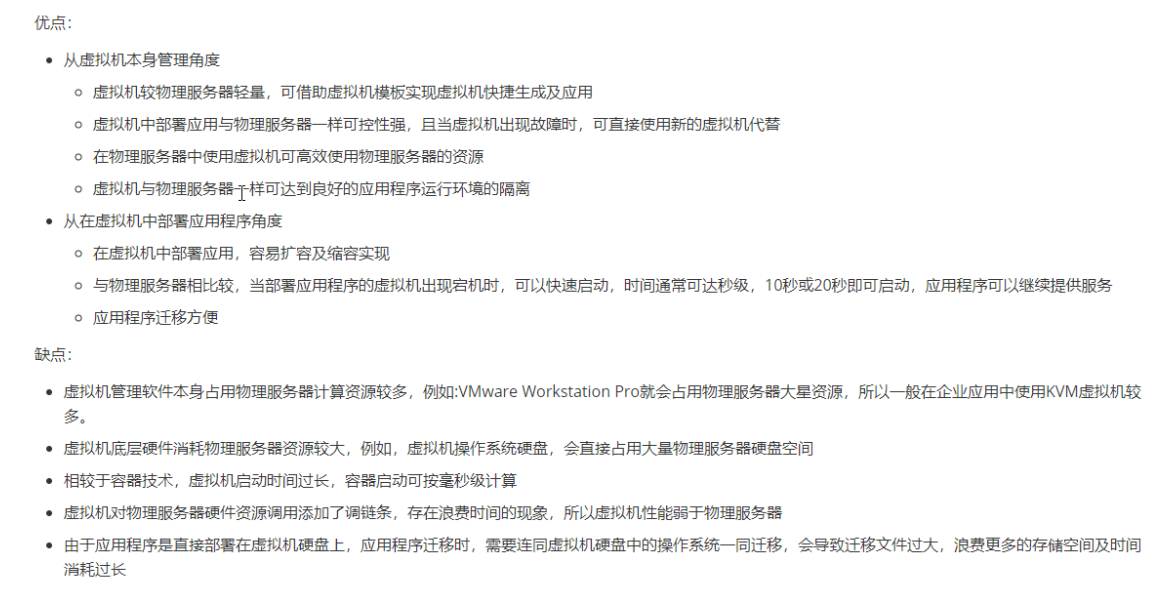
使用虚拟机的优点和缺点
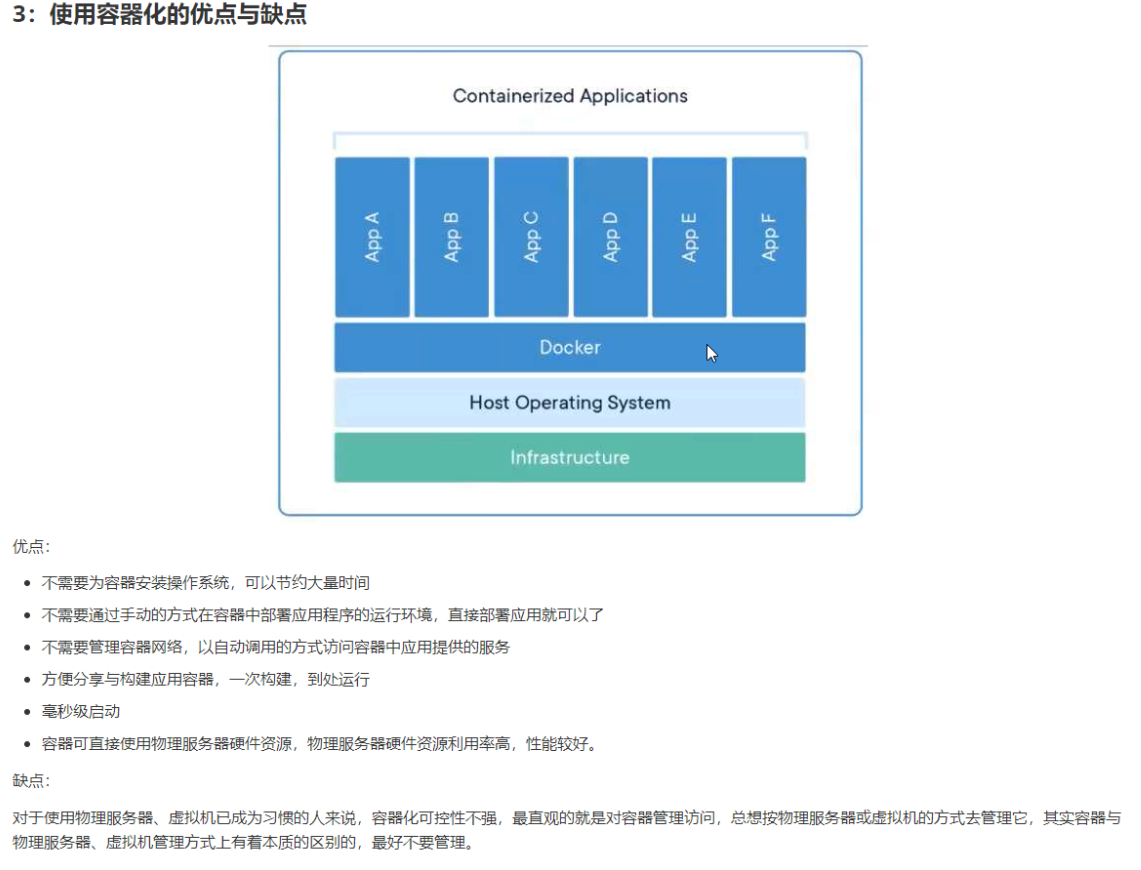
使用容器化的优点与缺点
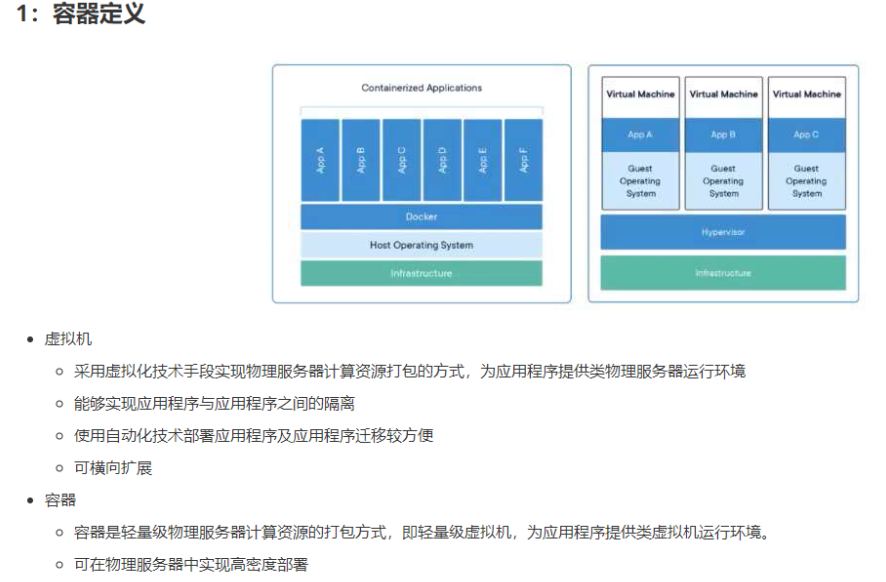
容器
常见问题
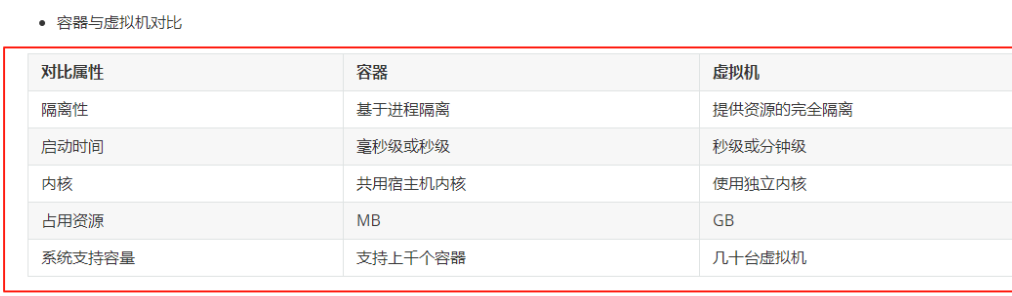
2、容器的底层原理/容器内核
2.1 namespace命名空间--主要对网络资源的管理
管理网络
namespace分类
Linux Namespace 是内核提供的资源隔离机制,目前主要支持以下分类(按功能与隔离维度划分):
1. Mount Namespace (CLONE_NEWNS)
隔离文件系统挂载点,使不同命名空间拥有独立的挂载目录树。例如,Docker 容器内的挂载操作不会影响宿主机。
2. UTS Namespace (CLONE_NEWUTS)
隔离主机名(hostname)和域名(domainname),允许容器自定义独立的主机标识。
3. IPC Namespace (CLONE_NEWIPC)
隔离进程间通信(IPC)资源,包括 System V IPC 和 POSIX 消息队列,避免不同容器间的通信冲突。
4. PID Namespace (CLONE_NEWPID)
隔离进程 ID(PID),每个命名空间内的进程拥有独立的 PID 树,容器内 PID 1 的进程在宿主机上可能对应其他 PID。
5. Network Namespace (CLONE_NEWNET)
隔离网络设备、IP 地址、端口、路由表等,实现独立的网络协议栈。Docker 容器的网络隔离即基于此。
6. User Namespace (CLONE_NEWUSER)
隔离用户和组 ID,允许容器内使用非特权用户映射到宿主机的特权用户,提升安全性。
7. Cgroup Namespace (CLONE_NEWCGROUP)
隔离 Cgroup 根目录,控制资源分配视图(需内核 4.6+),目前应用较少。
这些 Namespace 共同构成容器技术的隔离基础,与 Cgroups 的资源限制功能互补。
三层交换机 二层交换机等对应表和OSI 7层关系
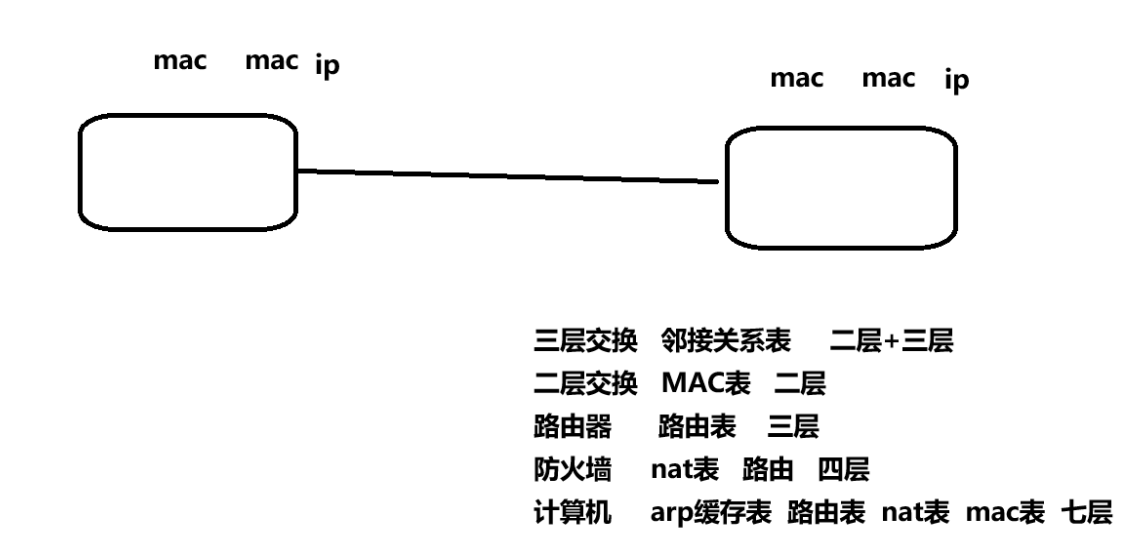
应用实践
ARP表 包含 MAC IP地址
2.1.1创建net命名空间 名称game
[root@localhost ~]# # 创建命名空间game
[root@localhost ~]# ip netns ls
[root@localhost ~]# ip netns add game
[root@localhost ~]# ip netns ls
game
2.1.2删除命名空间
[root@localhost ~]# # 删除命名空间
[root@localhost ~]# # ip netns delete game
2.1.3在net命名空间中执行命令
[root@localhost ~]# # 在网络命名空间中执行bash命令  退出用exit
[root@localhost ~]# ip netns exec game bash
[root@localhost ~]# ip link #在net命令空间中执行查看网络连接网卡命令
1: lo: <LOOPBACK> mtu 65536 qdisc noop state DOWN mode DEFAULT qlen 1
    link/loopback 00:00:00:00:00:00 brd 00:00:00:00:00:00
[root@localhost ~]# exit
exit
[root@localhost ~]# # 在linux主机系统中查看
[root@localhost ~]# ip netns exec game ip link list
1: lo: <LOOPBACK> mtu 65536 qdisc noop state DOWN mode DEFAULT qlen 1
    link/loopback 00:00:00:00:00:00 brd 00:00:00:00:00:00
[root@localhost ~]#
2.1.4在net命名空间中执行多条命令
容器路由表
[root@centen7-10-hehe ~ 10:13:48]$ ip netns exec game route -n
Kernel IP routing table
Destination     Gateway         Genmask         Flags Metric Ref    Use Iface
宿主机路由表
[root@centen7-10-hehe ~ 10:13:52]$ route -n
Kernel IP routing table
Destination     Gateway         Genmask         Flags Metric Ref    Use Iface
0.0.0.0         10.1.8.2        0.0.0.0         UG    100    0        0 ens33
10.1.8.0        0.0.0.0         255.255.255.0   U     100    0        0 ens33
192.168.122.0   0.0.0.0         255.255.255.0   U     0      0        0 virbr0

在网络命名空间中查看防火墙规则 iptables表
[root@centen7-10-hehe ~ 10:14:00]$ ip netns exec game iptables -nL
Chain INPUT (policy ACCEPT)
target     prot opt source               destination

Chain FORWARD (policy ACCEPT)
target     prot opt source               destination

Chain OUTPUT (policy ACCEPT)
target     prot opt source               destination
防火墙nat表  nat表
[root@centen7-10-hehe ~ 10:14:56]$ ip netns exec game iptables -nL -t nat
Chain PREROUTING (policy ACCEPT)
target     prot opt source               destination

Chain INPUT (policy ACCEPT)
target     prot opt source               destination

Chain OUTPUT (policy ACCEPT)
target     prot opt source               destination

Chain POSTROUTING (policy ACCEPT)
target     prot opt source               destination
2.1.5创建虚拟网卡
创建虚拟网卡
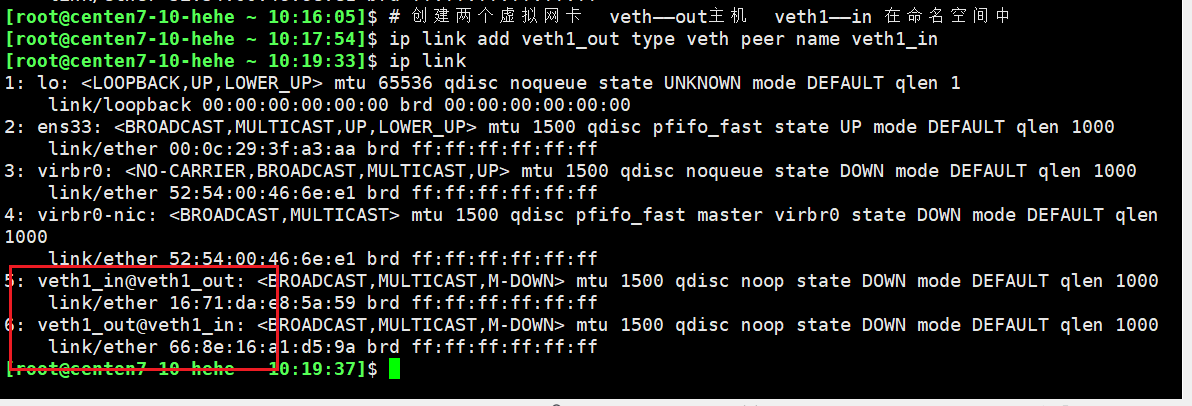
# 创建两个虚拟网卡  veth——out主机  veth1——in 在命名空间中
[root@centen7-10-hehe ~ 10:17:54]$ ip link add veth1_out type veth peer name veth1_in
[root@centen7-10-hehe ~ 10:19:33]$ ip link
1: lo: <LOOPBACK,UP,LOWER_UP> mtu 65536 qdisc noqueue state UNKNOWN mode DEFAULT qlen 1
    link/loopback 00:00:00:00:00:00 brd 00:00:00:00:00:00
2: ens33: <BROADCAST,MULTICAST,UP,LOWER_UP> mtu 1500 qdisc pfifo_fast state UP mode DEFAULT qlen 1000
    link/ether 00:0c:29:3f:a3:aa brd ff:ff:ff:ff:ff:ff
3: virbr0: <NO-CARRIER,BROADCAST,MULTICAST,UP> mtu 1500 qdisc noqueue state DOWN mode DEFAULT qlen 1000
    link/ether 52:54:00:46:6e:e1 brd ff:ff:ff:ff:ff:ff
4: virbr0-nic: <BROADCAST,MULTICAST> mtu 1500 qdisc pfifo_fast master virbr0 state DOWN mode DEFAULT qlen 1000
    link/ether 52:54:00:46:6e:e1 brd ff:ff:ff:ff:ff:ff
5: veth1_in@veth1_out: <BROADCAST,MULTICAST,M-DOWN> mtu 1500 qdisc noop state DOWN mode DEFAULT qlen 1000
    link/ether 16:71:da:e8:5a:59 brd ff:ff:ff:ff:ff:ff
6: veth1_out@veth1_in: <BROADCAST,MULTICAST,M-DOWN> mtu 1500 qdisc noop state DOWN mode DEFAULT qlen 1000
    link/ether 66:8e:16:a1:d5:9a brd ff:ff:ff:ff:ff:ff
2.1.6迁移虚拟网卡到命名空间中
[root@centen7-10-hehe ~ 10:19:37]$ ip netns exec game ip link
1: lo: <LOOPBACK> mtu 65536 qdisc noop state DOWN mode DEFAULT qlen 1
    link/loopback 00:00:00:00:00:00 brd 00:00:00:00:00:00

设置命令
[root@centen7-10-hehe ~ 10:21:59]$ ip link set veth1_in netns game
验证  5 不存在
[root@centen7-10-hehe ~ 10:22:48]$ ip link
1: lo: <LOOPBACK,UP,LOWER_UP> mtu 65536 qdisc noqueue state UNKNOWN mode DEFAULT qlen 1
    link/loopback 00:00:00:00:00:00 brd 00:00:00:00:00:00
2: ens33: <BROADCAST,MULTICAST,UP,LOWER_UP> mtu 1500 qdisc pfifo_fast state UP mode DEFAULT qlen 1000
    link/ether 00:0c:29:3f:a3:aa brd ff:ff:ff:ff:ff:ff
3: virbr0: <NO-CARRIER,BROADCAST,MULTICAST,UP> mtu 1500 qdisc noqueue state DOWN mode DEFAULT qlen 1000
    link/ether 52:54:00:46:6e:e1 brd ff:ff:ff:ff:ff:ff
4: virbr0-nic: <BROADCAST,MULTICAST> mtu 1500 qdisc pfifo_fast master virbr0 state DOWN mode DEFAULT qlen 1000
    link/ether 52:54:00:46:6e:e1 brd ff:ff:ff:ff:ff:ff
6: veth1_out@if5: <BROADCAST,MULTICAST> mtu 1500 qdisc noop state DOWN mode DEFAULT qlen 1000
    link/ether 66:8e:16:a1:d5:9a brd ff:ff:ff:ff:ff:ff link-netnsid 0
迁移至容器中
[root@centen7-10-hehe ~ 10:23:06]$ ip netns exec game ip link ls
1: lo: <LOOPBACK> mtu 65536 qdisc noop state DOWN mode DEFAULT qlen 1
    link/loopback 00:00:00:00:00:00 brd 00:00:00:00:00:00
5: veth1_in@if6: <BROADCAST,MULTICAST> mtu 1500 qdisc noop state DOWN mode DEFAULT qlen 1000
    link/ether 16:71:da:e8:5a:59 brd ff:ff:ff:ff:ff:ff link-netnsid 0
2.1.7配置虚拟网卡IP地址
给命名空间中内网卡配置IP
设置命令空间game的ip
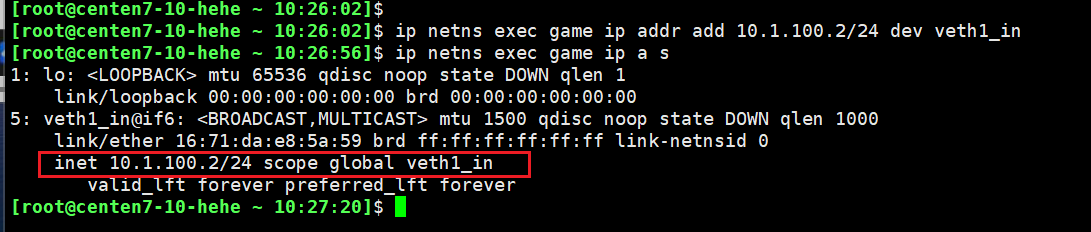
[root@centen7-10-hehe ~ 10:26:02]$ ip netns exec game ip addr add 10.1.100.2/24 dev veth1_in
验证
[root@centen7-10-hehe ~ 10:26:56]$ ip netns exec game ip a s
1: lo: <LOOPBACK> mtu 65536 qdisc noop state DOWN qlen 1
    link/loopback 00:00:00:00:00:00 brd 00:00:00:00:00:00
5: veth1_in@if6: <BROADCAST,MULTICAST> mtu 1500 qdisc noop state DOWN qlen 1000
    link/ether 16:71:da:e8:5a:59 brd ff:ff:ff:ff:ff:ff link-netnsid 0
    inet 10.1.100.2/24 scope global veth1_in
       valid_lft forever preferred_lft forever
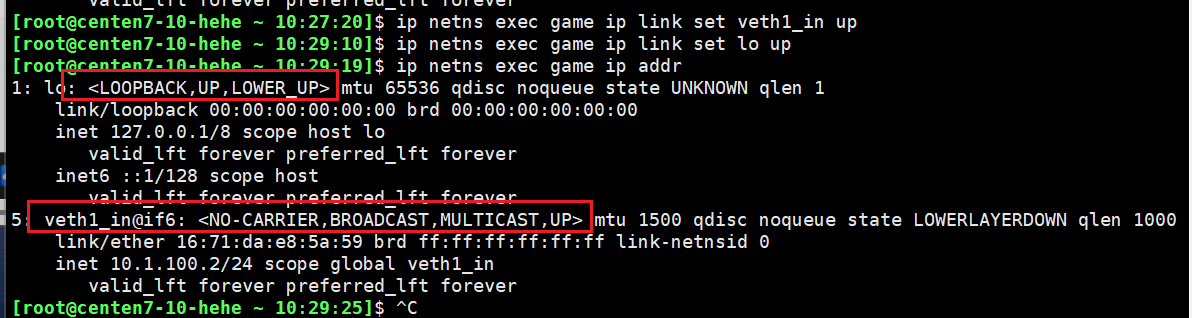
2.1.8启动虚拟网卡,veth1_in和lo,全部启动
[root@centen7-10-hehe ~ 10:27:20]$ ip netns exec game ip link set veth1_in up

[root@centen7-10-hehe ~ 10:29:10]$ ip netns exec game ip link set lo up

[root@centen7-10-hehe ~ 10:29:19]$ ip netns exec game ip addr
1: lo: <LOOPBACK,UP,LOWER_UP> mtu 65536 qdisc noqueue state UNKNOWN qlen 1
    link/loopback 00:00:00:00:00:00 brd 00:00:00:00:00:00
    inet 127.0.0.1/8 scope host lo
       valid_lft forever preferred_lft forever
    inet6 ::1/128 scope host
       valid_lft forever preferred_lft forever
5: veth1_in@if6: <NO-CARRIER,BROADCAST,MULTICAST,UP> mtu 1500 qdisc noqueue state LOWERLAYERDOWN qlen 1000
    link/ether 16:71:da:e8:5a:59 brd ff:ff:ff:ff:ff:ff link-netnsid 0
    inet 10.1.100.2/24 scope global veth1_in
       valid_lft forever preferred_lft forever
2.1.9为物理主机外网卡设置IP地址,并启动网卡
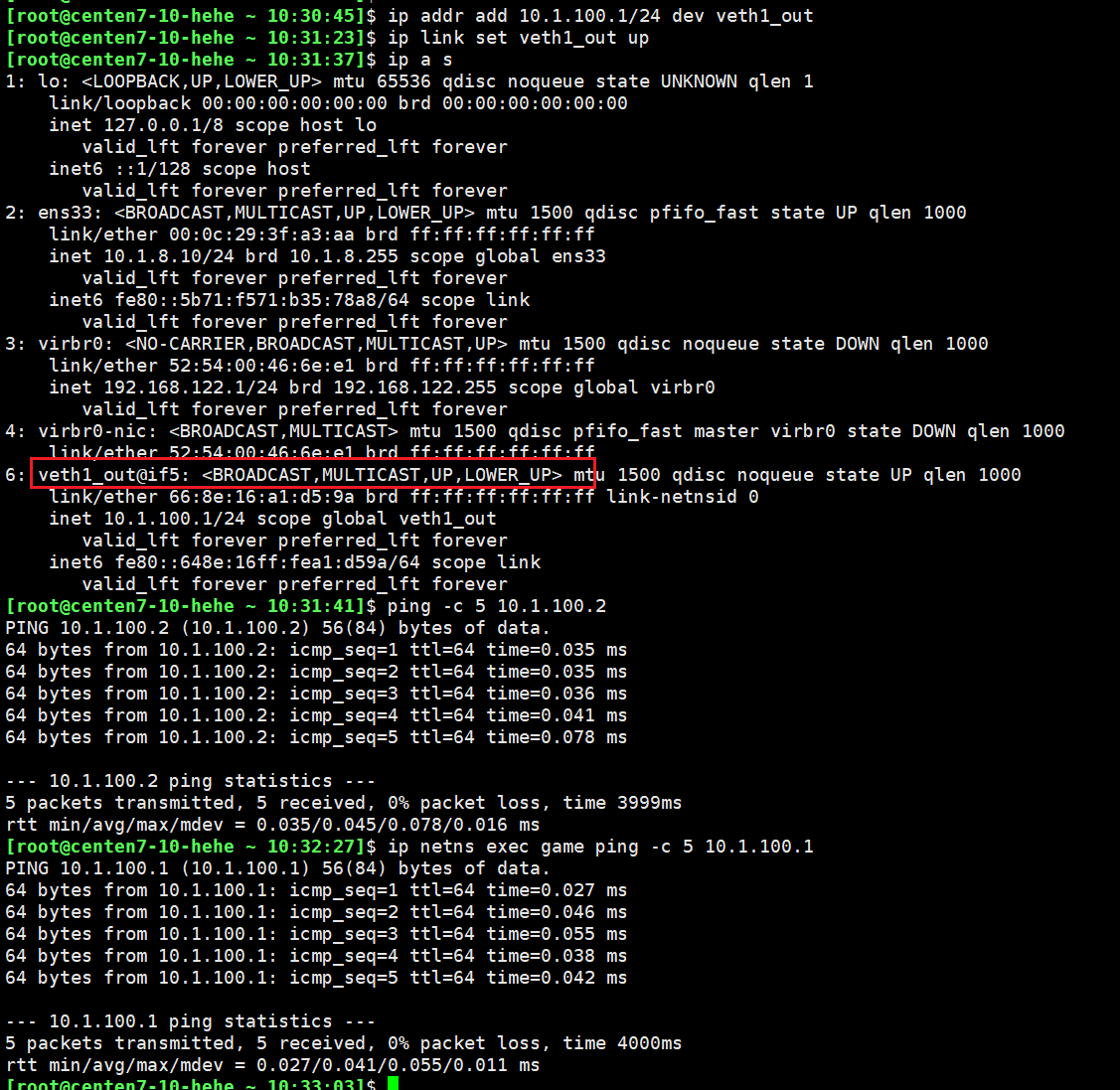
[root@centen7-10-hehe ~ 10:30:45]$ ip addr add 10.1.100.1/24 dev veth1_out

[root@centen7-10-hehe ~ 10:31:23]$ ip link set veth1_out up

[root@centen7-10-hehe ~ 10:31:37]$ ip a s
1: lo: <LOOPBACK,UP,LOWER_UP> mtu 65536 qdisc noqueue state UNKNOWN qlen 1
    link/loopback 00:00:00:00:00:00 brd 00:00:00:00:00:00
    inet 127.0.0.1/8 scope host lo
       valid_lft forever preferred_lft forever
    inet6 ::1/128 scope host
       valid_lft forever preferred_lft forever
2: ens33: <BROADCAST,MULTICAST,UP,LOWER_UP> mtu 1500 qdisc pfifo_fast state UP qlen 1000
    link/ether 00:0c:29:3f:a3:aa brd ff:ff:ff:ff:ff:ff
    inet 10.1.8.10/24 brd 10.1.8.255 scope global ens33
       valid_lft forever preferred_lft forever
    inet6 fe80::5b71:f571:b35:78a8/64 scope link
       valid_lft forever preferred_lft forever
3: virbr0: <NO-CARRIER,BROADCAST,MULTICAST,UP> mtu 1500 qdisc noqueue state DOWN qlen 1000
    link/ether 52:54:00:46:6e:e1 brd ff:ff:ff:ff:ff:ff
    inet 192.168.122.1/24 brd 192.168.122.255 scope global virbr0
       valid_lft forever preferred_lft forever
4: virbr0-nic: <BROADCAST,MULTICAST> mtu 1500 qdisc pfifo_fast master virbr0 state DOWN qlen 1000
    link/ether 52:54:00:46:6e:e1 brd ff:ff:ff:ff:ff:ff
6: veth1_out@if5: <BROADCAST,MULTICAST,UP,LOWER_UP> mtu 1500 qdisc noqueue state UP qlen 1000
    link/ether 66:8e:16:a1:d5:9a brd ff:ff:ff:ff:ff:ff link-netnsid 0
    inet 10.1.100.1/24 scope global veth1_out
       valid_lft forever preferred_lft forever
    inet6 fe80::648e:16ff:fea1:d59a/64 scope link
       valid_lft forever preferred_lft forever

验证   在物理机中ping命名空间中网卡地址
[root@centen7-10-hehe ~ 10:31:41]$ ping -c 5 10.1.100.2
PING 10.1.100.2 (10.1.100.2) 56(84) bytes of data.
64 bytes from 10.1.100.2: icmp_seq=1 ttl=64 time=0.035 ms
64 bytes from 10.1.100.2: icmp_seq=2 ttl=64 time=0.035 ms
64 bytes from 10.1.100.2: icmp_seq=3 ttl=64 time=0.036 ms
64 bytes from 10.1.100.2: icmp_seq=4 ttl=64 time=0.041 ms
64 bytes from 10.1.100.2: icmp_seq=5 ttl=64 time=0.078 ms

--- 10.1.100.2 ping statistics ---
5 packets transmitted, 5 received, 0% packet loss, time 3999ms
rtt min/avg/max/mdev = 0.035/0.045/0.078/0.016 ms

在命名空间中ping物理机
[root@centen7-10-hehe ~ 10:32:27]$ ip netns exec game ping -c 5 10.1.100.1
PING 10.1.100.1 (10.1.100.1) 56(84) bytes of data.
64 bytes from 10.1.100.1: icmp_seq=1 ttl=64 time=0.027 ms
64 bytes from 10.1.100.1: icmp_seq=2 ttl=64 time=0.046 ms
64 bytes from 10.1.100.1: icmp_seq=3 ttl=64 time=0.055 ms
64 bytes from 10.1.100.1: icmp_seq=4 ttl=64 time=0.038 ms
64 bytes from 10.1.100.1: icmp_seq=5 ttl=64 time=0.042 ms

--- 10.1.100.1 ping statistics ---
5 packets transmitted, 5 received, 0% packet loss, time 4000ms
rtt min/avg/max/mdev = 0.027/0.041/0.055/0.011 ms
2.1.10在命名空间中添加默认路由,可以访问物理主机的所有网卡地址
[root@centen7-10-hehe ~ 10:51:13]$ ip netns exec game route -n
Kernel IP routing table
Destination     Gateway         Genmask         Flags Metric Ref    Use Iface
10.1.100.0      0.0.0.0         255.255.255.0   U     0      0        0 veth1_in
[root@centen7-10-hehe ~ 10:51:23]$ ip netns exec game ip route add default via 10.1.100.1
[root@centen7-10-hehe ~ 10:52:31]$ ip netns exec game route -n
Kernel IP routing table
Destination     Gateway         Genmask         Flags Metric Ref    Use Iface
0.0.0.0         10.1.100.1      0.0.0.0         UG    0      0        0 veth1_in
10.1.100.0      0.0.0.0         255.255.255.0   U     0      0        0 veth1_in
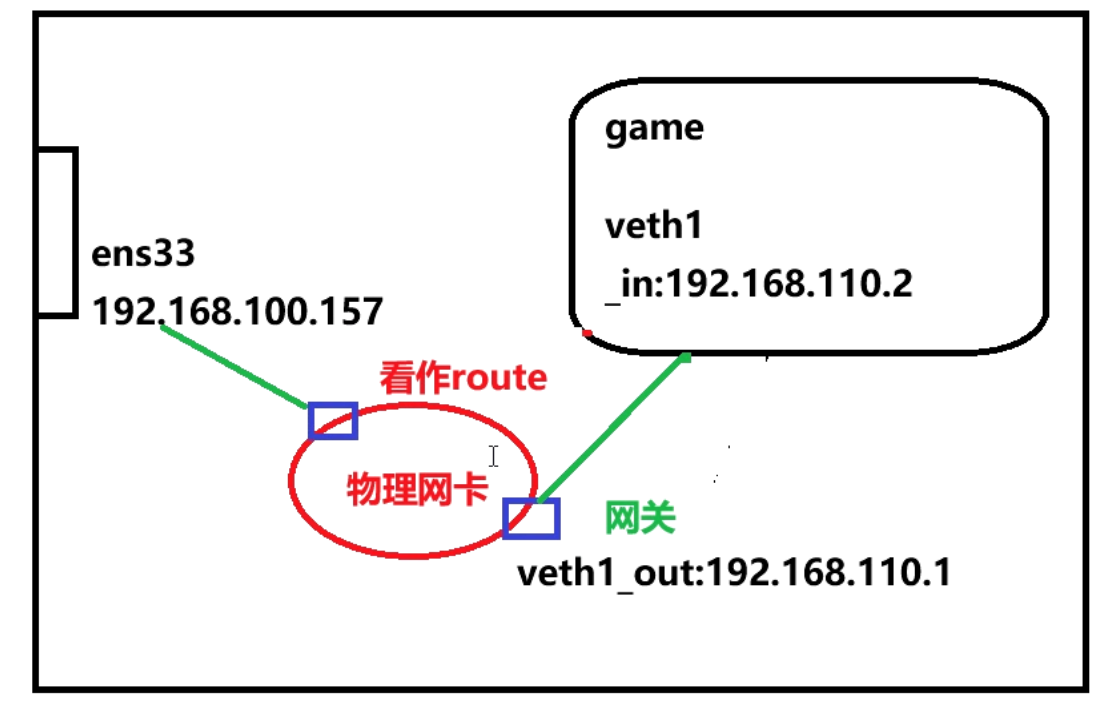
2.1.11在物理主机中启用IP数据包转发 容器内ping本机地址
192.168.110.2 --> 10.1.100.2
192.168.110.1 --> 10.1.100.1
192.168.100.157 --> 10.1.8.10
[root@centen7-10-hehe ~ 10:53:00]$ vim /etc/sysctl.conf
[root@centen7-10-hehe ~ 10:53:37]$ sysctl -p
net.ipv4.ip_forward = 1

验证 容器内ping本机地址
[root@centen7-10-hehe ~ 10:54:22]$ ip netns exec game ping -c 5 10.1.8.10
PING 10.1.8.10 (10.1.8.10) 56(84) bytes of data.
64 bytes from 10.1.8.10: icmp_seq=1 ttl=64 time=0.032 ms
64 bytes from 10.1.8.10: icmp_seq=2 ttl=64 time=0.040 ms
64 bytes from 10.1.8.10: icmp_seq=3 ttl=64 time=0.109 ms
64 bytes from 10.1.8.10: icmp_seq=4 ttl=64 time=0.038 ms
64 bytes from 10.1.8.10: icmp_seq=5 ttl=64 time=0.107 ms

--- 10.1.8.10 ping statistics ---
5 packets transmitted, 5 received, 0% packet loss, time 3999ms
rtt min/avg/max/mdev = 0.032/0.065/0.109/0.035 ms
2.1.12命名空间中迁出虚拟网卡
删除网卡,是一对都会被删除
[root@centen7-10-hehe ~ 10:56:18]$ ip netns exec game ip link delete veth1_in
[root@centen7-10-hehe ~ 10:56:21]$ ip netns exec game ip a s
1: lo: <LOOPBACK,UP,LOWER_UP> mtu 65536 qdisc noqueue state UNKNOWN qlen 1
    link/loopback 00:00:00:00:00:00 brd 00:00:00:00:00:00
    inet 127.0.0.1/8 scope host lo
       valid_lft forever preferred_lft forever
    inet6 ::1/128 scope host
       valid_lft forever preferred_lft forever
[root@centen7-10-hehe ~ 10:57:08]$ ip a s
1: lo: <LOOPBACK,UP,LOWER_UP> mtu 65536 qdisc noqueue state UNKNOWN qlen 1
    link/loopback 00:00:00:00:00:00 brd 00:00:00:00:00:00
    inet 127.0.0.1/8 scope host lo
       valid_lft forever preferred_lft forever
    inet6 ::1/128 scope host
       valid_lft forever preferred_lft forever
2: ens33: <BROADCAST,MULTICAST,UP,LOWER_UP> mtu 1500 qdisc pfifo_fast state UP qlen 1000
    link/ether 00:0c:29:3f:a3:aa brd ff:ff:ff:ff:ff:ff
    inet 10.1.8.10/24 brd 10.1.8.255 scope global ens33
       valid_lft forever preferred_lft forever
    inet6 fe80::5b71:f571:b35:78a8/64 scope link
       valid_lft forever preferred_lft forever
3: virbr0: <NO-CARRIER,BROADCAST,MULTICAST,UP> mtu 1500 qdisc noqueue state DOWN qlen 1000
    link/ether 52:54:00:46:6e:e1 brd ff:ff:ff:ff:ff:ff
    inet 192.168.122.1/24 brd 192.168.122.255 scope global virbr0
       valid_lft forever preferred_lft forever
4: virbr0-nic: <BROADCAST,MULTICAST> mtu 1500 qdisc pfifo_fast master virbr0 state DOWN qlen 1000
    link/ether 52:54:00:46:6e:e1 brd ff:ff:ff:ff:ff:ff

验证  ping -c 5 10.1.100.2   无法ping同
[root@centen7-10-hehe ~ 10:57:52]$ ping -c 5 10.1.100.2
PING 10.1.100.2 (10.1.100.2) 56(84) bytes of data.

--- 10.1.100.2 ping statistics ---
5 packets transmitted, 0 received, 100% packet loss, time 3999ms
2.2 cgroups资源限制--cpu、内存、存储资源
docker logs 容器id 查看容器日志
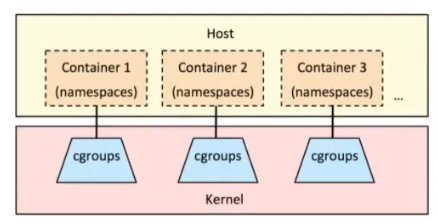
Control groups(cgroups)控制组
linux内核提供的可以限制、记录、隔离进程组所使用的物理资源的机制。为容器而生,没有
cgroups就没有今天的容器技术。
功能
资源限制(Resource Limitation):cgroups 可以对进程组使用的资源总额进行限制。如设定应用运行时使用内存的上限,一旦超过这个配额就发出 OOM(Out of Memory)。
优先级分配(Prioritization):通过分配的 CPU 时间片数量及硬盘IO 带宽大小,实际上就相当于控制了进程运行的优先级。
资源统计(Accounting):cgroups 可以统计系统的资源使用量,如 CPU 使用时长、内存用量等等,这个功能非常适用于计费。
进程控制(Control):cgroups 可以对进程组执行挂起、恢复等操作。
应用案例
安装及启动服务
[root@centen7-10-hehe ~ 11:39:13]$ yum install -y libcgroup

[root@centen7-10-hehe ~ 11:39:26]$ systemctl enable --now cgconfig.service
Created symlink from /etc/systemd/system/sysinit.target.wants/cgconfig.service to /usr/lib/systemd/system/cgconfig.service.

[root@centen7-10-hehe ~ 11:39:53]$ systemctl status cgconfig.service
● cgconfig.service - Control Group configuration service
   Loaded: loaded (/usr/lib/systemd/system/cgconfig.service; enabled; vendor preset: disabled)
   Active: active (exited) since 一 2025-07-21 11:39:53 CST; 7s ago
  Process: 3630 ExecStart=/usr/sbin/cgconfigparser -l /etc/cgconfig.conf -L /etc/cgconfig.d -s 1664 (code=exited, status=0/SUCCESS)
 Main PID: 3630 (code=exited, status=0/SUCCESS)

7月 21 11:39:52 centen7-10 systemd[1]: Starting Control Group configuration service...
7月 21 11:39:53 centen7-10 systemd[1]: Started Control Group configuration service.
限制进程使用CPU
查看cpu shares(CPU时间分片)
//查看资源限制子系统
[root@centen7-10-hehe ~ 11:40:52]$ lssubsys
cpuset
cpu,cpuacct
memory
devices
freezer
net_cls,net_prio
blkio
perf_event
hugetlb
pids

//查看子系统配置文件所在位置
[root@centen7-10-hehe ~ 11:41:40]$ ls /sys/fs/cgroup/
blkio  cpuacct      cpuset   freezer  memory   net_cls,net_prio  perf_event  systemd
cpu    cpu,cpuacct  devices  hugetlb  net_cls  net_prio          pids

[root@centen7-10-hehe ~ 11:42:19]$ ll /sys/fs/cgroup/
总用量 0
drwxr-xr-x. 4 root root  0 7月  21 09:44 blkio
lrwxrwxrwx. 1 root root 11 7月  21 09:44 cpu -> cpu,cpuacct
lrwxrwxrwx. 1 root root 11 7月  21 09:44 cpuacct -> cpu,cpuacct
drwxr-xr-x. 4 root root  0 7月  21 09:44 cpu,cpuacct
drwxr-xr-x. 2 root root  0 7月  21 09:44 cpuset
drwxr-xr-x. 4 root root  0 7月  21 09:44 devices
drwxr-xr-x. 2 root root  0 7月  21 09:44 freezer
drwxr-xr-x. 2 root root  0 7月  21 09:44 hugetlb
drwxr-xr-x. 4 root root  0 7月  21 09:44 memory
lrwxrwxrwx. 1 root root 16 7月  21 09:44 net_cls -> net_cls,net_prio
drwxr-xr-x. 2 root root  0 7月  21 09:44 net_cls,net_prio
lrwxrwxrwx. 1 root root 16 7月  21 09:44 net_prio -> net_cls,net_prio
drwxr-xr-x. 2 root root  0 7月  21 09:44 perf_event
drwxr-xr-x. 2 root root  0 7月  21 09:44 pids
drwxr-xr-x. 4 root root  0 7月  21 09:44 systemd

//查看CPU时间分片,用于保证分组所得到的CPU分片总量。
[root@centen7-10-hehe ~ 11:42:55]$ ls /sys/fs/cgroup/cpu
cgroup.clone_children  cpuacct.stat          cpu.cfs_quota_us   cpu.stat           tasks
cgroup.event_control   cpuacct.usage         cpu.rt_period_us   notify_on_release  user.slice
cgroup.procs           cpuacct.usage_percpu  cpu.rt_runtime_us  release_agent
cgroup.sane_behavior   cpu.cfs_period_us     cpu.shares         system.slice
[root@centen7-10-hehe ~ 11:43:03]$ cat /sys/fs/cgroup/cpu/cpu.shares
1024
使用CPU子系统创建2个group分组
在文件最后增加如下内容 一个20%   一个80%
[root@centen7-10-hehe ~ 11:45:54]$ cat /etc/cgconfig.conf
group lesscpu {
  cpu{
        cpu.shares=200;
  }
}
group morecpu {
  cpu{
        cpu.shares=800;
  }
}

重启
[root@centen7-10-hehe ~ 11:46:14]$ systemctl restart cgconfig.service
准备一个脚本
死循环脚本  保证一直使用
[root@centen7-10-hehe ~ 11:48:36]$ cat cpu.sh
#! /bin/bash
a=1
while true
do
  a=$[$a+1]
done

[root@centen7-10-hehe ~ 11:48:48]$ chmod +x cpu.sh
如果主机有多CPU,为了验证效果,可以进行如下操作
//可以看到有两个CPU,分别是CPU0,CPU1
[root@centen7-10-hehe ~ 11:48:54]$ ls /sys/devices/system/cpu/
cpu0  cpuidle   kernel_max  modalias   offline  possible  present
cpu1  isolated  microcode   nohz_full  online   power     uevent

//其中1表示在线,0表示下线(我们把cpu1设置下线,启动单核心,进行验证)
[root@centen7-10-hehe ~ 11:50:31]$ cat /sys/devices/system/cpu/cpu1/online
1
[root@centen7-10-hehe ~ 11:52:13]$ cat /sys/devices/system/cpu/cpu0/online
1
[root@centen7-10-hehe ~ 11:52:16]$ lscpu
......
CPU(s):                2  #两个cpu
......
NUMA 节点0 CPU:    0,1  #分别是0和1
Flags:                 fpu vme de pse tsc msr pae mce cx8 apic sep mtrr pge mca cmov pat pse36 clflush mmx fxsr sse sse2 ss syscall nx pdpe1gb rdtscp lm constant_tsc arch_perfmon rep_good nopl xtopology tsc_reliable nonstop_tsc eagerfpu pni pclmulqdq ssse3 fma cx16 pcid sse4_1 sse4_2 x2apic movbe popcnt tsc_deadline_timer aes xsave avx f16c rdrand hypervisor lahf_lm abm 3dnowprefetch fsgsbase tsc_adjust bmi1 avx2 smep bmi2 erms invpcid rdseed adx smap clflushopt clwb sha_ni xsaveopt xsavec xgetbv1 arat

设置cpu1下线
[root@centen7-10-hehe ~ 11:52:25]$ echo 0 > /sys/devices/system/cpu/cpu1/online

验证
[root@centen7-10-hehe ~ 11:54:12]$ lscpu
Architecture:          x86_64
CPU op-mode(s):        32-bit, 64-bit
Byte Order:            Little Endian
CPU(s):                2
On-line CPU(s) list:   0
Off-line CPU(s) list:  1
Thread(s) per core:    1
Core(s) per socket:    1
座:                 1
NUMA 节点:         1
厂商 ID:           GenuineIntel
CPU 系列:          6
型号:              183
型号名称:        Intel(R) Core(TM) i9-14900HX
步进:              1
CPU MHz:             2418.398
BogoMIPS:            4838.39
超管理器厂商:  VMware
虚拟化类型:     完全
L1d 缓存:          48K
L1i 缓存:          32K
L2 缓存:           2048K
L3 缓存:           36864K
NUMA 节点0 CPU:    0
Flags:                 fpu vme de pse tsc msr pae mce cx8 apic sep mtrr pge mca cmov pat pse36 clflush mmx fxsr sse sse2 ss syscall nx pdpe1gb rdtscp lm constant_tsc arch_perfmon rep_good nopl xtopology tsc_reliable nonstop_tsc eagerfpu pni pclmulqdq ssse3 fma cx16 pcid sse4_1 sse4_2 x2apic movbe popcnt tsc_deadline_timer aes xsave avx f16c rdrand hypervisor lahf_lm abm 3dnowprefetch fsgsbase tsc_adjust bmi1 avx2 smep bmi2 erms invpcid rdseed adx smap clflushopt clwb sha_ni xsaveopt xsavec xgetbv1 arat
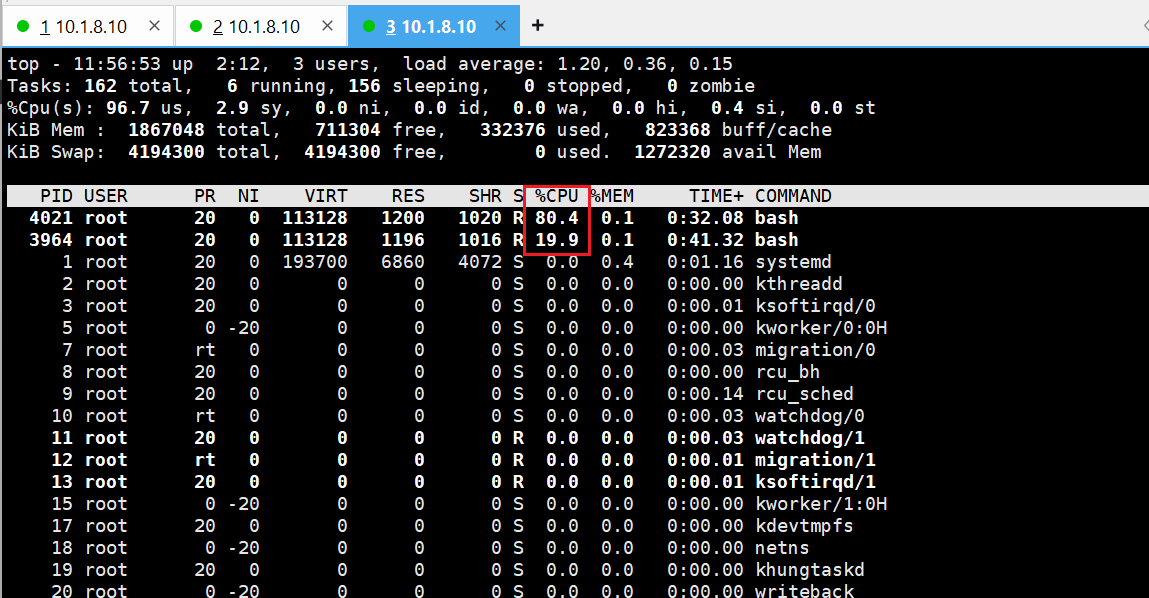
将要运行的应用程序分配到指定分组(请使用单CPU机器,三个终端验证)
//第1个终端
[root@centen7-10-hehe ~ 11:55:13]$ cgexec -g cpu:lesscpu bash ./cpu.sh
//第2个终端
[root@centen7-10-hehe ~ 11:55:42]$ cgexec -g cpu:morecpu bash ./cpu.sh
//第3个终端
[root@centen7-10-hehe ~ 11:56:15]$ top
验证





 扫一扫
扫一扫


 1657
1657

 被折叠的 条评论
为什么被折叠?
被折叠的 条评论
为什么被折叠?
 到【灌水乐园】发言





