


网上有很基于PT32的,我这里借鉴他的代码,实现基于arduino下的,烧录到ESP32验证可行。
MT6826S编码器,是MagnTek 麦歌恩公司的一款磁编码器。
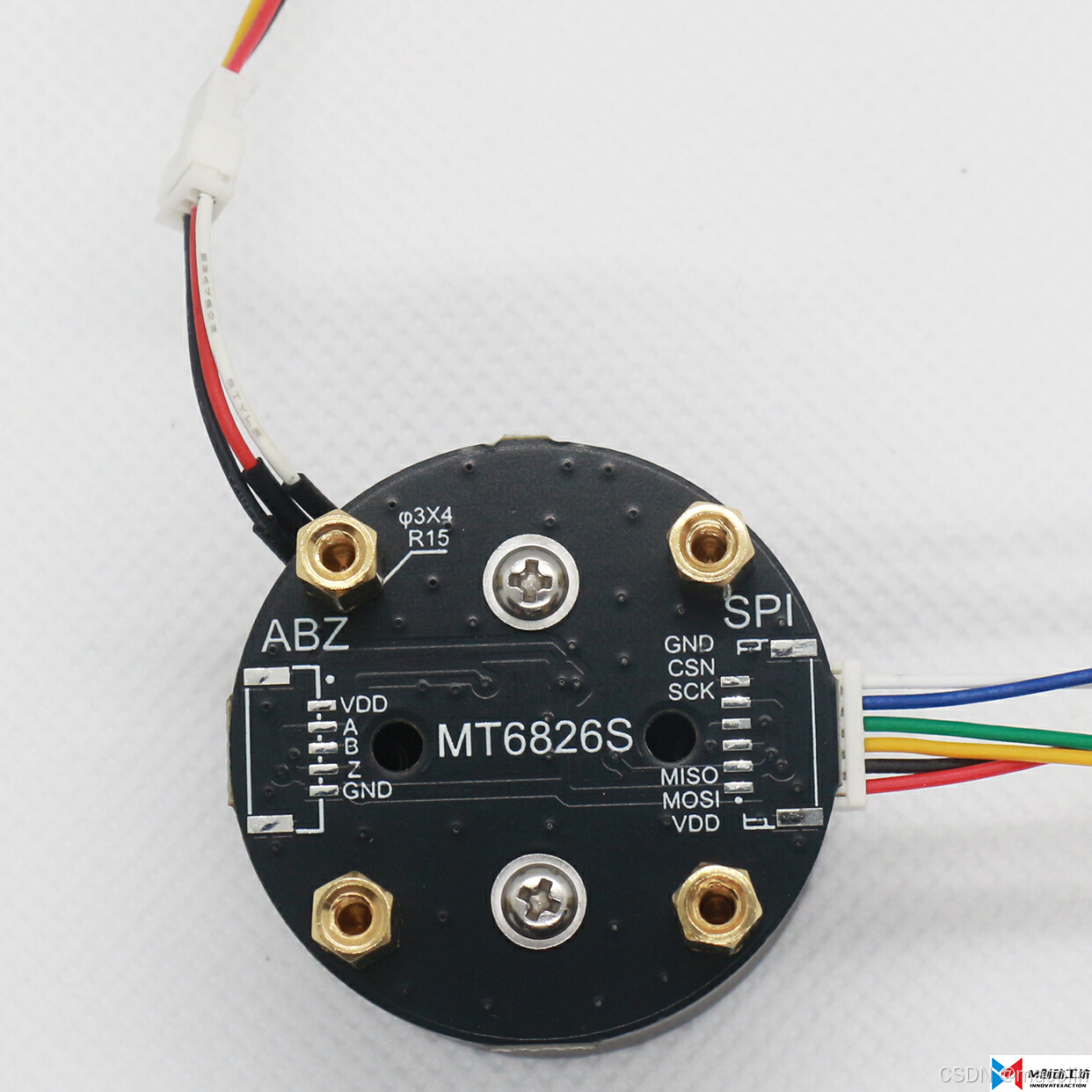
这是直接连接到了直流无刷电机上
支持SPI,ABZ通信,这里选择SPI通信。但是千万要注意,编码器的正反面丝印刚好相反,你接那边,就那边的丝印,否则刚好电源引脚是反的,接上ESP32后,发热,可能烧掉ESP32。其他4根线按丝印接上就行。
好,废话不多说,直接上代码:
#include <SPI.h>
#include <math.h> // Include the math library to use PI
#define READANGLECOMMAND 0xA000
#define READCOMMAND 0x3000
#define WRITECOMMAND 0x6000
#define TOEEPROMCOMMAND 0xC000
#define WRITEZEROCOMMAND 0x5000
#define CS_PIN 5 // Define the Chip Select pin
uint16_t RBuf[10] = {1, 2, 3, 4, 5, 6, 7, 8, 9, 10};
unsigned int Angle = 0;
uint32_t AngleIn21bits = 0;
uint8_t Spi_TxData[4] = {0x83, 0xff, 0xff, 0xff};
uint8_t Spi_pRxData[4] = {0};
// Variables to store previous angle and time for speed calculation
float previousAngle = 0.0;
unsigned long previousTime = 0;
void setup() {
Serial.begin(115200); // Initialize UART communication
SPI.begin(); // Initialize SPI
pinMode(CS_PIN, OUTPUT); // Set the CS pin as output
digitalWrite(CS_PIN, HIGH); // Set CS pin high (idle)
}
uint8_t SPI_transfer(uint8_t data) {
return SPI.transfer(data);
}
// Function to read the angle from the encoder in radians
float ReadAngle() {
uint32_t register03 = 0, register04 = 0, register05 = 0;
uint32_t angle = 0;
uint8_t pTxData[3] = {0, 0, 0}, pRxData[3] = {0, 0, 0};
uint16_t reg_addr = 0;
digitalWrite(CS_PIN, LOW); // Set CS pin low to start communication
// Read register 03
reg_addr = 0x03;
reg_addr = ((reg_addr & 0x0FFF) | READCOMMAND);
pTxData[0] = (uint8_t)(reg_addr >> 8);
pTxData[1] = (uint8_t)(reg_addr >> 0);
SPI.transfer(pTxData[0]);
SPI.transfer(pTxData[1]);
register03 = SPI.transfer(0x00);
// Read register 04
reg_addr = 0x04;
reg_addr = ((reg_addr & 0x0FFF) | READCOMMAND);
pTxData[0] = (uint8_t)(reg_addr >> 8);
pTxData[1] = (uint8_t)(reg_addr >> 0);
SPI.transfer(pTxData[0]);
SPI.transfer(pTxData[1]);
register04 = SPI.transfer(0x00);
// Read register 05
reg_addr = 0x05;
reg_addr = ((reg_addr & 0x0FFF) | READCOMMAND);
pTxData[0] = (uint8_t)(reg_addr >> 8);
pTxData[1] = (uint8_t)(reg_addr >> 0);
SPI.transfer(pTxData[0]);
SPI.transfer(pTxData[1]);
register05 = SPI.transfer(0x00);
digitalWrite(CS_PIN, HIGH); // Set CS pin high to end communication
angle = ((register03 << 16) | (register04 << 8) | (register05));
angle >>= 3; // Adjust the resolution to fit
float angleInDegrees = angle * 360.0 / 2097152; // Convert to degrees
float angleInRadians = angleInDegrees * PI / 180.0; // Convert degrees to radians
return angleInRadians;
}
// Function to calculate speed (radians per second)
float CalculateSpeed(float currentAngle, unsigned long currentTime) {
float angleDifference = currentAngle - previousAngle;
unsigned long timeDifference = currentTime - previousTime;
// Handle angle wrap-around for radians (2 * PI is the full rotation in radians)
if (angleDifference < -PI) {
angleDifference += 2 * PI;
} else if (angleDifference > PI) {
angleDifference -= 2 * PI;
}
// Calculate speed in radians per second
float speed = (angleDifference * 1000.0) / timeDifference; // timeDifference is in milliseconds, convert to seconds
// Update previous values for the next calculation
previousAngle = currentAngle;
previousTime = currentTime;
return speed;
}
void loop() {
// Get the current time
unsigned long currentTime = millis();
// Read the current angle in radians
float currentAngle = ReadAngle();
// Calculate speed in radians per second
float speed = CalculateSpeed(currentAngle, currentTime);
// Print angle and speed
Serial.print("Angle: ");
Serial.print(currentAngle, 4); // Print angle in radians
Serial.print(" radians, Speed: ");
Serial.print(speed, 4); // Print speed in radians per second
Serial.println(" radians/second");
delay(200); // Delay for 200 milliseconds between readings
}
实测,可以获得以弧度表示的角度数据,和速度数据。





 扫一扫
扫一扫


 84
84

 被折叠的 条评论
为什么被折叠?
被折叠的 条评论
为什么被折叠?
 到【灌水乐园】发言





