


目录
1使用jQuery DataTables.net的ASP.NET8
5 DataTables.AspNet.Core库中的Bug
1使用jQuery DataTables.net的ASP.NET8
我正在评估jQuery datatable.net组件[1]在ASP.NET8项目中的使用,并创建了几个原型(概念验证)应用程序,这些应用程序将在这些文章中展示。
1.1 本系列中的文章
本系列中的文章包括:
- 使用DataTables.net的ASP.NET8——第1部分——基础
- 使用DataTables.net的ASP.NET8——第2部分——操作按钮
- 使用DataTables.net的ASP.NET8——第3部分——状态保存
- 使用DataTables.net的ASP.NET8——第4部分——多语言
- 使用DataTables.net的ASP.NET8——第5部分——在AJAX中传递其他参数
- 使用DataTables.net的ASP.NET8——第6部分——在AJAX中返回其他参数
- 使用DataTables.net的ASP.NET8——第7部分——常规按钮
- 使用DataTables.net的ASP.NET8——第8部分——选择行
- 使用DataTables.net的ASP.NET8——第9部分——高级过滤器
2 最终结果
本文的目标是创建一个概念验证应用程序,该应用程序演示在AJAX中返回附加参数DataTables.net组件。让我们介绍一下这篇文章的结果。
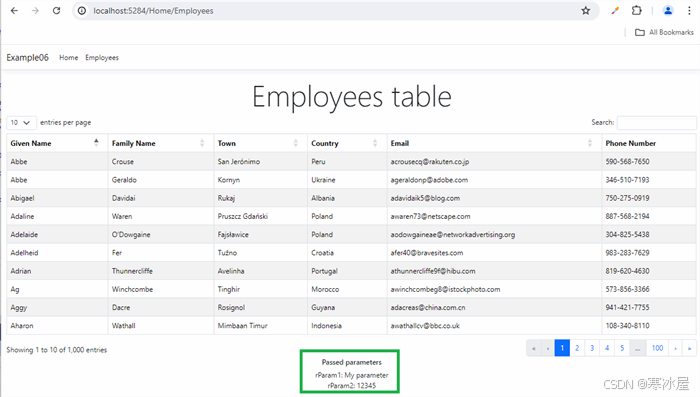
关键是,组件DataTables.net允许您传递一些额外的参数,以便在AJAX调用中返回给客户端。我在表单上显示该数据。该数据在AJAX调用中从后端传递到前端。
3 客户端DataTables.net组件
在这里,我将只展示使用DataTables组件的ASP.NET视图是什么样子的。
<!-- Employees.cshtml -->
<partial name="_LoadingDatatablesJsAndCss" />

@{
    <div class="text-center">
        <h3 class="display-4">Employees table</h3>
    </div>

    <!-- Here is our table HTML element defined. JavaScript library Datatables
    will do all the magic to turn it into interactive component -->
    <table id="EmployeesTable01" class="table table-striped table-bordered ">
    </table>

    <div class="text-center">
        <h6>Passed parameters</h6>
        rParam1: <span id="rParam1"></span> <br />
        rParam2: <span id="rParam2"></span>

    </div>
}

<script>
    // Datatables script initialization=========================================
    // we used defer attribute on jQuery so it might not be available at this point
    // so we go for vanilla JS event

    document.addEventListener("DOMContentLoaded", InitializeDatatable);

    function InitializeDatatable() {
        $("#EmployeesTable01").dataTable({
            //processing-Feature control the processing indicator.
            processing: true,
            //paging-Enable or disable table pagination.
            paging: true,
            //info-Feature control table information display field
            info: true,
            //ordering-Feature control ordering (sorting) abilities in DataTables.
            ordering: true,
            //searching-Feature control search (filtering) abilities
            searching: true,
            //search.return-Enable / disable DataTables' search on return.
            search: {
                return: true
            },
            //autoWidth-Feature control DataTables' smart column width handling.
            autoWidth: true,
            //lengthMenu-Change the options in the page length select list.
            lengthMenu: [10, 15, 25, 50, 100],
            //pageLength-Change the initial page length (number of rows per page)
            pageLength: 10,

            //order-Initial order (sort) to apply to the table.
            order: [[1, 'asc']],

            //serverSide-Feature control DataTables' server-side processing mode.
            serverSide: true,

            //Load data for the table's content from an Ajax source.
            ajax: {
                "url": "@Url.Action("EmployeesDT", "Home")",
                "type": "POST",
                "datatype": "json",
                "dataSrc": extractReturnParameters
            },

            //Set column specific initialization properties
            columns: [
                //name-Set a descriptive name for a column
                //data-Set the data source for the column from the rows data object / array
                //title-Set the column title
                //orderable-Enable or disable ordering on this column
                //searchable-Enable or disable search on the data in this column
                //type-Set the column type - used for filtering and sorting string processing
                //visible-Enable or disable the display of this column.
                //width-Column width assignment.
                //render-Render (process) the data for use in the table.
                //className-Class to assign to each cell in the column.

                {   //0
                    name: 'id',
                    data: 'id',
                    title: "Employee Id",
                    orderable: true,
                    searchable: false,
                    type: 'num',
                    visible: false
                },
                {
                    //1
                    name: 'givenName',
                    data: "givenName",
                    title: "Given Name",
                    orderable: true,
                    searchable: true,
                    type: 'string',
                    visible: true
                },
                {
                    //2
                    name: 'familyName',
                    data: "familyName",
                    title: "Family Name",
                    orderable: true,
                    searchable: true,
                    type: 'string',
                    visible: true
                },
                {
                    //3
                    name: 'town',
                    data: "town",
                    title: "Town",
                    orderable: true,
                    searchable: true,
                    type: 'string',
                    visible: true
                },
                {
                    //4
                    name: 'country',
                    data: "country",
                    title: "Country",
                    orderable: true,
                    searchable: true,
                    type: 'string',
                    visible: true
                },
                {
                    //5
                    name: 'email',
                    data: "email",
                    title: "Email",
                    orderable: true,
                    searchable: true,
                    type: 'string',
                    visible: true
                },
                {
                    //6
                    name: 'phoneNo',
                    data: "phoneNo",
                    title: "Phone Number",
                    orderable: false,
                    searchable: true,
                    type: 'string',
                    visible: true
                }
            ]
        });

        function extractReturnParameters(json) {
            let rParam1 = json.rParam1;
            let rParam2 = json.rParam2;
            //async work
            setTimeout(() => doWorkWithParamters(rParam1, rParam2), 0);
            return json.data;
        }

        function doWorkWithParamters(rParam1, rParam2) {
            let span1 = document.getElementById('rParam1');
            span1.innerHTML = rParam1;
            let span2 = document.getElementById('rParam2');
            span2.innerHTML = rParam2;
        }
    }
</script>请注意,在ajax属性中,我们使用属性dataSrc来传递对JavaScript函数extractReturnParameters的引用,该函数将提取返回的参数。
有关这些属性的更多信息,请参阅手册[1]。这里的应用程序只是ASP.NET环境的概念证明。
4 AJAX调用示例
为了更好地了解发生了什么,我使用Chrome DevTools捕获了示例AJAX调用中返回的数据。
下面是AJAX调用响应:
{
    "draw": 1,
    "recordsTotal": 1000,
    "recordsFiltered": 1000,
    "data": [
        {
            "id": 459,
            "givenName": "Abbe",
            "familyName": "Crouse",
            "town": "San Jerónimo",
            "country": "Peru",
            "email": "acrousecq@rakuten.co.jp",
            "phoneNo": "590-568-7650"
        },
        {
            "id": 854,
            "givenName": "Abbe",
            "familyName": "Geraldo",
            "town": "Kornyn",
            "country": "Ukraine",
            "email": "ageraldonp@adobe.com",
            "phoneNo": "346-510-7193"
        },
        {
            "id": 726,
            "givenName": "Abigael",
            "familyName": "Davidai",
            "town": "Rukaj",
            "country": "Albania",
            "email": "adavidaik5@blog.com",
            "phoneNo": "750-275-0919"
        },
        {
            "id": 256,
            "givenName": "Adaline",
            "familyName": "Waren",
            "town": "Pruszcz Gdański",
            "country": "Poland",
            "email": "awaren73@netscape.com",
            "phoneNo": "887-568-2194"
        },
        {
            "id": 375,
            "givenName": "Adelaide",
            "familyName": "O'Dowgaine",
            "town": "Fajsławice",
            "country": "Poland",
            "email": "aodowgaineae@networkadvertising.org",
            "phoneNo": "304-825-5438"
        },
        {
            "id": 145,
            "givenName": "Adelheid",
            "familyName": "Fer",
            "town": "Tužno",
            "country": "Croatia",
            "email": "afer40@bravesites.com",
            "phoneNo": "983-283-7629"
        },
        {
            "id": 340,
            "givenName": "Adrian",
            "familyName": "Thunnercliffe",
            "town": "Avelinha",
            "country": "Portugal",
            "email": "athunnercliffe9f@hibu.com",
            "phoneNo": "819-620-4630"
        },
        {
            "id": 585,
            "givenName": "Ag",
            "familyName": "Winchcombe",
            "town": "Tinghir",
            "country": "Morocco",
            "email": "awinchcombeg8@istockphoto.com",
            "phoneNo": "573-856-3366"
        },
        {
            "id": 389,
            "givenName": "Aggy",
            "familyName": "Dacre",
            "town": "Rosignol",
            "country": "Guyana",
            "email": "adacreas@china.com.cn",
            "phoneNo": "941-421-7755"
        },
        {
            "id": 464,
            "givenName": "Aharon",
            "familyName": "Wathall",
            "town": "Mimbaan Timur",
            "country": "Indonesia",
            "email": "awathallcv@bbc.co.uk",
            "phoneNo": "108-340-8110"
        }
    ],
    "rParam1": "My parameter",
    "rParam2": 12345
}当然,我只提取了相关的数据部分。每个更好的Web程序员都应该能够从上述数据中理解发生了什么。
5 DataTables.AspNet.Core库中的Bug
遗憾的是,C#/.NET库DataTables.AspNet.Core中存在一个与在AJAX调用中返回参数相关的错误。该bug有一个解决方法,我在此示例中使用了它。这是解决该错误的Helper类。
using DataTables.AspNet.AspNetCore;
using Newtonsoft.Json;
using System.Collections;

//DataTablesResponseHelper.cs
namespace Example06
{
    /*
     * This code has been taken from https://github.com/ALMMa/datatables.aspnet/issues/72
     * It resolves the bug in library DataTables.AspNet.AspNetCore
     * when returning parameters from server to client
     * proper usage is as follows
     *
     *  // Create some response additional parameters.
     *   var returnParameters = new Dictionary<string, object>()
     *               {
     *                   { "rParam1", "My parameter" },
     *                   { "rParam2", 12345 }
     *               };
     *
     *  var response = DataTablesResponse.Create(
     *       request, totalRecordsCount, filteredRecordsCount, dataPage, returnParameters);
     *  var response2 = new DataTablesResponseHelper(response);
     *
     *  return new DataTablesJsonResult(response2, true);
     */


    public class DataTablesResponseHelper : DataTables.AspNet.AspNetCore.DataTablesResponse
    {
        protected DataTablesResponseHelper(int draw, string errorMessage) :
            base(draw, errorMessage)
        {
        }

        protected DataTablesResponseHelper(int draw, string errorMessage,
            IDictionary<string, object> additionalParameters) :
            base(draw, errorMessage, additionalParameters)
        {
        }

        protected DataTablesResponseHelper(int draw, int totalRecords, int totalRecordsFiltered, object data) :
            base(draw, totalRecords, totalRecordsFiltered, data)
        {
        }

        protected DataTablesResponseHelper(int draw, int totalRecords, int totalRecordsFiltered,
            object data, IDictionary<string, object> additionalParameters) :
            base(draw, totalRecords, totalRecordsFiltered, data, additionalParameters)
        {
        }

        public DataTablesResponseHelper(DataTablesResponse response) :
            this(response.Draw, response.TotalRecords, response.TotalRecordsFiltered,
                response.Data, response.AdditionalParameters)
        {
        }

        private bool IsSuccessResponse()
        {
            return this.Data != null && string.IsNullOrWhiteSpace(this.Error);
        }

        public override string ToString()
        {
            using (StringWriter stringWriter = new StringWriter())
            {
                using (JsonTextWriter jsonTextWriter = new JsonTextWriter((TextWriter)stringWriter))
                {
                    if (this.IsSuccessResponse())
                    {
                        jsonTextWriter.WriteStartObject();
                        jsonTextWriter.WritePropertyName(Configuration.Options.ResponseNameConvention.Draw, true);
                        jsonTextWriter.WriteValue(this.Draw);
                        jsonTextWriter.WritePropertyName(Configuration.Options.ResponseNameConvention.TotalRecords, true);
                        jsonTextWriter.WriteValue(this.TotalRecords);
                        jsonTextWriter.WritePropertyName(Configuration.Options.ResponseNameConvention.TotalRecordsFiltered, true);
                        jsonTextWriter.WriteValue(this.TotalRecordsFiltered);
                        jsonTextWriter.WritePropertyName(Configuration.Options.ResponseNameConvention.Data, true);
                        jsonTextWriter.WriteRawValue(this.SerializeData(this.Data));
                        if (this.AdditionalParameters != null)
                        {
                            foreach (KeyValuePair<string, object> additionalParameter in (IEnumerable<KeyValuePair<string, object>>)this.AdditionalParameters)
                            {
                                jsonTextWriter.WritePropertyName(additionalParameter.Key, true);
                                if (additionalParameter.Value is IEnumerable)
                                {
                                    jsonTextWriter.WriteRawValue(SerializeData(additionalParameter.Value));
                                }
                                else
                                {
                                    jsonTextWriter.WriteValue(additionalParameter.Value);
                                }
                            }
                        }
                        jsonTextWriter.WriteEndObject();
                    }
                    else
                    {
                        jsonTextWriter.WriteStartObject();
                        jsonTextWriter.WritePropertyName(Configuration.Options.ResponseNameConvention.Draw, true);
                        jsonTextWriter.WriteValue(this.Draw);
                        jsonTextWriter.WritePropertyName(Configuration.Options.ResponseNameConvention.Error, true);
                        jsonTextWriter.WriteValue(this.Error);
                        if (this.AdditionalParameters != null)
                        {
                            foreach (KeyValuePair<string, object> additionalParameter in
                                (IEnumerable<KeyValuePair<string, object>>) this.AdditionalParameters)
                            {
                                jsonTextWriter.WritePropertyName(additionalParameter.Key, true);
                                if (additionalParameter.Value is IEnumerable)
                                {
                                    jsonTextWriter.WriteRawValue(SerializeData(additionalParameter.Value));
                                }
                                else
                                {
                                    jsonTextWriter.WriteValue(additionalParameter.Value);
                                }
                            }
                        }
                        jsonTextWriter.WriteEndObject();
                    }
                    jsonTextWriter.Flush();
                    return stringWriter.ToString();
                }
            }
        }
    }
}
6 ASP.NET后端处理
所以,我们现在在C#/.NET部分编写我们的ASP.NET代码。这是我想出的解决方案。我不会假装这很容易,它假定你对DataTables.AspNet.Core和System.Linq.Dynamic.Core库有很好的理解。
这是代码:
//HomeController.cs

//this is target of AJAX call and provides data for
//the table, based on selected input parameters
public IActionResult EmployeesDT(DataTables.AspNet.Core.IDataTablesRequest request)
{
    // There is dependency in this method on names of fields
    // and implied mapping. I see it almost impossible to avoid.
    // At least, in this method, we avoided dependency on the order
    // of table fields, in case order needs to be changed
    //Here are our mapped table columns:
    //Column0 id -> Employee.Id
    //Column1 givenName -> Employee.FirstName
    //Column2 familyName -> Employee.LastName
    //Column3 town -> Employee.City
    //Column4 country -> Employee.Country
    //Column5 email -> Employee.Email
    //Column6 phoneNo -> Employee.Phone

    try
    {
        IQueryable<Employee> employees = MockDatabase.MockDatabase.Instance.EmployeesTable.AsQueryable();

        int totalRecordsCount = employees.Count();

        var iQueryableOfAnonymous = employees.Select(p => new
        {
            id = p.Id,
            givenName = p.FirstName,
            familyName = p.LastName,
            town = p.City,
            country = p.Country,
            email = p.Email,
            phoneNo = p.Phone,
        });

        iQueryableOfAnonymous = FilterRowsPerRequestParameters(iQueryableOfAnonymous, request);

        int filteredRecordsCount = iQueryableOfAnonymous.Count();

        iQueryableOfAnonymous = SortRowsPerRequestParamters(iQueryableOfAnonymous, request);

        iQueryableOfAnonymous = iQueryableOfAnonymous.Skip(request.Start).Take(request.Length);

        var dataPage = iQueryableOfAnonymous.ToList();

        // Create some response additional parameters.
        var returnParameters = new Dictionary<string, object>()
            {
                { "rParam1", "My parameter" },
                { "rParam2", 12345 }
            };

        var response = DataTablesResponse.Create(request, totalRecordsCount, filteredRecordsCount, dataPage, returnParameters);
        var response2 = new DataTablesResponseHelper(response);

        return new DataTablesJsonResult(response2, true);
    }
    catch (Exception ex)
    {
        Console.WriteLine(ex.ToString());
        var response = DataTablesResponse.Create(request, "Error processing AJAX call on server side");
        return new DataTablesJsonResult(response, false);
    }
}
//Program.cs
namespace Example06
{
public class Program
{
public static void Main(string[] args)
{
var builder = WebApplication.CreateBuilder(args);
// Add services to the container.
builder.Services.AddControllersWithViews();
// DataTables.AspNet registration
DataTablesAspNetRegistration(builder);
var app = builder.Build();
// Configure the HTTP request pipeline.
if (!app.Environment.IsDevelopment())
{
app.UseExceptionHandler("/Home/Error");
}
app.UseStaticFiles();
app.UseRouting();
app.UseAuthorization();
app.MapControllerRoute(
name: "default",
pattern: "{controller=Home}/{action=Index}/{id?}");
app.Run();
}
//DataTables.AspNet registration
public static void DataTablesAspNetRegistration(WebApplicationBuilder? builder)
{
if (builder == null) { throw new Exception("builder == null"); };
var options = new DataTables.AspNet.AspNetCore.Options()
.EnableRequestAdditionalParameters()
.EnableResponseAdditionalParameters();
// DataTables.AspNet registration
builder.Services.RegisterDataTables(options);
}
}
}7 总结
可以下载完整的示例代码项目。
8 参考资料
https://www.codeproject.com/Articles/5385692/ASP-NET8-using-DataTables-net-Part6-Returning-addi


 5686


 扫一扫


 被折叠的 条评论
为什么被折叠?
 到【灌水乐园】发言


