


一、开发环境
系统版本:OpenHarmony 4.0.10.13
设备平台:rk3588
SDK版本:fullSDK 4.0.10.13
二、背景
使用自研应用作为默认Launcher,或者说使特定应用默认开机自启作为Home应用。
三、分析过程
通过分析原生Launcher启动流程可知:
AMS启动根据应用优先级启动应用,通常是OOBE或Launcher
foundation/ability/ability_runtime/services/abilitymgr/src/ability_manager_service.cpp
void AbilityManagerService::StartUserApps(int32_t userId, bool isBoot)
{
HILOG_INFO("StartUserApps, userId:%{public}d, currentUserId:%{public}d", userId, GetUserId());
if (currentMissionListManager_ && currentMissionListManager_->IsStarted()) {
HILOG_INFO("missionListManager ResumeManager");
currentMissionListManager_->ResumeManager();
}
//启动优先级最高的应用
StartHighestPriorityAbility(userId, isBoot);
}

...

void AbilityManagerService::StartHighestPriorityAbility(int32_t userId, bool isBoot)
{
    ...
    /* Query the highest priority ability or extension ability, and start it. usually, it is OOBE or launcher */
    Want want;
    want.AddEntity(HIGHEST_PRIORITY_ABILITY_ENTITY);
    AppExecFwk::AbilityInfo abilityInfo;
    AppExecFwk::ExtensionAbilityInfo extensionAbilityInfo;
    int attemptNums = 0;
    //ImplicitQueryInfoByPriority查询应用ability和extensionAbility配置中的优先级
    while (!IN_PROCESS_CALL(bms->ImplicitQueryInfoByPriority(want,
        AppExecFwk::AbilityInfoFlag::GET_ABILITY_INFO_DEFAULT, userId,
        abilityInfo, extensionAbilityInfo))) {
        HILOG_INFO("Waiting query highest priority ability info completed.");
        ++attemptNums;
        if (!isBoot && attemptNums > SWITCH_ACCOUNT_TRY) {
            HILOG_ERROR("Query highest priority ability failed.");
            return;
        }
        AbilityRequest abilityRequest;
        ComponentRequest componentRequest = initComponentRequest();
        if (!IsComponentInterceptionStart(want, componentRequest, abilityRequest)) {
            return;
        }
        usleep(REPOLL_TIME_MICRO_SECONDS);
    }
	...
	//启动查询到的最高优先级应用
    /* note: OOBE APP need disable itself, otherwise, it will be started when restart system everytime */
    (void)StartAbility(abilityWant, userId, DEFAULT_INVAL_VALUE);
}
至此我们了解到应用优先级取决于应用ability和extensionAbility 优先级配置
查看官方资料
module.json5配置文件

查看launcher module.json5配置文件
"extensionAbilities": [
      {
        "priority": 2,  //优先级设定为2
        "skills": [  //接受home Want的特征标签
          {
            "entities": [
              "entity.system.home",
              "flag.home.intent.from.system"
            ],
            "actions": [
              "action.system.home",
              "com.ohos.action.main",
              "action.form.publish"
            ]
          }
        ],
        "exported": false,  //本组件不可被其他应用调研
        "name": "com.ohos.launcher.MainAbility",  //组件名称,应用中唯一
        "icon": "$media:icon",
        "description": "$string:mainability_description",
        "label": "$string:entry_MainAbility",
        "srcEntry": "./ets/MainAbility/MainAbility.ts",  //组件代码对应路径
        "type": "service"  //组件类型为后台运行服务
      }
    ]
实现案例
创建openharmony demo工程
创建ServiceExtensionAbility
entery/src/main/ets创建ServiceExtAbility文件夹,添加ServiceExtensionAbility.ets
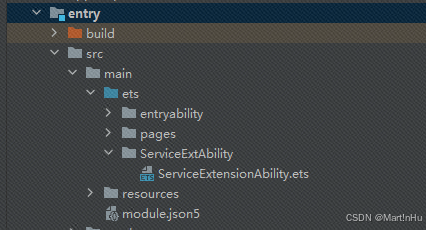
参考Launcher 配置module.json5 extensionAbilities和requestPermissions
demo/entry/src/main/module.json5
{
  "module": {
    "name": "entry",
    "type": "entry",
    "srcEntry": "./ets/entryability/EntryAbility.ets",
    "description": "$string:module_desc",
    "mainElement": "EntryAbility",
    "deviceTypes": [
      "default",
      "tablet"
    ],
    "metadata": [
      {
        "name": "ArkTSPartialUpdate",
        "value": "true"
      }
    ],
    "deliveryWithInstall": true,
    "installationFree": false,
    "pages": "$profile:main_pages",
    "extensionAbilities": [
      {
        "priority": 3,
        "skills": [
          {
            "entities": [
              "entity.system.home",
              "flag.home.intent.from.system"
            ],
            "actions": [
              "action.system.home",
              "com.ohos.action.main",
              "action.form.publish"
            ]
          }
        ],
        "exported": false,
        "name": "mylauncher",
        "icon": "$media:icon",
        "srcEntry": "./ets/ServiceExtAbility/ServiceExtensionAbility.ets",
        "type": "service"
      }
    ],
    "requestPermissions": [
      {
        "name": "ohos.permission.GET_BUNDLE_INFO_PRIVILEGED"
      },
      {
        "name": "ohos.permission.INSTALL_BUNDLE"
      },
      {
        "name": "ohos.permission.LISTEN_BUNDLE_CHANGE"
      },
      {
        "name": "ohos.permission.MANAGE_MISSIONS"
      },
      {
        "name": "ohos.permission.REQUIRE_FORM"
      },
      {
        "name": "ohos.permission.INPUT_MONITORING"
      },
      {
        "name": "ohos.permission.NOTIFICATION_CONTROLLER"
      },
      {
        "name": "ohos.permission.MANAGE_SECURE_SETTINGS"
      },
      {
        "name": "ohos.permission.START_ABILITIES_FROM_BACKGROUND"
      }
    ]
  }
}
打开默认index page
注意:windowType需配置为TYPE_DESKTOP桌面类型
demo/entry/src/main/ets/ServiceExtAbility/ServiceExtensionAbility.ets
import ServiceExtensionAbility from '@ohos.app.ability.ServiceExtensionAbility';
import Want from '@ohos.application.Want';
import rpc from '@ohos.rpc';
import window from '@ohos.window';
import { BusinessError } from '@ohos.base';

const TAG: string = "[ServiceDemo]";

export default class ServiceExtAbility extends ServiceExtensionAbility {
  onCreate(want: Want) {
    console.info(TAG, `onCreate, want: ${want.abilityName}`);
    let winCfg : window.Configuration = {
      name:"test",
      windowType: window.WindowType.TYPE_DESKTOP,  //
      ctx: this.context
    }
    window.createWindow(winCfg).then((win) =>{
      console.info(TAG, `createWindow`);
      win.setUIContent('pages/Index', (err) => {
        if (err.code) {
          //hilog.error(0x0000, 'testTag', 'Failed to load the content. Cause: %{public}s', JSON.stringify(err) ?? '');
          return;
        }
        //hilog.info(0x0000, 'testTag', 'Succeeded in loading the content.');
      });
      win.showWindow((err: BusinessError) => {
        const errCode: number = err.code;
        if (errCode) {
          console.error('Failed to show the window. Cause: ' + JSON.stringify(err));
          return;
        }
        console.info('Succeeded in showing the window.');
      });
    });

  }

  onRequest(want: Want, startId: number) {
    console.info(TAG, `onRequest, want: ${want.abilityName}`);
  }

  onDisconnect(want: Want) {
    console.info(TAG, `onDisconnect, want: ${want.abilityName}`);
  }

  onDestroy() {
    console.info(TAG, `onDestroy`);
  }
}
demo配置为系统应用
配置apl和app-feature
SDK_OpenHarmony\sdk\10\toolchains\lib\UnsgnedReleasedProfileTemplate.json
"bundle-info":{
		"developer-id":"OpenHarmony",
		"distribution-certificate":"xxxxxx",
		"bundle-name":"com.example.mylauncherdemo",
		"apl":"system_core",
		"app-feature":"hos_system_app"
	},
特权安装列表配置文件install_list_capability.json添加demo 应用配置
#从设备获取install_list_capability.json
hdc shell mount -o remount,rw /;hdc file recv /system/etc/app/install_list_capability.json  xxx\Desktop\hdcTools\configs
#修改后,更新install_list_capability.json至设备,并重启
hdc shell mount -o remount,rw /;hdc file send xxx\Desktop\hdcTools\configs\install_list_capability.json /system/etc/app/install_list_capability.json;hdc shell reboot
install_list_capability.json添加demo特权配置
‘注:签名指纹获取方式’
## 方式1
#打开应用查看应用包名
hdc shell "aa dump -a | grep 'bundle name' | sed -n 1p"
#查看指定包名应用的指纹信息
hdc shell "bm dump -n com.example.bluetoothopp | grep finger"

##方式2
#设置hilog level debug
hdc shell  hilog -b D
#安装时过滤log中finger关键字
hilog|grep finger
		....
        },
        {
            "bundleName": "com.ohos.launcher",
            "app_signature": ["8E93863FC32EE238060BF69A9B37E2608FFFB21F93C862DD511CBAC9F30024B5"],
            "allowAppUsePrivilegeExtension": true
        },
        {
            "bundleName": "com.example.mylauncherdemo",
            "app_signature": ["xxxxxx"],
            "keepAlive": true,
            "allowAppUsePrivilegeExtension": true
        },
        ....
安装demo程序后,重启设备默认打开demo应用
自动拉起
相比launcher demo应用无法自动拉起
kill [pid] 沙掉demo应用进程后无法自启;而launcher正常。
分析log发现,launcher由AMS重启
AbilityManagerService: [ability_connect_manager.cpp(HandleAbilityDiedTask:1560)]restart ability: com.ohos.launcher.MainAbility
foundation/ability/ability_runtime/services/abilitymgr/src/ability_connect_manager.cpp
void AbilityConnectManager::HandleAbilityDiedTask(
    const std::shared_ptr<AbilityRecord> &abilityRecord, int32_t currentUserId)
{
    HILOG_INFO("Handle ability died task.");
    ...
    //如果应用保活,则重启启动
    if (IsAbilityNeedKeepAlive(abilityRecord)) {
        HILOG_INFO("restart ability: %{public}s", abilityRecord->GetAbilityInfo().name.c_str());
        RestartAbility(abilityRecord, currentUserId);
    }
}

//判断应用是否保活
bool AbilityConnectManager::IsAbilityNeedKeepAlive(const std::shared_ptr<AbilityRecord> &abilityRecord)
{
	//systemUI和Launcher直接保活
    if ((abilityRecord->GetApplicationInfo().bundleName == AbilityConfig::SYSTEM_UI_BUNDLE_NAME &&
            abilityRecord->GetAbilityInfo().name == AbilityConfig::SYSTEM_UI_ABILITY_NAME) ||
        (abilityRecord->GetApplicationInfo().bundleName == AbilityConfig::LAUNCHER_BUNDLE_NAME &&
            abilityRecord->GetAbilityInfo().name == AbilityConfig::LAUNCHER_ABILITY_NAME)) {
        return true;
    }
    auto bms = AbilityUtil::GetBundleManager();
    CHECK_POINTER_AND_RETURN(bms, false);
    std::vector<AppExecFwk::BundleInfo> bundleInfos;
    //获取待检测应用
    bool getBundleInfos = bms->GetBundleInfos(OHOS::AppExecFwk::GET_BUNDLE_DEFAULT, bundleInfos, USER_ID_NO_HEAD);
    if (!getBundleInfos) {
        HILOG_ERROR("Handle ability died task, get bundle infos failed");
        return false;
    }
	//检查ability是否保活
    auto CheckIsAbilityNeedKeepAlive = [](const AppExecFwk::HapModuleInfo &hapModuleInfo,
        const std::string processName, std::string &mainElement) {
        if (!hapModuleInfo.isModuleJson) {
            // old application model
            mainElement = hapModuleInfo.mainAbility;
            for (auto abilityInfo : hapModuleInfo.abilityInfos) {
                if (abilityInfo.process == processName && abilityInfo.name == mainElement) {
                    return true;
                }
            }
            return false;
        }

        // new application model
        if (hapModuleInfo.process == processName) {
            mainElement = hapModuleInfo.mainElementName;
            return true;
        }
        return false;
    };
	获取保活abilities
    auto GetKeepAliveAbilities = [&](std::vector<std::pair<std::string, std::string>> &keepAliveAbilities) {
        for (size_t i = 0; i < bundleInfos.size(); i++) {
            std::string processName = bundleInfos[i].applicationInfo.process;
            HILOG_DEBUG("GetKeepAliveAbilities bundleName:%{public}s isKeepAlive:%{public}d",bundleInfos[i].name.c_str(), bundleInfos[i].isKeepAlive);
            if (!bundleInfos[i].isKeepAlive || processName.empty()) {
                continue;
            }
            std::string bundleName = bundleInfos[i].name;
            for (auto hapModuleInfo : bundleInfos[i].hapModuleInfos) {
                std::string mainElement;
                if (CheckIsAbilityNeedKeepAlive(hapModuleInfo, processName, mainElement) && !mainElement.empty()) {
                    keepAliveAbilities.push_back(std::make_pair(bundleName, mainElement));
                }
            }
        }
    };

    auto findKeepAliveAbility = [abilityRecord](const std::pair<std::string, std::string> &keepAlivePair) {
        return ((abilityRecord->GetAbilityInfo().bundleName == keepAlivePair.first &&
                abilityRecord->GetAbilityInfo().name == keepAlivePair.second));
    };

    std::vector<std::pair<std::string, std::string>> keepAliveAbilities;
    GetKeepAliveAbilities(keepAliveAbilities);
    auto findIter = find_if(keepAliveAbilities.begin(), keepAliveAbilities.end(), findKeepAliveAbility);
    if (findIter != keepAliveAbilities.end()) {
        abilityRecord->SetKeepAlive();
        return true;
    }
    return false;
}
本以为可以在install_list_capability.json配置demo keepAlive来保活,但bms->GetBundleInfos()获取的待检测应用不包含demo应用, 具体原因未知,有了解的专家帮忙解答下~
GetKeepAliveAbilities bundleName:com.example.kikakeyboard isKeepAlive:0
GetKeepAliveAbilities bundleName:com.example.kikakeyboard isKeepAlive:0
GetKeepAliveAbilities bundleName:com.ohos.nweb isKeepAlive:0
GetKeepAliveAbilities bundleName:com.ohos.settingsdata isKeepAlive:1
GetKeepAliveAbilities bundleName:com.ohos.systemui isKeepAlive:1
GetKeepAliveAbilities bundleName:com.ohos.useriam.authwidget isKeepAlive:0
GetKeepAliveAbilities bundleName:ohos.backgroundtaskmgr.resources isKeepAlive:0
GetKeepAliveAbilities bundleName:ohos.global.systemres isKeepAlive:0
强制保活demo
AbilityManagerService: [ability_connect_manager.cpp(HandleAbilityDiedTask:1560)]restart ability: com.ohos.launcher.MainAbility
bool AbilityConnectManager::IsAbilityNeedKeepAlive(const std::shared_ptr<AbilityRecord> &abilityRecord)
{
	//systemUI和Launcher直接保活
    if ((abilityRecord->GetApplicationInfo().bundleName == AbilityConfig::SYSTEM_UI_BUNDLE_NAME &&
            abilityRecord->GetAbilityInfo().name == AbilityConfig::SYSTEM_UI_ABILITY_NAME) ||
        (abilityRecord->GetApplicationInfo().bundleName == AbilityConfig::LAUNCHER_BUNDLE_NAME &&
            abilityRecord->GetAbilityInfo().name == AbilityConfig::LAUNCHER_ABILITY_NAME) ||
            (abilityRecord->GetApplicationInfo().bundleName == "com.example.mylauncherdemo" &&
            abilityRecord->GetAbilityInfo().name == "mylauncher")) {
        return true;
    }
}
编译并替换abilityms库进行验证
#编译libabilityms.z.so
./build.sh -p dayu210 --build-target abilityms

#替换设备libabilityms.z.so
hdc shell mount -o remount,rw /;hdc file send openHarmony\out\rk3588\ability\ability_runtime\libabilityms.z.so /system/lib64/platformsdk/libabilityms.z.so
验证
1、重启设备后,开机优先进入demo应用
2、手动kill 应用程序,应用程序自启

 880
880


 扫一扫
扫一扫


 被折叠的 条评论
为什么被折叠?
被折叠的 条评论
为什么被折叠?
 到【灌水乐园】发言


