


1,创建一个js文件,用来让用户主动开启通知权限。
import { i18n } from '@/locale/index.js'
const t = (key) => i18n.global.t(key)

import { upClientid } from '@/api/all.js'
import { usePushPopupStore } from '@/store/pushPopup.js'
//  诱导用户打开通知消息
export default function() {
	console.log('进了---')
	setPermissions();

	uni.getPushClientId({
		success: res => {
			console.log(res);
			console.log(res.cid);
			upClientid({
				pushClientid: res.cid
			}).then((ret) => {
				console.log('更新推送id', res.cid, ret);
			}).catch((err)=>{
				console.log(err);
			});
		},
		fail(err) {
			console.log(err);
		}
	})
	uni.onPushMessage((res) => {
		console.log('收到推送消息', res);
		const {
			data
		} = res
		// 创建通知栏消息
		if (res.type === 'receive') {
			uni.createPushMessage({
				title: data.payload.title,
				content: data.payload.content,
				payload: data.payload,
				// sound: "system",
				// cover: true
			})
		} else if (res.type === 'click') {
			usePushPopupStore().open(data || {});
			plus.runtime.setBadgeNumber(0);
		}
	})
}
/**
 * 设置手机通知权限
 */
function setPermissions() {
	// #ifdef APP-PLUS
	if (plus.os.name == 'Android') { // 判断是Android
		var main = plus.android.runtimeMainActivity();
		var pkName = main.getPackageName();
		var uid = main.getApplicationInfo().plusGetAttribute("uid");
		var NotificationManagerCompat = plus.android.importClass("android.support.v4.app.NotificationManagerCompat");
		//android.support.v4升级为androidx
		if (NotificationManagerCompat == null) {
			NotificationManagerCompat = plus.android.importClass("androidx.core.app.NotificationManagerCompat");
		}
		var areNotificationsEnabled = NotificationManagerCompat.from(main).areNotificationsEnabled();
		// 未开通‘允许通知’权限,则弹窗提醒开通,并点击确认后,跳转到系统设置页面进行设置
		if (!areNotificationsEnabled) {
			uni.showModal({
				title: t('unipush.text1'),
				content: t('unipush.text2'),
				showCancel: false,
				confirmText: t('unipush.text3'),
				success: function(res) {
					if (res.confirm) {
						var Intent = plus.android.importClass('android.content.Intent');
						var Build = plus.android.importClass("android.os.Build");
						//android 8.0引导
						if (Build.VERSION.SDK_INT >= 26) {
							var intent = new Intent('android.settings.APP_NOTIFICATION_SETTINGS');
							intent.putExtra('android.provider.extra.APP_PACKAGE', pkName);
						} else if (Build.VERSION.SDK_INT >= 21) { //android 5.0-7.0
							var intent = new Intent('android.settings.APP_NOTIFICATION_SETTINGS');
							intent.putExtra("app_package", pkName);
							intent.putExtra("app_uid", uid);
						} else { //(<21)其他--跳转到该应用管理的详情页
							intent.setAction(Settings.ACTION_APPLICATION_DETAILS_SETTINGS);
							var uri = Uri.fromParts("package", mainActivity.getPackageName(), null);
							intent.setData(uri);
						}
						// 跳转到该应用的系统通知设置页
						main.startActivity(intent);
					}
				}
			});
		}
	} else if (plus.os.name == 'iOS') { // 判断是IOS
		var isOn = undefined;
		var types = 0;
		var app = plus.ios.invoke('UIApplication', 'sharedApplication');
		var settings = plus.ios.invoke(app, 'currentUserNotificationSettings');
		if (settings) {
			types = settings.plusGetAttribute('types');
			plus.ios.deleteObject(settings);
		} else {
			types = plus.ios.invoke(app, 'enabledRemoteNotificationTypes');
		}
		plus.ios.deleteObject(app);
		isOn = (0 != types);
		if (isOn == false) {
			uni.showModal({
				title: t('unipush.text1'),
				content: t('unipush.text2'),
				showCancel: false,
				confirmText: t('unipush.text3'),
				success: function(res) {
					if (res.confirm) {
						var app = plus.ios.invoke('UIApplication', 'sharedApplication');
						var setting = plus.ios.invoke('NSURL', 'URLWithString:', 'app-settings:');
						plus.ios.invoke(app, 'openURL:', setting);
						plus.ios.deleteObject(setting);
						plus.ios.deleteObject(app);
					}
				}
			});
		}
	}
	// #endif
}
2,在App.vue中进行引用,使用
<script>
	import pushInit from '@/utils/unipush.js'
	export default {
		onLaunch: function() {
			console.log('App Launch')
			// #ifdef APP
			pushInit();
			// #endif
		},
		onShow: function(ops) {},
		onHide: function() {},
		methods:{}
	}
</script>

<style lang="scss">
</style>
3,创建云空间
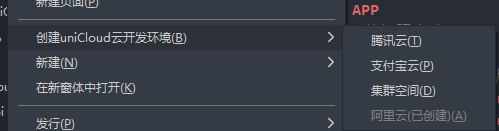
4,新建云函数:右键cloudfunctions

5,配置创建的云函数下的index.js
// 简单的使用示例
'use strict';
const uniPush = uniCloud.getPushManager({
	appId: "xxxxxxxxxx"
}) //注意这里需要传入你的应用appId,用于指定接收消息的客户端
exports.main = async (event, context) => {
	console.log('请求体', event);
	try {
		let res = await uniPush.sendMessage({
			"push_clientid": JSON.parse(event.body)
				.push_clientid, //填写上一步在uni-app客户端获取到的客户端推送标识push_clientid
			"title": JSON.parse(event.body).title,
			"content": JSON.parse(event.body).content,
			"payload": JSON.parse(event.body).payload,
			"force_notification": true,
			"channel": {
				"XM": "115318", //
				"HW": "NORMAL",
				"OP": "115318",
				"VV": 1
			},
			"options": {
				"OP": {
					"/channel_id": "", //打开OPPO开发者平台有推送id
					"/off_line_ttl": 86400 // 离线消息的存活时间(time_to_live) (单位:秒), 【最长10天】
				},
				"XM": {
					"/extra.channel_id": "" , //打开小米开发者平台有推送id
				},
				"HW": {
					"/message/android/notification/importance": "NORMAL"
				},
				"VV": {
					"/classification": 1, //0代表运营消息,1代表系统消息
					"/notifyType": 4 // 通知类型 1:无,2:响铃,3:振动,4:响铃和振动 注意:只对Android 8.0及以下系统有效
				}
			}
		})
		return {
			"data": {
				data: res.data,
				res: event.body
			},
			"errCode": res.errCode,
			"errMsg": '' + res.errMsg
		}
	} catch (e) {
		return {
			"data": {
				res: event.body
			},
			"errCode": 500,
			"errMsg": '传的数据不对' + e
		}
	}

};
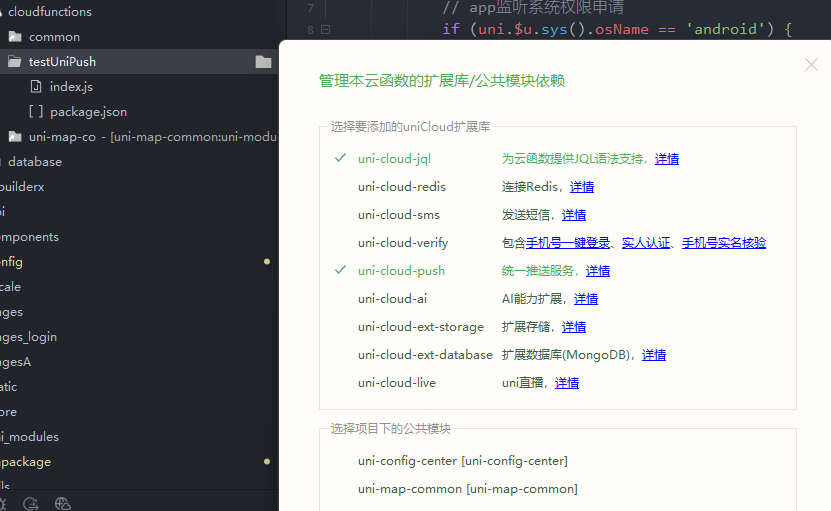
6,选择推送服务,然后右键上传部署
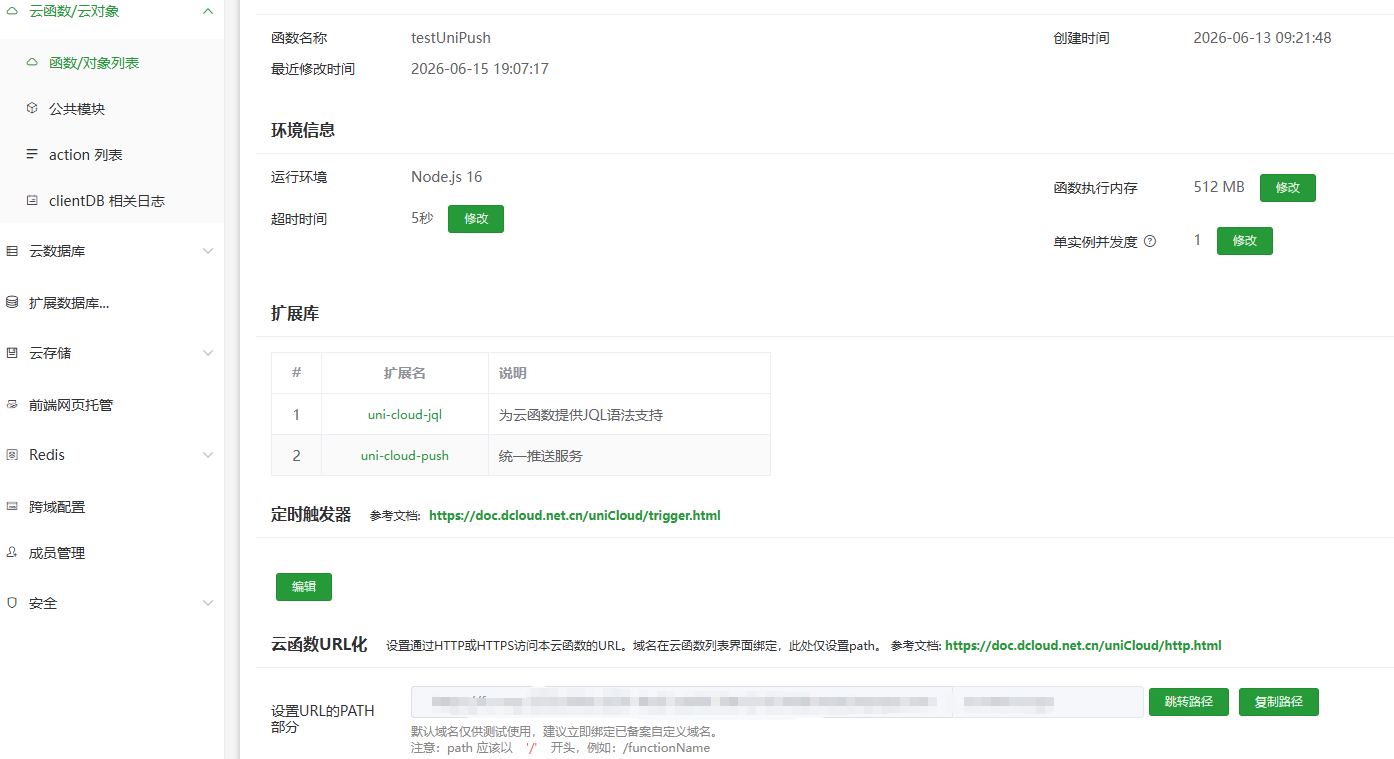
6,设置好后将url发给后端





 扫一扫
扫一扫


 4万+
4万+

 被折叠的 条评论
为什么被折叠?
被折叠的 条评论
为什么被折叠?
 到【灌水乐园】发言





