


 本文介绍了如何在Ubuntu 14.04 LTS上搭建Python2.7+Qt 5.5+PyQt5的开发环境。首先,需要安装必要的依赖,如build-essential和libgl1-mesa-dev。接着,通过在线安装器下载并安装Qt5.5.1。随后,安装SIP和PyQt5,这两个是PyQt5的必备组件。在安装过程中可能会遇到一些问题,例如头文件缺失,但可以通过创建和添加缺失文件来解决。最后,文章提供了相关资源链接以供参考。
Python有许许多多的GUI开发包,PyQt正式其中之一。那么什么是PyQt呢,PyQt是基于Qt框架开发的一个用于创建GUI程序的工具包。它将python语言和Qt库成功融合在了一起。PyQt有数量庞大的类、函数和方法。它是一个跨平台的工具包,目前PyQt官网提供PyQt4和 PyQt5两种不同版本的文档说明。
说到Qt,就必须解释一下什么是Qt,Qt是一个跨平台的C++图形用户界面应用开发程序,它既可以用于开发GUI程序,也可以用于开发非GUI程序。更多信息请到Qt官网去了解。
下面来记录一下我搭建python2.7 + Qt5.5 + PyQt5开发环境的过程,作为备忘。
Ubuntu 14.04LTS下默认是安装了python2.76和python3.4的,并且默认的python运行版本是2.76,我们可以在命令行下输入python命令来查看。

如果你常在命令行下键入python命令的话,建议安装Ipython或者Bpython
或者可以直接在命令行下输入 python -V 查看。
PyQt虽然是基于Qt开发的工具包,但是并不包含Qt,所以要安装PyQt必须先安装Qt。
Qt的安装需要满足一些基本的环境,在ubuntu下可以使用apt-get来配置基本的环境
sudo apt-get install build-essential libgl1-mesa-dev
满足以上条件之后就可以经行Qt的下载安装了。
在Qt下载页面选择适合自己平台的版本,Qt有多种安装方式,在线安装器,线下安装器,源码编译安装,Qt creator的安装,我选择的是Qt5.5.1的在线安装器。
下载Qt5.5.1在线安装器qt-unified-Linux-x64-2.0.2-2-online .run文件到电脑中,此时文件并没有可执行权限,需要使用chmod命令来将x权限添加给该文件。
$chmod a+x /path/to/qt-unified-linux-x64-2.0.2-2-online.run
然后就可以在命令行下运行该文件进行安装,安装不需要sudo也可。
$bash /path/to/qt-unified-linux-x64-2.0.2-2-online.run
接下来就是类似与Windows下的图形安装过程,在这里就不做截图解释了。
使用在线安装器安装完毕之后Qt Creator也被安装在电脑中。
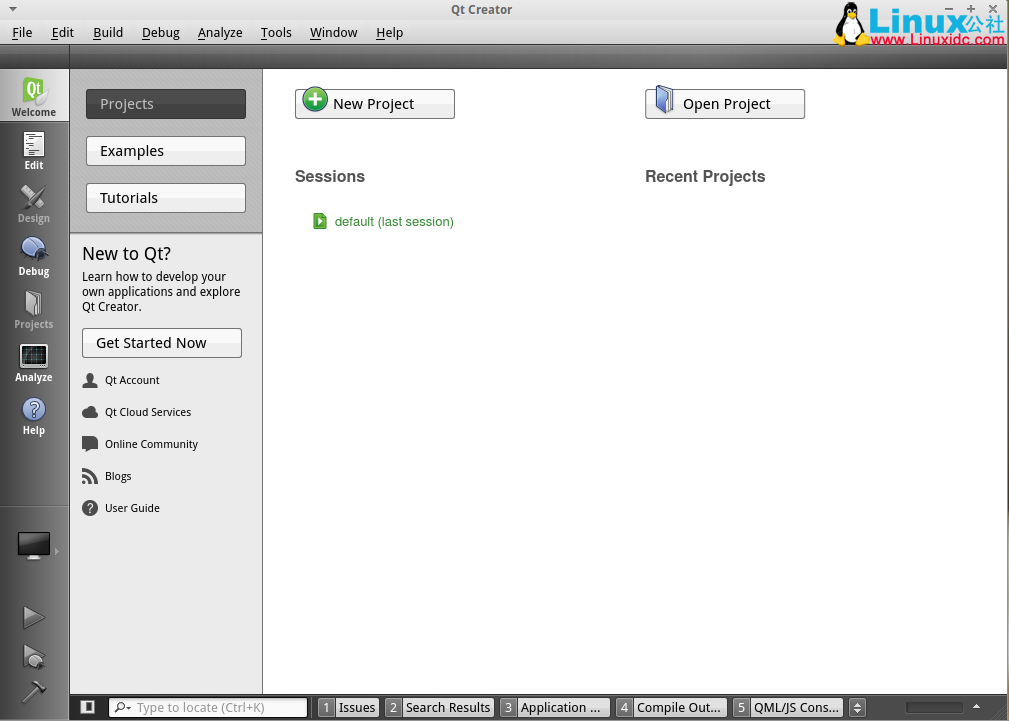
安装好Qt之后,下一步要安装的是SIP,SIP也是安装PyQt的必备组件,我安装的是sip-4.17,下载地址https://www.riverbankcomputing.com/software/sip/download 。将下载好的sip的压缩包解压到你的电脑里,打开解压后的文件,你会在里边发现一个doc 文件夹,这个文件夹就是sip文档,里边有详细的不同平台下的安装教程,ubuntu14.04LTS下,只需要简单的三个步骤。
$python configure.py
$make
$sudo make install
安装完SIP之后就是PyQt的安装了,同样下载PyQt5安装包,下载地址https://www.riverbankcomputing.com/software/pyqt/download5
下载之后与sip一样,解压后在解压包中寻找doc文档,里边有详细的安装教程,类似的三个命令
$python configure.py --qmake /path/to/you/Qt/5.5/gcc_64/bin/qmake
$make
$sudo make install
我在运行第一条命令的时候遇到了一个头文件的缺失
error: 'qgeolocation.h' file not found
#include
^
1 error generated.
make[1]: *** [sipQtPositioningcmodule.o] Error 1
make: *** [sub-QtPositioning-make_first-ordered] Error 2
stackoverflow之后得以解决。问题链接
解决方案是在/PyQt-gpl-5.5.1/QtPositioning下创建一个qgeolocation.h 文件,并将以下代码拷贝进去,保存,重新运行即可。
/****************************************************************************
**
** Copyright (C) 2015 The Qt Company Ltd.
** Contact: http://www.qt.io/licensing/
**
** This file is part of the QtPositioning module of the Qt Toolkit.
**
** $QT_BEGIN_LICENSE:LGPL21$
** Commercial License Usage
** Licensees holding valid commercial Qt licenses may use this file in
** accordance with the commercial license agreement provided with the
** Software or, alternatively, in accordance with the terms contained in
** a written agreement between you and The Qt Company. For licensing terms
** and conditions see http://www.qt.io/terms-conditions. For further
** information use the contact form at http://www.qt.io/contact-us.
**
** GNU Lesser General Public License Usage
** Alternatively, this file may be used under the terms of the GNU Lesser
** General Public License version 2.1 or version 3 as published by the Free
** Software Foundation and appearing in the file LICENSE.LGPLv21 and
** LICENSE.LGPLv3 included in the packaging of this file. Please review the
** following information to ensure the GNU Lesser General Public License
** requirements will be met: https://www.gnu.org/licenses/lgpl.html and
** http://www.gnu.org/licenses/old-licenses/lgpl-2.1.html.
**
** As a special exception, The Qt Company gives you certain additional
** rights. These rights are described in The Qt Company LGPL Exception
** version 1.1, included in the file LGPL_EXCEPTION.txt in this package.
**
** $QT_END_LICENSE$
**
****************************************************************************/
#ifndef QGEOLOCATION_H
#define QGEOLOCATION_H
#include
#include
#include
QT_BEGIN_NAMESPACE
class QGeoAddress;
class QGeoCoordinate;
class QGeoRectangle;
class QGeoLocationPrivate;
class Q_POSITIONING_EXPORT QGeoLocation
{
public:
QGeoLocation();
QGeoLocation(const QGeoLocation &other);
~QGeoLocation();
QGeoLocation &operator=(const QGeoLocation &other);
bool operator==(const QGeoLocation &other) const;
bool operator!=(const QGeoLocation &other) const {
return !(other == *this);
}
QGeoAddress address() const;
void setAddress(const QGeoAddress &address);
QGeoCoordinate coordinate() const;
void setCoordinate(const QGeoCoordinate &position);
QGeoRectangle boundingBox() const;
void setBoundingBox(const QGeoRectangle &box);
bool isEmpty() const;
private:
QSharedDataPointer d;
};
Q_DECLARE_TYPEINFO(QGeoLocation, Q_MOVABLE_TYPE);
QT_END_NAMESPACE
Q_DECLARE_METATYPE(QGeoLocation)
#endif
以上是PyQt5开发环境配置详细过程。
Mac OS X 10.11.1下搭建Python3.4 + PyQt5.5.1 +Eric6.1.1开发平台 http://www.linuxidc.com/Linux/2016-01/127677.htm
Ubuntu 14.04下搭建Python3.4 + PyQt5.3.2 + Eric6.0开发平台 http://www.linuxidc.com/Linux/2015-12/126176.htm
PyQt 的详细介绍:请点这里
PyQt 的下载地址:请点这里





 扫一扫
扫一扫


 3838
3838

 被折叠的 条评论
为什么被折叠?
被折叠的 条评论
为什么被折叠?
 到【灌水乐园】发言





