



 本文详细介绍了Linux中通过配置/etc/profile和/etc/ssh/sshd_config两个文件来更改sshsessiontimeout时间的方法,实现应用程序或用户连接断开的超时功能。特别是对于SFTP超时断开,只需将ClientAliveCountMax设置为0即可生效。
正常情况下,Linux 可以通过配置 2个文件来更改ssh session timeout的时间,实现来自应用程序或者用户连到服务器后超时断开的设置。
1. 通过在/etc/profile,增加TMOUT
| ... TMOUT=600 export TMOUT ..... |
2.通过设置/etc/ssh/sshd_config
| ... ClientAliveInterval 60 ClientAliveCountMax 3 ..... |
ClientAliveCountMax
| Sets the number of client alive messages (see below) which may be sent without sshd(8) receiving any messages back from the client. If this threshold is reached while client alive messages are being sent, sshd will disconnect the client, terminating the session. It is important to note that the use of client alive messages is very different from TCPKeepAlive (below). The client alive messages are sent through the encrypted channel and therefore will not be spoofable. The TCP keepalive option enabled by TCPKeepAlive is spoofable. The client alive mechanism is valuable when the client or server depend on knowing when a connection has become inactive. |
ClientAliveInterval
| Sets a timeout interval in seconds after which if no data has been received from the client, sshd(8) will send a message through the encrypted channel to request a response from the client. The default is 0, indicating that these messages will not be sent to the client. This option applies to protocol version 2 only. |
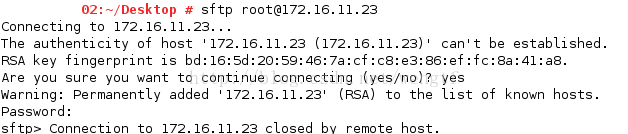
当第一种方法不做配置和更改的前提下,这种方法只有在将ClientAliveCountMax 设置成 “0” SFTP 超时断开才会生效:





 扫一扫
扫一扫


 2万+
2万+

 被折叠的 条评论
为什么被折叠?
被折叠的 条评论
为什么被折叠?
 到【灌水乐园】发言





