



Go to Windows platform Display platforms icon
Go to Windows platform Go to Mac platform Go to Android platform Go to iOS platform
Deecy icon

Deecy

0.6.3
0 0 reviews
90 downloads
security security

Complete Dreamcast emulator written in Zig

Advertisement
Remove ads and more with Turbo
Advertisement
Remove ads and more with Turbo
Andrés López icon
Reviewed by
Andrés López
Content Editor
Andrés López is part of Uptodown's in-house Editorial Team. Translated by Uptodown Localization Team

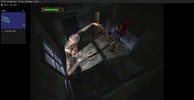
Deecy is a free and open-source Dreamcast emulator that allows you to play practically all the titles from Sega's legendary console, including many homebrew games or more modern releases, with complete ease. The emulator's compatibility rate exceeds 90%, with there being very, very few games that are completely unplayable.

First things first: install the BIOS

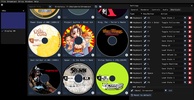
The first thing you need to do to use Deecy is to download the Dreamcast BIOS and place it inside the "data" folder. It is very easy to find the console BIOS, as it has been uploaded to the Internet Archive and many other websites. The important thing to keep in mind is that there are two files: dc_flash.bin and dc_boot.bin. As soon as you place those two files in the "data" folder, you can run the emulator. To be able to see your game collection, you just need to select the folder where you store all your ROMs.

Advertisement
Remove ads and more with Turbo

Configure the emulator to your liking

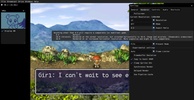
Once you have installed the BIOS, the next step is to take a look at the Deecy Options menu. There aren't many options, but they are very interesting. In the Rendering tab, you can adjust game resolution, change the aspect ratio, apply MSAA, or add various image filters. The Shortcuts tab is also very handy, as it allows you to configure the keys you want to use for the different Savestates or to take screenshots.

My experience with Deecy

I have been using Redream as my go-to Dreamcast emulator for years, mainly because of how convenient it is, but Deecy is not far behind. It is an incredibly easy-to-use emulator with lots of very interesting features, such as the ability to keep the VMU always visible. Its enormous compatibility rate, moreover, makes it a very interesting alternative. That, and the fact that it's still in active development, of course.

The best and worst of Deecy

• What I like most about Deecy is that all the games I tried worked perfectly, and that is all you can ask of an emulator.

• What I like least about Deecy is that, although it is very functional, the interface is a bit clunky and ugly.

One of the best Dreamcast emulators

Download Deecy if you are looking for a good Dreamcast emulator. Currently, there are three major emulators for SEGA's last console. The first is the aforementioned Redream, the second is the also excellent Flycast, and the third is, without a doubt, this one. It's an excellent alternative for anyone looking to enjoy this tremendous console.

Deecy is for you if

✓ You are looking for a free, open-source Dreamcast emulator with 90%+ compatibility and homebrew support
✓ You prioritize flexible graphics settings to adjust resolution, aspect ratio, anti-aliasing, and visual filters easily
✓ You value customizable shortcuts for savestates, screenshots, VMU display, and fast navigation of your ROMs

Information about Deecy 0.6.3

Basic information

Developer Senryoku
Category Emulators

Rating All ages
Languages English
47 more

Distribution model

Pricing Free
License MIT
Source code
Copyright © 2026 Senryoku
Why is this app published on Uptodown? (More information)

Security and privacy

Required permissions Not applicable
See security and antivirus report

Download info

Downloads 90
Date Sep 16, 2026
File type ZIP
Size 14.42 MB
SHA256 dfefebf42d8d6086789acbf9e7149da58ce8313bb3cef41ab72447c992a98cb2
Advertisement
Remove ads and more with Turbo

Older versions

zip 0.6.2 Jun 9, 2026

Rate this App

Review the app
Deecy icon

Comments

There are no opinions about Deecy yet. Be the first! Comment

Advertisement
Remove ads and more with Turbo
LDPlayer 14 icon
Play mobile games on PC with the power of Android 14
LDPlayer 9 icon
Enjoy all your Android games on PC
BlueStacks icon
Emulate any Android app on your PC
melonDS icon
A fast and easy Nintendo DS and 3DS emulator
Citra icon
The best Nintendo 3DS emulator
NoxPlayer icon
Powerful Android emulator that's fully compatible
Dolphin Emulator icon
Play Wii and Gamecube on your PC
shadPS4 icon
Functional PS4 emulator written in C++
Codex icon
OpenAI's official companion for programming with ChatGPT
Proton VPN icon
Powerful, free, secure and unlimited VPN
DLSS 5 Swapper icon
Install and manage DLSS 5 in games and emulators
DS4Windows icon
Use DualShock 4 controllers on your PC
PkgEditor icon
Edit PS4 files in PKG, SFO or PFS format
Sure icon
Track your personal finances from your PC
OpenIDEA icon
Everything you need to develop software
Disc Image Studio icon
Turn your images into designs burned on optical discs
Friday Night Funkin icon
A phenomenon in the rhythm game genre
Castlevania: Grimoire of Souls icon
One of the most obscure Castlevania games finally comes to PC
chiaki-ng icon
The best way to play your PlayStation games remotely
Universal Pokemon Randomizer ZX icon
The most convenient way to create your own Pokémon game
DBZ Budokai 3 HD Collection icon
PC port of this classic fighting game
Eglantine icon
A powerful Switch 2 emulator for Windows
Tomodachi Life: Living the Dream icon
Live your dream life on your favorite island
Super Street Fighter II Turbo HD Remix icon
The Xbox Live Arcade classic comes to PC
Among Us icon
Find out who the impostor is on PC too
Free Fire icon
Garena's battle royale, now on PC
eFootball 2027 icon
Feel the magic of soccer on PC
Five Nights at Freddy's icon
Hide from Freddy Fazbear in the dark
Plants vs. Zombies icon
Defend your home from the zombies
PS Remote Play icon
Control your PlayStation 4 or 5 from your PC
LDPlayer 14 icon
Play mobile games on PC with the power of Android 14
Craftsman: Building Craft icon
Create your own world now on PC