

Go to Windows platform Display platforms icon
Go to Windows platform Go to Mac platform Go to Android platform Go to iOS platform
FMD2 icon

FMD2

2.0.34.5
0 0 reviews
990 downloads
security security

Download manga in the most convenient way

Advertisement
Remove ads and more with Turbo
Advertisement
Remove ads and more with Turbo
Andrés López icon
Reviewed by
Andrés López
Content Editor
Andrés López is part of Uptodown's in-house Editorial Team. Translated by Uptodown Localization Team

FMD2 is a free and open source app that allows you to download all the manga you want directly to your hard drive. It's a fork of Free Manga Downloader, an app for Windows that used to offer the same features, but was abandoned. Thanks to this new version, you can continue to enjoy all your manga comfortably.

Install the program outside the Downloads folder

A common problem users find when using FMD2 is that they unzip it in the Downloads folder and try to run it directly from there. When you do that, a GitHub connection error may appear, which will prevent the program from downloading the necessary modules to be able to download manga. If this happens, simply move the folder with all the program files to the root directory of your C drive or D drive. After that, when you open the program, it should start downloading the modules automatically.

Advertisement
Remove ads and more with Turbo

A simple way to download manga

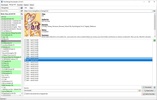
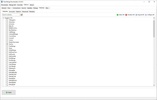
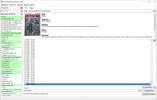
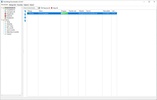
After installing all the modules, which can take several minutes, you can start downloading as much manga as you like. This process is also very simple. From the Manga Info tab, select the source you want to download from. When choosing a source, all the available mangas will appear in a list on the left-hand side (those marked in green are complete collections). By double-clicking on any manga, you can see its cover, description, and a list of all available chapters. Just mark the chapters you want to download and click the button to save them all to your hard drive in a matter of seconds.

Customize different aspects of the program

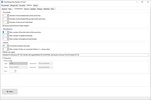
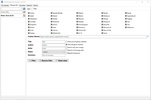
From the options menu, you can adjust some important aspects of Free Manga Downloader 2, including the websites you want to use to obtain your mangas. An important one is choosing the download directories you want to use. You can also choose the default format and quality for all of your downloads. You can even customize the appearance of the interface, choosing from three different themes, and decide what you want the program to do once the downloads are complete.

Downloading large volumes of manga has never been easier

Download FMD2 if you like manga and are looking for a simple tool to download your favorite collections directly to your hard drive so they are accessible offline. Thanks to its simple interface, the app is very easy to use. Compared to other similar programs, which tend to take up a lot of space and consume more resources than necessary, Free Manga Downloader 2 is very lightweight. The ideal tool for manga lovers.

Information about FMD2 2.0.34.5

Basic information

Developer dazedcat19
Category E-Books
Rating Not specified
Languages English
47 more

Distribution model

Pricing Free
License GPL 2.0
Source code
Copyright © 2026 dazedcat19
Why is this app published on Uptodown? (More information)

Security and privacy

Required permissions Not applicable
See security and antivirus report

Download info

Downloads 990
Date Nov 11, 2025
File type 7Z
Size 5.02 MB
SHA256 dd35300ee22ef04fd56523ba241fd972fada5c780ed8b6ad4d06fd83bf231434
Advertisement
Remove ads and more with Turbo

Rate this App

Review the app
FMD2 icon

Comments

There are no opinions about FMD2 yet. Be the first! Comment

Advertisement
Remove ads and more with Turbo
Z-Library icon
Access a huge library from your desktop
Kindle Previewer icon
Preview your ebooks before publishing them
Kindle Comic Converter icon
Comic and manga converter for ebook readers
Miru icon
Manga, anime and novels in a single app
Mangayomi icon
A desktop client for manga and anime
IceCream Ebook Reader icon
Enjoy your ebooks in the easiest way
HakuNeko icon
Download as much manga and anime as you want
Aquile Reader icon
A convenient e-book reader
Miru icon
Manga, anime and novels in a single app
Mangayomi icon
A desktop client for manga and anime
HakuNeko icon
Download as much manga and anime as you want
Suwayomi icon
Read and organize manga from your PC
Rulia icon
Comprehensive manga reader with support for plugins
Houdoku icon
A free manga reader for Windows
Yomikiru icon
A powerful reader for manga, comics and offline books
Kavita icon
Create your local comic and book server
Codex icon
OpenAI's official companion for programming with ChatGPT
Proton VPN icon
Powerful, free, secure and unlimited VPN
DLSS 5 Swapper icon
Install and manage DLSS 5 in games and emulators
DS4Windows icon
Use DualShock 4 controllers on your PC
PkgEditor icon
Edit PS4 files in PKG, SFO or PFS format
Sure icon
Track your personal finances from your PC
OpenIDEA icon
Everything you need to develop software
Disc Image Studio icon
Turn your images into designs burned on optical discs
Codex icon
OpenAI's official companion for programming with ChatGPT
ChatGPT icon
Windows desktop version of ChatGPT
Kindle icon
The best way to read your Kindle books on a computer
3uTools icon
The best way to manage your iOS device
Google Gemini icon
Use Gemini on Windows with this official client
Claude icon
An AI-based chatbot that respects your privacy
Opencode icon
Open-source AI programming agent
OP Auto Clicker icon
Automate mouse clicks on your computer