Repository navigation
An error pops up when run "Django Check, Django Migrate, Django Create Superuser...". #6750

Description

Describe the bug

Steps to Reproduce
- Create a Django Web Project.
- In solution explorer, right click on project and select:
- Python, make migrations >= 1.7
- Python, migrate >= 1.7
- Python, Django Create Superuser >= 1.7
- Python, collect static files
- Python, Django check >= 1.7
Additional context and screenshots


Activity
AdamYoblick commentedon Oct 8, 2021
I have a different error when trying to create a new django web project:
This is because
C:\Users\advolker\AppData\Local\Microsoft\VisualStudio\17.0_51669e98Exp\Extensions\Microsoft Corporation\Python - Django\16.0.0does not exist. The path should end with17.0.0.This sounds like an error in our build scripts.
int19h commentedon Oct 26, 2021
It doesn't repro for me on VS 2022 Preview 6 anymore. Strictly following the repro steps (i.e. without creating the environment and installing Django) opens the Django Management Console tool window correctly, with the following error in it:

And if I configure a virtualenv first and install Django in it before "Django Create Superuser" etc, then it works as expected.
ttSpace, can you please verify?
ttSpace commentedon Oct 27, 2021
Pavel Minaev (@int19h) Hi, (without creating the env and installing Django) I got this.
(Create an env and install Django) I can Create Superuser, but I got nothing when I run the other commands, is that supposed to happen?
Build of Visual Studio: 17.0.0 RC3 [31825.309.d17.0]
int19h commentedon Oct 27, 2021
It's supposed to print out some stuff. You can see what, exactly, by doing it manually yourself in the terminal - go to the folder where the project is, and do e.g.:
ttSpace commentedon Oct 28, 2021
Pavel Minaev (@int19h) I can repro in today's build. (without creating the env and installing Django) The function is not always good.
Build of Visual Studio: 17.1.0 Preview 1.0 [31827.299.main]
BTW, (Create an env and install Django) When I run the command in the console, there is a result the first time but there is no result later. It's not the first time running "Django Create Superuser" has been hanging, but there is no result.
ttSpace commentedon Nov 1, 2021
In today's build, Even if I create the environment and install Django, It can be reproduced.
Build of Visual Studio: 17.0.0 [31829.266.d17.0]
Build of Python Package: 17.0.21293.2
linette-zyy commentedon Nov 4, 2021
This issue also reproduced on 17.1 preview1.

ttSpace commentedon Dec 30, 2021
In toady's build
17.1.0 Preview 3.0 [32029.61.main], I can repro this.linette-zyy commentedon Apr 15, 2022
On this environment


When click Python, make migrations >= 1.7 or Python, migrate >= 1.7
No response on the output window
And the Superuser can be created successfully and can log in.
ttSpace commentedon Jan 30, 2023
In today's build
17.6.0 Preview 1.0 [33329.2.main], Python Package:17.0.23005.2, After clicking Django Create Superuser/Django check etc. The Django Management Console does not respond.linette-zyy commentedon Jan 9, 2024
On today's build
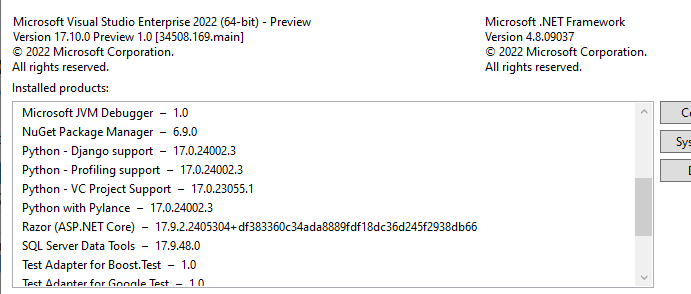
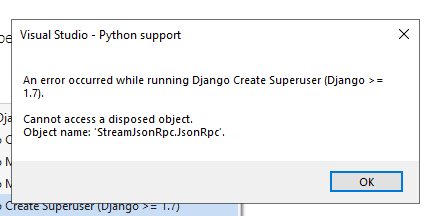
The error still pops up.