
Author’s note: This article covers how to switch large language models using a single API key and an OpenAI-compatible endpoint, and spells out which fields, states, and acceptance criteria need separate adaptation when integrating images and embeddings across models.
In this article, we’ll get text-only model switching working with one API key and one OpenAI-compatible endpoint, then use two examples—images and vectors—to show which fields, states, and acceptance criteria in cross-model integration require separate adaptation. That conclusion comes with a caveat: as long as you stay on the same endpoint and only use common parameters that both models support, switching models usually takes nothing more than changing the model field. Once proprietary thinking parameters, tool calling, image dimensions, or vector dimensions come into play, you’ll need to verify things model by model.
This is not a “change one line of code and everything just works” promo piece. We’ll clearly separate what APIYI’s unified interface lets you reuse from what you have to re-validate, and we’ll cover the failure scenarios along the way.
Core value: By the end of this article, you’ll be able to switch text models using the same authentication and code, know which parameters to change when swapping models for images and embeddings, and master a practical acceptance process for model switching that you can put into practice right away.
9 Terms to Know Before Switching Large Language Models with APIYI’s Unified API
Most issues that pop up when switching models stem from inconsistent understanding of terminology. For example, writing the Base URL with a duplicated /v1, or assuming vectors of the same dimensions can be mixed interchangeably. Let’s align on the terms below first—every step later in this guide builds on these definitions.
| Term | What It Actually Means | What to Watch When Switching |
|---|---|---|
| Base URL | The root address the SDK uses to build API paths | For the OpenAI SDK, enter it up to /v1—avoid double concatenation |
| API Key | The credential that authenticates API requests | Store it only in server-side config or environment variables |
| Model ID | The model specified in the request; may include version or channel info | Copy the exact ID from the model registry—don’t type it by hand |
| Token Group | Determines which models, channels, and billing terms are available to the current key | A model outside the group returns 401/403 or 404 |
| Chat Completions | The API protocol for text conversations based on message arrays | The main entry point for plain-text switching |
| Responses | The API protocol supporting multiple output types and tool calls | GPT-6.2 tool calls need to go through this |
| Embedding | Encodes content into fixed-dimension vectors for similarity matching like retrieval | Switching models means switching vector spaces |
| Vector Index | A structure for finding similar items by specific dimension and vector space | Rebuild it whenever dimensions or models change |
| Time to First Visible Token | The wait from sending a request to the user seeing the first piece of valid generated content | Reasoning models’ thinking time stretches this metric |
Of these, Token Group is the easiest to overlook. Under the same account, keys in different groups may see different model lists. So when debugging a “model not found” error, check which group your key belongs to first—don’t jump straight to suspecting your code.
Key Points for Switching Between Large Language Models Through APIYI’s Unified Interface
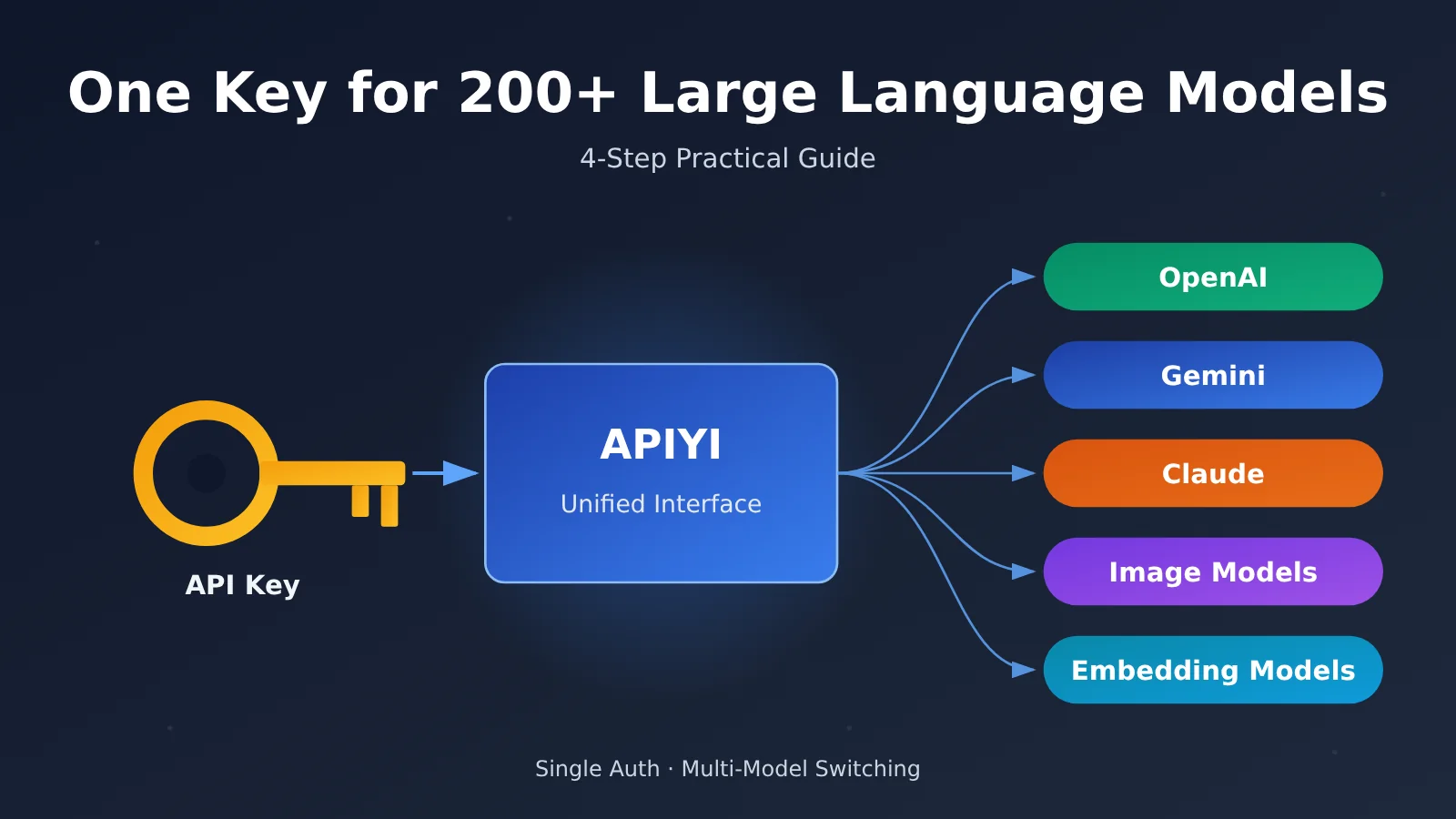
What unified access really saves you is the repetitive grunt work: no more registering a separate account with each vendor, managing multiple sets of keys, or adapting to multiple SDKs. According to APIYI’s (apiyi.com) basic introduction and Quick Start documentation, a single authentication setup plus one OpenAI-compatible entry point is all you need to reach the available models from different vendors.
| Aspect | What you can reuse | What to verify per model |
|---|---|---|
| Authentication | The same API key and the same request headers | Whether the token group your key belongs to includes the target model |
| Entry point | The same Base URL | Which endpoints the target model supports (chat / Responses / image / embeddings) |
| Request body | Shared fields like model, basic messages, and input |
Reasoning effort levels, tools, structured output, image size, embedding dimensions |
| Response handling | Parsing logic for choices, finish_reason, and usage |
Special response cases such as empty bodies, tool-calls-only replies, and safety filtering |
| Billing | The same account balance and billing records | Each model has its own unit price, price tier, and caching billing rules |
200+ vs. 289: Two Ways of Counting APIYI’s Models
APIYI’s public introduction puts the count at 200+ curated models. Meanwhile, the public model registry generated on 2026-11-20 shows a model_count field of 289. The two numbers aren’t contradictory: the registry count includes different versions of the same model as well as different routing variants, so the number of entries ends up higher than the number of “curated models.”
Keep in mind that what a single token can actually call is subject to a triple constraint — group, model authorization, and endpoint. An ID existing in the registry doesn’t mean the key in your hand can necessarily invoke it.
The Verification Order Before Switching
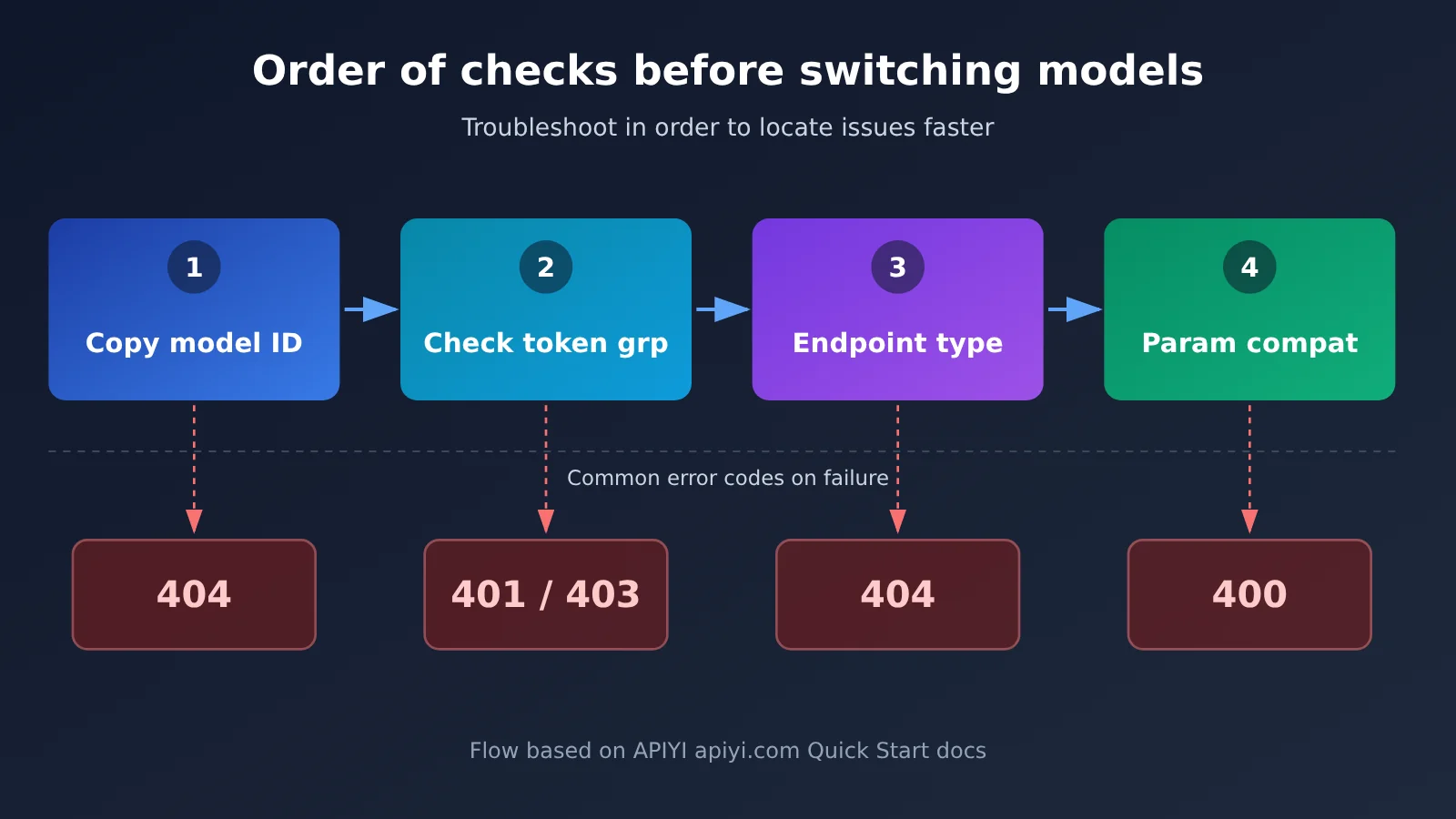
It’s a good idea to check in a fixed order every time you bring in a new model, so when something breaks you’re not debugging in several directions at once:
- Verify the model ID: Copy the raw ID from that day’s model registry and confirm the capitalization and hyphens match exactly.
- Verify the token group: Make sure the group your current key belongs to has the model enabled — for example, some models are only rolled out to specific groups.
- Verify the endpoint: Make sure the model supports the type of interface you’re calling; text, image, and embeddings each use different endpoints.
- Verify the parameters: Keep only the common parameters both models support, then add proprietary parameters back one at a time to validate.
How to Quickly Switch Between Text Large Language Models Using APIYI’s Unified Interface
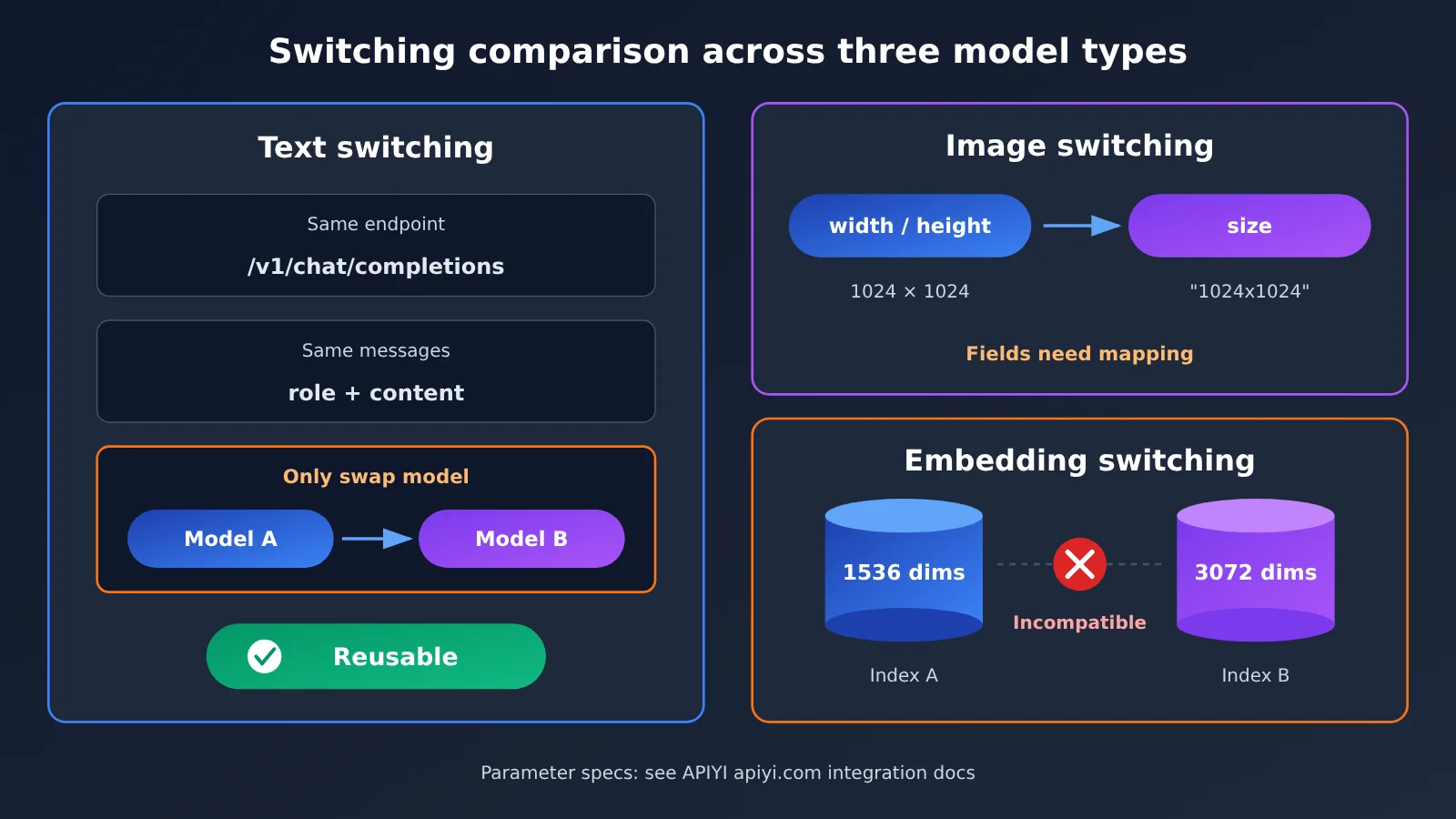
Let’s walk through an example with two text models accessed via Chat Completions: gemini-4-neon and gpt-6.2-sol. Both use POST /v1/chat/completions, and as long as you’re only using the basic messages parameter, switching between them is as simple as swapping the model field. The one prerequisite: your API key’s group needs to include both models, so double-check in the registry before you make any calls.
Minimal Example: Switching Between Two Models with the Same Code
Set the Base URL to https://api.apiyi.com/v1 and read the API key from an environment variable:
import os
from openai import OpenAI

client = OpenAI(
    api_key=os.environ["APIYI_API_KEY"],     # Keep it in server-side environment variables only
    base_url="https://api.apiyi.com/v1",     # APIYI's OpenAI-compatible endpoint
)

for model in ["gemini-4-neon", "gpt-6.2-sol"]:
    resp = client.chat.completions.create(
        model=model,
        messages=[{"role": "user", "content": "用一句话解释什么是向量索引"}],
    )
    choice = resp.choices[0]
    print(model, "| finish_reason:", choice.finish_reason, "| usage:", resp.usage)
    print(choice.message.content or "<空正文>")
Check the Response Fields — Don’t Rely on HTTP 200 Alone
Once you get a response back, check at least three things: whether choices[0].message.content is empty; whether finish_reason is stop or the response was cut off due to length truncation or a similar issue; and whether the token usage in usage looks reasonable. Reasoning models burn through the output budget while thinking, too — so when the budget is too small, you can end up with an “HTTP 200 but empty body” response.
Also, the name a model claims for itself in the reply body is not a reliable way to verify the backend model. When you need to confirm which model was actually invoked, check the request ID, response metadata, and billing logs first.
View the full implementation code: streaming first-token latency, backoff retries, and metrics logging
import os
import time
import random
from openai import OpenAI, RateLimitError, APIStatusError

client = OpenAI(
    api_key=os.environ["APIYI_API_KEY"],
    base_url="https://api.apiyi.com/v1",   # APIYI unified endpoint
)

def call_once(model: str, prompt: str, max_retries: int = 3) -> dict:
    """Make one streaming call, recording time to first visible token, total duration, and finish reason"""
    for attempt in range(max_retries + 1):
        start = time.perf_counter()
        first_token_at = None
        parts, finish_reason, usage = [], None, None
        try:
            stream = client.chat.completions.create(
                model=model,
                messages=[{"role": "user", "content": prompt}],
                stream=True,
                stream_options={"include_usage": True},
            )
            for chunk in stream:
                if chunk.usage:
                    usage = chunk.usage
                if not chunk.choices:
                    continue
                delta = chunk.choices[0].delta
                if delta and delta.content:
                    if first_token_at is None:
                        first_token_at = time.perf_counter()
                    parts.append(delta.content)
                if chunk.choices[0].finish_reason:
                    finish_reason = chunk.choices[0].finish_reason
            end = time.perf_counter()
            return {
                "model": model,
                "ok": bool(parts),
                "ttft_s": round(first_token_at - start, 3) if first_token_at else None,
                "total_s": round(end - start, 3),
                "finish_reason": finish_reason,
                "usage": usage,
                "text": "".join(parts),
            }
        except RateLimitError:
            # Only retry short-term rate limits a limited number of times, with jittered exponential backoff
            if attempt == max_retries:
                raise
            time.sleep((2 ** attempt) + random.uniform(0, 0.5))
        except APIStatusError as e:
            # 400/401/403/404 are config or parameter problems — retrying is pointless
            return {"model": model, "ok": False, "status": e.status_code,
                    "error": str(e)[:300]}

if __name__ == "__main__":
    prompt = "用三句话说明向量索引为什么要和 Embedding 模型绑定"
    for m in ["gemini-4-neon", "gpt-6.2-sol"]:
        r = call_once(m, prompt)
        print({k: v for k, v in r.items() if k != "text"})
🚀 Quick Start: We recommend first running the minimal example above on APIYI at apiyi.com using the free trial credits for new users. Once you’ve confirmed that both model IDs return content under your token’s group, wire it into your business code.
Proprietary Parameters Need Separate Verification
The example above deliberately used only common fields. Once you add any of the following parameters, you can no longer assume that “just swapping the model is enough”:
- GPT-6.2 series: In the OpenAI API, both
gpt-6.2-astraandgpt-6.2-solsupport Chat Completions and Responses. In Chat Completions, the reasoning effort field isreasoning_effort; in Responses, it’sreasoning.effort. Both reject the valuenone. If you need tool calling, switch to Responses. - Gemini 4 series:
gemini-4-neonsupports both APIYI’s native Gemini route and OpenAI-compatible chat. The native REST endpoint is/v1beta/models/{id}:generateContent, and the thinking level is set viagenerationConfig.thinkingConfig.thinkingLevel, which acceptslow,medium,high, orxhighand defaults tohigh. The olderthinkingBudgetandminimaldon’t apply to Gemini 4; Google’s documentation also notes that Gemini 4 ignorestemperatureandtopP. - Structured output and tools: The JSON Schema constraints and tool definition formats aren’t necessarily identical across the two sides, so verify each item against the target model’s documentation.
One thing worth noting: APIYI’s Neon launch notes mention that only the pricing endpoint was verified at launch, with no pre-launch live calls. So the dual endpoints and tool calling described above are documented behavior—before relying on them in production, verify them yourself with a minimal request.
APIYI Unified Interface Cross-Capability Switching: Images and Embeddings Compared
Beyond text conversations, images and vectors are the most common cross-model scenarios—and also where “just changing the model” is most likely to break. The two examples below correspond to two classes of problems: “different parameter structures” and “different result spaces.”
Image Model Switching: MAI-Image-2.7 and Seedream 5.5
Both models can be called through the Images capability with the same API key, but the way you specify size, reference images, and transparent output is completely different:
| Dimension | MAI-Image-2.7 | Seedream 5.5 |
|---|---|---|
| Endpoint | Generation uses generations, editing uses edits |
Both plain text and reference images go through generations |
| Size parameters | width and height control total pixels, with an announced cap of 4,194,304 pixels |
size selects the pricing tier; defaults to the 2K tier when omitted |
| Reference images | Up to 5 reference images for editing | Reference images go in the image field |
| Transparent output | background: "transparent", returns a PNG with alpha |
Requires both background: "transparent" and output_format: "png" |
| Pricing | Priced independently | Priced independently by size tier |
| Available platforms | APIYI apiyi.com (subject to the registry and grouping) | APIYI (subject to the registry and grouping) |
When making calls, it’s best to maintain a parameter mapping function for each model rather than assembling fields directly in your business layer:
# Reuse the client from earlier sections; copy the model ID from the current day's registry
def build_image_kwargs(model: str, prompt: str, transparent: bool = False) -> dict:
    if model.startswith("MAI-Image"):
        body = {"width": 1024, "height": 1024}
        if transparent:
            body["background"] = "transparent"
        return {"model": model, "prompt": prompt, "extra_body": body}
    # Seedream 5.5: size determines the pricing tier; check the integration docs for valid values
    body = {"size": "2K"}
    if transparent:
        body.update({"background": "transparent", "output_format": "png"})
    return {"model": model, "prompt": prompt, "extra_body": body}

img = client.images.generate(**build_image_kwargs("MAI-Image-2.7", "扁平风格的钥匙图标", True))
You’ll need to verify transparent images, reference image results, response formats, and costs separately for each model—one model’s acceptance results can’t stand in for the other’s.
Switching Embedding Models: small and large Can’t Be Mixed Directly
The invocation format for embeddings really is unified: everything goes through POST /v1/embeddings, and all you need to pass are model and input.
for m in ["text-embedding-3-small", "text-embedding-3-large"]:
    e = client.embeddings.create(model=m, input=["统一接口切换模型"])
    print(m, "维度:", len(e.data[0].embedding))   # 1536 and 3072 by default, respectively
The problem is the output. text-embedding-3-small produces 1536 dimensions by default, while text-embedding-3-large produces 3072 — and vectors with different dimensions can’t go into the same index. Even if you use the dimensions parameter to shrink large down to 1536, the two models’ vector spaces still don’t overlap, so similarity scores between old document vectors and new query vectors would be meaningless.
So the right way to switch embedding models is: build a new vector index, re-embed all of your existing documents, switch the model on the query side at the same time, then recalibrate your similarity thresholds with a batch of labeled samples. That cost is far greater than changing a single line of model — it’s something you should factor in at the selection stage.
How to Validate Model Switching on APIYI’s Unified Interface
Before a model switch goes live, you need to level up from “it runs” to “it’s verifiable.” Validation comes in two parts: error code troubleshooting and metric comparison.
Error Code Troubleshooting Reference
Before troubleshooting, pin down a minimal request first so you can reproduce the issue consistently—same API key, same node, same endpoint, same model ID:
| Symptom | Common Cause | Checks and Fixes |
|---|---|---|
| 400 | Fields specific to the old model, tool parameters, structured output, or image formats that aren’t compatible | Remove non-essential fields, then add them back one at a time to pinpoint the culprit |
| 401 / 403 | Malformed token, the group doesn’t include this model, or the model isn’t on the whitelist | Verify the API key, token group, and model whitelist |
| 404 | The SDK double-appends /v1, or the model doesn’t belong to that API type |
The OpenAI SDK’s Base URL should include /v1; the Google GenAI SDK uses a root address without /v1 plus a v1beta config; copy the original model ID exactly |
| 429 | Short-term rate limiting, concurrency over the limit, or insufficient quota | Read the error body first; for short-term rate limits, use a bounded number of retries with jittered exponential backoff, and fix quota issues before resending |
| 200 with an empty body | The thinking phase consumed the entire output budget, safety filtering kicked in, or only tool calls were returned | Check the finish reason and response type, then increase the output budget; run a minimal no-tools request as a baseline comparison |
For Gemini 4’s multi-turn tool workflows, also check that the thoughtSignature from the response is passed back verbatim, and that tool calls and tool results pair up one-to-one.
Track Metrics to Distinguish Model Differences from Channel Overhead
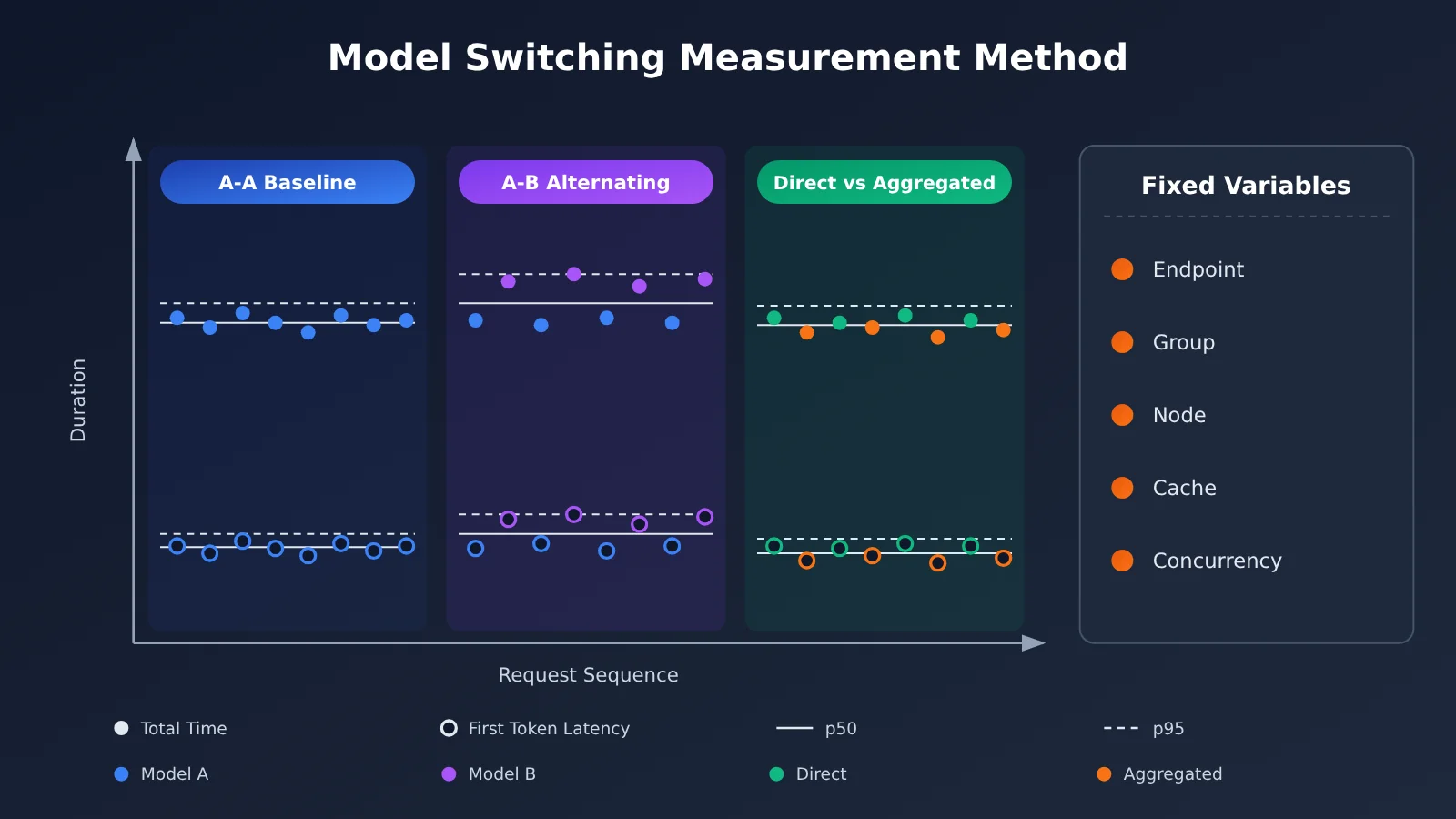
In everything published so far, there’s no paired dataset that isolates the overhead from either “switching models” or “gateway forwarding”—that is, measured with the same key, the same group, the same region, and identical inputs and load. Third-party benchmarks can compare different models or different providers, but they can’t directly attribute the difference to having switched models on APIYI. So rather than citing someone else’s numbers, run your own tests using the method below:
| Metric | How to Record It | What It’s For |
|---|---|---|
| Finish reason | Track the finish_reason distribution for every request |
Catches truncation, filtering, and tool call interruptions |
| Time to first visible token | The moment the first non-empty chunk arrives in a streaming request | Gauges the user’s waiting experience |
| Total duration p50/p95 | Percentiles of each full request’s duration | Gauges stability and tail latency |
| Failure rate | Count failures grouped by error code | Separates config errors from transient failures |
| Actual tokens vs. billing | Line-by-line comparison of the usage field against your bill |
Verifies true cost |
| Business acceptance pass rate | Score a fixed sample set manually or with rule-based checks | Decides whether quality meets the bar |
For the measurement steps, here’s a sensible sequence: first pin down the endpoint, group, node, and request parameters; establish a baseline with A-A repeated requests on the same model; then alternate between A-B runs where the model is the only thing you change. If you need to evaluate channel overhead specifically, run a separate comparison of direct connections vs. aggregated channels using the same model. Also keep cold vs. warm caches, output limits, and concurrency under control—otherwise model speed, cache misses, and channel overhead will all get tangled together, and you won’t be able to tell them apart.
Additional Risks with Stateful Tool Workflows
If you’re using the Responses API for multi-turn tool calls, switching models mid-way also introduces state problems. OpenAI’s GPT-6.2 migration documentation notes that switching to certain models mid-session (including downgrades) may cause existing reasoning items to be removed, and when the context is restored, the model may need to re-reason. This means you can’t promise “zero state loss” after a switch, and cost changes don’t follow any fixed ratio either.
When validating these workflows, check whether history items and context can be correctly reused by the new model, and add “switching models mid-way through the same session” as a separate test case.
Frequently Asked Questions (FAQ)
Q1: What is the APIYI unified interface?
It’s an OpenAI-compatible API entry point: with a single API key and the same Base URL, you can invoke models from different vendors like OpenAI, Claude, and Gemini. You don’t need to register accounts and maintain keys for each vendor separately—when switching models, you mainly just change the `model` field in the request and verify model-specific parameters accordingly.
Q2: How does switching models via a unified interface differ from integrating each vendor’s official SDK separately?
Official SDKs offer the most complete coverage of proprietary capabilities, but using multiple vendors means maintaining multiple sets of authentication, SDKs, and billing accounts. A unified interface consolidates authentication, entry points, and billing into a single set, making switching costs very low for common-parameter scenarios. The trade-off is that proprietary parameters need to be verified for compatibility one by one—for example, the mapping of Gemini’s native thinking fields on the compatible interface requires separate validation.
Q3: When did the models mentioned in this article go live on APIYI?
Based on APIYI’s real-time updates: GPT-6.2 Astra and Sol went live on 2026-11-18 and are available in three groups; Gemini 4 Neon was announced by Google on November 18, and APIYI added it to the `default`/`svip` groups on November 20; Seedream 5.5 went live on November 13. The model list changes quickly, so please refer to the registry for the current day.
Q4: Which scenarios are best suited for switching models via a unified interface?
– **Multi-model A/B comparison**: Compare effectiveness and cost across different models using the same prompt.
– **Failover backup**: Switch to a backup model when a particular model or route is under strain.
– **Task-based routing**: Use economical models for simple Q&A and flagship models for complex reasoning.
– **Multi-style image generation**: Choose among multiple image models based on your needs, paying attention to parameter mapping.
Q5: What’s the fastest way to start invoking multiple models via the unified interface?
1. Visit APIYI at apiyi.com to register an account; new users get free testing credits.
2. Create an API key and confirm that your token’s group includes the target models.
3. Run the minimal example in this article, replacing the `model` field per the registry to verify.
Pay-as-you-go billing makes it easy to compare multiple models at low traffic first, then decide on your primary solution.
Q6: What are gemini-4-neon’s pricing and context window?
According to the model registry generated by APIYI on 2026-11-20, `gemini-4-neon` costs $3 per million input tokens, $15 per million output tokens, and $0.15 per million cached-read tokens. APIYI’s updates note it’s priced the same as the official rates—actual charges are based on your account billing. Both Artificial Analysis and Google’s announcement list 1M context, which is a window shared across input, thinking, and output; APIYI’s launch documentation lists a synchronous generation limit of about 64K.
Q7: What are the known limitations of unified interface switching?
– **Proprietary parameters aren’t universal**: Thinking levels, tool calling, and structured output need to be verified per model.
– **Vectors can’t be mixed**: Switching embedding models requires re-vectorization and index rebuilding.
– **Stateful flows can lose data**: Switching models mid-way in Responses may drop reasoning items.
– **Limited visibility**: The model list is constrained by token groups, authorization, and endpoints. If you run into issues, check the error code troubleshooting docs at APIYI apiyi.com.
Switching Large Language Models with APIYI’s Unified Interface: Key Takeaways
- Changing only the
modelhas prerequisites: It only holds when you’re hitting the same endpoint and sticking to common parameters both models support. - Two different model counts: The 200+ figure refers to curated models, while the registry’s 289 entries include version and route variants.
- Check in order: Model ID → token group → endpoint → parameters, ruling things out one at a time.
- Image parameters need mapping: MAI uses
width/height, Seedream usessize, and transparent backgrounds are specified differently. - Switching embedding models requires rebuilding: small and large have different default dimensions, and even matching dimensions aren’t interchangeable.
- HTTP 200 doesn’t mean success: You still need to check the finish reason, watch for empty bodies, and handle tool-call-only responses.
- Benchmark performance yourself: Use an A-A baseline plus A-B alternating measurements — you can run the whole comparison on APIYI (apiyi.com) with a single API key.
Summary
Here’s what matters most when switching Large Language Models through APIYI’s unified interface:
- Reuse authentication and entry point: One API key and one Base URL cover text, image, embedding, and other capabilities.
- Separate common from proprietary parameters: Switch directly using common parameters, and validate proprietary ones one by one before adding them.
- Make switching a verifiable process: Use an error code reference table for troubleshooting, and track latency, failure rates, and billing with a consistent method.
Start by getting both models working with the shortest plain-text request you can write, then expand to your business scenarios step by step: image parameter mapping first, then embedding index rebuilding, then stateful tool workflows. We recommend completing the verification above using APIYI’s (apiyi.com) free testing credits before deciding on your primary model and fallback option.
📚 References
-
APIYI Documentation Center: Basic introduction, quick start, model registry, text embeddings, and model version notes
- Link:
docs.apiyi.com - Note: The first-hand source of truth for model IDs, groups, endpoints, and pricing; for the model registry, always refer to the version generated on the day
- Link:
-
OpenAI Using GPT-6.2: GPT-6.2 migration and parameter documentation
- Link:
developers.openai.com/api/docs/guides/latest-model - Note: Responses tool calls, thinking level fields, and the reasoning item lifecycle
- Link:
-
Google Gemini API Troubleshooting and Thought Signature Docs: Troubleshooting Gemini 4 model invocation issues
- Link:
aistudio.google.com/docs/troubleshooting - Note: Thinking levels, passing
thoughtSignatureback, and common errors
- Link:
-
Getting Started with Google Cloud Gemini 4: Gemini 4 long decoding and API version notes
- Link:
docs.cloud.google.com/gemini-enterprise-agent-platform/models/start/get-started-with-gemini-4 - Note: Learn which API versions support long decoding and the conditions for resuming generation
- Link:
-
Artificial Analysis Model Comparison Page: Third-party model benchmarks and latency measurement methodology
- Link:
artificialanalysis.ai/models/comparisons/gemini-4-neon-vs-gpt-6-2-sol - Note: Useful for cross-model comparison only — it can’t be used to attribute overhead to specific channels
- Link:
Author: APIYI Technical Team
Technical Exchange: Feel free to contact us via the APIYI website homepage. For more integration resources, visit the docs.apiyi.com documentation center