
Using migration, customer-service, and code examples from GPT-6.1 Sol and GPT-6.2 Sol, this article shows how to lock down business acceptance criteria first, then pick a reasoning effort level that reliably clears them — and calculate the cost of every passing task.
Bottom line first: when you change effort levels, what you should really compare is “how much money and how much time each passing task costs.” The sticker price per call is only one input. In the small public sample tests, GPT-6.2 Sol’s low matched medium on the number of passes for both the customer-service policy questions and a set of code problems — and it finished faster. On the code problems, the cost implied by low‘s list price was about 70% of medium. That conclusion holds under two conditions: your tasks are similar enough to the test tasks, and your acceptance gate doesn’t just look at pass rate but also checks for fabricated links, monetary fields, and rework. For tasks with conflicting cross-source material, complex tool dependencies, or a tendency to drop constraints, you should still separately validate medium and above.
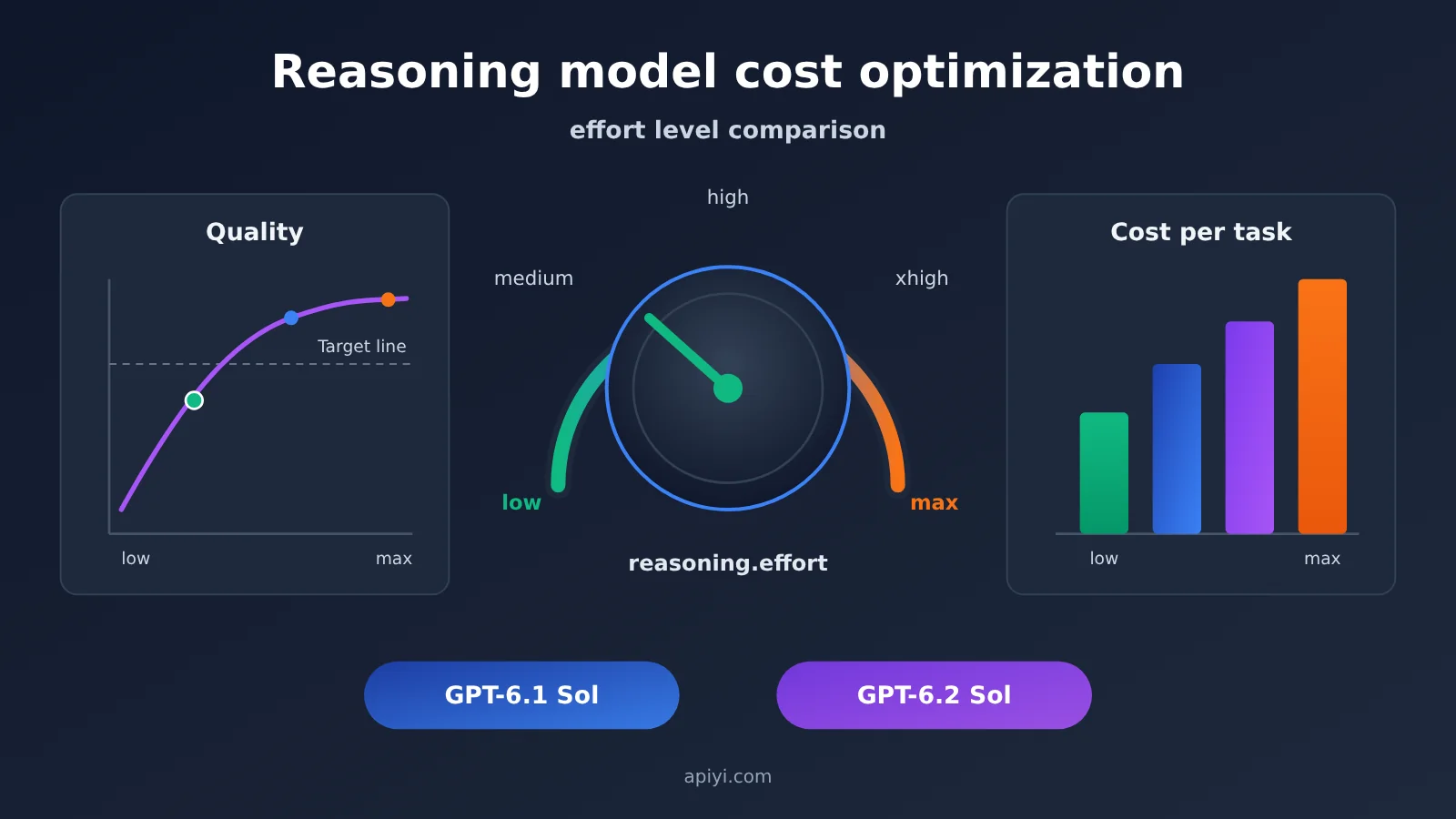
Reasoning-model effort levels at a glance
The table below gathers the evidence sets used in this article; each row notes its source and methodology. Numbers from different sources can’t be added together or mixed into a single comparison.
| Comparison dimension | GPT-6.1 Sol | GPT-6.2 Sol | What the difference means |
|---|---|---|---|
| Available levels (OpenAI docs) | low, medium, high, xhigh, max | Same five, rejects none |
When migrating from models that support none/minimal, you’ll need to change your starting effort level |
| APIYI short-context list price (2026-11-20 master table, USD per million tokens) | input $2, cached read $0.10, output $10 | same as left | Short-context pricing is identical across both generations; cost differences come mainly from usage volume |
| Input price above 272,000 input tokens | APIYI and OpenAI Standard both list $4 | APIYI lists $3, OpenAI Standard lists $4 | In long-input scenarios, price gaps show up between channels |
| eesel customer service, 15 tickets (low / medium) | 15/15, 3.8 sec; 15/15, 3.8 sec | 15/15, 3.2 sec; 15/15, 3.6 sec | Same pass rate; cost differences between effort levels are minimal |
| VulcanBench, 23 code problems (low / medium) | 20/23; 22/23 (historical batch) | 23/23; 23/23 | 6.2 Sol’s low level already passes; cross-version figures come from different batches |
| Artificial Analysis Index (cited via OrcaRouter, low / medium) | 35; 46 | 41; 53 | Third-party composite index; effort-level labels are mapped by the evaluator itself |
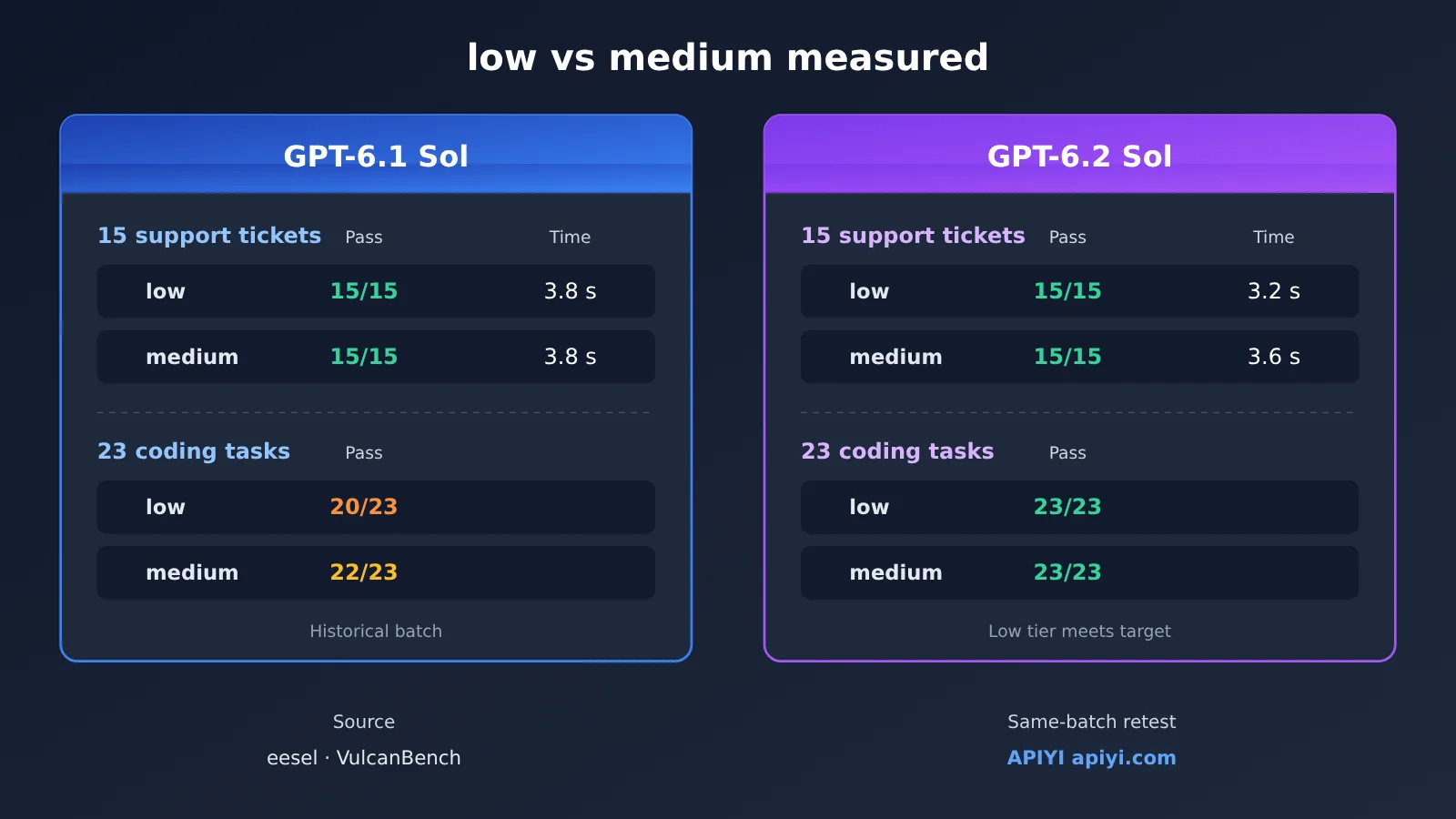
The article proceeds in this order: Section 1 confirms whether you can integrate the model and how pricing works; Section 2 looks at measured results on identical tasks; Section 3 lays out migration and acceptance steps; Section 4 deals with changing effort level mid-way through a multi-turn conversation. If you’ve already confirmed model routing and pricing, you can start reading at Section 2.
Reasoning Effort Tier Terms to Know
| Term | Explanation |
|---|---|
reasoning.effort |
The field in the Responses API that sets how hard the model thinks |
| Reasoning token | The reasoning usage the model burns to arrive at an answer. It’s included in the billed output_tokens and needs to be kept separate from the output users actually see |
low / medium |
The two reasoning tiers. Even when you move to a new version within the same tier, you still have to re-validate |
| Cached read unit price | Applies only to the portion of input that hits a reusable prefix — you can’t infer it directly from the total token count |
| Request prefix | The context that already exists before the current message. Editing earlier history affects cache and reasoning-item reuse |
configuration_update |
An input item used in Responses sessions that support the feature to adjust configuration for subsequent turns |
| Acceptance threshold | The minimum acceptable bar set for policy correctness, feature pass rate, or rework level |
| Cost per passing task | The invocation, retry, tool, and manual rework costs of the whole trial, divided by the number of passing tasks |
1. Before Optimizing Reasoning Model Costs: When Is It Worth Adjusting the Effort Tier
1.1 Access to the two Sol generations on APIYI
According to APIYI platform updates, GPT-6.1 Sol launched on 2026-09-30, and GPT-6.2 Astra and Sol were announced as available on 2026-11-18. The 2026-11-20 master price list shows that both Sol models offer both responses and chat routes, across the CodexResponses, Codex_Reverse, Default, and SVIP groups. What your account can actually call depends on the group your token belongs to.
According to OpenAI’s docs, both Sol generations support Chat Completions and Responses, but tool calls must go through Responses, and you set the effort level through reasoning.effort. So if your workflow has tool steps like order lookup or code execution, both evals and production should use the Responses route consistently, so route-specific behavior differences don’t get mixed into your comparison results.
1.2 Two pricing baselines: APIYI list prices vs upstream standard prices
| Model ID (APIYI master list, 2026-11-20) | Standard input | Cached read | Output | Available platforms |
|---|---|---|---|---|
gpt-6.2-sol |
$2 | $0.10 | $10 | APIYI apiyi.com, OpenAI official |
gpt-6.1-sol |
$2 | $0.10 | $10 | APIYI apiyi.com, OpenAI official |
gpt-6-sol |
$2 | $0.20 | $10 | APIYI |
gpt-6.2-astra |
$8 | $0.40 | $40 | APIYI |
The table above shows the default list prices for short context, in USD per million tokens. The upstream rate card compiled by OrcaRouter lists the same input, cached read, and output prices for both Sol generations, and also lists cache writes at $2.50. Long context needs to be checked separately: for gpt-6.2-sol, when input exceeds 272,000 tokens, APIYI currently lists $3, while OpenAI’s official Standard lists $4; for gpt-6.1-sol, both list $4. For cached and output prices in the long-context tier, check each channel’s current billing rules.
1.3 Read costs from real responses and bills
List prices are only good for estimates. Let’s use a set of hypothetical examples to show how costs break down. Assume each round has 12,000 input Token and no cache writes or tool fees:
- Prefix preserved: cache reads 9,000, total output 1,000, estimated at about $0.0169.
- Prefix modified: cache reads drop to 3,000, total output rises to 1,600, estimated at about $0.0343.
Of the difference between the two, about $0.0114 comes from 6,000 input Token moving from the cached price back to the regular price, and about $0.0060 comes from the extra 600 output Token. These are hypothetical numbers; use usage for the actual difference. If cache writes are listed separately, calculate normal input, cache reads, and cache writes as three mutually exclusive categories.
How to verify the actual charge: use the x-request-id in the response headers to correlate with type=2 records in APIYI consumption logs, convert the actual charge into USD with quota ÷ 500,000, and also record the model, token group, invocation time window, input/output usage, and retry count.
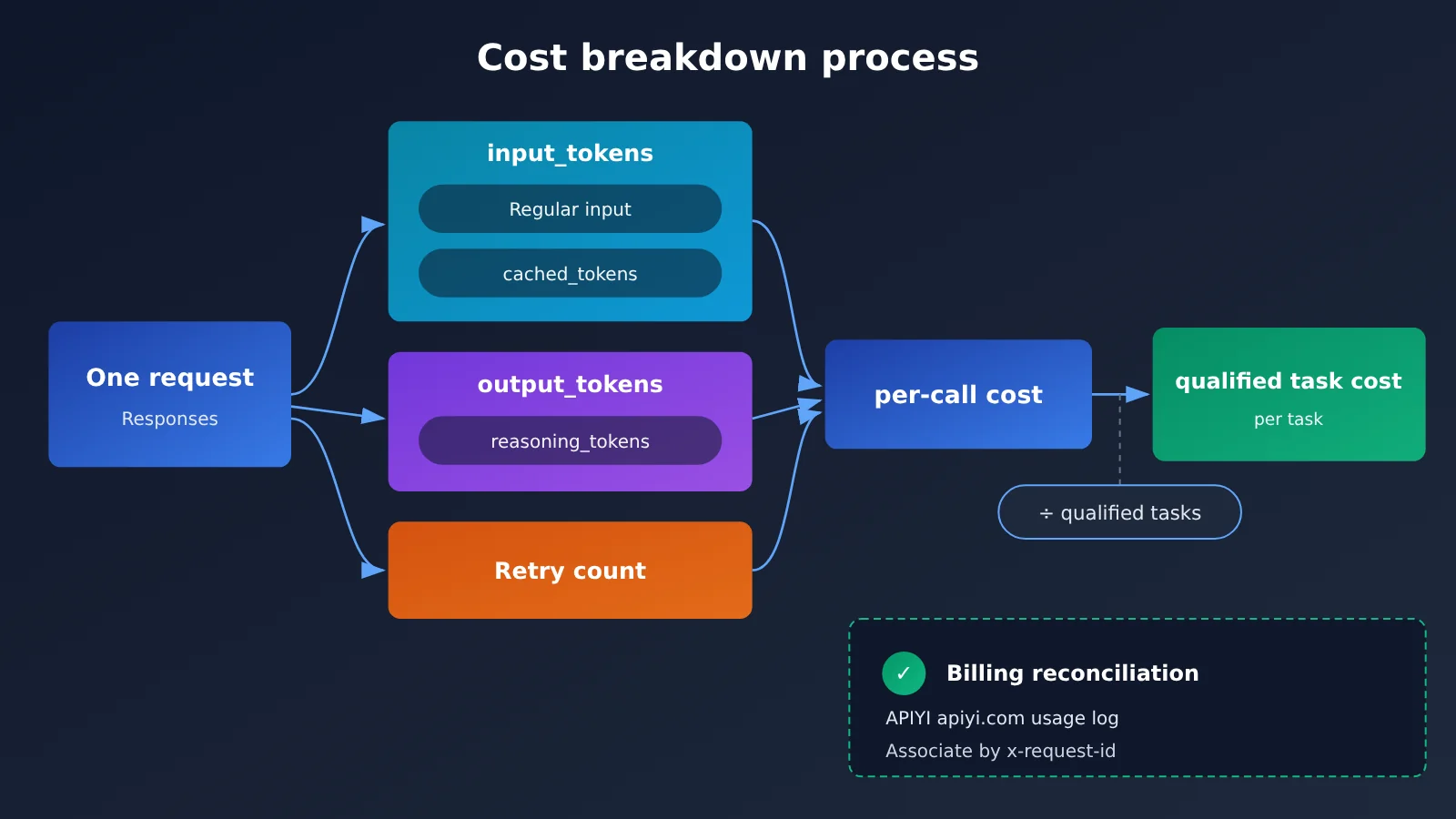
Below is a minimal call example that also reads out the usage fields you need for diagnostics:
from openai import OpenAI

client = OpenAI(
    api_key="YOUR_API_KEY",
    base_url="https://api.apiyi.com/v1"  # APIYI OpenAI-compatible API
)

resp = client.responses.create(
    model="gpt-6.2-sol",
    reasoning={"effort": "low"},
    input=[{"role": "user", "content": "根据退款政策判断工单 #1024 是否可退"}],
)

u = resp.usage
print(resp.output_text)
print("输入:", u.input_tokens, "缓存命中:", u.input_tokens_details.cached_tokens)
print("总输出:", u.output_tokens, "其中推理:", u.output_tokens_details.reasoning_tokens)
🚀 Quick start: We recommend first running the example above on APIYI apiyi.com with the new-user free quota, confirming that the target group correctly returns
cached_tokensandreasoning_tokens, then starting batch evaluation.
2. Same-task comparison: measured results for low vs. medium
2.1 Support tickets: the low tier brings little benefit
On 2026-11-18, eesel’s testers ran both generations of Sol through the Responses API at the low and medium tiers, for 60 calls total. Each configuration covered the same 15 tickets—refunds, shipping-status inquiries, and failed order tools—and a human scored them against a fictional SaaS policy.
| Configuration (eesel, 15 tickets) | Passed | Average latency | List-price equivalent per 1,000 tickets |
|---|---|---|---|
| GPT-6.1 Sol low | 15/15 | 3.8 sec | $1.32 |
| GPT-6.1 Sol medium | 15/15 | 3.8 sec | $1.35 |
| GPT-6.2 Sol low | 15/15 | 3.2 sec | $1.41 |
| GPT-6.2 Sol medium | 15/15 | 3.6 sec | $1.42 |
In this dataset, low and medium are only a few cents apart per thousand tickets, so picking a tier is more about latency than cost. And based on measured usage, GPT-6.2 Sol was actually slightly more expensive than 6.1 Sol on this support-ticket set. More importantly, even though all four configurations had a perfect pass rate, the author still found that 6.2 Sol produced shipping links that weren’t present in the tool responses. That means if support acceptance testing only checks whether the model “got the policy right,” it’ll miss this kind of problem. The provenance of links and fields has to be checked separately. These findings apply only to this ticket set, this scoring rubric, and OpenAI’s test environment.
2.2 Coding Tasks: The Low Tier’s Per-Problem Cost Is Worth Measuring
On 2026-11-19, VulcanBench used Codex to run GPT-6.2 Sol tier by tier on the same 23-problem test set, for a total of 115 runs. The dollar amounts in the table below are converted from run receipts at API list prices, not the actual settlement from an APIYI account.
| Configuration (VulcanBench, 23 problems) | Passed | Average time | List-price equivalent/problem | Composite score |
|---|---|---|---|---|
| GPT-6.2 Sol low | 23/23 | 2.8 min | $0.23 | 88.44 |
| GPT-6.2 Sol medium | 23/23 | 4.4 min | $0.33 | 88.94 |
| GPT-6.2 Sol max | — | 11.3 min | $0.55 | 88.74 |
| GPT-6.1 Sol low (historical batch) | 20/23 | 6.9 min | $0.31 | — |
| GPT-6.1 Sol medium (historical batch) | 22/23 | 10.6 min | $0.40 | — |
Looking at just the GPT-6.2 Sol group: low and medium have the same pass count, while low costs about 30% less per problem and finishes faster; max‘s composite score doesn’t beat medium‘s. Cross-version comparisons need caution: the 6.1 Sol numbers come from a historical evaluation on the same problem set, so they belong to a different test batch. The composite score is a code-quality score; it and the test pass rate are two different metrics and can’t substitute for each other.
Artificial Analysis Index v5.0.1, cited by OrcaRouter (read on 2026-11-20), offers another angle: in the low tier, 6.2 Sol scores 41 at $0.18 per task, while 6.1 Sol scores 35 at $0.16; in the medium tier, they score 53 at $0.41 and 46 at $0.36, respectively. The tier labels in this aggregate leaderboard are the evaluator’s own mapping, and the framework you use may not follow the same mapping.
💡 Recommendation: The two tests above show that the pass threshold, retry rate, and manual rework can all change which tier is “most cost-effective”—but none of them is the bill for your own business. Before deciding, re-test on APIYI (apiyi.com) with the same group and the same sample batch.
3. Migration Order and Acceptance Thresholds for Inference Model Cost Optimization
3.1 Keep a Baseline First, Then Adjust the Tier
Following the advice in OpenAI’s “Using GPT-6.2,” change only one variable at a time during migration:
- Currently on 6.1 Sol
low: First switch to 6.2 Sollowas a control, then testmediumseparately. - Currently on 6.1 Sol
medium: First switch models but keepmedium; once it passes acceptance, comparelowusing the same batch of tasks. - New integrations: Start from
medium. - Migrating from models that can be set to
noneorminimal: Start testing GPT-6.2 Sol fromlow.
For simple tasks with clear constraints, you can start validating from low; for compound tasks, step up one tier at a time based on results. During evaluation, keep prompts, tool definitions, groupings, and test samples fixed. Also clean up parameters that no longer apply, as the official docs suggest—for example, remove temperature, top_p, and top_logprobs from Responses requests.
3.2 Define Acceptance Thresholds by Scenario
| Scenario | Acceptance Threshold | When to Consider Stepping Up |
|---|---|---|
| Routine customer service | Policy consistency, correct amount fields, trigger conditions for escalating to a human; links and ticket numbers must come from tool returns | When cross-policy conflicts or multi-tool chaining are involved |
| Code changes | Tests pass, key functionality is complete, amount of code review rework | When the pass rate at the low tier drops or rework clearly increases |
| Short content | Constraint adherence, factual fields, manual editing time | When missed constraints or factual errors appear |
The way to calculate the cost per passing task is: add up the costs of calls, retries, tools, and manual rework, then divide by the number of passing tasks. As long as low meets the agreed threshold, you can choose low; if low requires multiple retries or manual fixes, the apparent savings may be offset.
💰 Cost optimization: When comparing tiers, you can create a separate token for evaluation on APIYI apiyi.com. Logs can then be filtered directly by token and model, making it easy to calculate the real cost of the entire batch of experiments.
4. Adjusting the effort level mid-conversation
4.1 Using configuration_update to change gears while keeping the prefix intact
In single-agent OpenAI HTTP Responses sessions that support this feature, leave the request-level reasoning.effort at its initial value and place the following item before the next user message:
{"type": "configuration_update", "reasoning": {"effort": "medium"}}
This setting stays in effect until the next update. The advantage here is that you don’t have to rewrite earlier history — the request prefix stays the same. According to the OpenAI docs, starting with GPT-6.2, editing earlier history can trigger a prefix_mismatch, causing existing reasoning items to be dropped; switching model families or downgrading to a less capable model can also remove reasoning items. Rewriting the prefix costs you in two ways: cache reads may drop, and losing usable reasoning items can force new reasoning output. Per the official guidance, deleting a complete item while leaving the rest unchanged, or appending new items after the reasoning items, won’t trigger this removal — though cache hits may still change. Also, in GPT-6.2 the top-level instructions are appended after input and billed as uncached input.
4.2 Caveats for context compaction and APIYI routing
When you use server-side context_management, updated configurations carry over. If you hand history containing an old configuration_update directly to the standalone /responses/compact endpoint, the request will be rejected; the right approach, per the official docs, is to separate out the configuration item first, then append a fresh configuration after compaction finishes.
On APIYI, the safe move for now is to manage the input history yourself rather than relying on previous_response_id. The reason is that APIYI’s native invocation guide is inconsistent on this point: the main text says chained continuation doesn’t work, while the FAQ notes it was verified working on 2026-09-02. APIYI’s docs also don’t currently list validation results for configuration_update across the various groups. So these vendor-specific configurations, encrypted reasoning item round-trips, and cache diagnostic fields should all be validated separately with a short session on the target channel before you wire them into a production workflow.
🎯 Technical tip: Try running a pair of two-turn short sessions on APIYI’s apiyi.com Responses route, comparing
cached_tokens,reasoning_tokens, and latency between the “append-only” and “prefix-rewrite” samples. Once you’ve confirmed the behavior, you can decide how to implement the mid-conversation gear change.
One last thought: the basis for choosing a gear level should be the cost per passing task under a fixed acceptance threshold. Running one comparison round on APIYI apiyi.com with your own samples and your own bill will tell you more than any leaderboard.
References
- OpenAI, “Using GPT-6.2”: migration and starting-tier recommendations
- Link:
developers.openai.com/api/docs/guides/latest-model
- Link:
- OpenAI, “Reasoning models”:
configuration_updateand reuse of reasoning items- Link:
developers.openai.com/api/docs/guides/reasoning
- Link:
- OpenAI, “Compaction”: context compaction rules
- Link:
developers.openai.com/api/docs/guides/compaction
- Link:
- OpenAI, “Keep the prefix unchanged”: prefix and cache diagnostics
- Link:
developers.openai.com/api/docs/guides/keep-prefix-unchanged
- Link:
- eesel AI, “GPT-6.2 Sol: what’s new, pricing, benchmarks”: hands-on customer support ticket tests, 2026-11-18
- Link:
eesel.ai/blog/gpt-6-2-sol
- Link:
- VulcanBench, “GPT-6.2 Sol across effort levels”: per-level evaluation on coding problems, 2026-11-19
- Link:
vulcanbench.com/benchmarks/swe-v4-gpt62-sol-v331.html
- Link:
- OrcaRouter, “GPT-6.2 vs GPT-6.1 Sol”: pricing card and composite index citation, 2026-11-20
- Link:
orcarouter.ai/blog/gpt-6-2-vs-gpt-6-1-sol
- Link:
- APIYI, “Model Price Master List”: data updated 2026-11-20
- Link:
docs.apiyi.com/models
- Link:
Author: APIYI Technical Team
Technical discussion: Feel free to reach out to us on the APIYI homepage at apiyi.com. For more integration details, check out the docs.apiyi.com documentation center.