
Descrizione
THE #1 NO CODE DRAG & DROP WORDPRESS WEBSITE BUILDER POWERING 23M+ WEBSITES WORLDWIDE, NOW WITH AGENTIC AI.
Elementor, la piattaforma leader nella creazione di siti web WordPress, ti consente di realizzare siti web professionali e perfetti in ogni pixel con il suo Editor atomico drag-and-drop senza codice.
Supporting the full website lifecycle, Elementor lets you build, optimize, and manage your website with extended capabilities such as agentic AI creation, image optimization, transactional email delivery, accessibility tools, performance boosters, and more.
Now in version 4, the Atomic Editor!. A new generation of performance-first atomic building blocks that puts you in control of every part of your site. Define your global design systems and reusable components once, and they apply everywhere instantly – turning hours or even days of work into single clicks. Elementor AI builds in the same structure, so anything it generates is a native, fully editable part of your site.
Unlock all Pro features with Elementor Pro.
Hai bisogno di un hosting cloud veloce e sicuro per il tuo sito Elementor? Prova Elementor Host. Basato su Google Cloud e Cloudflare. La valutazione su TrustPilot è di 4,9/5.
🌟 Create professional stunning websites
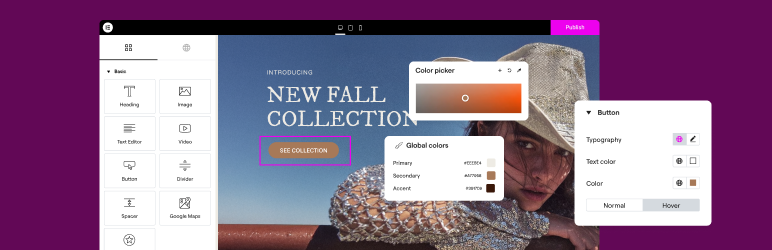
- Intuitive drag & drop builder: Build any website with our no-code, drag-and-drop Editor. Achieve design precision with full control over layout and style.
- Pixel-perfect design tools: Upload SVGs, apply masks, gradients, box shadows, headline effects, shape dividers, and use built-in CSS controls for advanced customization.
- Libreria dei template: applica kit completi di siti web per configurazioni immediate, oppure scegli, da una vasta libreria di template, pagine singole, blocchi e pop-up.
- Advanced widgets: Access over 40 FREE widgets, including heading, image, text editor, video, button, gallery, carousels, and more.
- Agentic AI for WordPress capabilities: Describe what you want in natural language and Elementor AI builds it: custom widgets, sections, full layouts, and WordPress snippets, delivered as production-ready, fully editable code native to your site.
🗝️ Key features
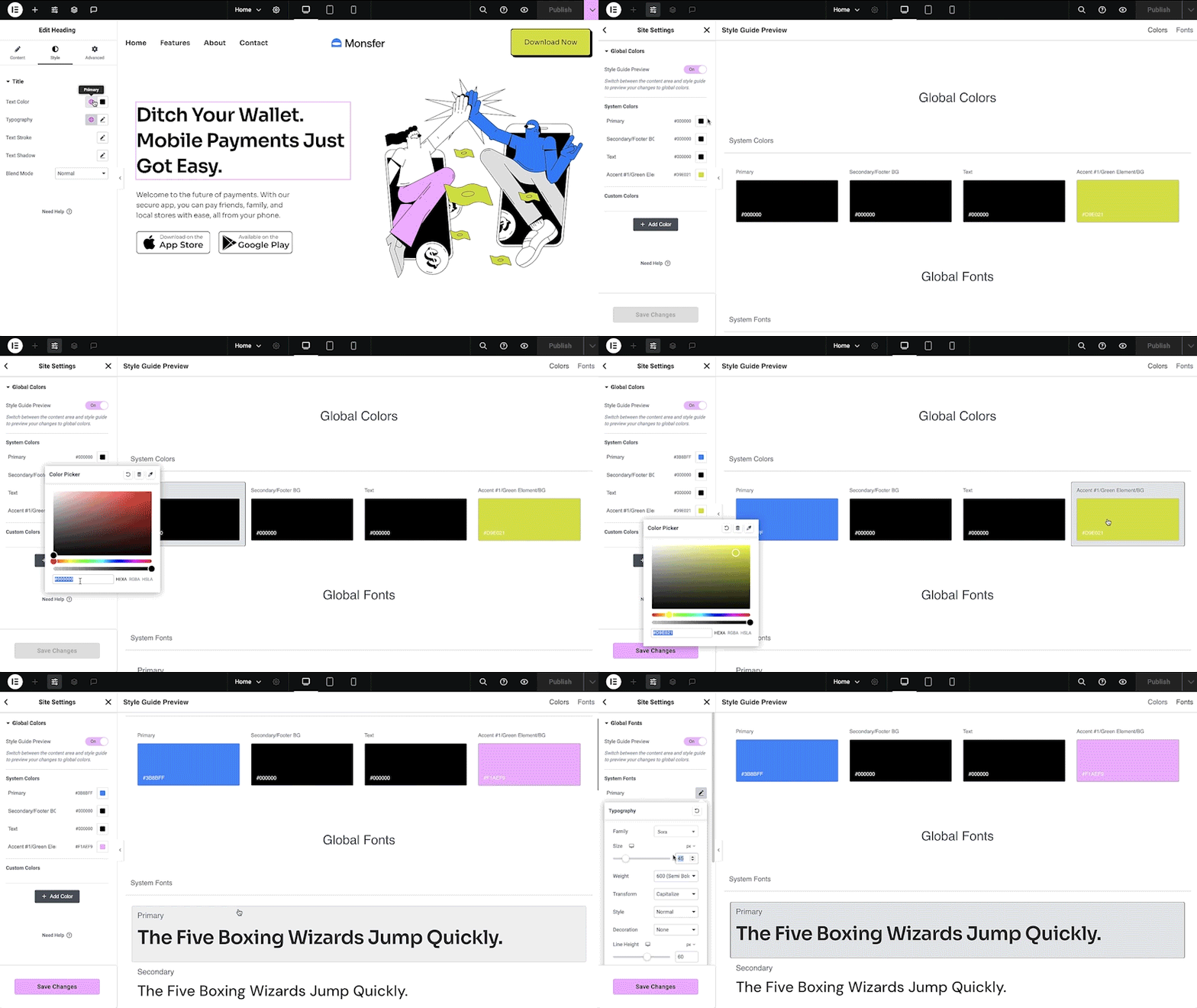
- Design system: Use Variables and Classes for consistent colors, typography, and design elements that update everywhere at once.
- Responsive design: Optimize your design for every device with custom breakpoints, ensuring a seamless desktop, tablet, and mobile experience.
- Mask shapes: Turn any element, like an image or video, into whatever shape you desire to create standout designs.
- CSS transform: Use CSS Transform to rotate, scale, and skew elements, adding dynamic styling to your site.
- Entrance animations: Add entrance animations to elements to create engaging and interactive user experiences.
- Revision history: Track and revert to previous versions of your designs at any point in the creative process.
- Developer-friendly: Extensive documentation, API, developer tools, and custom code areas, let developers extendElementor and build custom solutions.
- Floating buttons: Add customizable, floating action buttons that stay in view as users scroll.
- Components [Pro]: Reuse the same building blocks across pages and sites, and update them everywhere they appear, with controlled content editing, so collaborators and clients update only exposed content properties.
- Theme Builder [Pro]: Design every part of your site: headers, footers, posts, and archives,for full control over appearance.
- Popup Builder [Pro]: Create popups with advanced targeting and triggering options to optimize user engagement and conversions.
- Forms [Pro]: Design and integrate custom forms with advanced features and integrations to capture lead submissions.
- WooCommerce Builder [Pro]: Design custom product pages, shop layouts, archives, carts, checkout and account pages for your store.
- Dynamic Content [Pro]: Connect your designs to data sources to build personalized, interactive web experiences.
- Notes [Pro]: Leave feedback and comments directly on the design interface for better team collaboration.
- Custom Code [Pro]: Insert custom code to extend the functionality of your site, with flexibility for advanced customizations.
- Custom CSS [Pro]: Apply Custom CSS to fine-tune the styling of elements with precise control.
- Motion effects [Pro]: Add motion effects to elements for a more dynamic and engaging user experience.
- Custom fonts and icons [Pro]: Upload and use custom fonts and icons that match your brand’s identity.
😍 Widget di Elementor FREE
Access a suite of free widgets and tools built to support your website creation process:
- Heading: Add eye-catching headlines.
- Image: Control the size, opacity and more.
- Text Editor: Just like the WordPress text editor.
- Video: Add YouTube, Vimeo, VideoPress, Dailymotion or self-hosted videos.
- Button: Create interactive buttons.
- Link in Bio: Build link in bio components to promote your business / services.
- Image Box: A box with image, headline and text.
- Testimonials: Customer testimonials.
- Icon: Place one or more of 600+ icons available.
- Icon Box: An icon, headline, and text with one widget.
- Social Icons: Link to your social pages with the Facebook/X (formerly Twitter) icons.
- Image Gallery: Display your images in a grid.
- Image Carousel: Create rotating carousels or sliders for chosen images.
- Icon List: Use any icon to create a bullet list.
- Counter: Show numbers in an escalating manner.
- Progress Bar: Include an escalating progress bar.
- Nested Tabs: Display content in vertical or horizontal tabs.
- Nested Accordion: Display any type of content in collapsible sections.
- Rating: Display how many stars (or another icon) other visitors gave.
- Alert: Include a colored alert box to draw visitor’s attention.
- HTML: Insert code into the page.
- Shortcode: Insert shortcodes from any plugin into the page.
- Menu Anchor: Link any menu to this anchor.
- Read More: Set the Read More cut-off for the excerpt in archive pages.
- Sidebar: Add sidebars onto the page.
- Google Maps: Embed maps into the page.
- SoundCloud: Add SoundCloud audio bits.
- Divider: Separate content with a designed divider.
- Spacer: Add space between elements.
- Text Path: Attach your text to a path.
- And more.
🚀 Enhance your website
High-performing websites: Website performance affects your visitors’ experience and search result ranking. Elementor, in partnership with Google Chrome, continuously improves performance without compromising design.
Le caratteristiche principali includono:
- Reduced DOM output: Streamlined HTML structure for faster rendering.
- Improved media file loading: Optimized loading of images, videos, and other media assets.
- Reduced CSS and JS files: Minimized stylesheets and scripts individually loaded only on demand for quicker load times.
- Lazy loading: Deferred loading of non-critical resources to improve initial page load speed.
- Faster font loading: Efficient delivery of web fonts to enhance text rendering speed.
- Optimized front-end asset loading: Efficient loading of assets like JavaScript and CSS to minimize render-blocking.
- Element caching: Cache frequently accessed design elements to reduce server response time and enhance overall performance.
🔥 Elementor Editor Pro features
Create unparalleled websites while saving time, money and resources with Elementor Pro’s full website builder. Get access to 100+ professional widgets, features, and tools.
Editor Pro design widgets:
- Articoli: visualizza gli articoli del blog con layout e stili personalizzati.
- Share Buttons: Let visitors share your content on various social media platforms.
- Portfolio: Showcase your work or projects with portfolio layouts.
- Slides: Create slideshows with custom animations and transitions.
- Moduli: progetta e personalizza moduli avanzati per l’interazione con le persone e la raccolta dei dati.
- Login: aggiungi un modulo per il login o per la registrazione delle persone sul tuo sito.
- WordPress Menu: Customize and style your website’s navigation menu.
- Intestazioni animate: crea intestazioni che attirano l’attenzione con effetti animati.
- Price Table: Display pricing plans or packages in a structured format.
- Price List: Showcase a list of prices or services with customizable styling.
- Gallery: Create image galleries with layout options and lightbox support.
- Flip Box: Add flip animations to highlight content or features.
- Call to Action: Encourage user interaction and conversions with dedicated sections.
- Carosello dei media Carousel: presenta un carosello di file multimediali come immagini o video.
- Carosello delle testimonianze: mostra le testimonianze dei clienti in un formato a carosello per dare evidenza della tua reputazione.
- Carosello nidificato: crea caroselli nidificati per un’organizzazione dei contenuti più complessa.
- Carosello Loop: visualizza i contenuti in un carosello in loop per una visualizzazione continua.
- Table of Contents: Generate a table of contents for longer articles or guides.
- Conto alla rovescia: aggiungi dei timer di conto alla rovescia per creare urgenza per le promozioni o gli eventi.
- Pagina Facebook: integra il feed e i contenuti della tua pagina Facebook nel tuo sito web.
- Citazioni: evidenzia le citazioni o le testimonianze con eleganti opzioni di formattazione.
- Template: salva e riutilizza i template di design per ottenere un marchio e un layout coerenti.
- Recensioni: mostra le recensioni e le valutazioni dei clienti per creare fiducia e credibilità.
- Pulsante Facebook: aggiungi i pulsanti per promuovere le interazioni con la tua pagina Facebook o i suoi contenuti.
- Integrazione di Facebook: integra gli articoli o il contenuto di Facebook nel tuo sito web.
- Facebook Comments: Enable Facebook comments on your website’s pages or posts.
- PayPal Button: Integrate PayPal buttons for online payments.
- Stripe Button: Integrate Stripe payment buttons for secure online transactions.
- Widget Lottie: aggiungi animazioni Lottie per migliorare l’aspetto e il coinvolgimento.
- Codice in evidenza: visualizza gli snippet di codice con evidenziazione della sintassi per una migliore leggibilità.
- Playlist dei video: crea e personalizza le playlist per i contenuti video del tuo sito web.
- Mega Menu: personalizza i menu avanzati per migliorare la navigazione e la visualizzazione di contenuti complessi.
- Off Canvas: crea aree off-canvas che scorrono per mostrare informazioni o menu extra senza sovraffollare il layout principale.
Editor Pro theme widgets:
Build and customize all the key parts of your website including headers, footers, 404 page, global archives, and more.
- Titolo: personalizza il titolo di singoli articoli o pagine del blog.
- Riassunto: mostra un breve riassunto o un teaser dei vostri post sul blog.
- Contenuto degli articoli: personalizza l’area del contenuto principale degli articoli o delle pagine del blog.
- Immagine in evidenza: imposta e personalizza le immagini in evidenza per gli articoli o le pagine del blog.
- Box Autore: mostra le informazioni e le biografie degli autori negli articoli del blog.
- Commenti: personalizza l’aspetto e la funzionalità della sezione commenti sul tuo sito.
- Navigazione tra gli articoli: aggiungi link di navigazione agli articoli precedenti e/o successivi per facilitare la navigazione.
- Informazioni sugli articoli: mostra informazioni relative agli articoli del sito, come data e autore.
- Site Logo: Upload and customize your website’s logo for branding purposes.
- Titolo del sito: personalizza il nome del tuo sito.
- Titolo di pagina: personalizza i titoli delle pagine.
- Search Bar: Add a search bar to allow users to search your website’s content.
- Breadcrumb: mostra percorsi di navigazione gerarchici per migliorare la navigazione.
- Sitemap: genera una sitemap per migliorare l’indicizzazione nei motori di ricerca e la navigazione di chi utilizza il sito.
- Griglia Loop Grid: progetta e personalizza i layout a griglia per gli archivi degli articoli del blog o per gli elenchi dei prodotti.
Editor Pro WooCommerce widgets:
Progetta e personalizza un’esperienza di acquisto online completa su tutto il sito web.
- Prodotto: mostra i singoli prodotti con layout e stili personalizzabili.
- Breadcrumb: mostra percorsi di navigazione gerarchici per migliorare la navigazione del tuo negozio.
- Nome del prodotto: personalizza il nome/titolo di ogni prodotto.
- Immagini del prodotto: imposta e personalizza le immagini per gli annunci dei prodotti.
- Prezzo: mostra il prezzo di ogni prodotto.
- Aggiungi al carrello: aggiungi pulsanti Aggiungi al carrello personalizzabili per facilitare gli acquisti.
- Recensioni dei prodotti: mostra le valutazioni e le recensioni dei prodotti.
- Prodotti in stock: aggiungi la disponibilità in stock dei prodotti.
- Altri dati di prodotti: mostra informazioni aggiuntive sui prodotti, come SKU e categorie.
- Contenuto dei prodotti: personalizza l’area di contenuto principale delle descrizioni dei prodotti.
- Descrizione breve: mostra brevi riassunti o teaser dei prodotti.
- Schede con i dati del prodotto: Organizza le informazioni sui prodotti in sezioni a schede per una migliore organizzazione.
- Informazioni aggiuntive: mostra ulteriori dettagli sui prodotti, come dimensioni e peso.
- Prodotti correlati: presenta i prodotti correlati per incoraggiare ulteriori acquisti.
- Upsell: promuovi prodotti in upsell per aumentare il valore medio dell’ordine.
- Prodotti: mostra una griglia o un elenco di prodotti con impostazioni personalizzabili.
- Pulsante Aggiungi al carrello personalizzato: personalizza il pulsante Aggiungi al carrello per prodotti specifici.
- Pagine WooCommerce: progetta e personalizza le pagine specifiche di WooCommerce, come le pagine del carrello e del pagamento (checkout).
- Categorie di prodotto: mostra le categorie di prodotti per facilitare la navigazione all’interno del negozio.
- carrello nel menu: visualizza l’icona del carrello nel menu di navigazione per accedere facilmente al carrello.
- Carrello: personalizza l’aspetto e la funzionalità della pagina del carrello.
- Checkout: personalizza l’aspetto e la funzionalità della pagina di pagamento (checkout).
- Il mio account: personalizza l’aspetto e la funzionalità dell’area dell’account cliente.
- Riepilogo dell’ordine: visualizza un riepilogo degli acquisti durante il processo di pagamento (checkout).
- Avvisi di WooCommerce: personalizza l’aspetto e la funzionalità degli avvisi di WooCommerce, come i messaggi di conferma dell’ordine.
Build professional websites with Elementor Pro
🔒 Security and compliance
Elementor places a strong backed by industry certifications such as ISO/IEC 27001, ISO/IEC 27017, ISO/IEC 27018, ISO/IEC 27701, and SOC 2 Type II. These certifications reflect our commitment to robust security measures and recognized industry standards.
We encourage ethical security research through our Bug Bounty program. We work with leading bug bounty services so researchers can report vulnerabilities in our service backed by a triage team available 24/7/365.
Per approfondire: Trust Center.
♿ Accessibility best practices
Elementor offers accessibility tools and enhancements to help you provide a better experience for all users. Including HTML5 semantics, full keyboard navigation menus, ongoing improvements of features and widget.
🌐 Tradotto in più di 63+ lingue, incluso il supporto RTL
Elementor supporta molte lingue, tipografie, e RTL, con la traduzione dell’editor in oltre 63 lingue.
It’s compatible with WPML, Polylang, TranslatePress, Weglot, and more. To contribute, add a new language via translate.wordpress.org. See our guide on how to translate and localize the plugin.
🧩 Use of 3rd-party services
Per migliorare l’esperienza utente, Elementor può utilizzare i seguenti servizi di terze parti se la funzione richiesta è abilitata:
- Google Fonts are loaded to add additional fonts to your website. Google’s TOS and Privacy Policy apply.
- Some Elementor features require loading assets from Elementor.com. These assets are not used for tracking unless explicitly stated, and require your approval and manual opt-in. Learn more in our TOS and Privacy Policy.
📧 Related products by Elementor
Image Optimizer: Image compression for faster, high-quality website performance.
Site Mailer: Reliable email management without SMTP plugins, keeping your communications reliable.
Ally: Improves website usability for people with disabilities. Ally scans, detects, and remediates key accessibility violations, and works on all WordPress and Elementor websites.
Manage: Centralized dashboard to monitor, optimize, and maintain multiple WordPres sites without switching between individual site admins.
Cookiez: GDPR and CCPA compliant cookie banner with automatic cooking scanning, script blocking and consent logging.
Activity Log: Records every change on your WordPress site, who did it, when, and where the request came from (WP Admin, REST API, WP-CLI, WP-Cron, or the WP Abilities API), for a full audit trail).
📣 See what our users have to say
“Elementor is hands down the best page builder out there” – ★★★★★ Graphicvision1
“An incredibly user-friendly plugin” – ★★★★★ Hyeyoga
🌍 Join a global community
Unisciti a una community globale che si aiuta a vicenda per raggiungere i propri obiettivi.
- Facebook Community – Oltre 150K+ componenti, supporto, suggerimenti, feedback, e tutorial.
- Scopri suggerimenti interessanti e tecniche sul nostro canale YouTube.
- Show your support by …
Screenshot



Installazione
Requisiti minimi
- WordPress 6.8 or greater
- PHP versione 7.4 o superiore
- MySQL version 5.6 or MariaDB version 10.5 or greater
- PHP Memory limit of 256 MB or greater
- WordPress Memory limit of 256 MB or greater
Requisiti consigliati
- WordPress 7.0 or greater
- PHP version 8.3 or greater
- MySQL version 8.0 or MariaDB version 10.6 or greater
- PHP Memory limit of 512 MB (768 MB for best performance) or greater
- WordPress Memory limit of 512 MB (768 MB for best performance) or greater
Note: These requirements are for Elementor and Elementor Pro only. If you are using additional plugins on your site that also have minimum requirements such as WooCommerce or Elementor addons, you may need to increase your PHP and WordPress Memory limit to help avoid loading issues. See also, the following documentation Elementor Widget Panel Not Loading.
Installazione
- Puoi installare Elementor utilizzando la procedura di installazione dei plugin di WordPress, oppure estrarre il file zip e inserire il contenuto nella directory
wp-content/plugins/della tua installazione di WordPress. - Attiva il plugin nel menu ‘Plugin’ in WordPress.
- Vai nel menu Pagine > Aggiungi pagina
- Premi il pulsante “Modifica con Elementor”.
- Ora è possibile trascinare e rilasciare i widget dal pannello di sinistra all’area dei contenuti, nonché aggiungere nuove sezioni e colonne che compongono la struttura della pagina.
Per documentazione e tutorial vai nella nostra sezione Knowledge Base.
FAQ
-
Come si installa Elementor?
-
To install the free version of Elementor, follow the steps below:
From your WordPress dashboard -> Go to Plugins -> Click on ‘Add new’-> In the Search field, enter Elementor and choose Elementor website builder.
Press install -> After installation, click Activate. -
Does Elementor work with all the themes?
-
Elementor works with any theme that respects the coding standards of WordPress set by its Codex. We recommend using Elementor’s Hello Theme, a lightweight blank canvas, to enjoy full flexibility when using Elementor Editor, and optimize your experience.
-
Is Elementor compatible with Gutenberg?
-
Elementor and Gutenberg work together. You can easily decide which editor to use at every point while editing your site.
-
Posso creare un negozio online?
-
Yes, with the Elementor Pro WooCommerce Builder you can customize every page of your store to build a customer experience that drives sales.
-
Elementor funziona con gli altri plugin di WordPress?
-
It works with almost all the plugins. If you experience an incompatibility issue, please report it to us and to the plugin that conflicts with Elementor.
-
Devo avere conoscenze di codice?
-
No. Elementor provides you with all the widgets and features that you need to build a professional website without using code.
-
Devo avere conoscenze di design?
-
No. Choose between professionally designed kits and templates that fit to every industry and have all you need to create your own professional website.
-
Will Elementor slow down my website?
-
As Elementor prioritizes speed and performance, you enjoy better and faster performance with each new version of the Editor. When testing the same page layout on older versions you can see a significant performance improvement, from a score of 82 in Google PageSpeed Insight in version 3.1, to a score of 95 in version 3.5.
-
Is my site secure with Elementor?
-
The security of your website matters to us and we take proactive measures to keep your websites secure. Elementor is ISO 27001 certified, and has a dedicated team of security professionals that implements industry best-practices for maximum security and compliance, 24/7.
There is also a managed security Bug Bounty program, using the power of community for 24/7/365 crowdsourced vulnerability detection.
-
Posso comprare i template separatamente?
-
Yes. you can use any template that supports Elementor
-
Is Elementor compatible with Post and Custom Post Types?
-
Yes. You can set which post types will enable Elementor in the settings page.
-
What is the difference between Elementor’s free Editor plugin and Elementor Pro?
-
Elementor’s Free version gives you our drag & drop live editor, basic widgets and templates. Elementor Pro (Essential, Advanced, Expert, Studio, and Agency) adds professional tools that speed up your workflow, help you build more advanced content, and convert visitors.
-
Come posso contribuire?
-
If you want to contribute, go to our Elementor GitHub Repository and see where you can help. You can also add a new language via translate.wordpress.org. We’ve built a short guide explaining how to translate and localize the plugin.
Recensioni


Contributi e sviluppo
“Elementor Website Builder – Molto più di un semplice page builder” è un software open source. Le persone che hanno contribuito allo sviluppo di questo plugin sono indicate di seguito.
Collaboratori
“Elementor Website Builder – Molto più di un semplice page builder” è stato tradotto in 64 lingue. Grazie a chi traduce per il contributo.
Traduci “Elementor Website Builder – Molto più di un semplice page builder” nella tua lingua.
Ti interessa lo sviluppo?
Esplora il codice segui il repository SVN, segui il log delle modifiche tramite RSS.
Changelog
4.2.4 – 2026-08-31
- Tweak: Updated WordPress compatibility to version 7.1
- Fix: Improved code security enforcement in query handling
4.2.3 – 2026-08-19
- Fix: Improved code security enforcement in template handling
- Fix: Invalid style properties prevent pages from being published
4.2.2 – 2026-08-06
- Fix: Editor top bar integrations may not appear in non-English languages
4.2.1 – 2026-07-28
- Fix: Improved code security enforcement in template handling
- Fix: Improved code security enforcement in document handling
- Fix: Invalid border-radius values in Global Classes prevent class changes – Atomic Editor
- Fix: Atomic Variables synced from Atomic Classes are missing after site import – Atomic Editor
4.2.0 – 2026-07-20
- New: Introducing Grid for building advanced row and column layouts – Atomic Editor
- Tweak: Improved Angie layout, composition, and design system creation from prompts and images – Atomic Editor
- Tweak: Added dynamic tag support for AI-generated element properties
- Fix: VideoPress URLs do not display on the frontend when used in Background Video and Lightbox dynamic tags (#24467)
- Fix: Grid containers can cause slower Editor performance on complex pages
- Fix: Filters do not work as expected in Website Templates
- Fix: The Save as Template button is unreachable when the modal does not fit the browser viewport
- Fix: AI-related Editor features show a console error when required services are not available yet
- Fix: Missing classes can affect the editing panel when they are still applied to elements – Atomic Editor
- Fix: Unsaved Class changes are not detected when switching between Design System tabs – Atomic Editor
- Fix: Custom Font names with spaces or special characters do not work in the Font Family control – Atomic Editor
- Fix: The drop indicator is missing when dragging Atomic elements inside row Containers – Atomic Editor
- Fix: Global Classes can be shared across multiple Kits instead of being separated per Kit – Atomic Editor
- Fix: Angie cannot update text in some Atomic elements – Atomic Editor
