Loading...
Loading...
Loading...
Loading...
Loading...
Loading...
Loading...
Loading...
Loading...
Loading...
Loading...
Loading...
Loading...
Loading...
Loading...
Loading...
For how zero data retention (ZDR) applies to this feature, see API and data retention.
Skills are reusable, filesystem-based resources that give Claude domain-specific expertise: workflows, context, and best practices that turn a general-purpose agent into a specialist. Unlike prompts (conversation-level instructions for one-off tasks), Skills load on demand, so you don't have to repeat the same guidance across conversations.
Key benefits:
For more on the architecture and real-world applications of Agent Skills, see the engineering blog post Equipping agents for the real world with Agent Skills.
Anthropic provides pre-built Agent Skills for common document tasks (PowerPoint, Excel, Word, PDF), and you can create your own custom Skills. Both work the same way: once a Skill is available in your environment, Claude uses it automatically when relevant to your request.
Pre-built Agent Skills are available on claude.ai, the Claude API, Claude Platform on AWS, and Microsoft Foundry. On Microsoft Foundry, Agent Skills require a Hosted on Anthropic deployment. See Available Skills for the complete list.
Custom Skills let you package domain expertise and organizational knowledge. They're available across Claude's products: create them in Claude Code, upload them through the Claude API, or add them in claude.ai settings. On Claude Platform on AWS and Microsoft Foundry, upload custom Skills through the Skills API.
Get started:
Skills use Claude's VM environment to provide capabilities beyond what's possible with prompts alone. Claude operates in a virtual machine with filesystem access, allowing Skills to exist as directories containing instructions, executable code, and reference materials, organized like an onboarding guide you'd create for a new team member.
This filesystem-based architecture enables progressive disclosure: Claude loads information in stages as needed, rather than consuming context upfront.
Skills can contain three types of content, each loaded at a different time:
The Skill's YAML frontmatter provides discovery information:
---
name: pdf-processing
description: Extract text and tables from PDF files, fill forms, merge documents. Use when working with PDF files or when the user mentions PDFs, forms, or document extraction.
---Claude loads this metadata at startup and includes it in the system prompt. The description is what Claude matches your request against when determining whether to trigger the Skill, so it must say both what the Skill does and when to use it. This lightweight approach means you can install many Skills without context penalty: until a Skill is triggered, only its name and description occupy context.
The main body of SKILL.md contains procedural knowledge: workflows, best practices, and guidance:
# PDF Processing

## Quick start

Use pdfplumber to extract text from PDFs:

```python
import pdfplumber

with pdfplumber.open("document.pdf") as pdf:
    text = pdf.pages[0].extract_text()
```

For advanced form filling, see [FORMS.md](FORMS.md).When you request something that matches a Skill's description, Claude reads SKILL.md from the filesystem using bash. Only then does this content enter the context window.
Skills can bundle additional materials:
pdf-processing/
├── SKILL.md (main instructions)
├── FORMS.md (form-filling guide)
├── REFERENCE.md (detailed API reference)
└── scripts/
└── fill_form.py (utility script)Instructions: Additional markdown files (FORMS.md, REFERENCE.md) containing specialized guidance and workflows
Code: Executable scripts (fill_form.py, validate.py) that Claude runs using bash, providing deterministic operations without loading their code into context
Resources: Reference materials such as database schemas, API documentation, templates, or examples
Claude accesses these files only when referenced. The filesystem model means each content type has different strengths: instructions for flexible guidance, code for reliability, resources for factual lookup.
| Level | When loaded | Token cost | Content |
|---|---|---|---|
| Level 1: Metadata | Always (at startup) | ~100 tokens per Skill | name and description from YAML frontmatter |
| Level 2: Instructions | When Skill is triggered | Under 5k tokens | SKILL.md body with instructions and guidance |
| Level 3+: Resources | As needed | None until accessed | Bundled files. Reference files load into context when read. Scripts run through bash, and only their output enters context |
Progressive disclosure ensures only relevant content occupies the context window at any given time.
Skills run in a code execution environment where Claude has filesystem access, bash commands, and code execution capabilities. Skills exist as directories on a virtual machine, and Claude interacts with them using the same bash commands you'd use to navigate files on your computer.
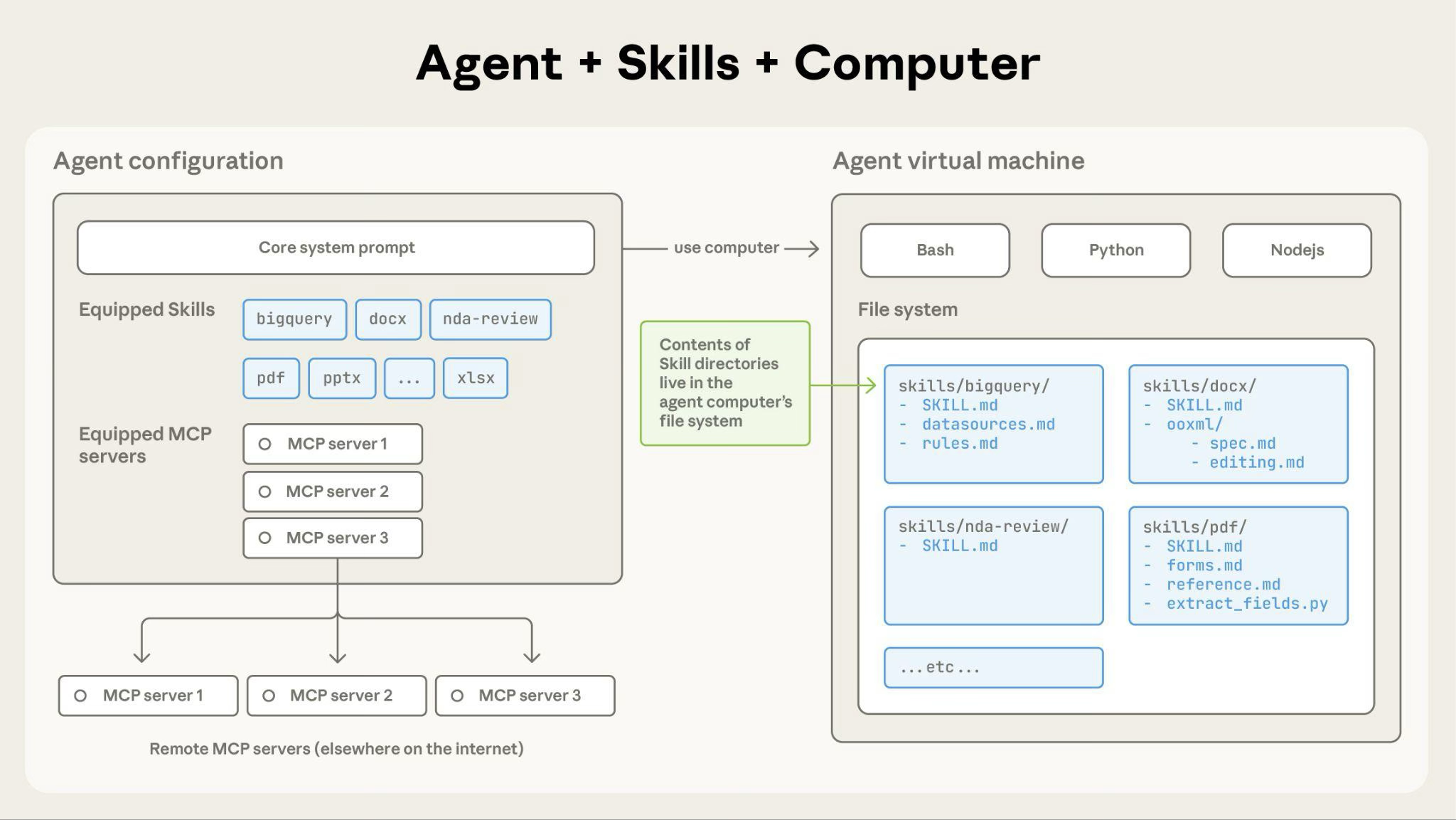
How Claude accesses Skill content:
When a Skill is triggered, Claude uses bash to read SKILL.md from the filesystem, bringing its instructions into the context window. If those instructions reference other files (such as FORMS.md or a database schema), Claude reads those files too using additional bash commands. When instructions mention executable scripts, Claude runs them through bash and receives only the output (the script code itself never enters context).
What this architecture enables:
validate_form.py, the script's code never loads into the context window. Only its output (such as "Validation passed" or a specific error message) consumes tokens, which makes scripts far more efficient than having Claude generate equivalent code on the fly.Here's how Claude loads and uses the custom pdf-processing Skill from the earlier examples (not the pre-built pdf Skill):
pdf-processing - Extract text and tables from PDF files, fill forms, merge documents. Use when working with PDF files or when the user mentions PDFs, forms, or document extraction.bash: cat pdf-processing/SKILL.md → Instructions loaded into context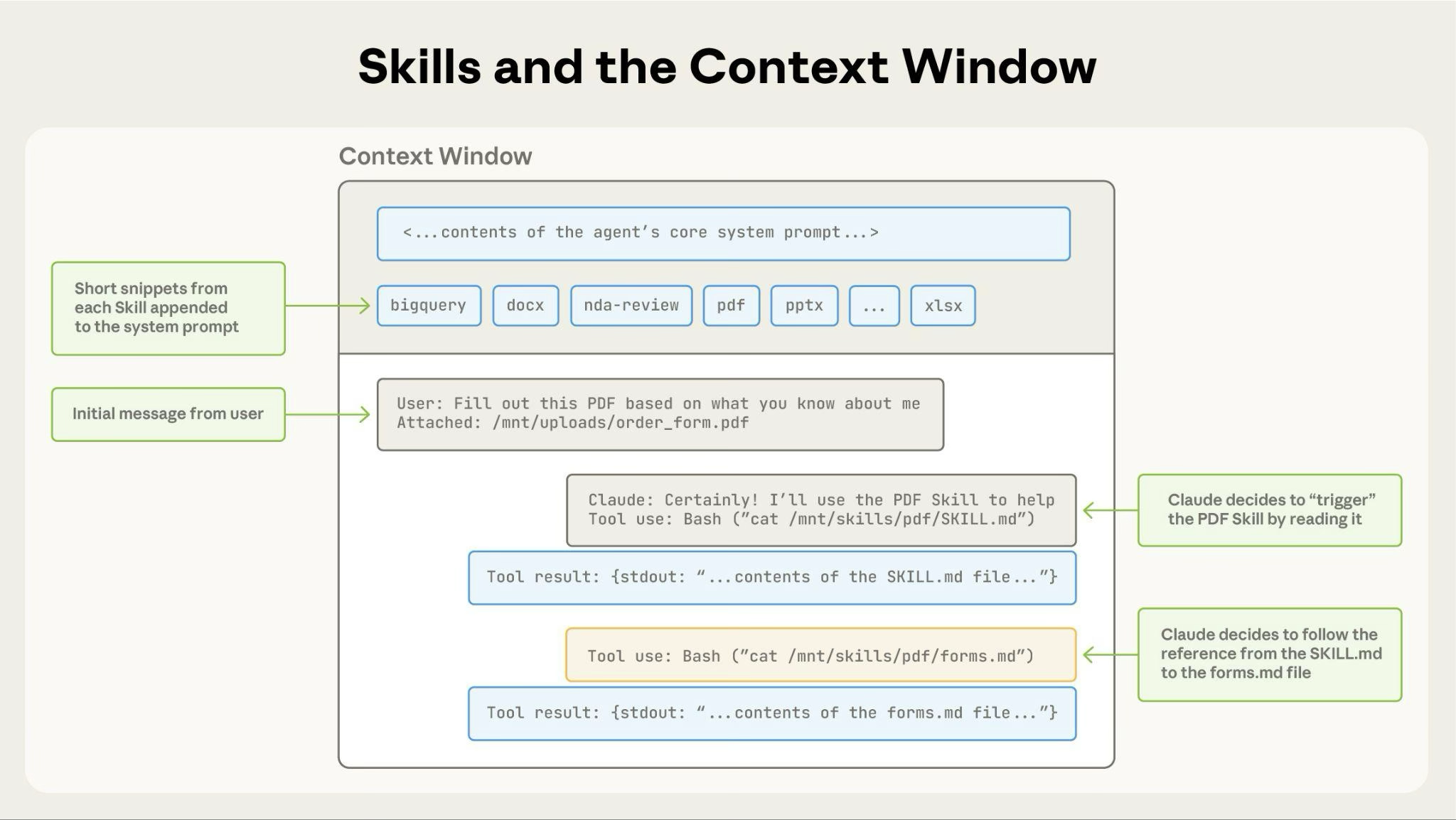
Skills are available across Claude's agent products:
Claude Platform on AWS and Microsoft Foundry inherit the same Skills behavior as the Claude API in all following sections.
The Claude API supports both pre-built Agent Skills and custom Skills. Both work identically: specify the relevant skill_id in the container parameter along with the code execution tool.
Prerequisites: Using Skills through the API requires the code execution tool, whose container Skills run in, and one beta header:
skills-2025-10-02 - Enables Skills functionalityAdd a second header, files-api-2025-04-14, when you use the Files API to upload input files to the container or download files a Skill produces.
Use pre-built Agent Skills by referencing their skill_id (pptx, xlsx, docx, or pdf), or create and upload your own through the Skills API (/v1/skills endpoints). Custom Skills are shared workspace-wide: all workspace members can access them.
Skills on the API run in a sandboxed container with no network access and no runtime package installation. See Limitations and constraints for details.
To learn more, see Using Agent Skills with the API.
Claude Code supports custom Skills. The pre-built document Skills (PowerPoint, Excel, Word, PDF) are not available in Claude Code, though the open-source Claude API skill comes bundled with it. See the full list of built-in commands and Skills that ship with Claude Code.
Custom Skills: Create Skills as directories with SKILL.md files. Claude discovers and uses them automatically.
Custom Skills in Claude Code are filesystem-based and don't require API uploads: place them in ~/.claude/skills/ (personal) or .claude/skills/ (project).
To learn more, see Use Skills in Claude Code.
claude.ai supports both pre-built Agent Skills and custom Skills.
Pre-built Agent Skills: These Skills are active when you create documents. Claude uses them with no setup required.
Custom Skills: Upload your own Skills as zip files through Settings > Features. Available on Pro, Max, Team, and Enterprise plans with code execution enabled. Custom Skills are individual to each user. They are not shared organization-wide and cannot be centrally managed by admins.
To learn more about using Skills in claude.ai, see the following resources in the Claude Help Center:
Every Skill requires a SKILL.md file with YAML frontmatter:
---
name: your-skill-name
description: Brief description of what this Skill does and when to use it
---

# Your Skill Name

## Instructions
[Clear, step-by-step guidance for Claude to follow]

## Examples
[Concrete examples of using this Skill]Required fields: name and description
Field requirements:
name:
description:
The description must include both what the Skill does and when Claude should use it. For complete authoring guidance, see Skill authoring best practices.
Use Skills only from trusted sources: those you created yourself or obtained from Anthropic. Skills give Claude new capabilities through instructions and code, which also means a malicious Skill can direct Claude to invoke tools or execute code in ways that don't match the Skill's stated purpose.
If you must use a Skill from an untrusted or unknown source, exercise extreme caution and thoroughly audit it before use. Depending on what access Claude has when executing the Skill, malicious Skills could lead to data exfiltration, unauthorized system access, or other security risks.
Key security considerations:
For organization-scale governance, vetting, and deployment guidance, see Skills for enterprise.
The following pre-built Agent Skills are available for immediate use:
These Skills are available on the Claude API, Claude Platform on AWS, Microsoft Foundry, and claude.ai. See the quickstart tutorial to start using them in the API.
Anthropic also publishes open-source Skills in the skills repository:
For complete examples of custom Skills, see the Skills cookbook.
Agent Skills is not covered by ZDR arrangements. Skill definitions and execution data are retained according to Anthropic's standard data retention policy.
For ZDR eligibility across all features, see API and data retention.
Claude Platform on AWS and Microsoft Foundry follow the same limitations as the Claude API in the following subsections.
Custom Skills do not sync across surfaces. Skills uploaded to one surface are not automatically available on others:
Manage and upload Skills separately for each surface where you want to use them.
Skills have different sharing models depending on where you use them:
~/.claude/skills/) or project-based (.claude/skills/). Can also be shared through Claude Code Plugins.claude.ai does not support centralized admin management or org-wide distribution of custom Skills.
The exact runtime environment available to your Skill depends on the product surface where you use it.
Plan your Skills to work within these constraints.
Learn how to use Agent Skills to create documents with the Claude API in under 10 minutes.
Learn how to use Agent Skills to extend Claude's capabilities through the API.
Create and manage custom Skills in Claude Code.
Learn how to write effective Skills that Claude can discover and use successfully.
Was this page helpful?
