A Practical Guide for Exploratory Data Analysis: Movies on Streaming Platforms
Exploring movies on Netflix, Hulu, Prime Video, and Disney+.
Exploring movies on Netflix, Hulu, Prime Video, and Disney+.

We live in the era of big data. We can collect lots of data which allows to infer meaningful results and make informed business decisions. To get the most out of data, a robust and thorough data analysis process is needed. In this post, we will try to explore a dataset about the movies on streaming platforms. The data is available here on Kaggle.
We can directly download Kaggle datasets into a Google Colab environment. Here is a step-by-step explanation on how to do it:
Let's start with downloading the dataset and read it into a pandas dataframe.
"Unnamed: 0" and "ID" columns are redundant as they do not provide any information about the movies so we drop them. "Type" column indicates whether the title is a movie or TV show. We drop them because all of the rows contain data on movies.
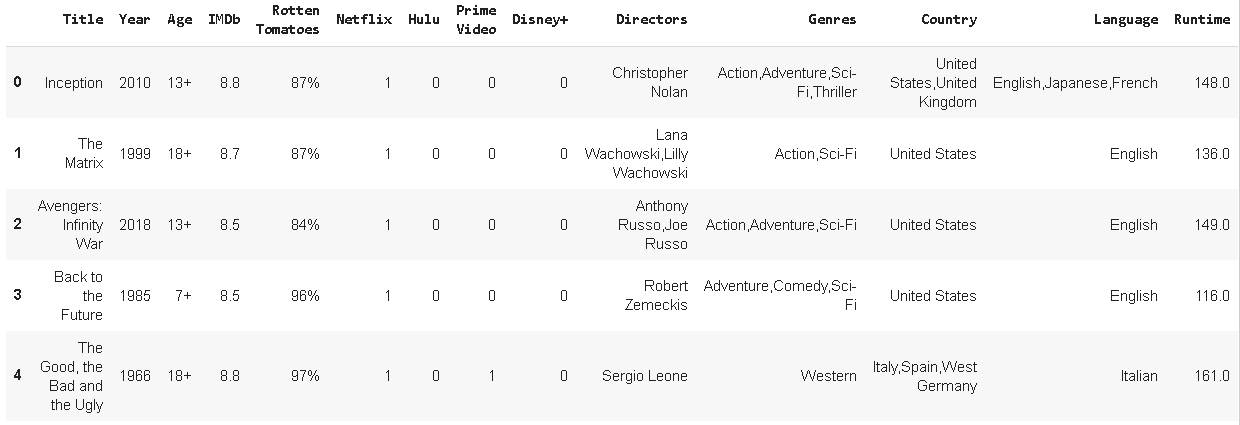
We have data on movies and information about their availability on streaming platforms. Movie ratings from IMDb and Rotten Tomatoes are also provided.
Missing values
It is a good practice to handle missing values first.
Dataset includes more than 16k rows and 14 columns. Let's see how many missing values each column contains.
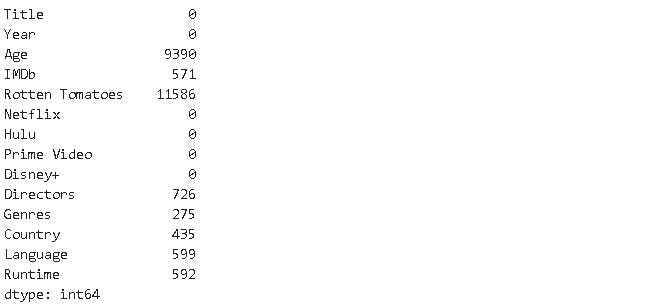
Most of the values in "Age" and "Rotten Tomatoes" column are missing. Some other columns also have missing values. There is a great python library to explore missing values in a dataset which is missingno. We can plot a missing value matrix to have an idea of the distribution of missing values in the dataset.
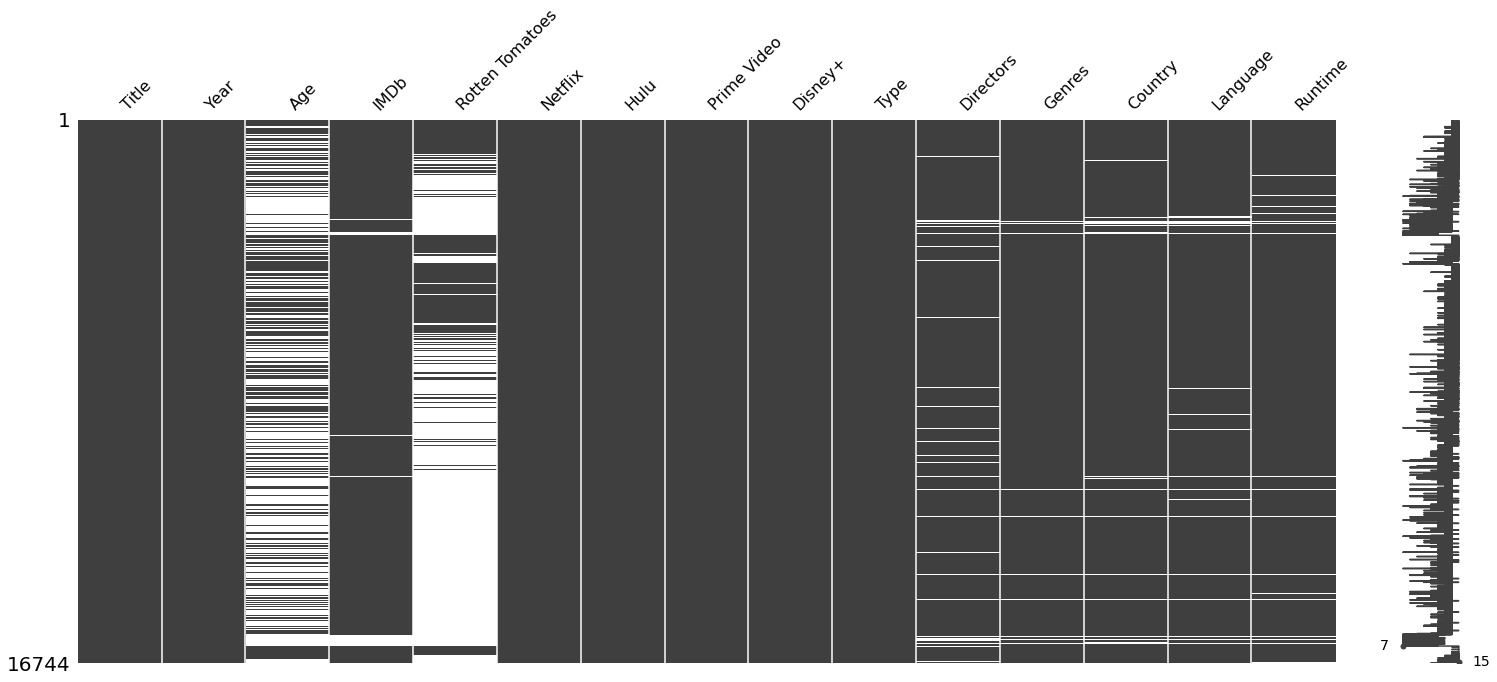
White lines indicate missing values. Missing values dominate "Age" and "Rotten Tomatoes" columns as expected. The interesting schema is that the missing values in the other columns are mostly matching. Rows either have no missing values or have missing values in multiple columns. Also the number of rows with missing values are much less than number of rows with no missing value. Thus, we can drop the rows that contain any missing value. Please note that we cannot always drop missing values. In some cases, we cannot just afford to drop them. Instead, we need to find a way to fill the missing values. It highly depends on the task we are working on.
We have lost about 9% of the rows. The dataset does not have any missing values now.
General Overview
Let's first see the language distribution within movies. We will use a recently published pandas utility library called sidetable. Sidetable creates a frequency table based on selected columns. It is kind of an improved version of value_counts function. If you'd like to learn more about sidetable, you can visit the following post:
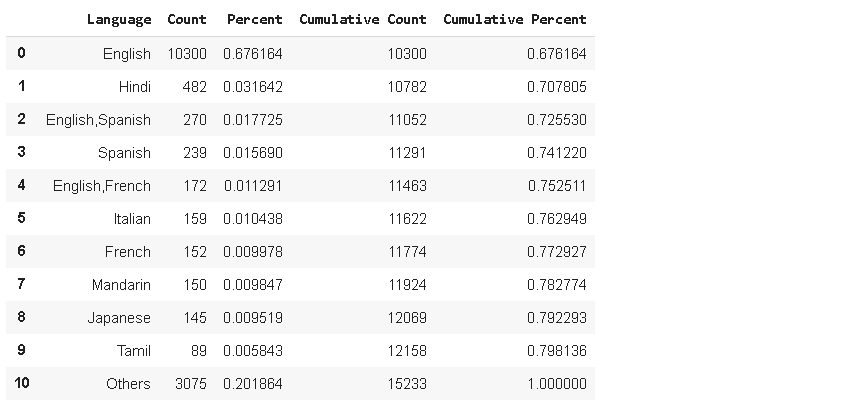
English movies lead by far. There are 10300 English movies which constitutes 67% of the entire dataset. 9 languages dominate almost 80% of all the movies.
IMDb rating is a very important criterion for a movie as many people select a movie to watch based on IMDb ratings. Let's see the distribution of IMDb ratings.
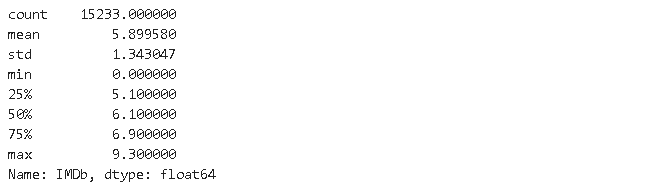
Another way is to plot the distribution.
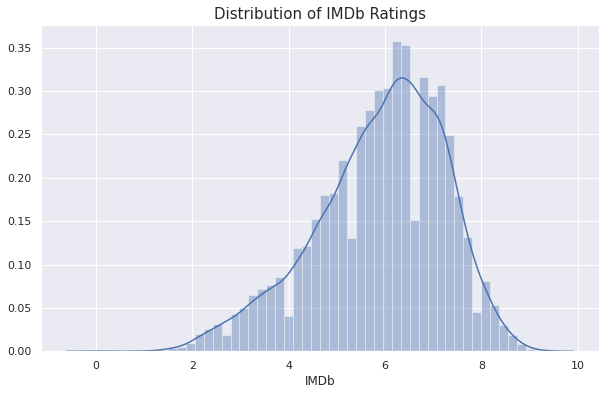
Most of the movies fall between 5 and 8 around the mean rating of 5.89. We also see a smaller number of extreme values on both high and low sides.
If you like watching movies, you probably have a favourite director. We can check the average IMDb rating of directors.
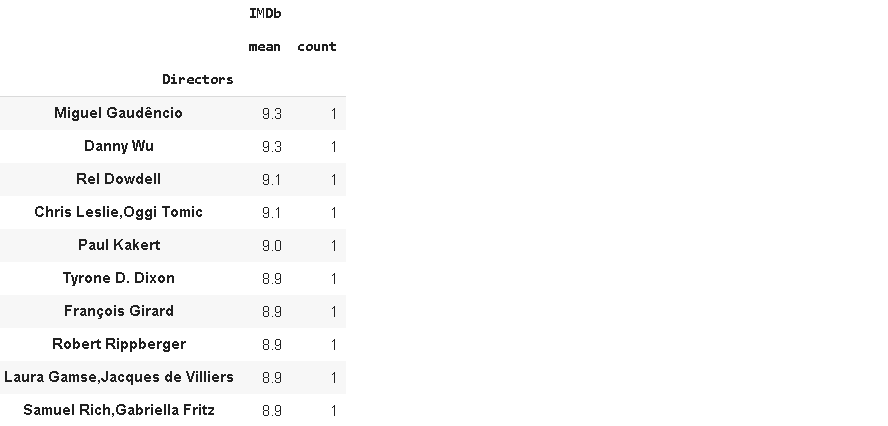
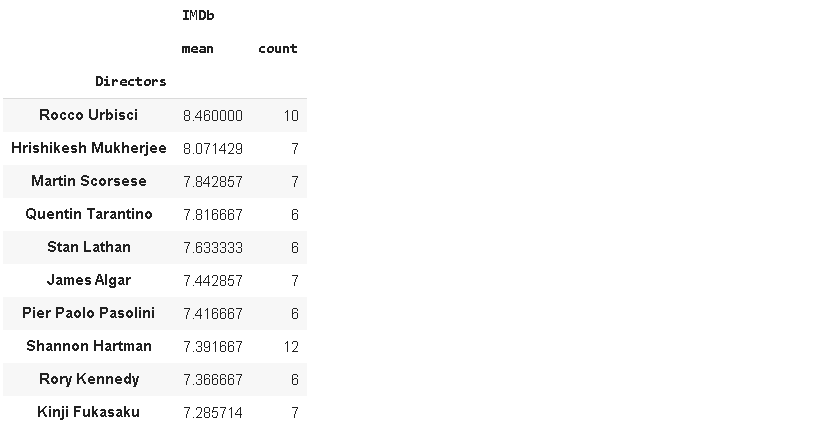
There are the top 10 directors in terms of IMDb ratings. However, all of them have only one movie which I think is not enough for a true evaluation. Let's change it to rank directors who have at least 5 movies.
Streaming platforms
The platforms contained in the dataset are Netflix, Hulu, Prime Video, and Disney+. Some movies are only in one of these platforms whereas some are available on multiple platforms. Let's check how many movies each platform has and also the average IMDb ratings of platforms.
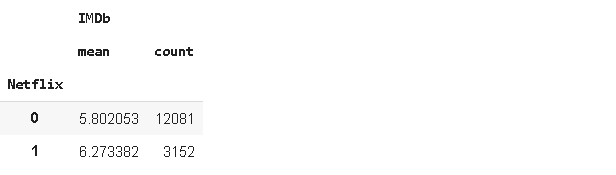
Netflix has 3152 movies and the average IMDb rating is 5.8. Instead of checking one-by-one, we can create a for loop and save the results into a dictionary and then create a dataframe from that dictionary.
We take the second row of what groupby function returns because second row contains the data on movies available (1) on that platform. Then, the row is saved in a dictionary with a key which is the name of the platform. After the dictionary is complete, it is converted to a dataframe.

Prime Video has most movies by far and the lowest average IMDb rating. I think this indicates Prime Video is not very selective about the content. Disney+ has the highest average IMDb rating, followed closely by Netflix.
Country
The advancement in technology and streaming platforms have made it possible for us to watch movies from all over the world. Due to the different taste and preferences in different countries, streaming platforms usually change their contents based on the country. Let's see which countries have the richest content.
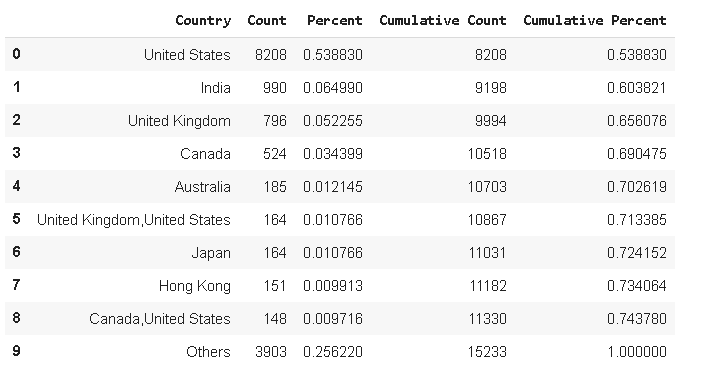
United States leads by far with more than 50%.
Runtime
Although there are some exceptions, the length of movies are usually between 1.5 and 2 hours. Let's see the distribution of runtime.
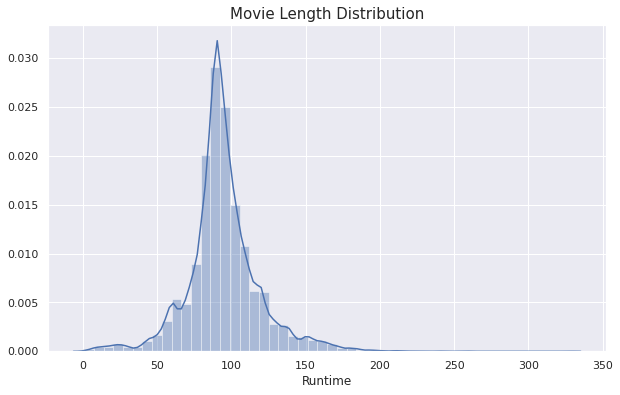
We see a normal distribution with a mean around 90 minutes.
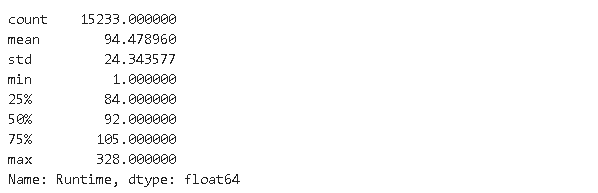
The average is 94 minutes. We also see a movie that is 1 minute long which must be a mistake. Let's see what are these movies.

Custer's Last Stand is really 328 minutes long but the other is, of course, not 1-minute.

I wonder if there is any correlation between length of the movie and IMDb rating. We can use corr function of pandas to check.
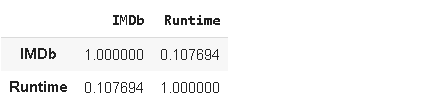
There is not a significant correlation between IMDb rating and runtime.
We have tried approach the dataset from a few different perspectives but there is no limit to the exploratory data analysis process. We can approach the dataframe from a specific point of view depending on our needs. However, the techniques and operations are usually the same. So, it is better to practice with different kind of datasets.
Thank you for reading. Please let me know if you have any feedback.