
Preprocessors are programs that process C source code before compilation. They perform tasks such as expanding macros, including header files, and handling conditional compilation to prepare the source code for the compiler.
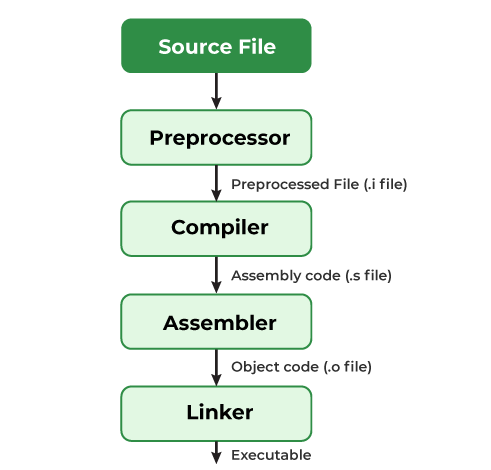
- First stage of the C compilation process.
- Supports macros, file inclusion, conditional compilation, #undef, and #pragma.
- Modifies source code before compilation. For example, #define PI 3.14 replaces every occurrence of PI with 3.14.
Types of C Preprocessor Directives
C preprocessor directives are commonly classified into the following four categories:
Macros
Macros are preprocessor directives used to define constants or function-like substitutions that are expanded before compilation.
- #define creates a macro.
- #undef removes a previously defined macro.
#define token replacement_text
#undef token
Here,
- token is the macro name.
- replacement_text is the value or expression that replaces the macro during preprocessing.
#include <stdio.h>

// Macro Definition
#define LIMIT 5

int main(){
    for (int i = 0; i < LIMIT; i++) {
        printf("%d \n", i);
    }
    return 0;
}
Output
0
1
2
3
4
Explanation: Before compilation, the preprocessor replaces every occurrence of LIMIT with 5. Here, LIMIT is the macro name, and 5 is its replacement text.
Note: Macro definitions do not end with a semicolon (;).
C also provides several predefined macros such as __FILE__, __LINE__, __DATE__, and __TIME__, which supply useful information during compilation. A previously defined macro can be removed using the #undef directive.
#include <stdio.h>

// Macro Definition
#define LIMIT 5

// Undefine macro
#undef LIMIT

int main(){
    for (int i = 0; i < LIMIT; i++) {
        printf("%d \n", i);
    }
    return 0;
}
Output
./Solution.c: In function 'main':
./Solution.c:10:25: error: 'LIMIT' undeclared (first use in this function)
   10 |     for (int i = 0; i < LIMIT; i++) {
      |                         ^~~~~
./Solution.c:10:25: note: each undeclared identifier is reported only once for each function it appears in
Explanation: After LIMIT is undefined, the preprocessor no longer replaces it with 5, causing a compilation error.
Macros With Arguments
Function-like macros accept parameters and expand them during preprocessing, similar to simple functions.
- Accept arguments to create reusable code snippets.
- Expanded by the preprocessor without any function call overhead.
Example:
#define foo(a, b) a + b
#define func(r) r * r
#include <stdio.h>

// macro with parameter
#define AREA(l, b) (l * b)

int main(){
    int a = 10, b = 5;

    // Finding area using above macro
    printf("%d", AREA(a, b));
    return 0;
}
Output
50
Explanation: The macro AREA(l, b) expands to ((l) * (b)). When AREA(a, b) is used, the preprocessor replaces it with ((a) * (b)), and the expression is evaluated during compilation.
File Inclusion
The #include directive is used to include declarations and definitions from external files, such as header files.
- Includes system or user-defined header files.
- Promotes code reuse and modular programming.
Syntax
There are two ways to include header files.
#include <file_name>
#include "filename"
- <file_name> tells the preprocessor to search for the file in the standard system directories.
- "file_name" tells the preprocessor to first search the current source file's directory and then the standard directories if needed.
The < > notation tell the compiler to look for the file in the standard directory while double quotes ( " " ) tell the compiler to search for the header file in the source file's directory.
// Includes the standard I/O library
#include <stdio.h>

int main() {
    printf("Hello World");

    return 0;
}
Output
Hello World
Conditional Compilation
Conditional compilation allows parts of a program to be compiled only when specified conditions are met.
- Uses directives such as #if, #ifdef, #ifndef, #elif, #else, and #endif.
- Commonly used for platform-specific code, debugging, and optional features.
Syntax
#if
// some code
#elif
// some more code
#else
// Some more code
#endif
#endif directive is used to close off the #if, #ifdef, and #ifndef opening directives.
#include <stdio.h>

// Defining a macro for PI
#define PI 3.14159

int main(){

// Check if PI is defined using #ifdef
#ifdef PI
    printf("PI is defined\n");

// If PI is not defined, check if SQUARE is defined
#elif defined(SQUARE)
    printf("Square is defined\n");

// If neither PI nor SQUARE is defined, trigger an error
#else
    #error "Neither PI nor SQUARE is defined"
#endif

// Check if SQUARE is not defined using #ifndef
#ifndef SQUARE
    printf("Square is not defined");

// If SQUARE is defined, print that it is defined
#else
    printf("Square is defined");
#endif

    return 0;
}
Output
PI is defined
Square is not defined
Explanation: Since PI is defined, the first conditional block is executed. The second block checks whether SQUARE is undefined, so it prints "Square is not defined".
Other Directives
Besides macros, file inclusion, and conditional compilation, C provides a few additional preprocessor directives for compiler-specific behavior and error handling.
#pragma
The #pragma directive provides compiler-specific instructions to control compiler behavior, such as warnings, memory alignment, and optimization.
- Used to configure compiler-specific settings.
- Support varies across different compilers.
Note: #pragma directives are compiler-specific and are not part of the C standard.
#error
The #error directive generates a compilation error with a custom message. It is commonly used with conditional compilation to stop compilation when required conditions are not met.
Syntax
#error "Error message"
#line
The #line directive changes the line number and optionally the filename reported by the compiler. It is mainly used by code generators and debugging tools.
Syntax
#line line_number "filename"
