
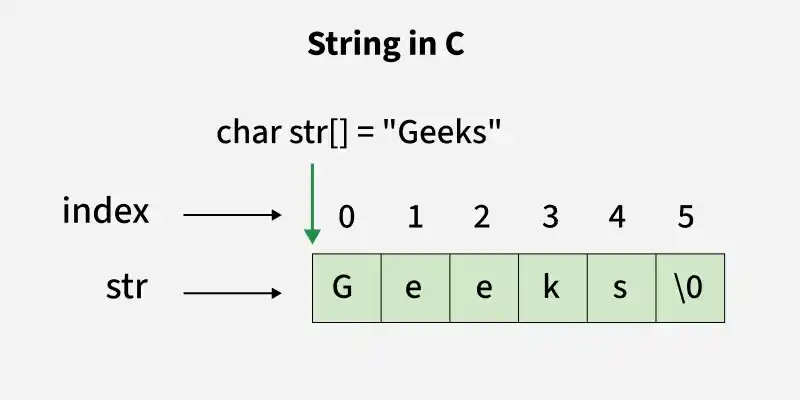
A string in C is a sequence of characters stored in a character array and terminated by the null character '\0'. Since C does not provide a built-in string data type, strings are represented using char arrays.
- The null character '\0' indicates the end of the string and helps string functions determine where the string ends.
- Strings are stored as arrays of char, allowing each character to be accessed and modified using its index.
#include <stdio.h>

int main() {

    // declaring and initializing a string
    char str[] = "Geeks";

    // printing the string
    printf("The string is: %s\n", str);

    return 0;
}
Output
The string is: Geeks
Explaination
char str[] = "Geeks";This line declares a character arraystrand initializes it with the string"Geeks". Internally, this creates an array like:{ 'G', 'e', 'e', 'k', 's', '\0'}
The null character'\0'is automatically added at the end to terminate the string.printf("The string is: %s\n", str);%sis the format specifier used to print a string.printfstarts at the memory location ofstrand prints each character until it finds the terminating null character'\0'.
Accessing Characters
We can access any character of the string by providing the index (position) of the character, like in array.
#include <stdio.h>

int main() {

    char str[] = "Geeks";

    // Access first character
    // of string
    printf("%c", str[0]);
    return 0;
}
Output
G
Update
Individual characters in a string can be modified using their index, such as `str[0] = 'h'`. The entire string can be updated using functions like strcpy(), provided the new string fits within the allocated array size.
#include <stdio.h>

int main() {
    char str[] = "Geeks";

    // Update the first
    // character of string
    str[0] = 'R';
    printf("%c", str[0]);
    return 0;
}
Output
R
String Length
To find the length of a string in C, count the characters until the null terminator `'\0'` is reached. This is commonly done using the strlen() function from the C standard library.
#include <stdio.h>

int main() {
    char str[] = "Geeks";

    printf("%d", strlen(str));
    return 0;
}
Output
5
In this example, strlen() returns the length of the string "Geeks", which is 5, excluding the null character.
C language also provides several other useful string library functions to perform operations like copying, comparing, and concatenating strings. You can refer to standard string functions for more details.
String Input
String input in C allows users to enter a sequence of characters, which is stored in a character array. Different input functions can be used depending on whether whitespace needs to be read.
- Functions like scanf("%s", str) read a single word and stop when a whitespace character is encountered.
- Functions like fgets() can read an entire line, including spaces, making them suitable for sentence input.
Using scanf()
The simplest way to read a string in C is by using the scanf() function.
#include<stdio.h>

int main() {
    char str[6];

    // Read string
    // from the user
    scanf("%s",str);

    // Print the string
    printf("%s",str);
    return 0;
}
Output
Geeks (Enter by user)
Geeks
In the above program, the string is taken as input using the scanf() function and is also printed. However, there is a limitation with the scanf() function. scanf() will stop reading input as soon as it encounters a whitespace (space, tab, or newline).
Using scanf() with a Scanset
We can also use scanf() to read strings with spaces by utilizing a scanset. A scanset in scanf() allows specifying the characters to include or exclude from the input.
#include <stdio.h>

int main() {
    char str[20];

    // Using scanset in scanf
    // to read until newline
    scanf("%19[^\n]", str);

    // Printing the read string
    printf("%s", str);

    return 0;
}
Output
Geeks For Geeks (Enter by user)
Geeks For Geeks
Using fgets()
If someone wants to read a complete string, including spaces, they should use the fgets() function. Unlike scanf(), fgets() reads the entire line, including spaces, until it encounters a newline.
#include <stdio.h>

int main() {
    char str[20];

    // Reading the string
    // (with spaces) using fgets
    fgets(str, 20, stdin);

    // Displaying the string using puts
    printf("%s", str);
    return 0;
}
Output
Geeks For Geeks (Enter by user)
Geeks For Geeks
Passing Strings to Function
As strings are character arrays, we can pass strings to functions in the same way we pass an array to a function. Below is a sample program to do this:
#include <stdio.h>

void printStr(char str[]) {
    printf("%s", str);
}

int main() {
    char str[] = "GeeksforGeeks";

    // Passing string to a
    // function
    printStr(str);
    return 0;
}
Output
GeeksforGeeks
Strings and Pointers in C
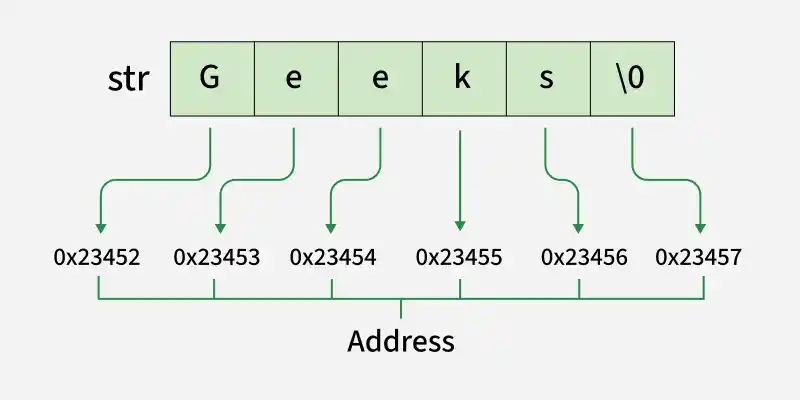
A character pointer in C can store the address of the first character of a string. The string can then be accessed or traversed using pointer operations.
- A pointer points to the beginning of the string, allowing characters to be accessed one by one.
- Pointer arithmetic can be used to move through the string without using array indexing.
#include <stdio.h>

int main(){

    char str[20] = "Geeks";

    // Pointer variable which stores
    // the starting address of
    // the character array str
    char* ptr = str;

    // While loop will run till
    // the character value is not
    // equal to null character
    while (*ptr != '\0') {
        printf("%c", *ptr);
        ptr++;
    }
    return 0;
}
Output
Geeks
So far, we've seen how to declare and use strings as character arrays. But in C, strings can also be represented using string literals, which offer a simpler way to initialize strings directly in the code. Let's understand what string literals are and how they work.
Strings Literals
A string literal is a sequence of characters enclosed in double quotes, such as "Hello World". It is automatically stored as a null-terminated string in memory.
- String literals are typically stored in read-only memory, so modifying them results in undefined behavior.
- They are commonly assigned to a const char * pointer to prevent accidental modification.
#include <stdio.h>

int main() {

    // pointer to a string literal
    const char *str = "Hello World";

    printf("%s\n", str);

    return 0;
}
Output
Hello World
Explanation
- "Hello World" is a string literal. It is stored in a read-only section of memory.
- const char *str = "Hello World";
This creates a pointer to the string literal. Using const is important because string literals should not be modified. - printf("%s\n", str); prints the string starting from the address stored in str.
