
A 2-D array in C is a multidimensional array that stores data in rows and columns. It has two dimensions, allowing data to be organized in a tabular format.
- A 2-D array can be initialized in multiple ways, such as using nested braces, a flat list, or partial initialization.
- The initialization method determines how values are assigned to the array elements during declaration.
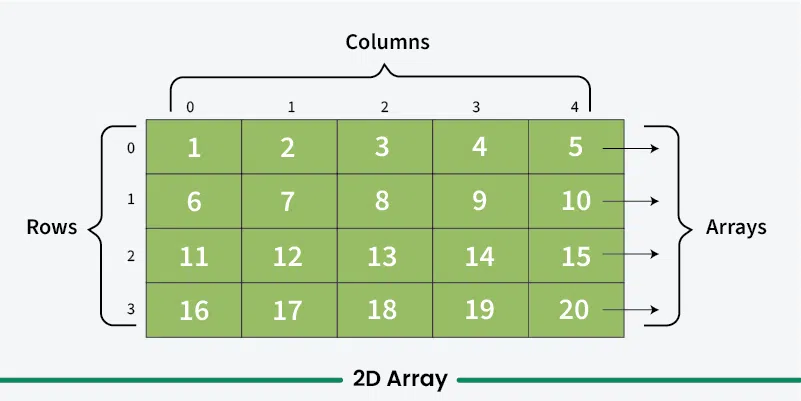
Example
int arr[2][3] = {{1, 2, 3}, {4, 5, 6}};
int matrix[][3] = {{10, 20, 30}, {40, 50, 60}};
There are three main ways to initialize the 2D array in C:
List Initialization
A 2-D array can be initialized by providing a list of values enclosed in braces {}, where each value is assigned to an array element. The values are separated by commas.
- Each value in the initializer list corresponds to an element of the 2-D array.
- Values can be grouped using nested braces, where each inner brace represents one row.
Syntax
int arr[3][4] = {0, 1, 2, 3, 4, 5, 6, 7, 8, 9, 10, 11}
The first 4 elements from the left will be filled in the first row, the next 4 elements in the second row, and so on. We can also explicitly do this as:
int arr[3][4] = {{0, 1, 2, 3}, {4, 5, 6, 7}, {8, 9, 10, 11}};
This method is called List Initialization of 2D Array.
Example: Program to Initialize 2D Array Using Initializer Lists
#include <stdio.h>

int main() {

    // Initializing a 3x4 2D array
    int arr[3][4] = {{0, 1, 2, 3}, {4, 5, 6, 7},
                     {8, 9, 10, 11}};

    // Printing the 2D array
    for (int i = 0; i < 3; i++) {
        for (int j = 0; j < 4; j++) {
            printf("%d ", arr[i][j]);
        }
        printf("\n");
    }

    return 0;
}
Output
0 1 2 3
4 5 6 7
8 9 10 11
Note: The number of elements in initializer list should always be either less than or equal to the total number of elements in the array.
Initialization with Zero
A 2-D array can be initialized with zero by specifying {0} during declaration. This sets all elements of a numeric, character, or binary array to 0.
- Using {0} automatically initializes every element of the array to zero.
- This is a simple and efficient way to initialize the entire 2-D array with default values.
Syntax
int arr[3][4] = {0}
Example: Program to Zero Initialize 2D Array
#include <stdio.h>

int main() {

    // Initializing a 3x4 2D array
    int arr[3][4] = {0};

    // Printing the 2D array
    for (int i = 0; i < 3; i++) {
        for (int j = 0; j < 4; j++) {
            printf("%d ", arr[i][j]);
        }
        printf("\n");
    }
    return 0;
}
Output
0 0 0 0
0 0 0 0
0 0 0 0
Runtime Initialization Using Loops
Runtime initialization assigns values to a 2-D array during program execution instead of at compile time. It is useful when values are entered by the user or generated dynamically.
- It is performed using nested loops, where the outer loop traverses the rows and the inner loop initializes each element in the current row.
- Runtime initialization is commonly used for user input or values that follow a specific pattern.
Syntax
int arr[2][3];
for (int i = 0; i < 2; i++)
for (int j = 0; j < 3; j++)
scanf("%d", &arr[i][j]);
Example: Program to Initialize 2D Array Using Loops
#include <stdio.h>

int main() {

    // Define a 2D array
    int arr[3][4];

    // A variable that is assigned to the array elements
    int count = 1;

    // Initializing using loops
    for (int i = 0; i < 3; i++) {

        // Inner loop move through each element left to right
        for (int j = 0; j < 4; j++) {
            arr[i][j] = count++;
        }
    }

    // Printing the 2D array
    for (int i = 0; i < 3; i++) {
        for (int j = 0; j < 4; j++) {
            printf("%d ", arr[i][j]);
        }
        printf("\n");
    }
    return 0;
}
Output
1 2 3 4
5 6 7 8
9 10 11 12
We also can use this method to initialize an array from another array of same size by using the values of the array elements instead of count variable.
