
Smoke Testing is a software testing technique used to verify whether the critical functionalities of a new build are working correctly. It ensures the build is stable enough for further detailed testing.
- Verifies the application's core functionalities.
- Ensures the build is stable for further testing.
- Helps identify major defects at an early stage.
Example: After deploying a new build of an online shopping application, testers verify essential features such as login, product search, add-to-cart, and checkout to ensure the application is ready for detailed testing.
Smoke Testing Workflow
The below diagram illustrates the simple flow of smoke testing, showing how a new build is validated and either approved for further testing or rejected for fixes.
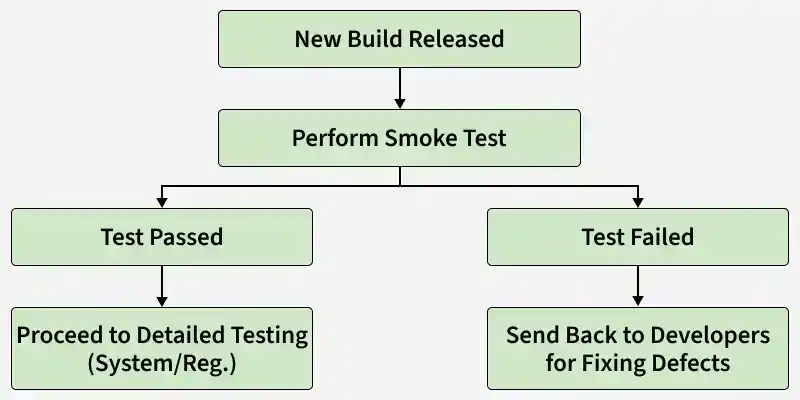
- New Build Released: A new software build is deployed to the QA or testing environment. It becomes ready for initial validation.
- Perform Smoke Test: Basic test cases are executed to check core functionalities of the application. This ensures the build is stable at a high level.
- Test Passed: If all critical tests pass, the build is considered stable. It is then moved to detailed testing like System or Regression testing.
- Test Failed: If any major test fails, the build is marked unstable. It is sent back to developers for fixing defects before retesting.
Smoke Testing Architecture
Smoke Testing Architecture defines the framework used to verify the stability and core functionality of a new software build before detailed testing begins. It helps identify critical issues early and determines whether the build is ready for further testing.
Key Components
- Critical Test Suite: A small set of predefined test cases that cover the most important application functions, such as login, navigation, database connectivity, and key business workflows. The suite is designed to execute quickly.
- Test Environment & Framework: A dedicated testing environment where the build is deployed. It includes test scripts, automation tools, required test data, and integration with CI/CD pipelines for automatic execution.
- Build Verification Mechanism: The process that executes smoke tests and evaluates the results. It checks for major failures such as application crashes, broken functionality, or deployment issues and provides a pass/fail decision.
- Reporting & Feedback: Generates test reports and logs that help teams quickly identify defects and decide whether the build can proceed to further testing stages.
Types of Smoke Testing
Smoke testing can be performed in different ways depending on how the basic tests are executed.
- Manual Smoke Testing: Testers manually execute a small set of critical test cases for each new build. It is suitable for smaller projects or during the early stages of testing.
- Automated Smoke Testing: Predefined smoke test cases are executed using automation tools. It is ideal for large projects, frequent builds, and continuous integration environments.
- Hybrid Smoke Testing: Combines manual and automated smoke testing, using human validation along with automation for better efficiency and coverage.
Techniques Used in Smoke Testing
Smoke testing uses simple and quick techniques to verify that the critical functionalities of an application are working correctly.
- Build Verification Testing (BVT): A basic technique where the build is verified to ensure that it is stable and ready for further testing.
- Critical Path Testing: Focuses on testing the most important workflows of the application, such as login, navigation, and core operations.
- Basic Functionality Testing: Ensures that the key features of the application are working without going into detailed validation.
- Risk-Based Testing: Prioritizes testing of high-risk areas or functionalities that are more likely to fail or impact the system.
- Integration Touchpoint Testing: Checks whether major modules or components are interacting correctly at a basic level.
Applying Smoke Testing at Different Levels
Smoke Testing can be performed at different stages of the testing process to ensure overall system stability.
- Integration Level: Verifies that integrated modules or components work together properly and communicate without major issues.
- System Level: Ensures the complete system functions correctly as a whole and that all major modules operate smoothly.
- Acceptance Level: Confirms that the build meets the basic acceptance criteria defined by clients or stakeholders before moving to detailed acceptance testing.
At each level the goal remains the same, to quickly validate stability before proceeding with deeper testing.
Tools Used for Smoke Testing
Commonly uses automation tools to quickly execute basic test cases and verify the stability of a build.
- Selenium: Used for automating web application testing.
- Cypress: Modern tool for fast and reliable front-end testing.
- JUnit / TestNG: Frameworks commonly used for unit and functional testing in Java.
- PyTest: Python-based testing framework for writing simple and scalable tests.
- Postman: Used for API testing and validating backend services.
- Jest: JavaScript testing framework, mainly for front-end and React applications.
- SoapUI: Tool for testing SOAP and REST APIs.
- Robot Framework: Keyword driven automation framework for acceptance and functional testing.
Characteristics of Smoke Testing
The following are the main characteristics of smoke testing:
- It tests only the main features, not the full application in detail.
- It focuses on essential functions like login, navigation, or core workflows.
- It is usually done whenever a new build is released for testing.
- It takes less time and helps quickly decide whether the build is stable.
- Smoke testing may be done manually or through automation tools.
- Its main purpose is to confirm the build is ready for further detailed testing.
Advantages of Smoke Testing
Quickly identifies critical issues in a build, saving time and ensuring only stable versions proceed to detailed testing.
- Detects major issues early in the build
- Ensures the build is stable for further testing
- Saves time by avoiding testing on unstable builds
- Improves overall software quality
- Helps testers quickly decide whether to accept or reject a build
- Supports faster testing in Agile and CI/CD environments
Limitations of Smoke Testing
- Tests only major functionalities, not the entire application
- Minor defects may remain undetected
- Does not provide deep or detailed testing
- Cannot guarantee the software is bug-free
- May miss issues in less frequently used features
- Depends on the quality of selected smoke test cases
