Kafka moves enormous amounts of data, yet its brokers do surprisingly little work per byte. The secret is not clever Java code. It is the opposite: Kafka avoids touching the data at all and lets the operating system do the heavy lifting.
In this article, we follow a message from disk to network, explain the page cache and zero-copy, and use FileChannel.transferTo in Java. Then we measure what it really changes, including a result that surprised me.
Where the Time Goes in a Normal Send
Imagine a broker sending a log file to a consumer the usual way. First, the kernel reads the file into its page cache. Next, an application reads that data into its own buffer, which is one copy. Then the application writes it into a socket buffer, which is another copy. Finally, the network card sends it.
Arpit Bhayani’s short explanation counts four copies for this path and two with sendfile. In plain words, the middle copies move bytes that the program never needed to look at.
The Page Cache: A Free Memory Layer
The page cache is the part of RAM the operating system uses to keep recently used file data. Kafka relies on it instead of building its own cache. Confluent’s Kafka design notes on efficiency explain that combining the page cache with sendfile lets consumers that keep up be served from memory, so the disks see little or no read activity.
To see the effect, I read a 1 GiB file after dropping the page cache, and then again right away.
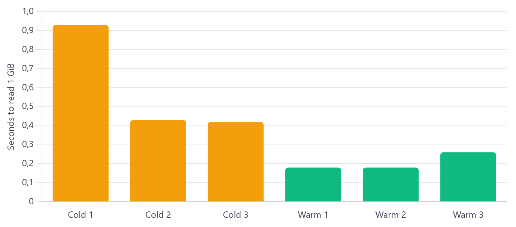
The first cold read took 0.93 s, and the next two took about 0.42 s. In contrast, the warm reads took 0.18 s, 0.18 s and 0.26 s. As a result, the cached read was roughly twice as fast, without a single line of caching code.
Zero-Copy With transferTo
Kafka asks the operating system to move data straight from the page cache to the socket, using the sendfile system call. In Java, the same idea is exposed through FileChannel.transferTo. The FileChannel reference says many operating systems can move bytes directly from the filesystem cache to the target channel without actually copying them.
One detail matters in practice. The same documentation warns that a call may or may not transfer all requested bytes. Therefore, always call it in a loop. Here is a small, complete program that copies a file this way. It needs only Java 17 or newer, and it prints copied 8388608 bytes when it works.
cat > ZeroCopy.java <<'JAVA'
import java.io.IOException;
import java.nio.channels.FileChannel;
import java.nio.file.*;

public class ZeroCopy {
    public static void main(String[] args) throws IOException {
        Path src = Files.createTempFile("src", ".bin");
        Path dst = Files.createTempFile("dst", ".bin");
        Files.write(src, new byte[8 * 1024 * 1024]);

        try (FileChannel in = FileChannel.open(src);
             FileChannel out = FileChannel.open(dst,
                     StandardOpenOption.WRITE)) {
            long pos = 0, size = in.size();
            while (pos < size) {
                pos += in.transferTo(pos, size - pos, out);
            }
        }
        System.out.println("copied " + Files.size(dst) + " bytes");
        Files.delete(src);
        Files.delete(dst);
    }
}
JAVA
java ZeroCopy.java
I ran it on JDK 17, 21 and 25, and each printed the same line. Keep in mind one limit: Bhayani’s note adds that sendfile does not work with TLS, because encryption must happen in user space.
What the Numbers Say
Next, I compared three ways of sending the same 1 GiB cached file over a loopback socket: a plain stream with a heap array, a channel with a direct buffer, and transferTo. Each figure is the average of two rounds of ten transfers.
| Method | Wall time per GiB | User CPU | Kernel CPU |
|---|---|---|---|
| Stream + heap array | 0.60 s | 0.093 s | 0.50 s |
| Channel + direct buffer | 0.60 s | 0.030 s | 0.56 s |
| transferTo | 0.67 s | 0.016 s | 0.64 s |
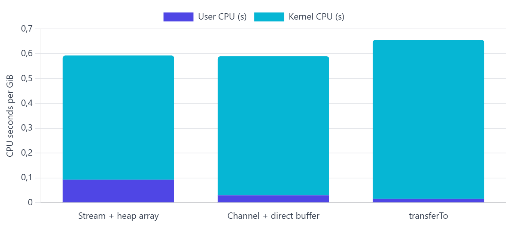
The CPU split matches the theory. With transferTo, user-space CPU time fell to about 0.016 s per GiB, roughly six times less than the heap-array version, because the Java program no longer handles the bytes. However, the total time did not improve here. In fact, transferTo was about 11% slower on this loopback test, because the kernel did more work.
This is an honest result, not a failure of the idea. Loopback has no network card and no real DMA, and the sender and receiver shared one CPU. I did not profile the kernel, so I cannot say exactly why. The lesson is that zero-copy removes user-space work, but the end-to-end win depends on your hardware and workload. Therefore, measure on a real network before you promise a speedup.
When Zero-Copy Pays Off
| Situation | Helps? | Why |
|---|---|---|
| Streaming large files unchanged | Yes | The program never needs to touch the bytes |
| Many consumers reading recent data | Yes | The page cache serves them from memory |
| TLS-encrypted connections | No | Encryption happens in user space |
| Data changed per request | No | The program must read it anyway |
| Loopback or tiny tests | Maybe not | No NIC offload, so gains can vanish |
Quick checklist
- Leave caching to the page cache and give it free RAM.
- Call
transferToin a loop until all bytes move. - Remember that TLS turns the zero-copy path off.
- Measure user and kernel CPU, not just wall time.
- Test on real network hardware before claiming a gain.
What We Have Learned
Kafka is fast partly because it avoids work. It leans on the operating system’s page cache, so caught-up consumers are served from memory, and it uses sendfile so data moves from the cache to the socket without passing through the application. In Java, FileChannel.transferTo exposes the same mechanism, and it should always be called in a loop. In our measurements, a cached read was about twice as fast as a cold one, and transferTo cut user-space CPU roughly sixfold, although loopback wall time did not improve. So, use zero-copy for large, unchanged data, keep TLS in mind, and always measure on your own hardware.