
Consent management plugin · GDPR
ConsentMagic. Consent management for WordPress.
Geo-targeted consent rules, automatic script and cookie blocking, Google Consent Mode V2, Meta Limited Data Use and the IAB Europe framework, for any WordPress site, with or without PixelYourSite.
ConsentMagic · 2-minute tour
rules, blocking, Consent Mode
Consent Mode V2
Google tags follow the visitor’s choice
Meta Limited Data Use
for US state privacy laws
IAB Europe TCF 2.2
supported out of the box
Script & cookie blocking
automatic, until consent is given
Geo-targeted rules
one rule per region, each with its consent type
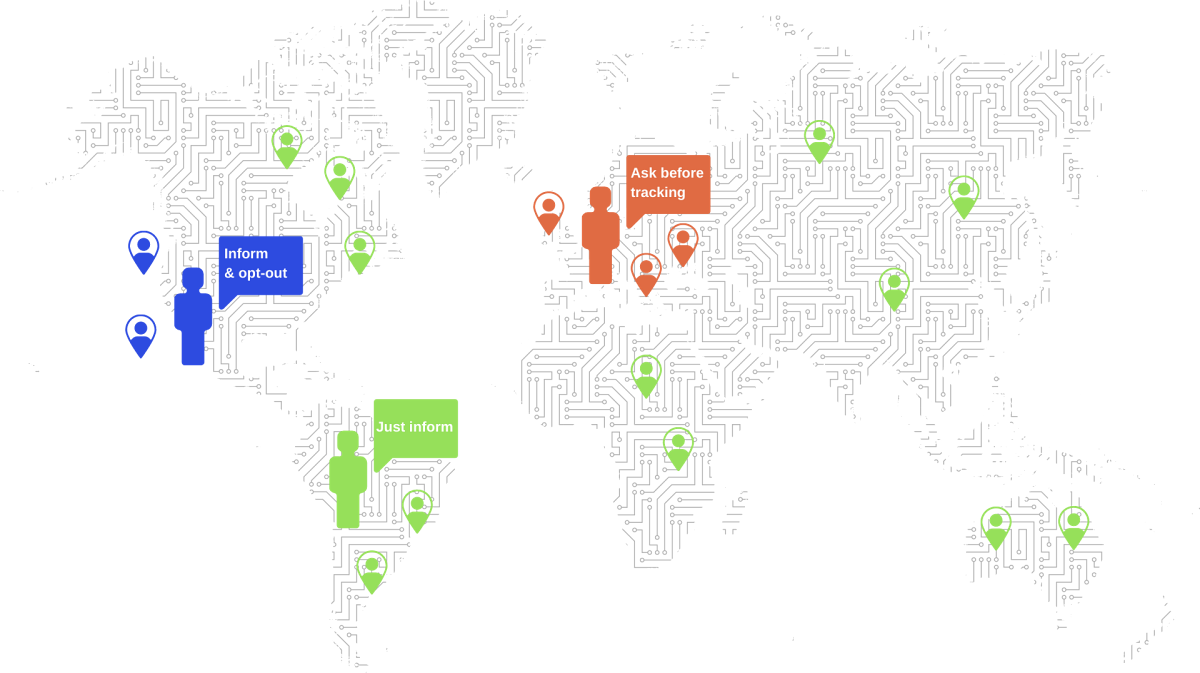
Consent rules
one rule per region, each with its own consent type
What it does
ConsentMagic is perfect for every WordPress website
Create Rules with different Consent Types and target your visitors based on their location.
Geo-Targeted Rules
Show the right consent message to each visitor. Target traffic based on their location’s laws.
Automatically block scripts & cookies
Block tracking when needed. Make sure you don’t break the law by tracking users that didn’t express their consent.
Cookies & Script Scanner
Scan your website for tracking scripts and cookies. Inform your visitors about how you track their data.
Consent proof and statistics
Every consent decision is stored as proof, and the consent statistics show you how visitors respond to each rule.
Ready-made templates, or your own design
Start from the default bars and popups, then customize colors, text and layout to match your site.
Multilingual
The front-end text is translated into 25 languages. Add any extra language you need. It works with WPML or any WordPress multilingual plugin.
Consent types
Consent Type. Configure consent the way you need it
Each “Rule” can use a different consent type.
Type 1
Just inform
Show a banner telling your users that you use scripts, cookies, and tracking technologies.
- Hide on scroll
- Show the Data Policy link
Type 2
Inform and opt-out
Show a banner telling your users that you use scripts, cookies and tracking technologies. Give them the option to opt-out of tracking and select what categories of scripts and cookies they allow.
- Hide on scroll
- Show the Data Policy link
- Sticky: show a small consent button after closing the banner
- Show the “Deny All” button
Type 3
Ask before tracking (GDPR)
Block tracking and ask for permission to use scripts, cookies and tracking technologies. Let your users “allow all”, or select what categories are permitted.
- Hide on scroll
- Show the Data Policy link
- Sticky: show a small consent button after closing the banner
- Show the “Deny All” button
- Track “Analytics” before consent option
- Block page content before consent is expressed
Script blocking
Block scripts and cookies when you need to
Cookies and scripts are organised in categories and your visitors can express consent for all or each category.
Smart script-blocking technology
Control the most common scripts and cookies. The plugin can automatically identify and block the most common scripts and cookies.
Scripts and cookies scan
Scan your site for pre-defined scripts, manually configured scripts, and any cookies. Use shortcodes to display scripts and cookies, informing your users about them.
Manually add cookies or scripts
Add scripts and cookies manually when needed.
Google Fonts and GDPR
Google Fonts API can track your visitors’ IPs and break GDPR. ConsentMagic can scan your website and detect Google Fonts API, inform your visitors and ask their permission when needed. If a visitor doesn’t accept Google Fonts, replace them with locally hosted fonts.
Meta
Meta Limited Data Use (LDU)
Use LDU for traffic coming from US supported states.
It works with PixelYourSite
Limited Data Use is supported for Meta pixel and CAPI events fired by the PixelYourSite plugin.
Target the right user location
LDU is supported in a limited number of US states. ConsentMagic has a dedicated LDU consent rule that targets traffic from these states.
Meta events will still work
When using LDU, instead of completely blocking Meta events, we can send them with the correct LDU consent flag (positive, or negative). Meta will process private data accordingly.
Google Consent Mode V2
Use Google Consent Mode for tags fired by PixelYourSite, GTM, and other plugins.
Google Consent Mode V2 for PixelYourSite →
Google Consent Mode V2 for Google Tag Manager (GTM) →
Google Consent Mode V2 for Site Kit →
Google Consent Mode V2 for MonsterInsights →
Google Consent Mode V2 for Google Analytics by WooCommerce →
It works with PixelYourSite, GTM, and other plugins
Google Analytics and Google Ads tags fired by the PixelYourSite, GTM, or other plugins can use Google Consent Mode V2. Tested with:
- PixelYourSite free or paid
- Google Tag Manager
- MonsterInsights
- Site Kit by Google
- Google Analytics for WooCommerce
- GA Google Analytics
Use Consent Mode instead of blocking
ConsentMagic will not block Google’s tags when missing consent but instead will send the required consent parameters that Google expects.
Google will process the data differently
When consent is denied, new cookies will not be set for advertising purposes. Additionally, third-party cookies previously set on google.com and doubleclick.net will not be used except for spam and fraud purposes. Data sent to Google will still include the full page URL, including any ad click information in the URL parameters.
WP Consent API
WP Consent API Integration
ConsentMagic works with the WP Consent API plugin.
Get users’ consent options
ConsentMagic informs your visitors and lets them configure category-based consent, as required in many jurisdictions.
Send it to the WP Consent API
The visitor’s options are sent to the WP Consent API plugin immediately.
Other plugins can use it
Any WordPress plugin can get the consent from the WP Consent API and adjust its behaviour accordingly.
IAB Europe
IAB Europe Transparency and Consent Framework
ConsentMagic implements the IAB Europe Transparency and Consent Framework (TCF 2.2).
IAB Europe compatible
ConsentMagic supports the IAB Europe Transparency and Consent Framework, TCF 2.2, out of the box.
IAB Rule
ConsentMagic has a dedicated IAB rule that automatically implements the IAB Transparency and Consent Framework.
- Customise purposes, features, or vendors lists
- Multilingual support
- Google Ad Tech Vendors support
Enhanced Script Control
Maintain native control of scripts along the IAB Framework.
Ready-made rules
Pre-defined rules
The plugin comes with ready-made rules targeting specific locations. You can edit or adjust them according to your needs.
GDPR Rule
Visitors coming from GDPR countries will be asked to agree to tracking. Scripts and cookies will be blocked until consent is given. Consent can be given for all, or specific categories like Analytics, Marketing, Embedded Video, Facebook Advanced Matching or server-side events.
IAB Europe Rule
A consent rule that automatically implements the IAB Europe Transparency and Consent Framework.
LDU Rule
Visitors from certain US states will be informed about tracking. They can choose to allow or block tracking scripts and cookies. Consent can be given for all tracking or specific categories. For Meta, instead of blocking events, we will send Limited Data Use (LDU) signals as required.
Rest of the World Rule
Visitors will be informed about scripts and cookies.
Custom rules
Create custom rules
You can configure your own rules targeting countries or regions.
Target locations
Fire your own rules based on the visitor’s locations.
Use the right Consent Type
Each rule can have a different consent type:
- Just inform
- Inform and opt-out
- Ask before tracking
Smart options
Persuade your visitors to agree to tracking with smart options like:
- Block scroll before consent is expressed
- Allow your visitors to change their consent at any time
- Show or hide the Privacy link
- Show or hide the Deny All button
- Close on scroll
- Split consent for each category of scripts and cookies
- Different text for mobile and desktop
- Select or configure the right template
Design
Own your consent design
Match your site’s aspect with our flexible consent design options.
Simple and slick templates
Decide between our default small or large bars or popups. Each consent rule can have its own design setup.
Multi-step or single-step
You can have a multi-step or single-step consent prompt for each rule.
Create your own design
Create your own design to match your site’s colors and general feel.
Pricing
Get ConsentMagic and start managing consent.
Select the best license for your needs, or get the plugin with our All Access Pass.
Every license is the full plugin for one year of updates and support. The licenses differ only in the number of sites.
Agency
Up to 100 sites
$699
/ year
For agencies and multi-site owners.
Most popular
Advanced
Up to 10 sites
$229
/ year
One license for all your sites.
Starter
1 site
$199
/ year
For a single site.
Agency
Up to 100 sites
$699
/ year
For agencies and multi-site owners.
Most popular
Advanced
Up to 10 sites
$229
/ year
One license for all your sites.
Starter
1 site
$199
/ year
For a single site.
All Access
Every PixelYourSite plugin on one license.
PixelYourSite Pro, ConsentMagic, the catalog feeds, Cost of Goods, Smart Prices, Conversion Exporter, Social Connect and Boost, current and future.
$999
/ year · 100 sites
$399
/ year · 10 sites
$359
/ year · 1 site
- After the license expires, the plugin will continue to work on the sites where it is already installed. Your license will be valid for one year. Updates, support, and license activation require a valid license. You can cancel renewals at any time.
- If you have an active subscription, your renewal price will remain the same, even if our public prices increase in the future.
- Refunds are granted according to our refund policy.
Questions
Frequently Asked Questions
Who should use ConsentMagic?
Virtually ANY WordPress website owner who needs to inform visitors about cookies and tracking scripts.
Do I need the PixelYourSite plugin?
No, ConsentMagic works with any tracking or pixel plugin.
Does it work on Shopify?
ConsentMagic is a WordPress plugin and doesn’t work on Shopify.
Can I use this plugin for GDPR?
Yes, in fact we have a ready-made GDPR rule that targets visitors from GDPR countries.
Can I use this plugin for CCPA?
Yes, in fact we have a ready-made CCPA rule that targets visitors from California.
Can I create my own rules?
Yes, you can create your own rules and target any country you want.
How to install the plugin?
- Download the files on your computer
- Open your WordPress admin and go to Plugins > Add New
- Click on Upload Plugin and then on Chose file. Select the plugin files from where you downloaded them and click Install now.
- Activate the plugin
Do I get updates?
Yes, if you have a valid license, updates will work automatically. You can also download the latest version of the plugin from your account.
Can I get a refund?
Yes, you can.
If the plugin doesn’t work, you can ask for a refund during the first 14 days. Read our refund policy here.
