




Highlights
- Salesforce Flow empowers Salesforce Admins to build complex automations using clicks, not code. Apex is Salesforce’s Java-like programming language that enables developers to build on the Salesforce Platform.
- The Order of Execution matters when selecting a tool because Salesforce Flow and Apex triggers run at different points in the transaction.
- Salesforce’s Architecture Center provides guidance on selecting the right tool for the job based on an object’s automation density. Heavier objects should leverage more Apex, whereas lighter objects can be fully automated with Salesforce Flow.
- Apex code requires passing coverage tests before moving to production, while Salesforce Flow (at least today) does not.
It’s no secret that Salesforce Flow Builder is one of the most powerful tools available to Salesforce professionals. Even in the agentic AI/SI era, Flow Builder stands proud and can be used to build tools for humans and agents alike.
That said, the age-old question remains: How does Flow Builder compare with Apex? Can it replace Apex altogether? In this article, I’ll go through the differences between Apex and Salesforce Flow, how the Order of Execution impacts both tools, the limitations of both tools, and testing.
What Is Apex?
Apex is a programming language that uses Java-like syntax and acts like database stored procedures. Apex enables developers to add business logic to system events, such as button clicks, updates of related records, and Visualforce pages. There are a variety of tools in which you can write Apex, including the Web Console, VS Code with Salesforce CLI, and Agentforce Vibes.
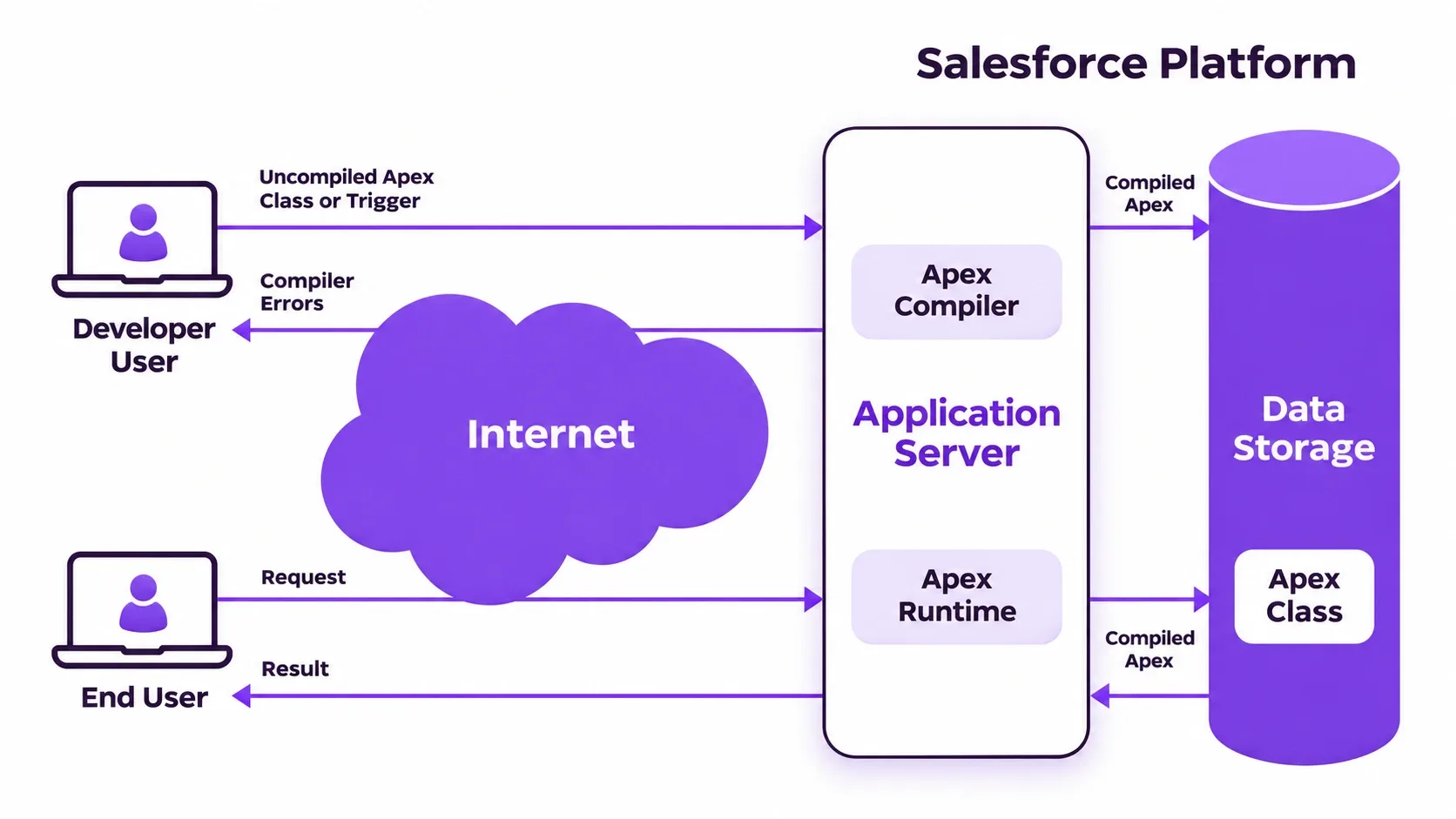
As Apex is a programming language, utilizing it will almost always require some sort of developer resource in your organization. That being said, Salesforce Admins can use agentic tools like Claude Code with the Salesforce DX MCP connected to read, understand, and in some situations, write Apex as well.
What Is Salesforce Flow?
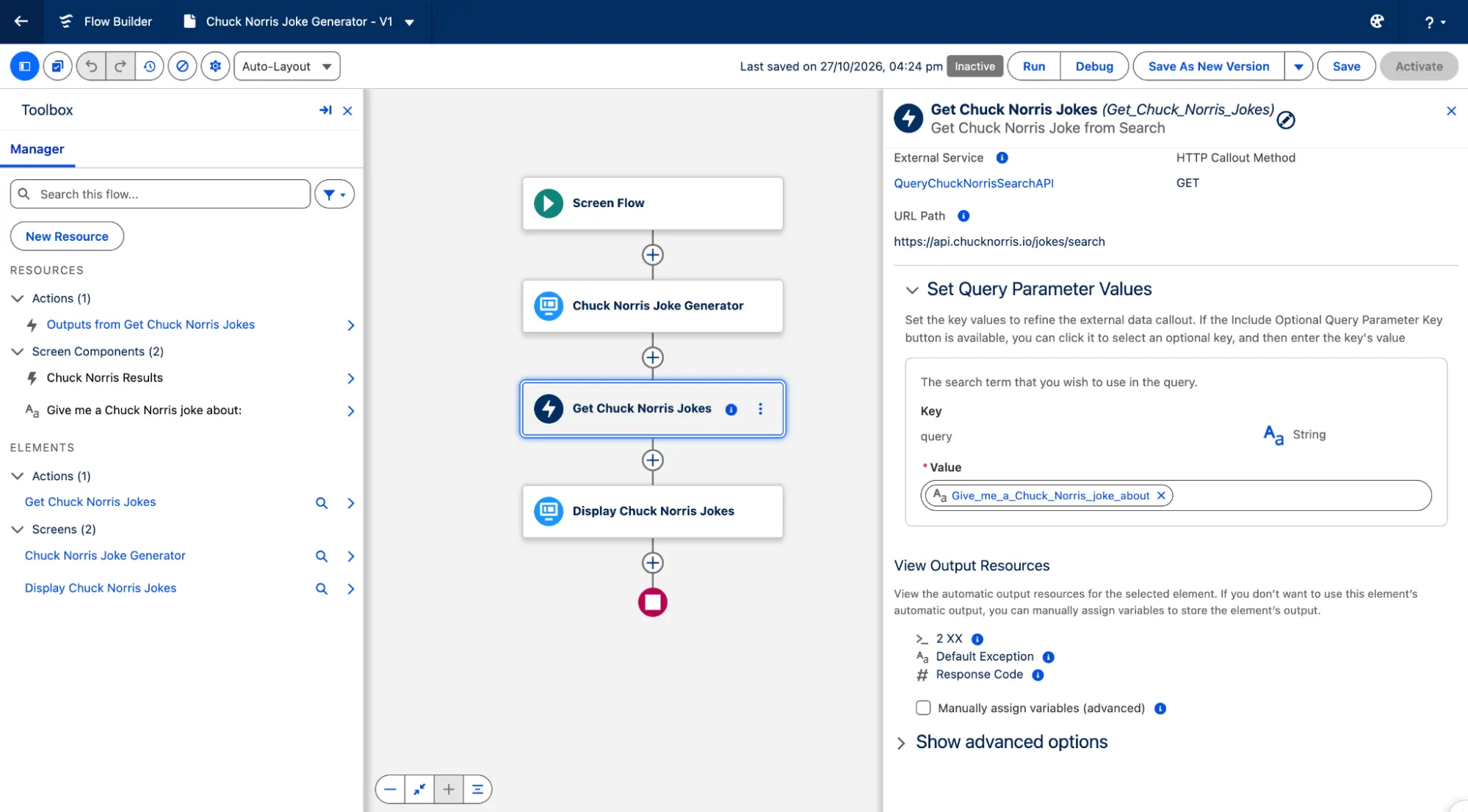
As described in The Complete Guide to Salesforce Flow, Salesforce Flow allows you to build complex business automation using clicks instead of code. Flow Builder is the declarative interface used to build these flows.
The biggest and most notable difference between Apex and Salesforce Flow is that you don’t need any developer resources on your team to take advantage of the capabilities of Flow Builder.
A Salesforce Admin can build automations using Flow Builder by using clicks, not code. The learning curve for Salesforce Flow is significantly less than that of Apex, especially for someone who doesn’t have much coding experience.
Order of Execution
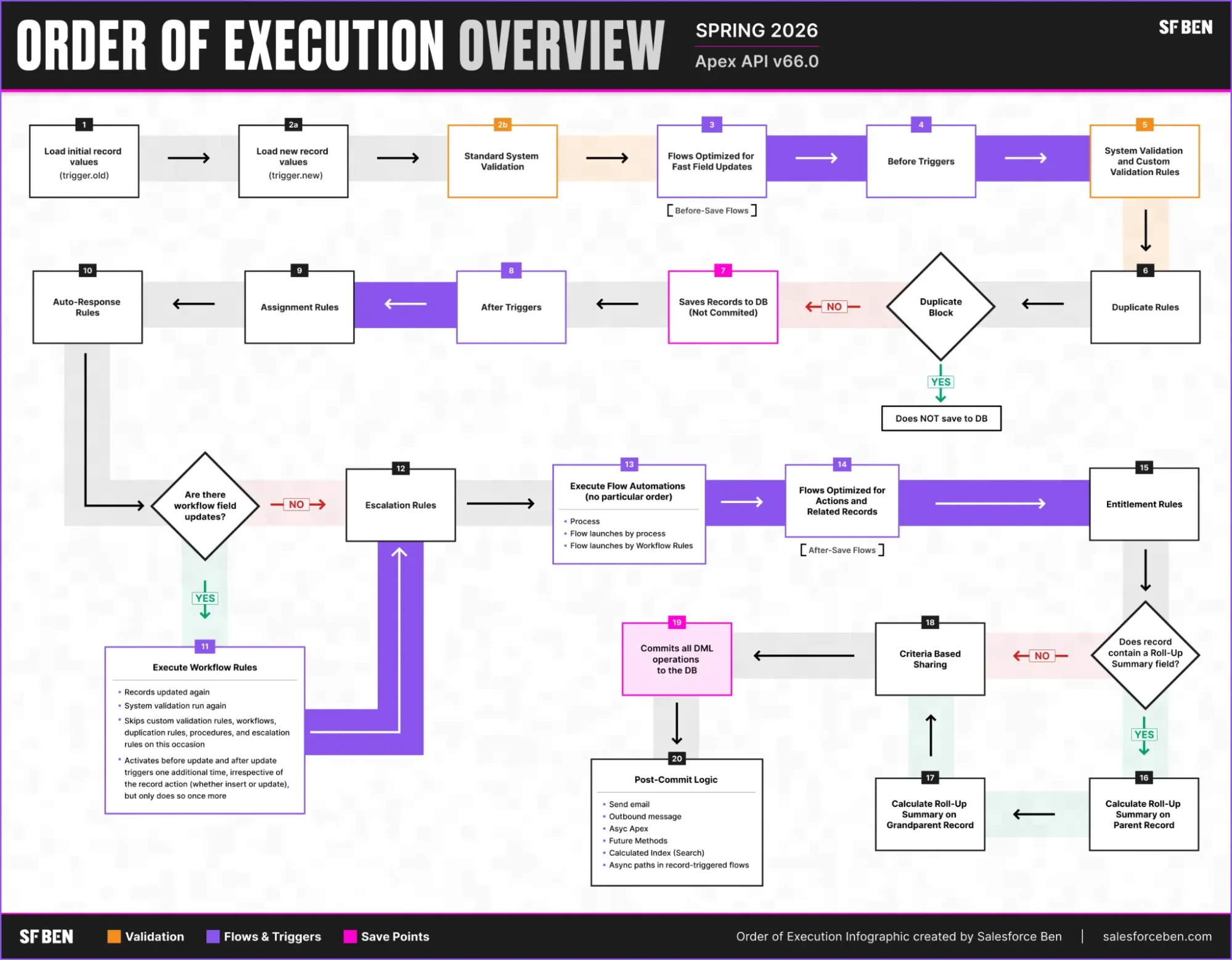
The Order of Execution is something that needs to be considered depending on whether you are using Apex or Flow. There are two important points when it comes to the Order of Execution (as you can see in the graphic below):
- Flows run before Apex triggers.
- Apex triggers can also run multiple times in a single transaction.
You should take both of these points into account when architecting your business workflow to make sure everything runs as expected.
Automation Density
The Salesforce Architecture Center provides specific guidance on how to choose between the two tools, and it has summarized it perfectly into three “density levels”.
Low density is defined as less than 15 automations on the object, 1-200 records processed at a time, typically triggered by a user, and no more than one downstream DML operation on the same or related object.
Medium density is defined as between 15 and 30 automations on the object, 200-2,000, and having parent/child updates with 2-4 downstream DML operations.
Finally, high density is defined as more than 30 automations on the object, over 2,000 records processed at a time, and a deep and complex dependency sprawl of over five downstream DML operations.
In low-density situations, the recommended approach is to use Record-Triggered Flow to achieve your automation goals. When things get to medium density, it’s time to begin leveraging a hybrid of Salesforce Flow as well as invocable Apex. Finally, when you’re working with high-density objects, Salesforce recommends that you ditch Flow Builder entirely in favor of Apex.
Limitations
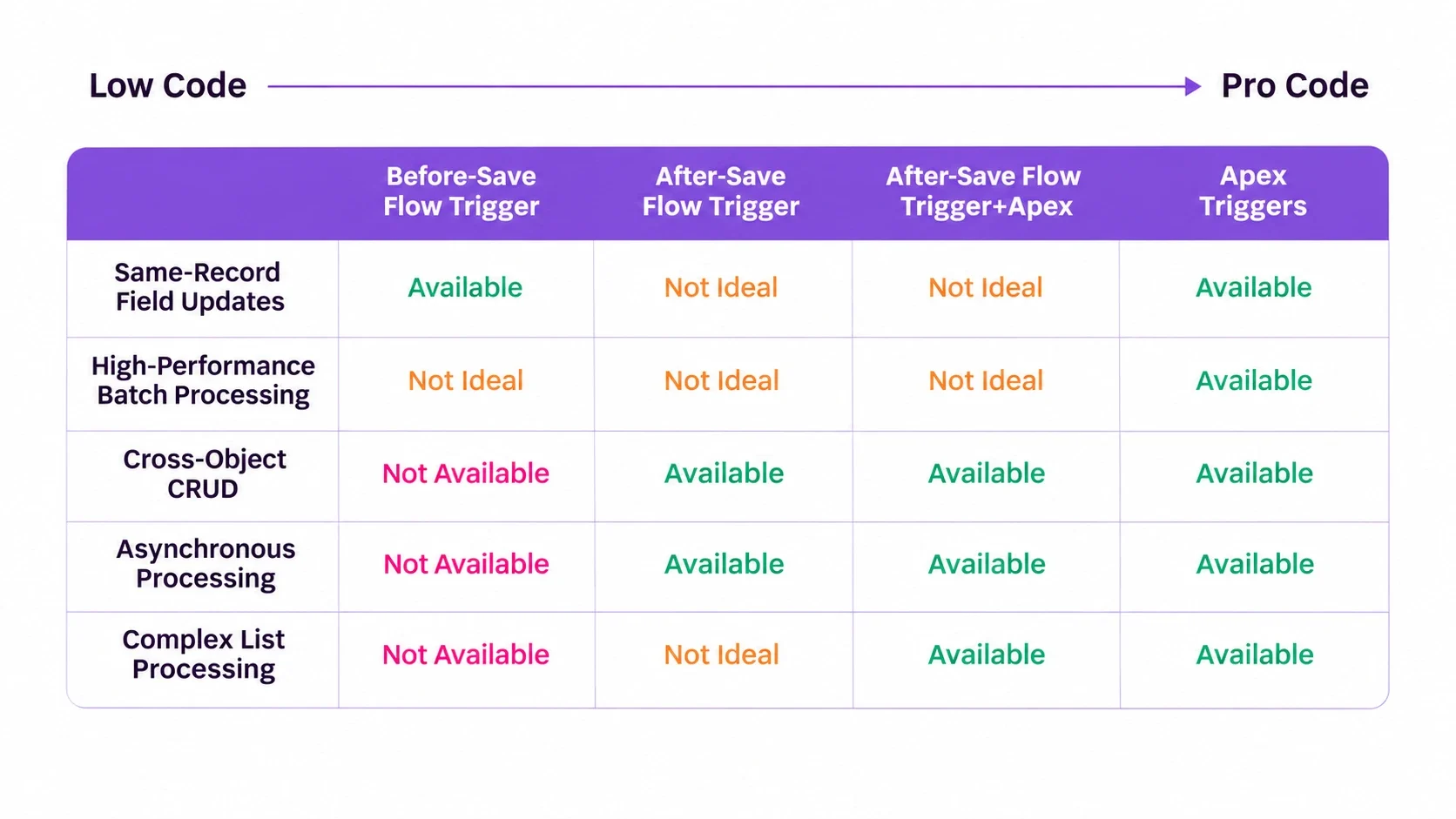
With Flow Builder, there are certain limitations depending on the type of flow that is being created. As you can see in the table below, a before-save triggered flow has more limitations than an after-save triggered flow. There are also certain things (such as complex list processing) that simply cannot be done with Flow alone. In those situations, you can look to combine flows with Apex to extend the functionality of your automations.
In terms of the limitations of Apex, the only real one is that of resources. Developer resources can be quite costly for an organization. However, in terms of functionality, Apex doesn’t have any limitations. If you have a developer who can write the right code, anything is possible.
Testing
With Apex, testing is ‘part and parcel’ of development. You simply cannot push any Apex code from a sandbox into production without a passing test class.
With Salesforce Flow, this currently isn’t the case. As ill-advised as it is, you can build and activate a flow directly in production if you want to. I say currently because I imagine this will change in the future, and testing with flows is likely to become compulsory, as it is with Apex.
That being said, Salesforce has recently introduced a new feature called Flow Test Mode. This is the first step in the right direction in terms of a more streamlined and structured approach to testing flows. While there’s still no ability to enforce the testing of a flow before it can be deployed into production, and you can still build directly in production, Salesforce’s messaging is clear. The plan, it seems, is to bring Salesforce Flow in line with (or close to) Apex testing.
In the meantime, it’s critical to get into the habit of testing your flows and get into the practice of building in a sandbox before deploying into production. As covered in How to Test Your Salesforce Flow, there are a number of ways that you can test your flows.
Summary
I hope this article has helped in terms of understanding the differences between Salesforce Flow and Apex. From the resources you have available to the limitations of each tool, ultimately you need to choose the tool that is right for each circumstance.
Both tools have their place. Both tools are able to build for humans and agents alike. Both tools can work together to achieve a perfect balance between code and low-code automation. Do you have a favorite tool between the two, or is there another tool that you like even more? Let us know!