



Why you’ll love Catalog
Controls — Buttons, menus, segmented controls, sliders, switches, steppers, text fields, search bars, page controls
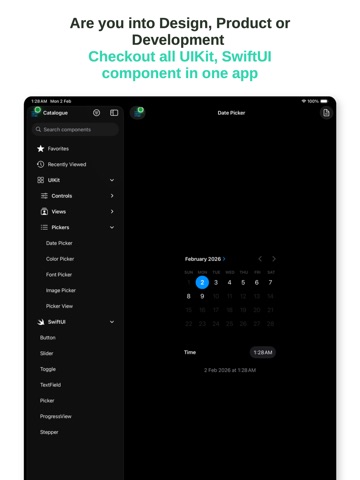
Pickers — Date picker, color picker, font picker, image picker, custom picker view
SwiftUI — Parallel demos for key SwiftUI components
Tap any component to see a live demo
View code snippets and copy them into your project
Filter by tag: UIKit, Controls, Views, Pickers, SwiftUI
Getting started with Catalog
Install Catalog - UI
Download Catalog - UI free from the App Store on your iPhone or iPad and open it. No account is needed.
Pick a component
Browse Controls, Pickers, Views or SwiftUI, or search by name, then tap a component to see a live demo.
Copy the code
Open the component's code snippet, copy it into your Xcode project, and add the item to Favorites to find it again.
Catalog on iPad


App privacy
Your privacy matters. Catalog is built to keep your data on your device wherever possible. The app may show ads (Google AdMob) and use basic, anonymous analytics to improve the experience. Catalog does not sell your personal data.
Terms of Use and Privacy Policy
Terms of Use (EULA): https://www.apple.com/legal/internet-services/itunes/dev/stdeula/
Our Terms of Use: https://bestlatestapps.com/apps/catalog/terms
Privacy Policy: https://bestlatestapps.com/apps/catalog/privacy
Frequently asked questions
Is Catalog free?
Yes, Catalog is free to download on the App Store.
What is Catalog?
Browse and try iOS UI components in one place. Buttons, pickers, sliders, alerts, toolbars, and more—see how they look and behave before you build.
What devices does Catalog support?
Catalog runs on iPhone and iPad. It requires iOS 17.6 or later.
When was Catalog last updated?
The latest version is 2026.02.02, released on 2026-02-03.
Explore more about Catalog
Reviews, comparisons and guides.
Catalog details
What’s new (v2026.02.02)
- Bug fixes and enhancements.
From the blog
Guides and build notes about this app, written by Alok Singh.
One registry for every component, hosting UIKit inside SwiftUI with UIViewRepresentable, wrapping the system pickers, comparing UIKit and SwiftUI versions…
Choosing the Right iOS Control: A Practical Guide to UIKit and SwiftUI ComponentsWhen to use a button, menu, segmented control, picker, slider, stepper, switch or alert on iOS, with UIKit and SwiftUI equivalents side by side.
Get Catalog today
Download Catalog on the App Store and start in seconds.

