
See Mic to Speaker in action


Why you’ll love Mic to Speaker
Use your device as a live microphone! Connect to any speaker and your voice comes out loud and clear.
One tap to turn on or off
Works in the background
Runs even when screen is locked
Connect via Bluetooth, AirPlay, or cable
No complicated setup needed
Getting started with Mic to Speaker
Install Mic to Speaker
Download Mic to Speaker free from the App Store on your iPhone or iPad and open it.
Connect a speaker
Pair a Bluetooth speaker, choose an AirPlay device or plug in a cable. Start with the volume low and keep your phone away from the speaker to avoid feedback.
Tap to go live
Allow microphone access the first time, then tap the screen. Your voice plays through the speaker, even with the screen locked.
Shape your sound
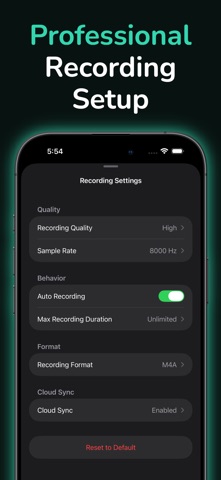
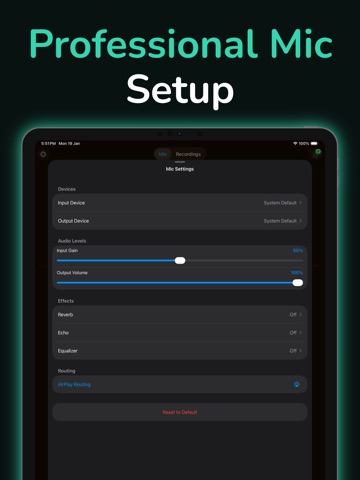
Add echo or reverb and adjust bass, treble and volume as you talk. Every session is recorded automatically so you can play it back, trim and share it.
Mic to Speaker on iPad



What users say about Mic to Speaker
Real reviews from the App Store.
“It works the way i need it to but it is still a little off when it comes to sound quality”
“We lent our tzumi speaker systems to some friends. They lost the microphone. We needed to use the system for an event but we’re at a loss with no mic. Downloaded several apps claiming would allow us to use iPhone as mic. None worked. Downloaded this app - worked first time like a charm. Made my day”
“I tried several apps, most of them I couldn’t get to work with my iPhone 13 and the one’s that did wanted to charge me. This one is simple and easy to use, works well and above all…free!”
“I tried many apps but this one gives the best clarity in sound. No echoes no voice breaking. It has both bluetooth and airplay option. Overall best app in it’s category.”
“My dad has hearing aids and doesn’t like to put the volume all the way so he uses this app to put the phone near the tv and can hear everything through his hearing aids. Way to go!!!”
“The app only has one control, turning off and on the mic which makes it user friendly and quality sounds good”
App privacy
Your privacy matters. Mic to Speaker is built to keep your data on your device wherever possible. The app may show ads (Google AdMob) and use basic, anonymous analytics to improve the experience. Mic to Speaker does not sell your personal data.
Terms of Use and Privacy Policy
Terms of Use (EULA): https://www.apple.com/legal/internet-services/itunes/dev/stdeula/
Our Terms of Use: https://bestlatestapps.com/apps/mic-to-speaker/terms
Privacy Policy: https://bestlatestapps.com/apps/mic-to-speaker/privacy
Frequently asked questions
Is Mic to Speaker free?
Yes, Mic to Speaker is free to download on the App Store.
What is Mic to Speaker?
Use your device as a live microphone! Connect to any speaker and your voice comes out loud and clear.
What devices does Mic to Speaker support?
Mic to Speaker runs on iPhone and iPad. It requires iOS 16.2 or later.
When was Mic to Speaker last updated?
The latest version is 2026.06.24, released on 2026-06-26.
Explore more about Mic to Speaker
Reviews, comparisons and guides.
Mic to Speaker details
What’s new (v2026.06.24)
- Bug fixes and enhancements.
From the blog
Guides and build notes about this app, written by Alok Singh.
Get Mic to Speaker today
Download Mic to Speaker on the App Store and start in seconds.

