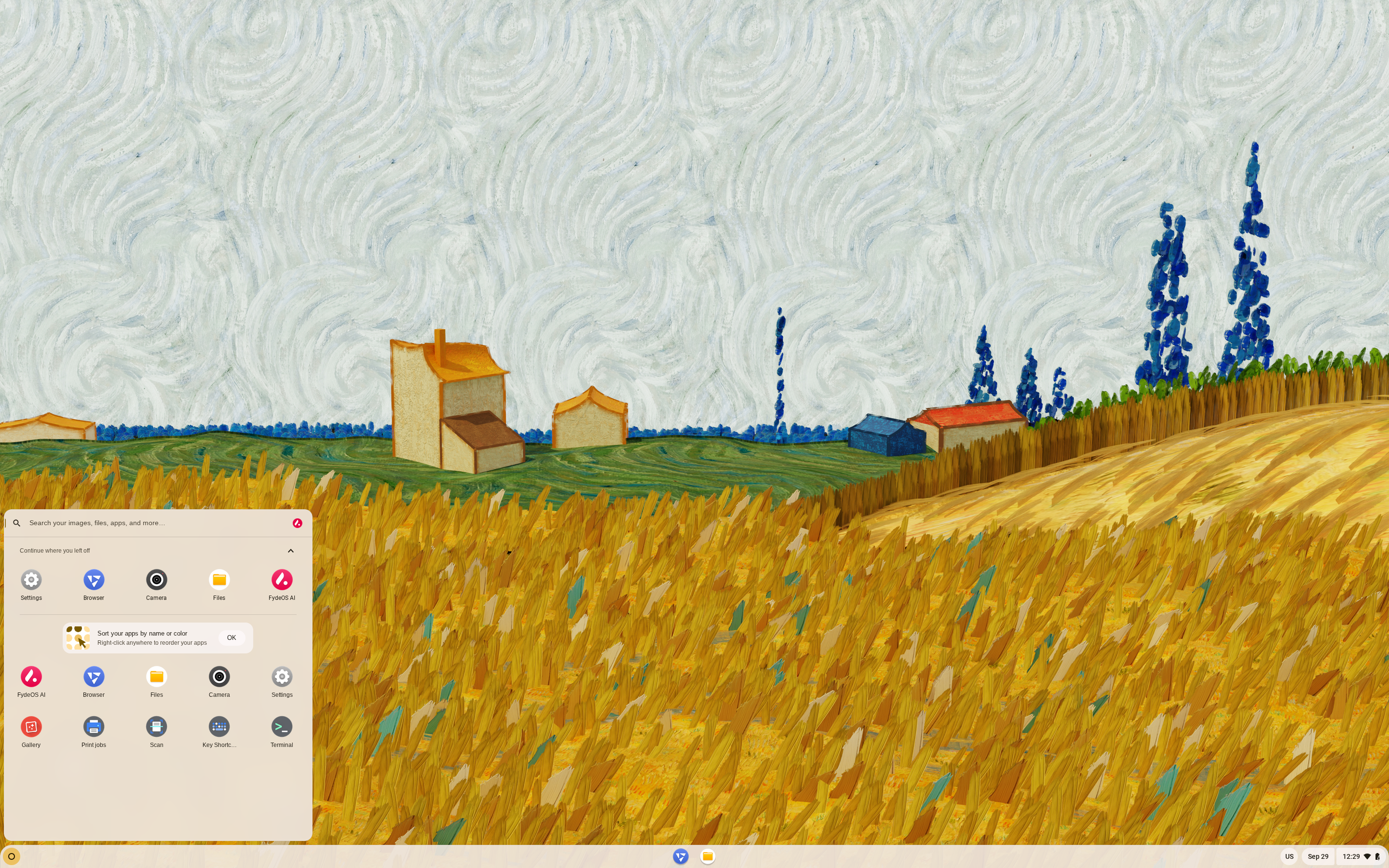
FydeOS, developed by Fyde Innovations, is a lightweight operating system that carries a Linux kernel, a browser platform and a container technology driver. It is very similar to Google ChromeOS in use. FydeOS supports the latest web application standards, and is able to run Android and Linux applications (by activating the included Android and Debian subsystems), providing a Google Chromebook-like experience. Users have a choice to use cloud services provided by Google, services powered by Fyde Innovations, or a local account. FydeOS is based on the open-source ChromiumOS and includes the Chromium browser; it is available free of charge for most standard Intel/AMD personal computers.
To compare the software in this project to the software available in other distributions, please see our Compare Packages page.
Notes: In case where multiple versions of a package are shipped with a distribution, only the default version appears in the table. For indication about the GNOME version, please check the "nautilus" and "gnome-shell" packages. The Apache web server is listed as "httpd" and the Linux kernel is listed as "linux". The KDE desktop is represented by the "plasma-desktop" package and the Xfce desktop by the "xfdesktop" package.
Colour scheme:green text = latest stable version, red text = development or beta version. The function determining beta versions is not 100% reliable due to a wide variety of versioning schemes.
TUXEDO
TUXEDO Computers - Linux Hardware in a tailor made suite Choose from a wide range of laptops and PCs in various sizes and shapes at TUXEDOComputers.com. Every machine comes pre-installed and ready-to-run with Linux. Full 24 months of warranty and lifetime support included!
Learn more about our full service package and all benefits from buying at TUXEDO.
NovaCustom
NovaCustom PrivacyGuard Laptops - Escape from Big Tech
The NovaCustom PrivacyGuard Laptop is ideal for anyone who prioritizes privacy. Comes with Dasharo coreboot open source firmware and Zorin OS Pro, free from influence of Big Tech.
Star Labs
Star Labs - Laptops built for Linux.
View our range including the highly anticipated StarFighter. Available with coreboot open-source firmware and a choice of Ubuntu, elementary, Manjaro and more. Visit Star Labs for information, to buy and get support.
Version: 23.0 Rating: 9 Date: 2026-08-28 Country: United States Votes: 1
This is a class and well thought out distro. I didn't think I would like it but was in the mood for something different. I liked it a lot - it was smooth and quick with a lot of little details that are easy to miss if you don't fully explore this release. I took a point off because the installer doesn't install the bootloader correctly and takes a lot of work to get multi-boot to function correctly. Looking forward to an update with that issue squashed. I would post more on how I finally got it to work but honestly I was flying by the seat of my pants and can't even come close to everything I did - I'm sure it was just something goofy with my system. Give this distro a shot - it's a lot better than I thought it would be. I only tried the modern release - I am going to try the slim release on an old laptop my roommate wont stop complaining about how slow it runs.
FydeOS Slim Edition and the Legacy Edition.both worked for me. I admit to not really trusting its Chinese origins, although they claim to have moved to the UK. However, whenever I ask DeepSeek about some aspect of the system it seeks an answer in the extensive Chinese community. When it works, I have a Chromium browser, an Android subsystem with, after some complex manipulation, access to the Google Play Store (as well as access to F-Droid and Droidify without any manipulation). On the Linux side, after downloading and installing the environment, there is Debian Bookworm. It is really a painless Linux. By that, I mean no coping with drivers, no bootloading to configure and finally, no struggling with CUPS, I.e., out of the box printing and scanning.
The downside is that I was unable to install it on a Toshiba Tecra dynabook with an NVME01 drive. It will only run from USB on that laptop.
Einfach zu installieren, nicht vergessen Widevine herunter zu laden und opengaps zu verwenden um den Playstore zu Insatllieren, geht aber auch mit FDroid store und Aurora dem Foss opensource Playstore. Die anmelde modi sind FydeOS account oder mit seinem google account sich an zu melden. Viele apps funktionieren tadellos.
Fyde OS bringt sogar einen eigenen store mit.
Wenn das Gerät otg fähig ist kann man fast alles anklemmen was geht, bei mir muss ich abzüge machen der hp drucker wurde erkannt keine app nötig aber der scanner des druckers leider nicht.
Wird leider vom Treiber nicht erkannt , funktioniert nur bei der Entwickler einstellung und linux umgebung aber auch nur mäßig will gleich ausdrucken was nicht funktioniert und speichern geht auch nicht.
Mein Chromebook von asus mit chrome os hat da die selben star allüren.
Firefox lässt sich nachrüsten und auch mit tabbeed browsen versehen , zu ändern in der firefox einstellung (anpassen).
Allerdings sollte man dan streaming apps nach rüsten wie netflix, prime , hbo disney etc. die werden nur im Chrome browser abgespielt, unter firefox öffnet man per link dazu die apps .Die wahl unter Firefoxvertretern ist Fennec oder firefox oder waterfox zu nutzen ist das selbe erlebniss. addons werden unterstützt.
Office google docs , colabora aka a libreoffice vertreter, softmaker office , wps oder auch sehr gut ist polaris.
Dateimanager gibt es auch einen den ich persönlich gefunden habe der mir eine struktur anzeigt wie unterr linux bzw. windows und man auch in ihm videos und musik abspielen kann somit auch übersichtlicher ist.
Ach bei opengapps ist es so das ihr vorher noch die entwickler umgebung freischalten müsst, neu starten das terminal mit strg + T öffnen die befghelszeile die man auf der fyde os hilfe seite zu opnegapps finden kann eingeben .
Vor der eingabe in das terminal den befehl Shell eintragen. dann den befehl
Anschließend neu starten
Wer damit zu frieden ist bekommt ein schnelles system und ein leichtes noch dazu , ob es sicher ist muss die zeit zeigen

 •
•  •
•  •
•  •
•  •
•  •
•  •
• 


 bc1qxes3k2wq3uqzr074tkwwjmwfe63z70gwzfu4lx
  lnurl1dp68gurn8ghj7ampd3kx2ar0veekzar0wd5xjtnrdakj7tnhv4kxctttdehhwm30d3h82unvwqhhxarpw3jkc7tzw4ex6cfexyfua2nr
  86fA3qPTeQtNb2k1vLwEQaAp3XxkvvvXt69gSG5LGunXXikK9koPWZaRQgfFPBPWhMgXjPjccy9LA9xRFchPWQAnPvxh5Le