
Go to Mac platform Display platforms icon
Go to Mac platform Go to Windows platform Go to Android platform Go to iOS platform
ABBYY FineReader PDF icon

ABBYY FineReader PDF

16.0.14.7295
4 2 reviews
17.6 k downloads
security security

Digitize your documents quickly

Advertisement
Remove ads and more with Turbo
Advertisement
Remove ads and more with Turbo
Alberto García icon
Reviewed by
Alberto García
Developer’s Operations and Support
Alberto García is part of Uptodown's in-house Editorial Team. Translated by Uptodown Localization Team

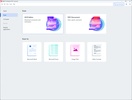
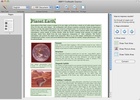
ABBYY FineReader PDF is a program that allows you to edit PDFs and convert images to text using OCR (Optical Character Recognition) technology. Its wide variety of features make it an ideal program for professionals, students and anyone who needs to manage, edit or convert documents efficiently.

Editing and modifying PDFs

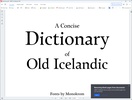
ABBYY FineReader PDF is one of the few apps that allows you to edit PDFs directly on macOS. You can edit text, change fonts, resize images and rearrange elements on the page without converting the file to another format. In addition to this, the app allows you to add or delete pages, combine multiple PDFs into one and split large documents into more manageable sections. These features are ideal for tailoring reports, presentations or any other type of document.

Advertisement
Remove ads and more with Turbo

Accurate conversion between formats

In terms of conversion, ABBYY FineReader PDF allows you to convert PDFs to popular formats such as Word, Excel or PowerPoint, maintaining the original layout and structure of the document. This is especially useful when you need to extract information from a PDF and edit it in another app. What's more, ABBYY FineReader PDF supports bi-directional conversion, which means that you can also create PDFs from other formats, ensuring compatibility and flexibility in your workflow.

Get text from images or non-editable documents

Another useful feature of ABBYY FineReader PDF is its detection of text in non-editable images and documents. Thanks to its OCR technology, you can recognize text in an image and convert it into editable digital content. This is perfect for digitizing scanned documents or extracting information from photos. ABBYY FineReader PDF integrates with your scanner, allowing you to scan a document and open it directly in the app to edit and convert it into editable text.

Organize and annotate documents

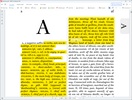
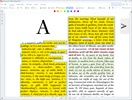
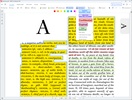
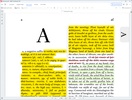
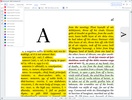
With ABBYY FineReader PDF, you can efficiently organize and annotate your PDFs. ABBYY FineReader PDF includes features to add bookmarks, create indexes and manage large numbers of files. You can also add annotations and comments, highlight text and draw shapes directly in the document. All changes are saved in the document history, which you can go back to and check at a later date, making it easier to review and collaborate on projects.

File protection and security

Security is a priority in ABBYY FineReader PDF, and the software offers several options to protect your PDFs. You can add passwords to restrict access, encrypt files and manage editing or printing permissions. In addition to this, the program allows you to redact confidential information, permanently deleting selected text or images to ensure that they can't be retrieved.

Limits with the free version

ABBYY FineReader PDF offers a free trial version that you can use for seven days, which lets you edit a maximum of 100 pages of text. This version allows you to explore all the software's features before deciding on a paid subscription. After the trial period, you'll need to purchase a license to continue using the program.

Download ABBYY FineReader PDF to edit your PDFs and scan them using OCR.

Information about ABBYY FineReader PDF 16.0.14.7295

Basic information

Developer ABBYY
Category Text & documents
Rating All ages
Languages English
1 more

Distribution model

Pricing Trial
License Proprietary
Copyright © 2026 ABBYY
Why is this app published on Uptodown? (More information)

Security and privacy

Required permissions Not applicable
See security and antivirus report

Download info

Downloads 17,589
Date Feb 5, 2025
File type DMG
Size 888.66 MB
SHA256 f837b1213f105f539c7d8d248351297dcba78eb77e65a1c3f2ac82b6ddac66d8
Advertisement
Remove ads and more with Turbo

Older versions

dmg 15 May 21, 2021
dmg 8.0.0.4123 Dec 13, 2011
dmg 8.0.0.3895 May 7, 2010
Available for other platforms

Rate this App

Review the app
ABBYY FineReader PDF icon

Rating

4.0
5
4
3
2
1
2 reviews

Comments

happysilversnake98547 icon
happysilversnake98547
in 2024

An excellent software for creating PDFs and converting files to Word.

Like
Reply
itorrede icon
itorrede
in 2012

how can I activate the program. I can't find or determine the code it asks me for thank you

9
Reply
Advertisement
Remove ads and more with Turbo
Adobe Acrobat Reader DC icon
The most popular PDF reader out there
WPS Office icon
Free all-in-one office suite for Mac
PDFgear icon
Free PDF Software for Everything
UPDF icon
Simple and powerful PDF editing software with AI tools
PDFCraft icon
Open-source alternative to Adobe Acrobat
PDF Converter Master icon
Quickly convert PDFs into any format
NAPS2 icon
Powerful document scanning app for Mac
Evernote icon
Gather and access your info on Mac
UPDF icon
Simple and powerful PDF editing software with AI tools
NAPS2 icon
Powerful document scanning app for Mac
Evernote icon
Gather and access your info on Mac
EvaSpy icon
Parental control to monitor your child's online safety discreetly
Savvyshot icon
Capture and turn screenshots into polished, share-ready visuals
Tenorshare PDNob icon
Tenorshare Co., Ltd.
Enolsoft PDF Converter OCR icon
Enolsoft PDF Converter OCR converts PDFs to various formats.
Saladict Translator icon
Saladict Translate: Your Convenient Translation and OCR Tool
Adobe Acrobat Reader DC icon
The most popular PDF reader out there
WPS Office icon
Free all-in-one office suite for Mac
PDFgear icon
Free PDF Software for Everything
PDFCraft icon
Open-source alternative to Adobe Acrobat
PDF Converter Master icon
Quickly convert PDFs into any format
RevPDF icon
A comprehensive PDF editor
Stirling PDF icon
Edit and convert PDFs with all kinds of tools
PDFix Desktop Pro icon
Free PDF Reader and PDF Accessibility Checker with PDF/UA Validator.
balenaEtcher icon
Create self-booting external disks on Mac
OpenCore Legacy Patcher icon
Install recent versions of macOS on your old Mac
CrossOver icon
Run Windows apps and games on Mac
Logitech G HUB icon
Customize your Logitech devices
CleanMyMac icon
Keep your computer in good shape
Raspberry Pi Imager icon
Flash distros and images on your Raspberry Pi
NoMachine icon
Connect to other devices remotely
Kindle icon
Read Amazon Kindle books on your Mac