




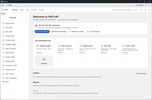
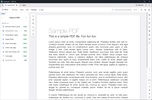
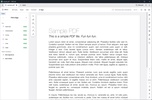
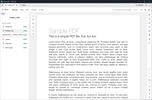
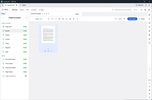
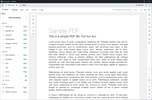
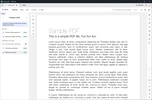
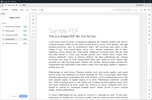

PDFCraft is a free, open-source alternative to Adobe Acrobat that lets you read and edit PDF documents on macOS. You can use it to view documents, organize pages, search for text, extract specific pages, and merge files without creating an account or uploading anything to the cloud. Built with Rust, it remains lightweight even on less powerful machines.
Smooth reading of long documents
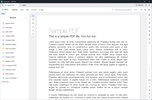
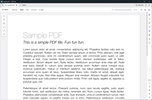
The rendering engine opens PDFs quickly and supports continuous scrolling, side-by-side page viewing, rotated views, and full-screen mode. You can even switch between light and dark themes and zoom in on any part of a document. Alongside standard editing tools, such as adding text and underlining content, the app lets you export documents to other formats without relying on third-party converters.
Reorganize pages without recreating the document
The page organizer displays thumbnail previews, letting you select one or more pages to rotate, delete, move, or replace. You can also insert blank pages or import pages from another PDF. To extract pages, simply copy your selection into a new file, and to split long documents, you can divide them at regular page intervals or manually choose where each section begins and ends. The merge tool combines multiple PDFs into a single file, creating a bookmark for each source file while preserving any existing bookmarks, while the history feature also lets you undo changes even after saving.
Comments and forms
You can add notes, highlight text, underline, draw freehand, and add shapes and text boxes. Comments can be replied to in a thread, edited, and show status changes, making it easier to track outstanding feedback. For PDFs with interactive forms, you can fill in text fields, checkboxes, radio buttons, and list fields, as well as view signatures by the document's author. You can also toggle optional layers and open or save embedded attachments.
Encryption, redaction, and offline use
The app is capable of opening password-protected PDFs and incorporates encryption methods ranging from RC4 to AES-256, respecting the permissions set by the creator. It includes redaction and sanitization tools for removing sensitive content, basic digital signature support, and accessibility checks. On top of this, everything is processed locally, with no account, telemetry, or cloud connection required, meaning you can also work offline without needing to validate a license. It also features a command-line tool to query metadata, extract text, render pages, edit properties, merge files, and split documents via commands.
My experience with PDFCraft
PDFCraft is an excellent PDF viewer and document reader. It brings together many of the tools found in leading PDF apps such as Adobe Acrobat, but it's free to use, without the hefty license fees. It runs quickly and feels lightweight, using considerably less RAM than Adobe's suite. Overall, it's a well-rounded PDF app that's actively being developed, with constant improvements and bug fixes that could help it become a serious competitor to Acrobat.
What I liked most about PDFCraft and what could be improved
· What I liked most: It allows you to read, organize, comment, fill out forms, protect files, and convert PDFs in a desktop app that works without depending on the cloud.
· What could be improved: I'd like to see more of the features available in Adobe's software, bringing the app closer to what Acrobat can offer.
Download PDFCraft for Mac to read, organize, annotate, merge, and protect PDF documents, even while offline.
PDFCraft is for you if
✓ You want a fast, free PDF reader-editor for macOS that works fully offline without accounts
✓ You value powerful page management to reorder, split, merge, and extract PDF sections efficiently
✓ You prioritize secure, professional workflows with annotations, form filling, encryption, redaction, and local-only processing
























Comments
There are no opinions about PDFCraft yet. Be the first! Comment