Repository navigation
Audio Output
The sink writes the received PCM data to an output that you define with the AudioTools library. This is used when A2DP_I2S_AUDIOTOOLS is active in config.h, which is the default when the AudioTools library is installed. For the old API (Arduino ESP32 core 2.0.x) see Legacy I2S API.
#include "AudioTools.h"
#include "BluetoothA2DPSink.h"

I2SStream i2s;
BluetoothA2DPSink a2dp_sink(i2s);

void setup() {
    auto cfg = i2s.defaultConfig();
    cfg.pin_bck = 26;
    cfg.pin_ws = 25;
    cfg.pin_data = 22;
    i2s.begin(cfg);

    a2dp_sink.start("MyMusic");
}

void loop() {
    delay(100);
}
If you don't define any pins, the AudioTools defaults are used: BCK = 14, WS = 15, DATA = 22. Please note that these defaults differ from the legacy API (26, 25, 22).
Here is the detailed information about the I2S config API.
#include "AudioTools.h"
#include "BluetoothA2DPSink.h"

AnalogAudioStream out;
BluetoothA2DPSink a2dp_sink(out);

void setup() {
    a2dp_sink.start("MyMusic");
}

void loop() {
    delay(100);
}
The output goes to the DAC pins GPIO25 (Channel 1) and GPIO26 (Channel 2). The sound quality is much lower than with an external DAC.
The best sound quality can be achieved with an external DAC. Here is a quick overview of the most popular breakout boards. The wiring tables use the pins of the I2S example above (BCK = GPIO26, WS = GPIO25, DATA = GPIO22).

This DAC is very easy to use: Just connect the 3 I2S pins and the power and everything works as expected, w/o changing the configuration!
| DAC | ESP32 |
|---|---|
| BCK | BCK (GPIO26) |
| DATA | OUT (GPIO22) |
| LRCK | WS (GPIO25) |
| GND | GND |
| GND | GND |
| VCC | 5V |
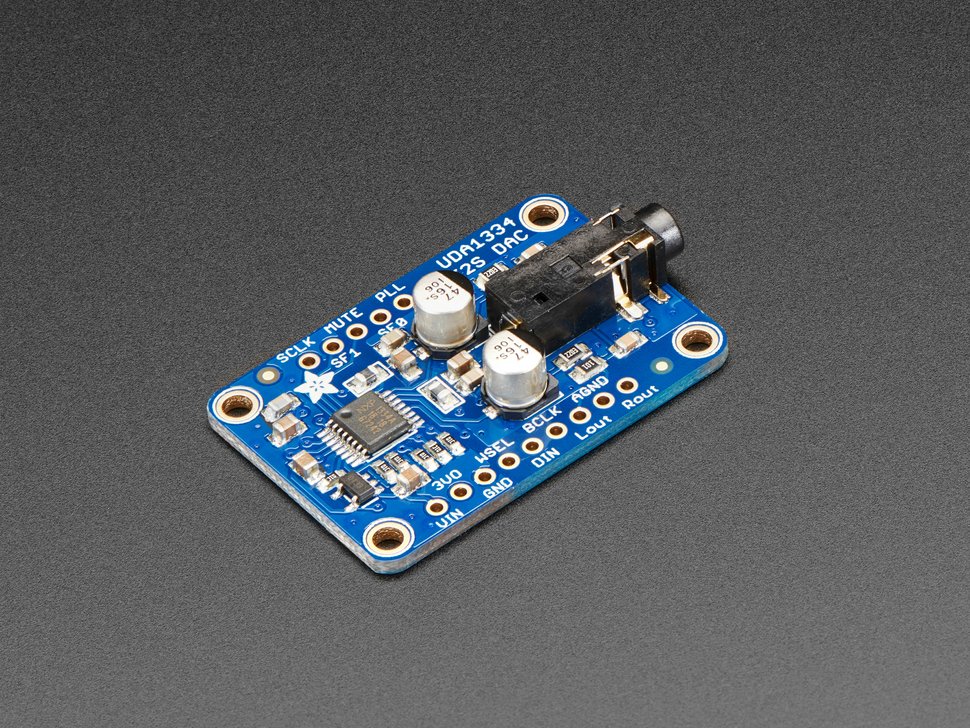
It seems that most DACs from Adafruit have a different byte order than what the ESP32 expects, and therefore you need to select the LSB format:
    auto cfg = i2s.defaultConfig();
    cfg.i2s_format = I2S_LSB_FORMAT;
    i2s.begin(cfg);
| DAC | ESP32 |
|---|---|
| VIN | 5V |
| GND | GND |
| WSEL | WS (GPIO25) |
| DIN | OUT (GPIO22) |
| BCLK | BCK (GPIO26) |
I was struggling quite a big to have this one working, because it needs some additional connections:
| DAC | ESP32 |
|---|---|
| VCC | 5V |
| GND | GND |
| BCK | BCK (GPIO26) |
| DIN | OUT (GPIO22) |
| LCK | WS (GPIO25) |
| FMT | GND |
| XMT | 3V (or another GPIO PIN which is set to high) |
- DMP - De-emphasis control for 44.1kHz sampling rate(1): Off (Low) / On (High)
- FLT - Filter select : Normal latency (Low) / Low latency (High)
- SCL - System clock input (probably SCL on your board).
- FMT - Audio format selection : I2S (Low) / Left justified (High)
- XMT - Soft mute control(1): Soft mute (Low) / soft un-mute (High)

This is an often seen module on Amazon, Bangood ... that is quite easy to use.
| DAC | ESP32 |
|---|---|
| SCK | GND |
| BCK | BCK (GPIO26) |
| DIN | OUT (GPIO22) |
| LCK | WS (GPIO25) |
| GND | GND |
| VIN | 5V |
Solder Bridges:
- H1L: FLT - Filter select : Normal latency (Low) / Low latency (High)
- H2L: DEMP - De-emphasis control for 44.1kHz sampling rate: Off (Low) / On (High)
- H3L: XSMT - Soft mute control: Soft mute (Low) / soft un-mute (High)
- H4L: FMT - Audio format selection : I2S (Low) / Left justified (High)
Normally it's working w/o any soldering! However if you encounter any issues I suggest that you try with FLT:Low, DEMP: Low, XSMT: High, FMT: Low
There are some rare high end DACs which only support 32 bit data. A2DP provides 16 bits, so you need to convert the data, e.g. with a NumberFormatConverterStream:
#include "AudioTools.h"
#include "BluetoothA2DPSink.h"

AudioInfo info(44100, 2, 32);
I2SStream out;
NumberFormatConverterStream convert(out);
BluetoothA2DPSink a2dp_sink(convert);

void setup() {
  auto cfg = out.defaultConfig();
  cfg.copyFrom(info);
  out.begin(cfg);
  convert.begin(16, 32);
  a2dp_sink.start("MyMusic");
}

void loop() {
  delay(1000);
}
See the bt_music_receiver_32bits example.
