


Accordion
Overview
If you have multiple sections of content and you are looking for a way to display all of it without the users having to scroll too much, the Accordion can be used to show or hide different sections of content.
To take it to the next level, Enfold includes the sortable Accordion.
Check out the live Example of Accordion
Accordion Setup
Accordion elements are very easy to set up. By using the accordion element we can organize the information into small sections which make it easy to understand:
Add an Accordion element to your site.
- Open an existing or a new page from your WordPress dashboard.
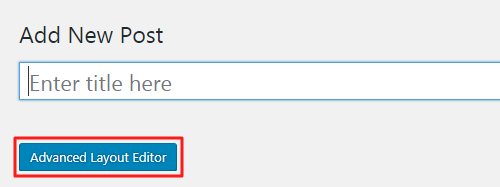
- Click on the “Advanced Layout Editor” button to display the avia layout builder.
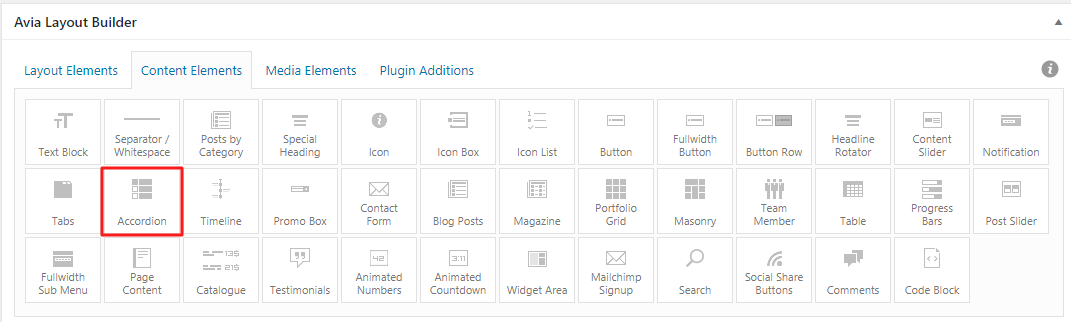
- Select the “Accordion” element under the Content Elements section.
Add Accordion tabs
After adding the accordion element on to the page, drag it above or below other elements to place it to suit your design and click on the newly added accordion element to open more options.
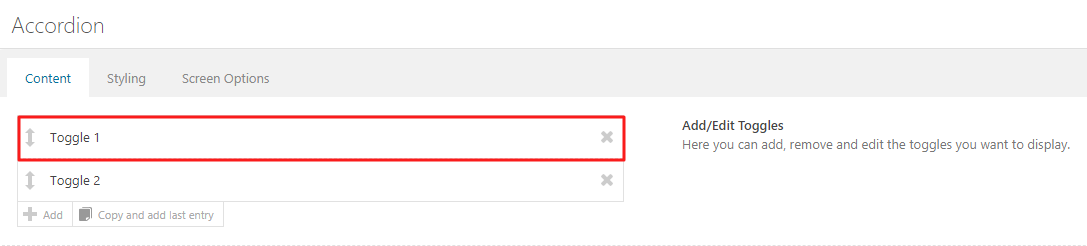
By default to get you quickly started, Accordion element comes with substitute tabs whose content can be easily replaced by clicking on it.
Add Accordion content
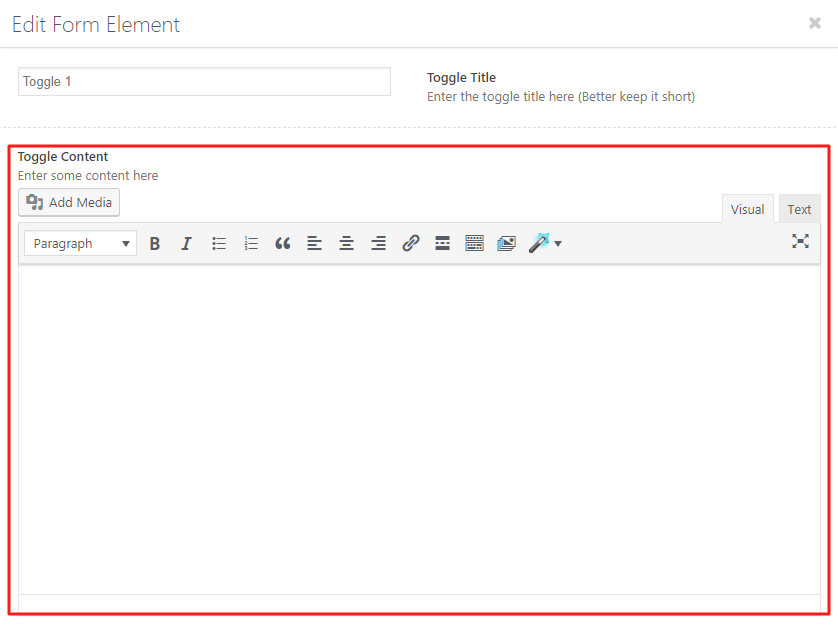
To add the tab content click on the accordion element and open the tab options. Here each tab can have it’s own content.
Code Snippets
Shortcode
[av_toggle_container initial='0' mode='accordion' sort='' custom_class='' av_uid='av-w8wcwc']
[av_toggle title='Toggle 1' tags='' av_uid='av-37adsc']
Toggle Content for first tab goes here
[/av_toggle]
[av_toggle title='Toggle 2' tags='' av_uid='av-vu501g']
Toggle Content for second tab goes here
[/av_toggle]
[/av_toggle_container]
Customization
To access the styling options of the accordion element, double-click on the accordion element and select the styling tab here you can change the styles for the default, active and hover state along with options to change the color of the text, background and border of the accordion tabs.
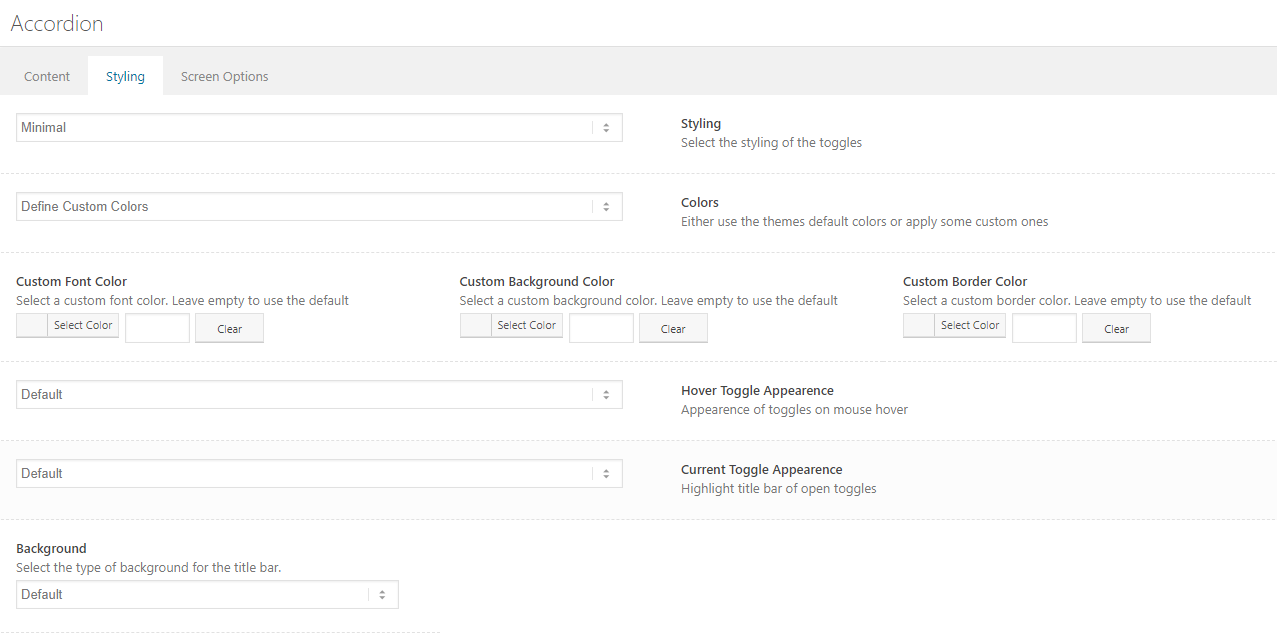
Using custom code we can further change the way the tabs, text, background, border, icons and tab content look and behave.
NOTE: Before we start customization, enable custom CSS class name support from Enfold theme options > Layout Builder so we can easily target specific elements. For the below examples to work please assign a class name “my-custom-tabs” to your accordion element or simply use the below accordion element shortcode to which we have already applied a custom class.
[av_toggle_container initial='0' mode='accordion' sort='' styling='' colors='' font_color='' background_color='' border_color='' av_uid='av-jlaaf8in' custom_class='my-custom-tabs']
[av_toggle title='Toggle 1' tags='' av_uid='av-3x8ipn'][/av_toggle]
[av_toggle title='Toggle 2' tags='' av_uid='av-2c0jrf'][/av_toggle]
[/av_toggle_container]
Default tab style:
The default tab styles can be changed form the tab styling options CSS snippets to custom style the default tab styles:
Tab Title
Tab title font, size, color and other properties can be changed by using the below code.
/* Tab Title */

.my-custom-tabs .toggler {
    font-family: 'Roboto', sans-serif!important;
    font-size: 18px;
    line-height: 1em;
    color: #000;
    text-transform: capitalize;
    font-weight: bolder;
}Tab Background
/* Tab Background */

.my-custom-tabs .toggler {
    background: blue;
}Tab border
/* Default tab border */
.my-custom-tabs .toggler {
    border: none;
}
Tab Title alignment
/* Tab title alignment */
.my-custom-tabs .toggler {
    text-align: center;  /* left | center | right*/
}
Tab style on hover
Tab styles for the hover state can be changed from the Tab options > Styling > Hover Toggle Appearance. Double click the Accordion element to access the Tab Styling options and define a custom color for Tab background and font color.
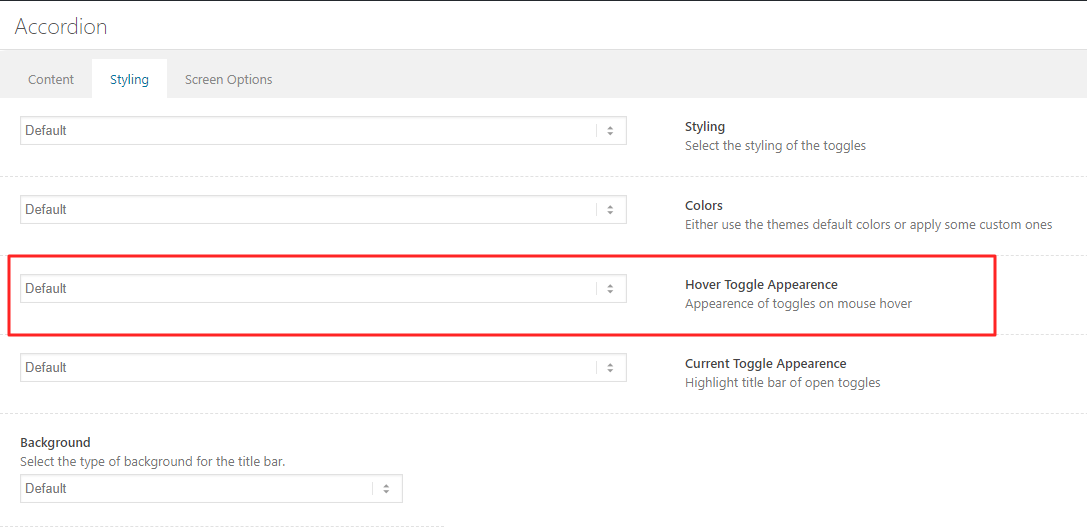
To add custom styles using the CSS, please copy the below snippets to your website:
Tab Title
/* Tab tile */
.my-custom-tabs .activeTitle.toggler:hover,
.my-custom-tabs .toggler:hover {
    color: red;
}Tab Background
/* Tab background */
.my-custom-tabs .activeTitle.toggler:hover,
.my-custom-tabs .toggler:hover {
      background: gold;
}Tab Border
/* Tab border */
.my-custom-tabs .activeTitle.toggler:hover,
.my-custom-tabs .toggler:hover {
      border: red;
}
Active tab style
Active or Current Tab style options can be accessed by double-clicking the Accordion element to open the Accordion Options > Styling > Current Toggle Appearence
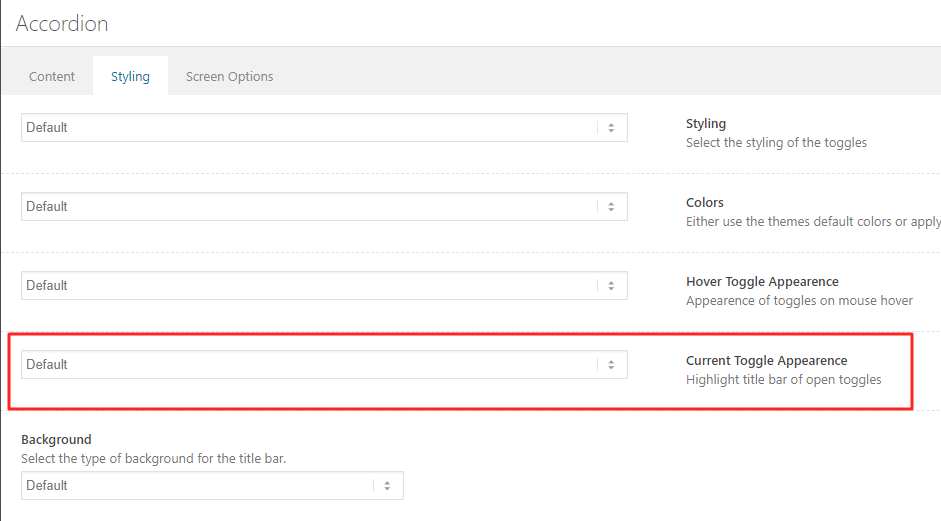
To add custom CSS styling to the Active tabs please use the below CSS snippets:
Tab Title
/* Active Tab Title */
.my-custom-tabs .activeTitle.toggler {
      color: blue;
}Tab Background
/* Active Tab Title */
.my-custom-tabs .activeTitle.toggler {
      background: orange ;
}Tab border
/* Active Tab Title */
.my-custom-tabs .activeTitle.toggler {
      border: blue;
}
Tab icon style
To change the default accordion icons and use a custom icon from the theme use the below CSS snippet. The below CSS code snippet will help you change the following:
- Add custom icons to the tabs by updating the icon unicode value in the CSS code.
- Tab icon active/hover state
- Tab icon color
- Tab icon size
Default Icons
/* Remove default icon border */
.my-custom-tabs .toggle_icon {
    border:none;
}

/* Hide default icons */
.my-custom-tabs .toggle_icon .vert_icon,
.my-custom-tabs .toggle_icon .hor_icon {
    display:none;
}
Add custom icon
Icon styles such as the position, color, size, etc can be defined in the below CSS selector:
/* Custom Accordion Icon */
.my-custom-tabs .toggle_icon {
    display: inline-block!important;
}
.my-custom-tabs .toggle_icon:before {
    font-family: 'entypo-fontello';
    content:'e817';
    position: absolute;
    font-size: 18px;
    top:50%;
    transform: translateY(-50%);
    left: 0px;
    line-height: 0;
    color:red;
}Tab Icons on hover
/* Tab icon on hover */
.my-custom-tabs .toggler:hover .toggle_icon:before {
    color:gold;
}
Active Tab icon
/* Active tab icon */
.my-custom-tabs .activeTitle .toggle_icon:before {
    font-family: 'entypo-fontello';
    content:'e81a';
}
Tab content style
Tab styles of the tab content can be changed using the below CSS snippets:
Tab Content
/* Tab content */
.my-custom-tabs .toggle_content {
    font-size: 20px;
    line-height: 1.4em;
}Content Background
/* Tab content background */
.my-custom-tabs .toggle_content {
    background: #f2f6fa;
}Content border
/* Tab content border */
.my-custom-tabs .toggle_content {
    border:2px solid red;
}Content link text
/* Tab content link text */
.my-custom-tabs .toggle_content a {
    color: red;
}
Alternate tab colors
To assign alternate tab colors first, add a custom CSS class name “av-accordion-bg-alternate” and use the below CSS snippet. The below CSS code snippet will help you change the following:
- Even tab color
- Odd tab color
Toggle content using accordion
Lorem ipsum dolor sit amet, consectetuer adipiscing elit. Aenean commodo ligula eget dolor. Aenean massa. Cum sociis natoque penatibus et magnis dis parturient montes, nascetur ridiculus mus. Donec quam felis, ultricies nec, pellentesque eu, pretium quis, sem. Nulla consequat massa quis enim.
Open multiple tabs at once
Donec pede justo, fringilla vel, aliquet nec, vulputate eget, arcu. In enim justo, rhoncus ut, imperdiet a, venenatis vitae, justo. Nullam dictum felis eu pede mollis pretium. Integer tincidunt. Cras dapibus. Vivamus elementum semper nisi. Aenean vulputate eleifend tellus.
Toggle one tab at a time
Nullam sagittis. Suspendisse pulvinar, augue ac venenatis condimentum, sem libero volutpat nibh, nec pellentesque velit pede quis nunc. Vestibulum ante ipsum primis in faucibus orci luctus et ultrices posuere cubilia Curae; Fusce id purus. Ut varius tincidunt libero. Phasellus dolor. Maecenas vestibulum mollis
Add widgets or media content
Lorem ipsum dolor sit amet, consectetuer adipiscing elit. Aenean commodo ligula eget dolor. Aenean massa. Cum sociis natoque penatibus et magnis dis parturient montes, nascetur ridiculus mus. Donec quam felis, ultricies nec, pellentesque eu, pretium quis, sem. Nulla consequat massa quis enim.
Code snippets:
CSS
/*----------------------------------------
// CSS - Alternate tab color
//--------------------------------------*/

/* Even tab color */
.av-accordion-bg-alternate .av_toggle_section:nth-child(even) .toggler  {
  background: #3369e7;
}

/*Odd tab color */
.av-accordion-bg-alternate .av_toggle_section:nth-child(odd) .toggler  {
  background: #00aeff;
}

/* Remove default tab style */
.av-accordion-bg-alternate .toggler,
.av-accordion-bg-alternate .toggler.activeTitle:hover {
  border:none;
  color:#eee;
}
Multicolor tabs
Each tab can have a unique color first, add a custom CSS class name “av-accordion-bg-multi” and use the below CSS snippet. In the CSS code below, the number of the tab is represented by nth-child(x).
Toggle content using accordion
Lorem ipsum dolor sit amet, consectetuer adipiscing elit. Aenean commodo ligula eget dolor. Aenean massa. Cum sociis natoque penatibus et magnis dis parturient montes, nascetur ridiculus mus. Donec quam felis, ultricies nec, pellentesque eu, pretium quis, sem. Nulla consequat massa quis enim.
Open multiple tabs at once
Donec pede justo, fringilla vel, aliquet nec, vulputate eget, arcu. In enim justo, rhoncus ut, imperdiet a, venenatis vitae, justo. Nullam dictum felis eu pede mollis pretium. Integer tincidunt. Cras dapibus. Vivamus elementum semper nisi. Aenean vulputate eleifend tellus.
Toggle one tab at a time
Nullam sagittis. Suspendisse pulvinar, augue ac venenatis condimentum, sem libero volutpat nibh, nec pellentesque velit pede quis nunc. Vestibulum ante ipsum primis in faucibus orci luctus et ultrices posuere cubilia Curae; Fusce id purus. Ut varius tincidunt libero. Phasellus dolor. Maecenas vestibulum mollis
Add widgets or media content
Lorem ipsum dolor sit amet, consectetuer adipiscing elit. Aenean commodo ligula eget dolor. Aenean massa. Cum sociis natoque penatibus et magnis dis parturient montes, nascetur ridiculus mus. Donec quam felis, ultricies nec, pellentesque eu, pretium quis, sem. Nulla consequat massa quis enim.
Code snippets:
CSS
/*----------------------------------------
// CSS - Multicolor tabs
//--------------------------------------*/

/* Tab 1 */
.av-accordion-bg-multi .av_toggle_section:nth-child(1) .toggler  {
  background: #b84592;
}
/* Tab 2 */
.av-accordion-bg-multi .av_toggle_section:nth-child(2) .toggler  {
  background: #3369e7;
}
/* Tab 3 */
.av-accordion-bg-multi .av_toggle_section:nth-child(3) .toggler  {
  background: #00aeff;
}
/* Tab 4 */
.av-accordion-bg-multi .av_toggle_section:nth-child(4) .toggler  {
  background: #003666;
}
/* Tab title color*/
.av-accordion-bg-multi .toggler,
.av-accordion-bg-multi .toggler.activeTitle:hover  {
  color: #FFF;
  border:none;
}

/* Hide default icon */

.av-accordion-bg-multi .toggle_icon {
    display: none;
}

.av-accordion-bg-multi .toggler {
	padding-left:20px;
	font-size: 18px;
	font-weight: bolder;
}

/*Toggle content area */

.av-accordion-bg-multi .toggle_content {
	background: #f2f6fa;
}
Tab Shapes
The tab shape can be changed using custom CSS. To make the tabs have rounded corners, please reduce the border-radius value in the below code.
Custom CSS class assigned: av-accordion-pill
Business Tactics and Strategy
Most of the words of Lorem Ipsum dummy copy that are pasted into browser text boxes, content management systems, or word processors will get underlined with red or green wavy lines by the spell checker. This can be distracting during development as turning it off temporarily is a hassle.
Foreign Trade Studies
Most of the words of Lorem Ipsum dummy copy that are pasted into browser text boxes, content management systems, or word processors will get underlined with red or green wavy lines by the spell checker. This can be distracting during development as turning it off temporarily is a hassle.
The Six Figure Jobs
Most of the words of Lorem Ipsum dummy copy that are pasted into browser text boxes, content management systems, or word processors will get underlined with red or green wavy lines by the spell checker. This can be distracting during development as turning it off temporarily is a hassle.
Latest investing trends
Most of the words of Lorem Ipsum dummy copy that are pasted into browser text boxes, content management systems, or word processors will get underlined with red or green wavy lines by the spell checker. This can be distracting during development as turning it off temporarily is a hassle.
Code snippets:
CSS
/*----------------------------------------
// CSS - Accordion tab shape
//--------------------------------------*/


/* Tab shape */
.av-accordion-pill .toggler  {
 border-radius: 50px!important;
 background: #48b8e7;
 color: #FFF;
}

/* Hover and active colors */
.av-accordion-pill .toggler:hover,
.av-accordion-pill .toggler.activeTitle:hover  {
    background: #0d9ddb;
    color: #FFF;
}

/* Hide default icon */

.av-accordion-pill .toggle_icon {
    display: none;
}

.av-accordion-pill .toggler {
    padding-left:20px;
    font-size: 18px;
    font-weight: bolder;
}

/*Toggle content area */

.av-accordion-pill .toggle_content {
    background: #f2f6fa;
    width: calc(100% - 50px);
    position: relative;
    left: 50%;
    transform: translateX(-50%);
}
Animated tabs
Accordion tabs can be animated using custom CSS. In the below example we have created a custom shake animation and applied it to the hover state of the tabs.
Custom CSS class assigned : av-accordion-tab-animation
Toggle content using accordion
Lorem ipsum dolor sit amet, consectetuer adipiscing elit. Aenean commodo ligula eget dolor. Aenean massa. Cum sociis natoque penatibus et magnis dis parturient montes, nascetur ridiculus mus. Donec quam felis, ultricies nec, pellentesque eu, pretium quis, sem. Nulla consequat massa quis enim.
Open multiple tabs at once
Donec pede justo, fringilla vel, aliquet nec, vulputate eget, arcu. In enim justo, rhoncus ut, imperdiet a, venenatis vitae, justo. Nullam dictum felis eu pede mollis pretium. Integer tincidunt. Cras dapibus. Vivamus elementum semper nisi. Aenean vulputate eleifend tellus.
Toggle one tab at a time
Nullam sagittis. Suspendisse pulvinar, augue ac venenatis condimentum, sem libero volutpat nibh, nec pellentesque velit pede quis nunc. Vestibulum ante ipsum primis in faucibus orci luctus et ultrices posuere cubilia Curae; Fusce id purus. Ut varius tincidunt libero. Phasellus dolor. Maecenas vestibulum mollis
Add widgets or media content
Lorem ipsum dolor sit amet, consectetuer adipiscing elit. Aenean commodo ligula eget dolor. Aenean massa. Cum sociis natoque penatibus et magnis dis parturient montes, nascetur ridiculus mus. Donec quam felis, ultricies nec, pellentesque eu, pretium quis, sem. Nulla consequat massa quis enim.
Code snippets:
CSS
/*----------------------------------------
// CSS - Accordion tab animation
//--------------------------------------*/

/* Animate tab on hover */

.av-accordion-tab-animation .toggler:hover {
    animation: headShake 0.82s cubic-bezier(.36,.07,.19,.97);
}


/* Tab shape */

.av-accordion-tab-animation .toggler  {
 background: #48b8e7;
 color: #FFF;
}


/* Hover and active colors */

.av-accordion-tab-animation .toggler:hover,
.av-accordion-tab-animation .toggler.activeTitle:hover  {
    background: #0d9ddb;
    color: #FFF;
}

/* Hide default icon */

.av-accordion-tab-animation .toggle_icon {
    display: none;
}


/* Custom animation */

@keyframes headShake{
0%    { transform: translateX(0); }
6.5%  { transform: translateX(-6px) rotateY(-9deg); }
18.5% { transform: translateX(5px) rotateY(7deg); }
31.5% { transform: translateX(-3px) rotateY(-5deg); }
43.5% { transform: translateX(2px) rotateY(3deg); }
50%   { transform: translateX(0); }
}
Styling the sort filter
To custom style, the accordion tab filter as seen in the below example copy the CSS code to your site and assign a custom CSS class “av-accordion-tab-sort-filter” to the accordion tab element.
Toggle content using accordion
Lorem ipsum dolor sit amet, consectetuer adipiscing elit. Aenean commodo ligula eget dolor. Aenean massa. Cum sociis natoque penatibus et magnis dis parturient montes, nascetur ridiculus mus. Donec quam felis, ultricies nec, pellentesque eu, pretium quis, sem. Nulla consequat massa quis enim.
Open multiple tabs at once
Donec pede justo, fringilla vel, aliquet nec, vulputate eget, arcu. In enim justo, rhoncus ut, imperdiet a, venenatis vitae, justo. Nullam dictum felis eu pede mollis pretium. Integer tincidunt. Cras dapibus. Vivamus elementum semper nisi. Aenean vulputate eleifend tellus.
Toggle one tab at a time
Nullam sagittis. Suspendisse pulvinar, augue ac venenatis condimentum, sem libero volutpat nibh, nec pellentesque velit pede quis nunc. Vestibulum ante ipsum primis in faucibus orci luctus et ultrices posuere cubilia Curae; Fusce id purus. Ut varius tincidunt libero. Phasellus dolor. Maecenas vestibulum mollis
Add widgets or media content
Lorem ipsum dolor sit amet, consectetuer adipiscing elit. Aenean commodo ligula eget dolor. Aenean massa. Cum sociis natoque penatibus et magnis dis parturient montes, nascetur ridiculus mus. Donec quam felis, ultricies nec, pellentesque eu, pretium quis, sem. Nulla consequat massa quis enim.
Code snippets:
CSS
/*----------------------------------------
// CSS - Accordion tab sort filter
//--------------------------------------*/

/* Animate tab on hover */

.av-accordion-tab-sort-filter .taglist {
    background: #f3f3f5;
    padding:10px 5px;
    border-radius: 4px;
}
.av-accordion-tab-sort-filter .taglist a {
    background: #fff;
    border-radius: 4px;
    padding:5px 15px;
    margin:5px;
    color: #333;
    text-decoration:none;
}
.av-accordion-tab-sort-filter .taglist a.activeFilter {
    background: #3197d6;
    color:#efefef;
}
.av-accordion-tab-sort-filter .taglist .tag-seperator {
    display:none;
}
Accordion activate on hover
To activate the accordion tabs on hover please assign the CSS class name “av_accordion_hover_active” and add the below function to your child theme functions.php
Toggle content using accordion
Lorem ipsum dolor sit amet, consectetuer adipiscing elit. Aenean commodo ligula eget dolor. Aenean massa. Cum sociis natoque penatibus et magnis dis parturient montes, nascetur ridiculus mus. Donec quam felis, ultricies nec, pellentesque eu, pretium quis, sem. Nulla consequat massa quis enim.
Open multiple tabs at once
Donec pede justo, fringilla vel, aliquet nec, vulputate eget, arcu. In enim justo, rhoncus ut, imperdiet a, venenatis vitae, justo. Nullam dictum felis eu pede mollis pretium. Integer tincidunt. Cras dapibus. Vivamus elementum semper nisi. Aenean vulputate eleifend tellus.
Toggle one tab at a time
Nullam sagittis. Suspendisse pulvinar, augue ac venenatis condimentum, sem libero volutpat nibh, nec pellentesque velit pede quis nunc. Vestibulum ante ipsum primis in faucibus orci luctus et ultrices posuere cubilia Curae; Fusce id purus. Ut varius tincidunt libero. Phasellus dolor. Maecenas vestibulum mollis
Add widgets or media content
Lorem ipsum dolor sit amet, consectetuer adipiscing elit. Aenean commodo ligula eget dolor. Aenean massa. Cum sociis natoque penatibus et magnis dis parturient montes, nascetur ridiculus mus. Donec quam felis, ultricies nec, pellentesque eu, pretium quis, sem. Nulla consequat massa quis enim.
Code snippets:
Function
//---------------------------
// Accordion hover active
//---------------------------
function accordionActiveHover(){
    ?>
    <script>
        jQuery(document).ready(function() {
            jQuery('.av_accordion_hover_active .av_toggle_section').each(function(){
            	jQuery(this).on('hover', function(){
                	jQuery(this).find(".toggler").toggleClass('activeTitle');
                	jQuery(this).find(".toggle_wrap").css('display','block').toggleClass('active_tc');
            	});

            });
        });
    </script>
    <?php
}
add_action('wp_footer', 'accordionActiveHover');
Anchor links to according tab ID
Accordion tabs can be linked from a different page or the same page by using the tab ID’s. The URL pattern should be similar to the example below.
http://your-site.com/page/#toggle-id-46
Custom tab and toggle ID’s for prettier URL hashes
Tab ID’s are used to link to a tab section and since the tab ID’s are auto-generated it is usually in the format #toggle-id-4. To change the hashtags to a more human-readable and prettier hashtag, please edit the Custom Toggle ID in the Toggle item > Advanced > Developer Settings > For Developers: Custom Toggle ID.

If this field isn’t available on your installation, please make sure that the Enfold theme options > Layout Builder > Show Advanced Options > Hide Advanced Layout Builder Developer Options option is not disabled.
Disable certain accordion toggles
To disable certain accordion toggles from opening, please edit the toggle you would like to disable and give it a custom tab ID (“disabled-acc” in this example)
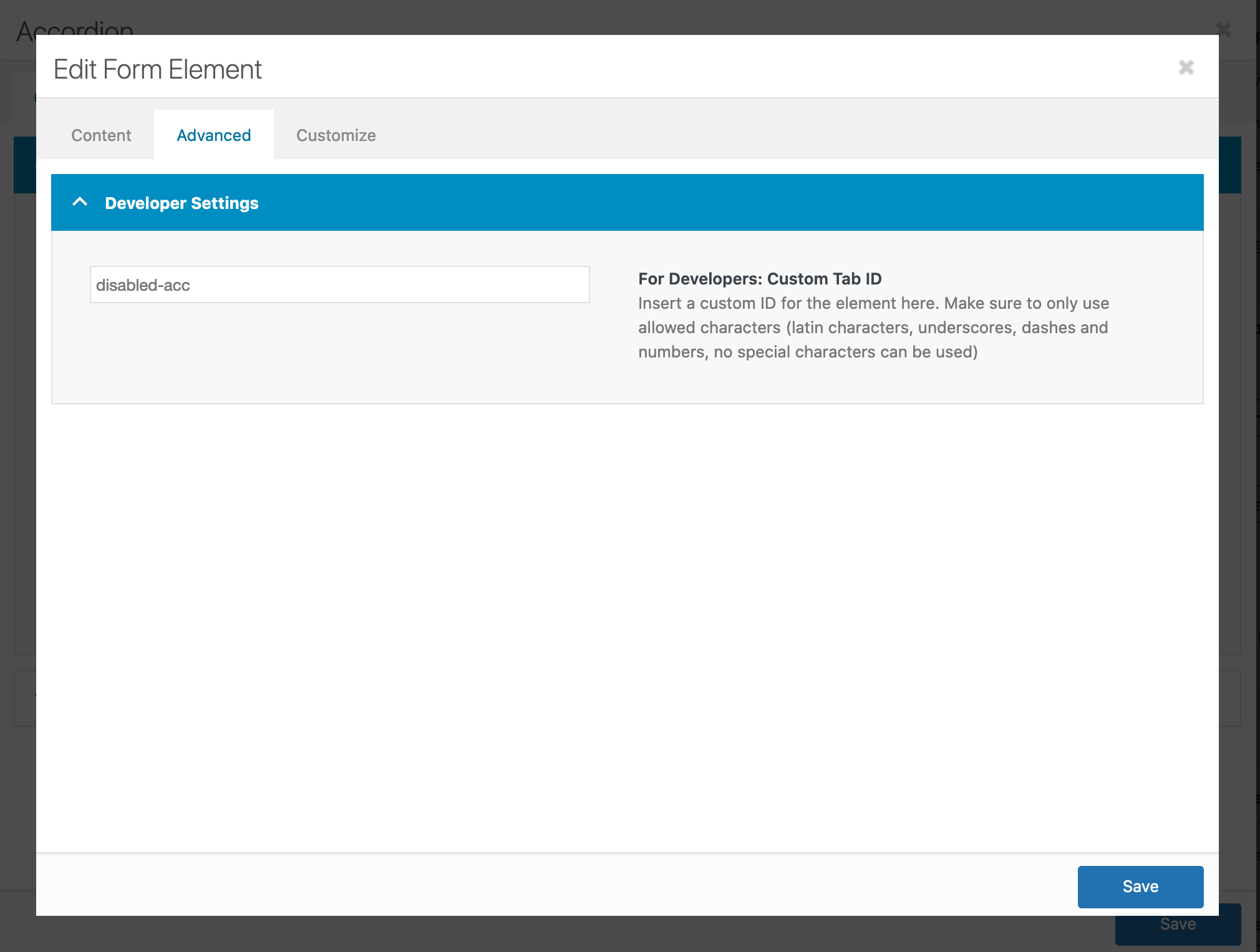
and then add following code to Quick CSS field in Enfold theme options > General Styling
.toggler[data-fake-id="#disabled-acc"] {
    pointer-events: none !important;
}
Custom styled tabs
Accordion style-1
The below accordion element has a CSS class name “av-accordion-style-1” assigned and styled using custom CSS. The easiest way to reproduce the below example is to copy the shortcode and CSS to your site.
Standard $25.00
Most of the words of Lorem Ipsum dummy copy that are pasted into browser text boxes, content management systems, or word processors will get underlined with red or green wavy lines by the spell checker. This can be distracting during development as turning it off temporarily is a hassle.
Premium $50.00
Most of the words of Lorem Ipsum dummy copy that are pasted into browser text boxes, content management systems, or word processors will get underlined with red or green wavy lines by the spell checker. This can be distracting during development as turning it off temporarily is a hassle.
Deluxe $75.00
Most of the words of Lorem Ipsum dummy copy that are pasted into browser text boxes, content management systems, or word processors will get underlined with red or green wavy lines by the spell checker. This can be distracting during development as turning it off temporarily is a hassle.
Code snippets:
Shortcode
[av_toggle_container initial='0' mode='accordion' sort='' styling='' colors='' font_color='' background_color='' border_color='' custom_class='av-accordion-style-1' av_uid='av-1e57ndj']
[av_toggle title='Standard <span class="extra-content"> $25.00</span>' tags='' av_uid='av-1csilt3']
Most of the words of Lorem Ipsum dummy copy that are pasted into browser text boxes, content management systems, or word processors will get underlined with red or green wavy lines by the spell checker. This can be distracting during development as turning it off temporarily is a hassle.

[av_button label='Order Now!' link='manually,#' link_target='' size='small' position='left' icon_select='yes' icon='ue859' font='entypo-fontello' color='theme-color' custom_bg='#444444' custom_font='#ffffff' custom_class='' admin_preview_bg='' av_uid='av-4pqc1j']
[/av_toggle]
[av_toggle title='Premium <span class="extra-content"> $50.00 </span> ' tags='' av_uid='av-18ytoqf']
Most of the words of Lorem Ipsum dummy copy that are pasted into browser text boxes, content management systems, or word processors will get underlined with red or green wavy lines by the spell checker. This can be distracting during development as turning it off temporarily is a hassle.

[av_button label='Order Now!' link='manually,#' link_target='' size='small' position='left' icon_select='yes' icon='ue859' font='entypo-fontello' color='theme-color' custom_bg='#444444' custom_font='#ffffff' custom_class='' admin_preview_bg='' av_uid='av-187ye7b']
[/av_toggle]
[av_toggle title='Deluxe <span class="extra-content"> $75.00 </span> ' tags='' av_uid='av-1665xhj']
Most of the words of Lorem Ipsum dummy copy that are pasted into browser text boxes, content management systems, or word processors will get underlined with red or green wavy lines by the spell checker. This can be distracting during development as turning it off temporarily is a hassle.

[av_button label='Order Now!' link='manually,#' link_target='' size='small' position='left' icon_select='yes' icon='ue859' font='entypo-fontello' color='theme-color' custom_bg='#444444' custom_font='#ffffff' custom_class='' admin_preview_bg='' av_uid='av-14323iv'][av_textblock av_uid='av-3v2ao7']
[/av_toggle][av_textblock av_uid='av-780pxj'][av_textblock av_uid='av-bhxhiv']
[/av_toggle_container]

[av_textblock size='' av-medium-font-size='' av-small-font-size='' av-mini-font-size='' font_color='' color='' av-desktop-hide='' av-medium-hide='' av-small-hide='' av-mini-hide='' id='' custom_class='' av_uid='av-eavykn']
[/av_textblock]
Accordion style-2
The below accordion element has a CSS class name “av-accordion-style-2” assigned and styled using custom CSS. The easiest way to reproduce the below example is to copy the shortcode and CSS to your site.
Standard 2 TB File Storage and Easy File Manager
Most of the words of Lorem Ipsum dummy copy that are pasted into browser text boxes, content management systems, or word processors will get underlined with red or green wavy lines by the spell checker. This can be distracting during development as turning it off temporarily is a hassle.
Business 5 TB File Storage and Complete Admin Control
Most of the words of Lorem Ipsum dummy copy that are pasted into browser text boxes, content management systems, or word processors will get underlined with red or green wavy lines by the spell checker. This can be distracting during development as turning it off temporarily is a hassle.
Premium 10 TB File Storage, Version control and Collaboration
Most of the words of Lorem Ipsum dummy copy that are pasted into browser text boxes, content management systems, or word processors will get underlined with red or green wavy lines by the spell checker. This can be distracting during development as turning it off temporarily is a hassle.
Code snippets:
Shortcode
[av_toggle_container initial='0' mode='accordion' sort='' styling='' colors='' font_color='' background_color='' border_color='' custom_class='av-accordion-style-2' av_uid='av-11ilh9z']
[av_toggle title='Standard <span class="extra-content"> 2 TB File Storage and Easy File Manager</span>' tags='' av_uid='av-3k7s13']
Most of the words of Lorem Ipsum dummy copy that are pasted into browser text boxes, content management systems, or word processors will get underlined with red or green wavy lines by the spell checker. This can be distracting during development as turning it off temporarily is a hassle.

[av_button label='Order Now!' link='manually,#' link_target='' size='small' position='left' icon_select='yes' icon='ue859' font='entypo-fontello' color='theme-color' custom_bg='#444444' custom_font='#ffffff' custom_class='' admin_preview_bg='' av_uid='av-xspb1j']
[/av_toggle]
[av_toggle title='Business  <span class="extra-content"> 5 TB File Storage and Complete Admin Control</span>' tags='' av_uid='av-wyyx3b']
Most of the words of Lorem Ipsum dummy copy that are pasted into browser text boxes, content management systems, or word processors will get underlined with red or green wavy lines by the spell checker. This can be distracting during development as turning it off temporarily is a hassle.

[av_button label='Order Now!' link='manually,#' link_target='' size='small' position='left' icon_select='yes' icon='ue859' font='entypo-fontello' color='theme-color' custom_bg='#444444' custom_font='#ffffff' custom_class='' admin_preview_bg='' av_uid='av-uui05j']
[/av_toggle]
[av_toggle title='Premium <span class="extra-content"> 10 TB File Storage, Version control and Collaboration </span>' tags='' av_uid='av-tcceyv']
Most of the words of Lorem Ipsum dummy copy that are pasted into browser text boxes, content management systems, or word processors will get underlined with red or green wavy lines by the spell checker. This can be distracting during development as turning it off temporarily is a hassle.

[av_button label='Order Now!' link='manually,#' link_target='' size='small' position='left' icon_select='yes' icon='ue859' font='entypo-fontello' color='theme-color' custom_bg='#444444' custom_font='#ffffff' custom_class='' admin_preview_bg='' av_uid='av-s2x987'][av_textblock av_uid='av-2tyk93']
[/av_toggle][av_textblock av_uid='av-3y4gpz'][av_textblock av_uid='av-846k13']
[/av_toggle_container]

[av_textblock size='' av-medium-font-size='' av-small-font-size='' av-mini-font-size='' font_color='' color='' av-desktop-hide='' av-medium-hide='' av-small-hide='' av-mini-hide='' id='' custom_class='' av_uid='av-8uzhon']
[/av_textblock]
Accordion style-3
The below accordion element has a CSS class name “av-accordion-style-2” assigned and styled using custom CSS. The easiest way to reproduce the below example is to copy the shortcode and CSS to your site.
Available Plans & Features
Most of the words of Lorem Ipsum dummy copy that are pasted into browser text boxes, content management systems, or word processors will get underlined with red or green wavy lines by the spell checker. This can be distracting during development as turning it off temporarily is a hassle.
Code snippets:
Shortcode
[/av_textblock]
Resource
Contributed video:
