


Post Slider
Overview
The post slider element allows you to display a 2-5 column slider with entries, that are fetched from any of your Themes active Taxonomies. This also includes Taxonomies that are added via Plugins. So for example, if you have a shop plugin active you will also be able to display the latest Products.
Examples of post slider.
Code Snippets
Shortcode
[av_postslider link='portfolio_entries,60,51,37,20,61,38,22,62,63,23,39,54,64,40' wc_prod_visible='' prod_order_by='' prod_order='' columns='3' items='9' offset='0' contents='title' preview_mode='auto' image_size='portfolio' autoplay='no' interval='5' custom_class='' av_uid='av-6pfjb8']
Customization
Post slider with round thumbnails
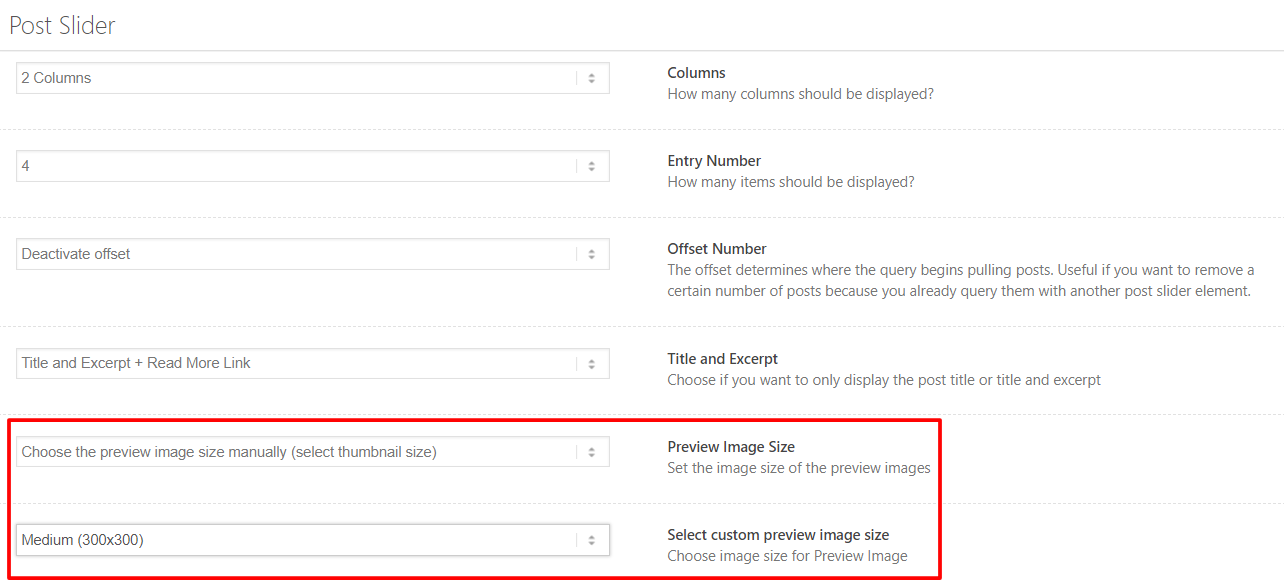
To change the shape of the thumbnails in the post slider please use the below CSS. Best results are achieved when the thumbnail is square in share or else the images will look stretched. In the Post Slider option select the preview image size as 300×300.
/*----------------------------------------
// CSS - Post slider with round thumbs
//--------------------------------------*/

.avia-content-slider .slide-image,
.avia-content-slider .slide-image img {
    border-radius: 200px;
    background: transparent!important;
    width: 200px;
    min-width:200px;
    height: 200px;
}
Display post tags on Post Slider
You can add following code to bottom of functions.php file of your child theme in Appearance > Theme Editor to display tags on Post Slider element
add_filter('avf_postslider_posts_meta_data_show', 'display_tags_on_post_slider');
function display_tags_on_post_slider(){
	return true;
}
Note: Filter was added in Enfold 5.4.
Title, Meta & Excerpt
Title, meta and excerpt text inherits the style which is set in the theme options. To add custom CSS style to this element please view the CSS code snippet below.
/*----------------------------------------
// CSS - Post slider titel, meta and excerpt
//--------------------------------------*/

/* Title */
.avia-content-slider .slide-entry-title  {
font-family: 'Playfair Display', serif;
text-transform:uppercase;
letter-spacing:.45em;
}

/* Meta area */
.avia-content-slider .slide-meta,
.avia-content-slider .slide-meta a {
	 font-size:11px;
	 color:#ddd;
	}

/* Comments */
.avia-content-slider .slide-meta .slide-meta-comments a {
	/* YOUR STYLE HERE */
}

/* separator */
.avia-content-slider .slide-meta .slide-meta-del {
	/* YOUR STYLE HERE */
}

/* Date */
.avia-content-slider .slide-meta .slide-meta-time {
	/* YOUR STYLE HERE */
}

/* Excerpt content*/
#top .avia-content-slider .slide-entry-excerpt {
	font-family: 'Roboto Mono', monospace;
font-size:13px;
line-height:1.9em;
}
/* Text area  */
#top .avia-content-slider .slide-content {
/* 	background-color:gold; */
	}
#top .avia-content-slider article.slide-entry {
margin-bottom:40px;
}

#top .avia-content-slider .avia-content-slider-inner {
height: 100% !important;
}

/* Read more link */
#top .avia-content-slider .read-more-link {
		background-color:#efefef;
		display:inline-block;
		padding:0 0 0 10px;
		font-size:10px;
	}
Border, shadow and background color
The look and feel of the post slider element can be completely changed with the help of custom CSS snippets.
/*----------------------------------------
// CSS - Post slider border, shadow and background
//--------------------------------------*/
#top .avia-content-slider {
padding:0 10px;
}
#top .avia-content-slider article.slide-entry {
background: #f6f6f6;
/*border: 1px solid rgb(160, 160, 160);*/
margin-bottom:40px;
}

/* Text area  */
#top .avia-content-slider .slide-content {
	padding:30px 20px;
	margin-top:-10px;
	}
#top .avia-content-slider-inner {
height: 100% !important;
}

/* Shadow on hover */
#top .avia-content-slider article.slide-entry
 {
  box-shadow: 0 1px 3px rgba(0,0,0,0.12), 0 1px 2px rgba(0,0,0,0.24);
  transition: all 0.3s cubic-bezier(.25,.8,.25,1);
}
#top .avia-content-slider article.slide-entry:hover {
  box-shadow: 0 14px 28px rgba(0,0,0,0.25), 0 10px 10px rgba(0,0,0,0.22);
}
Overlay effect for post slider
We can add custom styled overlay effect for the post slider using CSS snippet.
/*----------------------------------------
// CSS - Post slider Overlay
//--------------------------------------*/

/* Overlay */
#top .avia-content-slider .slide-entry .slide-content {
  	position: absolute;
  	top: 50%;
  	left: 50%;
  	transform: translate(-50%, -50%);
  	background: rgba(0,0,0,.65);
  	padding: 20px;
  	width:100%;
  	height:100%;
}

/* Title */
.avia-content-slider .slide-entry-title  {
  	color:#FFF;
	font-family: 'Playfair Display', serif;
	text-transform:uppercase;
	letter-spacing:.45em;
}

/* Meta area */
.avia-content-slider .slide-meta,
.avia-content-slider .slide-meta a {
	 font-size:11px;
	 color:#ddd;
}

/* Excerpt */
#top .avia-content-slider .slide-entry-excerpt {
font-size:13px;
line-height:1.9em;
color:#FFF;
}

/* Read more link */
#top .avia-content-slider .read-more-link {
    color: #FFF!important;
    background-color: #efefef;
    padding: 0 0 0 10px;
    font-size: 10px;
    position: absolute;
    margin-top: 15px;
	}
Random Post
To display random post in the post slider add the below code to your functions.php file.
//------------------------------
// php -  Display random post
//------------------------------

add_filter('avia_post_slide_query', 'enfold_customization_query_custom');
function enfold_customization_query_custom( $query ) {
	$query['orderby'] = 'rand';
	return $query;
}
How to add an order/orderby option to the blog/post slider/portfolio/masonry grid element
Some users asked us how they can set a different order for their blog/post slider/portfolio/masonry grid elements. The filter solution here: https://www.kriesi.at/documentation/enfold/change-the-sort-order-of-portfolio-elements/ is not flexible because it affects all elements and all custom queries. Since Enfold 2.7.1 it’s possible to add some custom order/orderby options to the blog/post slider/portfolio/masonry grid settings which enable you to change the sort order for each element independently. Insert this code into the child theme functions.php file:
if(!function_exists('avia_custom_query_extension'))
{
    function avia_custom_query_extension($query, $params)
    {
        global $avia_config;
        if(!empty($avia_config['avia_custom_query_options']['order']))
        {
            $query['order'] = $avia_config['avia_custom_query_options']['order'];
        }

        if(!empty($avia_config['avia_custom_query_options']['orderby']))
        {
            $query['orderby'] = $avia_config['avia_custom_query_options']['orderby'];
        }

        unset($avia_config['avia_custom_query_options']);

        return $query;
    }

    add_filter('avia_masonry_entries_query', 'avia_custom_query_extension', 10, 2);
    add_filter('avia_post_grid_query', 'avia_custom_query_extension', 10, 2);
    add_filter('avia_post_slide_query', 'avia_custom_query_extension', 10, 2);
    add_filter('avia_blog_post_query', 'avia_custom_query_extension', 10, 2);
    add_filter('avf_magazine_entries_query', 'avia_custom_query_extension', 10, 2);

    add_filter('avf_template_builder_shortcode_elements','avia_custom_query_options', 10, 1);
    function avia_custom_query_options($elements)
    {
        $allowed_elements = array('av_blog','av_masonry_entries','av_postslider','av_portfolio','av_magazine');

        if(isset($_POST['params']['allowed']) && in_array($_POST['params']['allowed'], $allowed_elements))
        {
            $elements[] = array(
                "name" => __("Custom Query Orderby",'avia_framework' ),
                "desc" => __("Set a custom query orderby value",'avia_framework' ),
                "id"   => "orderby",
                "type" 	=> "select",
                "std" 	=> "",
                "subtype" => array(
                    __('Default Order',  'avia_framework' ) =>'',
                    __('Title',  'avia_framework' ) =>'title',
                    __('Random',  'avia_framework' ) =>'rand',
                    __('Date',  'avia_framework' ) =>'date',
                    __('Author',  'avia_framework' ) =>'author',
                    __('Name (Post Slug)',  'avia_framework' ) =>'name',
                    __('Modified',  'avia_framework' ) =>'modified',
                    __('Comment Count',  'avia_framework' ) =>'comment_count',
                    __('Page Order',  'avia_framework' ) =>'menu_order')
            );

            $elements[] = array(
                "name" => __("Custom Query Order",'avia_framework' ),
                "desc" => __("Set a custom query order",'avia_framework' ),
                "id"   => "order",
                "type" 	=> "select",
                "std" 	=> "",
                "subtype" => array(
                    __('Default Order',  'avia_framework' ) =>'',
                    __('Ascending Order',  'avia_framework' ) =>'ASC',
                    __('Descending Order',  'avia_framework' ) =>'DESC'));
        }

        return $elements;
    }

    add_filter('avf_template_builder_shortcode_meta', 'avia_custom_query_add_query_params_to_config', 10, 4);
    function avia_custom_query_add_query_params_to_config($meta, $atts, $content, $shortcodename)
    {
        global $avia_config;
        if(empty($avia_config['avia_custom_query_options'])) $avia_config['avia_custom_query_options'] = array();

        if(!empty($atts['order']))
        {
            $avia_config['avia_custom_query_options']['order'] = $atts['order'];
        }

        if(!empty($atts['orderby']))
        {
            $avia_config['avia_custom_query_options']['orderby'] = $atts['orderby'];
        }

        return $meta;
    }
}
and save the file. Then go to the blog/post slider/portfolio/masonry grid element settings screen, scroll to the bottom of the option window and configure the order/orderby settings. Then save the template and page and the posts should be displayed based on the new sort order.
Change Post Slider excerpt length
This is a function to change the length of the excerpts on the Post Slider element:
add_filter('avf_postgrid_excerpt_length','avf_increase_postgrid_excerpt_length', 10, 1);

function avf_increase_postgrid_excerpt_length($prepare_excerpt) {
	$prepare_excerpt = 300;
	return $prepare_excerpt;
}
Resource
Contributed video:
