

Node.js is a JavaScript runtime that allows JavaScript to run outside the browser for server-side development. It provides access to system-level features such as the file system.
- Uses an asynchronous and non-blocking architecture.
- Handles multiple requests efficiently with minimal resource usage.
- Commonly used for building APIs, chat applications, and streaming services.
- NPM (Node Package Manager) is a tool that comes with Node.js and is used to manage project dependencies and configurations.
Node.js Request Handling Process
Node.js handles client requests using an event-driven architecture with the Event Loop and Thread Pool to ensure efficient and scalable performance.
- The client sends a request to the Node.js web server.
- The request can be blocking (synchronous) or non-blocking (asynchronous).
- Node.js receives the request and places it in the Event Queue.
- The Event Loop continuously checks the queue and processes requests in FIFO (First In, First Out) order.
Request Processing
Requests are handled differently based on whether they are blocking or non-blocking.
- If the request is non-blocking, it is processed immediately and the response is sent back to the client.
- If the request is blocking, it is sent to the Thread Pool.
Node.js is often described as single-threaded, but this is only partially true. While it uses a single main thread to execute your JavaScript code, the runtime as a whole is multi-threaded behind the scenes to handle background tasks
Thread Pool Handling
Manages blocking tasks in a web application by assigning them to available threads for execution.
- The Thread Pool contains a limited number of threads.
- If a thread is available, the blocking task is assigned to it.
- Once completed, the result is returned to the Event Loop, which sends the response to the client.
- If all threads are busy, new blocking requests must wait in a queue.
Note: A thread is like a worker that processes blocking tasks so the main application can continue running smoothly.
Blocking or Synchronous Operation
In a blocking or synchronous operation, tasks are executed one after another, and the program waits for each task to complete before moving to the next.
- Tasks are executed in a fixed sequence.
- The program waits until the current task is finished.
- Time-consuming operations can delay the entire program.
- Simple to understand but less efficient for multiple requests.
Example:
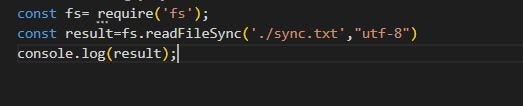
Reads a file synchronously using fs.readFileSync() in UTF-8 encoding and blocks execution.
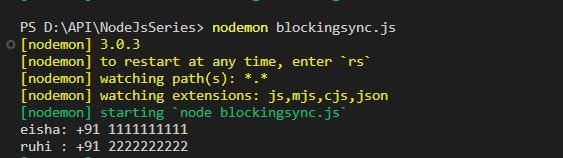
Shows the output of the file after it is completely read.
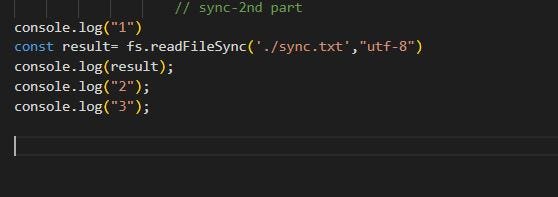
Adds logs to demonstrate how execution pauses during file reading.
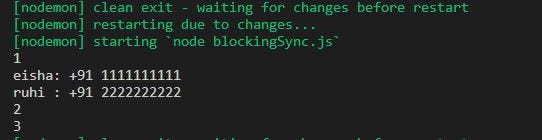
Displays execution oreder, confirming synchronous (blocking) behavior.
Non-Blocking or Asynchronous Operation
In a non-blocking or asynchronous operation, tasks are executed without waiting for previous ones to complete, allowing efficient handling of multiple operations.
- Tasks run in the background without blocking execution.
- Improves performance by handling multiple operations simultaneously.
- Uses callbacks or promises to handle results after completion.
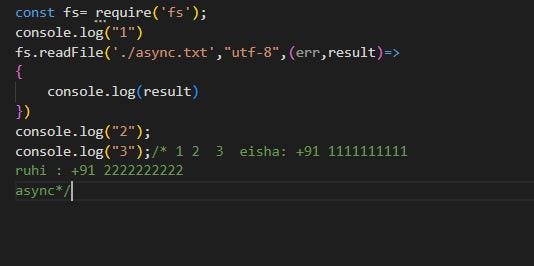
- Uses fs.readFile(), which reads files asynchronously without blocking program execution.
- Execution continues while the file is being read in the background.
- File content is printed later through a callback function.
- Demonstrates Node.js's non-blocking behavior.
