
NPM (Node Package Manager) is the default package manager for Node.js. It helps manage project dependencies, scripts, and third-party libraries, and is automatically installed with Node.js.
- It is mainly used to manage packages or modules, which are pre-built pieces of code that extend your Node.js application.
- The NPM registry hosts millions of free packages that you can download and use in your projects.
Package in Node.js
A package in NodeJS is a reusable module of code that adds functionality to your application. It can be anything from a small utility function to a full-featured library.
- Packages can be installed from the NPM registry.
- You can easily install, update, or remove packages with NPM commands.
Note: NPM packages are stored in the node_modules folder in your project.
Using NPM with NodeJS
To start using NPM in your project, follow these simple steps
Step 1: Install NodeJS and NPM
First, you need to install NodeJS. NPM is bundled with the NodeJS installation.
Step 2: Initialize a New NodeJS Project
In the terminal, navigate to your project directory and run:
npm init -yThis will create a package.json file, which stores metadata about your project, including dependencies and scripts.
Step 3: Install Packages with NPM
To install a package, use the following command
npm install <package-name>For example, to install the Express.js framework
npm install expressThis will add express to the node_modules folder and automatically update the package.json file with the installed package information.
Step 4: Run Scripts
You can also define custom scripts in the package.json file under the "scripts" section. For example:
{
    "scripts": {
        "start": "node app.js"
    }
}
Then, run the script with
npm startInstalling Packages Globally
To install packages that you want to use across multiple projects, use the -g flag:
npm install -g <package-name>Using NPM Package in the project
Create a file named app.js in the project directory to use the package
//app.js

const express = require('express');//import the required package
const app = express();

app.get('/', (req, res) => {
    res.send('Hello, World!');
});

app.listen(3000, () => {
    console.log('Server running at http://localhost:3000');
});
- express() creates an instance of the Express app.
- app.get() defines a route handler for HTTP GET requests to the root (/) URL.
- res.send() sends the response “Hello, World!” to the client.
- app.listen(3000) starts the server on port 3000, and console.log() outputs the server URL.
Managing Project Dependencies
1. Installing All Dependencies
In a NodeJS project, dependencies are stored in a package.json file. To install all dependencies listed in the file, run:
npm installThis will download all required packages and place them in the node_modules folder.
2. Installing a Specific Package
To install a specific package, use:
npm install <package-name>You can also install a package as a development dependency using:
npm install <package-name> --save-devUsage of Flags:
- --save: flag one can control where the packages are to be installed.
- --save-prod : Using this packages will appear in Dependencies which is also by default.
- --save-dev : Using this packages will get appear in devDependencies and will only be used in the development mode.
Note: If there is a package.json file with all the packages mentioned as dependencies already, just type npm install in terminal
3. Updating Packages
You can easily update packages in your project to their latest compatible versions based on the version constraints using the following command:
npm updateTo update a specific package, run:
npm update <package-name>4. Uninstalling Packages
To uninstall packages using npm, follow the below syntax:
npm uninstall <package-name>For uninstall Global Packages
npm uninstall package_name -gPopular NPM Packages for NodeJS
NPM has a massive library of packages. Here are a few popular packages that can enhance your NodeJS applications
- Express : A fast, minimal web framework for building APIs and web applications.
- Mongoose: A MongoDB object modeling tool for NodeJS.
- Axios: A promise-based HTTP client for making HTTP requests.
- React: A popular front-end library for building user interfaces.
- Dotenv: Loads environment variables from a
.envfile intoprocess.env. - Nodemon: Automatically restarts the Node.js server when file changes are detected during development.
- Socket.io: Enables real-time, bidirectional communication between clients and servers.
Versioning in NPM
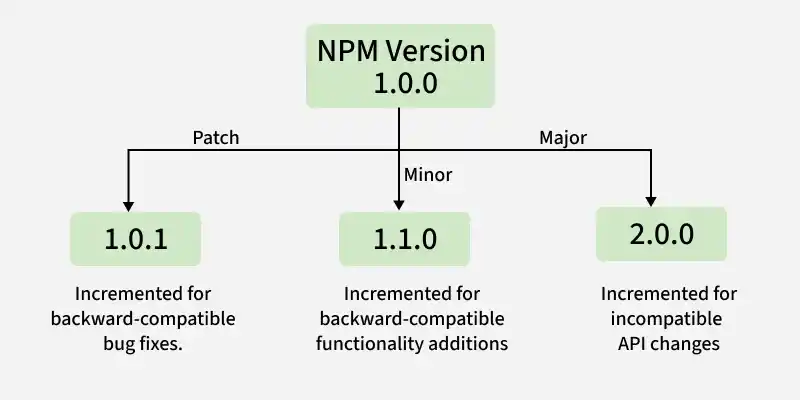
NPM allows you to manage package versions. This is important when you want to ensure that a specific version of a library is used across all environments.
Install a Specific Version
To install a specific version of a package, use:
npm install <package-name>@<version>For example:
npm install express@4.17.1This will install version 4.17.1 of Express, regardless of the latest version.
Also Read:
