
Third-party modules are external libraries installed via npm that extend Node.js functionality, such as handling HTTP requests and other complex tasks.
- Not included by default in Node.js and must be installed manually.
- Installed and managed using npm, which handles dependencies and updates.
- Provide ready-made solutions for routing, authentication, database integration, and other backend tasks.
Installing and Using Third-Party Modules
Node.js uses npm, the world’s largest software registry, to manage third-party packages. To install A module is straightforward; you just need to give the command "npm install express".
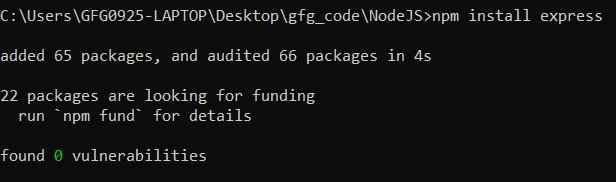
This command installs the popular express web framework and adds it to the project's node_modules directory. To use the installed module you just simply need to give the "require" command .
const express = require('express');
const app = express();
app.get('/', (req, res) => {
  res.send('Hello Martin!');
});
app.listen(3000, () => console.log('Server running on port 3000'));
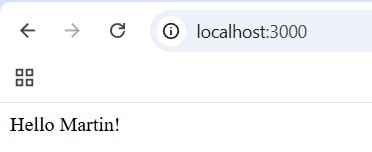
When you start running your server on port no 3000 you will see output Hello Martin!
Output:
Popular Third-Party Modules
Here are some widely adopted third-party modules:
1. Express
Express is a fast, minimalist web framework for Node.js that simplifies the process of building web applications and APIs. It provides robust routing, middleware support, and HTTP utility methods.
const express= require('express');
const app= express();
app.get('/',(req,res)=>{
    res.send('Hello from Express')
});
app.listen(8080,()=>{
    console.log('app created successfully');
})
Output:

2. Mongoose
Mongoose is an Object Data Modeling (ODM) library for MongoDB and Node.js. It provides a straightforward way to define schemas and interact with MongoDB using JavaScript objects.
const mongoose = require('mongoose');
mongoose.connect('mongodb://localhost:27017/testDB');
const userSchema = new mongoose.Schema({
  name: String,
  age: Number
});
const User = mongoose.model('User', userSchema);
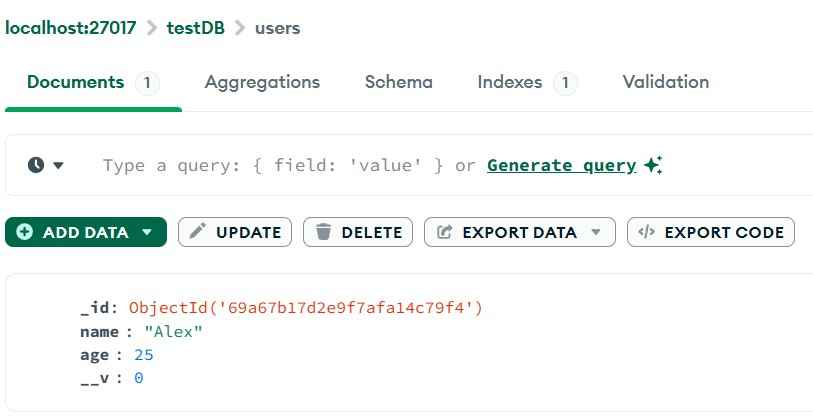
const newUser = new User({ name: 'Alex', age: 25 });
newUser.save().then(() => console.log('User saved!'));
Output:

You can check the data in the database ie. username , user id, user age etc.
3. Axios
Axios is a promise-based HTTP client for Node.js and the browser. It simplifies making HTTP requests, handling responses, and managing errors.
const axios = require('axios');
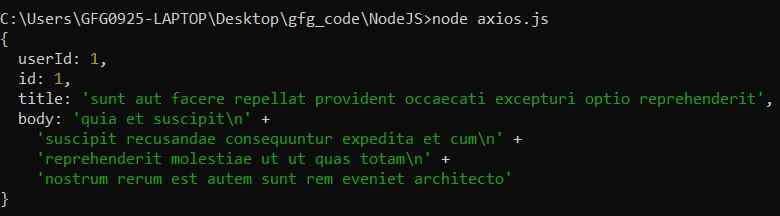
axios.get('https://jsonplaceholder.typicode.com/posts/1')
  .then(response => {
    console.log(response.data);
  })
  .catch(error => {
    console.error(error);
  });
Output:
4. lodash
Lodash is a utility library that provides helpful functions for manipulating arrays, objects,strings, and more—making JavaScript code cleaner and more readable.
const _ = require('lodash');
const numbers = [10, 5, 8, 3];
const sorted = _.sortBy(numbers);
console.log(sorted);
Output:

5. dotenv
dotenv is a zero-dependency module that loads environment variables from a .env file into process.env. It helps manage configuration settings securely and separately from code.
require('dotenv').config();
console.log(process.env.PORT); // 4000
PORT=4000
Output:

Note: You should have .env file in the same folder have Port no . i.e PORT= 4000
6. Nodemon
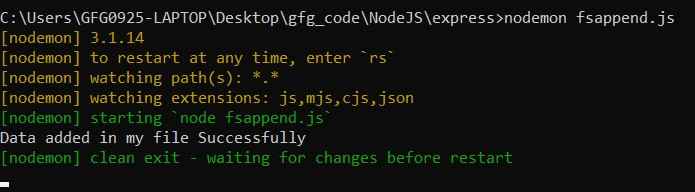
Nodemon is a development utility that automatically restarts your Node.js Application whenever file change. It is very useful during development to avoid manually stopping and restarting the server after every change.
const fs = require('fs');

// Append data to a file
fs.appendFile('demo.txt', 'New data added\n', (err) => {
    if (err) {
        console.error("Error writing to file:", err);
    } else {
        console.log("Data added in my file Successfully");
    }
});
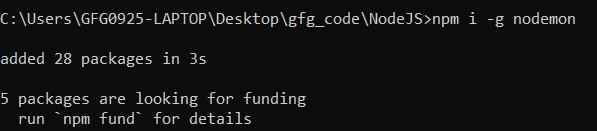
Installation : To install nodemon you need to run this command.
To run the command using nodemon
7. Jsonwebtoken
Jsonwebtoken (or jwt) is a module that enables you to generate and verify JSON Web Tokens, commonly used for implementing secure authentication in APIs.
const jwt = require('jsonwebtoken');
const token = jwt.sign({ username: 'Martin' }, 'secretKey');
console.log('JWT:', token);
const decoded = jwt.verify(token, 'secretKey');
console.log('Decoded:', decoded);
Output:

Advantages of Third-Party Modules
- Faster Development: Reduces development time by providing pre-built functionality.
- Reliability: Well-maintained modules receive regular updates and community support.
- Security: Popular modules are frequently patched to address known vulnerabilities.
- Maintainability: Promotes modular, reusable code and simplifies application maintenance.
