
Users expect fast and smooth navigation and slow-loading pages can lead to poor user experiences. Remix provides a powerful tool to optimize page load times with the PrefetchPageLinks component.
In this article, we'll explore what PrefetchPageLinks is, how it works, and how you can use it to boost the performance of your Remix applications.
What is PrefetchPageLinks in Remix?
PrefetchPageLinks is a built-in component in Remix that allows you to prefetch the resources (data, JavaScript, and CSS) for a specific page before the user navigates to it. By preloading these resources in advance, the page can be rendered much faster when the user actually clicks the link, resulting in a smoother user experience.
Key Features:
- Automatically fetches resources for linked pages.
- Seamlessly integrates with your existing routing and navigation.
- Reduces perceived load times by preloading data, components, and styles.
Why Prefetching is Important?
Prefetching is an important performance optimization technique, particularly in Single Page Applications (SPAs) where the user experience heavily relies on fast page transitions. Without prefetching, resources are only fetched when a user clicks on a link, causing a delay while those assets are downloaded and rendered.
With prefetching, these assets are fetched in the background when the user is likely to visit a page, leading to faster and smoother transitions.
Benefits of PrefetchPageLinks
- Improved User Experience: Faster page transitions create a more fluid browsing experience.
- Reduced Waiting Time: Prefetching eliminates the need to wait for resources to load after clicking a link.
- Proactive Loading: By anticipating user behavior, your app can prepare resources in advance, making it feel snappier.
How PrefetchPageLinks Works?
PrefetchPageLinks works by identifying the links that are likely to be clicked next and prefetching the required assets. When you use the PrefetchPageLinks component, Remix will prefetch the following resources:
- Data required for the page.
- JavaScript modules.
- CSS styles specific to the page.
This prefetching happens when the component is in the viewport, ensuring that the necessary resources are loaded before the user clicks the link.
Using PrefetchPageLinks in Your Remix Application
Let’s look at how to use PrefetchPageLinks in your Remix project.
import { PrefetchPageLinks } from "@remix-run/react";

export default function BlogIndex() {
    return (
        <div>
            <h1>Blog</h1>
            {/* Prefetch links for these pages */}
            <PrefetchPageLinks page="/blog/1" />
            <PrefetchPageLinks page="/blog/2" />
            <PrefetchPageLinks page="/blog/3" />

            <ul>
                <li><a href="/blog/1">Post 1</a></li>
                <li><a href="/blog/2">Post 2</a></li>
                <li><a href="/blog/3">Post 3</a></li>
            </ul>
        </div>
    );
}
In this example, the resources for /blog/1, /blog/2, and /blog/3 are prefetched as soon as the BlogIndex component is rendered. When the user clicks on any of these links, the page is loaded instantly.
How to Use PrefetchPageLinks with Dynamic Routes?
If you have dynamic routes (e.g., /blog/:postId), you can still use PrefetchPageLinks effectively:
import { PrefetchPageLinks } from "@remix-run/react";

export default function BlogIndex() {
    const posts = [
        { id: 1, title: "First Post" },
        { id: 2, title: "Second Post" },
        { id: 3, title: "Third Post" },
    ];

    return (
        <div>
            <h1>Blog</h1>
            {posts.map((post) => (
                <PrefetchPageLinks key={post.id} page={`/blog/${post.id}`} />
            ))}

            <ul>
                {posts.map((post) => (
                    <li key={post.id}>
                        <a href={`/blog/${post.id}`}>{post.title}</a>
                    </li>
                ))}
            </ul>
        </div>
    );
}
In this example, the pages for each dynamic route are prefetched based on the id of the blog post.
Placing PrefetchPageLinks in Layout Components
You can also place PrefetchPageLinks in layout components or shared components like a header or footer if you want to prefetch resources for pages that are frequently accessed.
import { PrefetchPageLinks } from "@remix-run/react";

export default function Header() {
    return (
        <header>
            <nav>
                <ul>
                    <li>
                        <a href="/">Home</a>
                        <PrefetchPageLinks page="/" />
                    </li>
                    <li>
                        <a href="/about">About</a>
                        <PrefetchPageLinks page="/about" />
                    </li>
                    <li>
                        <a href="/blog">Blog</a>
                        <PrefetchPageLinks page="/blog" />
                    </li>
                </ul>
            </nav>
        </header>
    );
}
This prefetches resources for key pages as soon as the user navigates to your site, ensuring fast loading for frequently accessed routes.
Steps to Implement PrefetchPageLinks
Step 1: Set Up the Remix Project
First, create a new Remix project:
npx create-remix@latestFollow the setup prompts to configure your project. Once the setup is complete, navigate into your project directory:
cd my-remix-app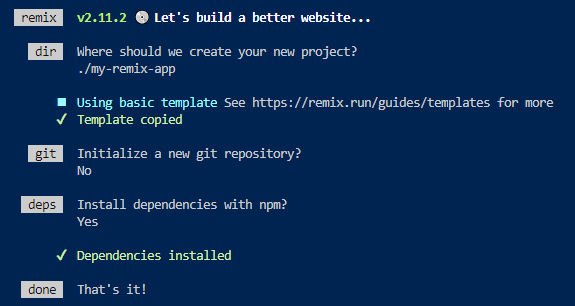
Folder Structure
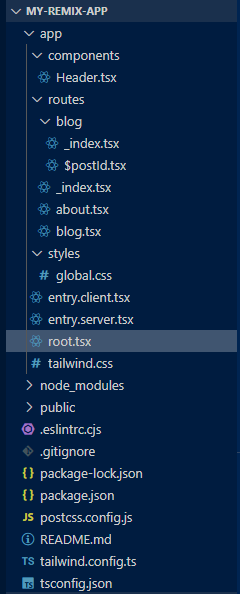
Dependencies
"dependencies": {
    "@remix-run/node": "^2.11.2",
    "@remix-run/react": "^2.11.2",
    "@remix-run/serve": "^2.11.2",
    "isbot": "^4.1.0",
    "react": "^18.2.0",
    "react-dom": "^18.2.0"
  }
Example: In this example we are implementing a simple PrefetchPageLinks.
/* app/styles/global.css */
body {
    font-family: Arial, sans-serif;
    margin: 0;
    padding: 0;
    line-height: 1.6;
}

h1,
h2 {
    color: #333;
}

nav ul {
    list-style-type: none;
}

nav ul li {
    display: inline;
    margin-right: 10px;
}
// app/root.tsx
import {
    Links,
    LiveReload,
    Meta,
    Outlet,
    Scripts,
    ScrollRestoration,
} from "@remix-run/react";
import globalStyles from "./styles/global.css";
import Header from "./components/Header";

export function links() {
    return [{ rel: "stylesheet", href: globalStyles }];
}

export default function App() {
    return (
        <html lang="en">
            <head>
                <Meta />
                <Links />
            </head>
            <body>
                <Header />
                <Outlet />
                <ScrollRestoration />
                <Scripts />
                <LiveReload />
            </body>
        </html>
    );
}
// app/routes/_index.tsx
import { Link } from "@remix-run/react";

export default function Index() {
    return (
        <div>
            <h1>Welcome to My Remix App</h1>
            <nav>
                <ul>
                    <li><Link to="/about">About</Link></li>
                    <li><Link to="/blog">Blog</Link></li>
                </ul>
            </nav>
        </div>
    );
}
// app/routes/about.tsx
export default function About() {
    return (
        <div>
            <h1>About Us</h1>
            <p>This is the about page.</p>
        </div>
    );
}
// app/routes/blog.tsx
import { Outlet } from "@remix-run/react";

export default function BlogLayout() {
    return (
        <div>
            <h1>Blog</h1>
            <Outlet />
        </div>
    );
}
// app/routes/blog/_index.tsx
import {
    LoaderFunction,
    Link,
    useLoaderData,
    PrefetchPageLinks,
} from "@remix-run/react";

type Post = {
    id: number;
    title: string;
};

export let loader: LoaderFunction = () => {
    return [
        { id: 1, title: "First Blog Post" },
        { id: 2, title: "Second Blog Post" },
    ] as Post[];
};

export default function BlogIndex() {
    const posts = useLoaderData<Post[]>();

    return (
        <div>
            {posts.map((post) => (
                <PrefetchPageLinks key={post.id} page={`/blog/${post.id}`} />
            ))}

            <ul>
                {posts.map((post) => (
                    <li key={post.id}>
                        <Link to={`/blog/${post.id}`}>{post.title}</Link>
                    </li>
                ))}
            </ul>
        </div>
    );
}
// app/routes/blog/$postId.tsx
import { LoaderFunction, useLoaderData } from "@remix-run/react";

type Post = {
    id: string;
    title: string;
    content: string;
};

export let loader: LoaderFunction = ({ params }) => {
    const postId = params.postId;
    return {
        id: postId,
        title: `Blog Post ${postId}`,
        content: `This is the content for blog post ${postId}.`,
    } as Post;
};

export default function BlogPost() {
    const post = useLoaderData<Post>();

    return (
        <div>
            <h2>{post.title}</h2>
            <p>{post.content}</p>
        </div>
    );
}
// app/components/Header.tsx
import { PrefetchPageLinks } from "@remix-run/react";

export default function Header() {
    return (
        <header>
            <nav>
                <ul>
                    <li>
                        <a href="/">Home</a>
                        <PrefetchPageLinks page="/" />
                    </li>
                    <li>
                        <a href="/about">About</a>
                        <PrefetchPageLinks page="/about" />
                    </li>
                    <li>
                        <a href="/blog">Blog</a>
                        <PrefetchPageLinks page="/blog" />
                    </li>
                </ul>
            </nav>
        </header>
    );
}
To start the application run the following command.
npm run devOutput
Advanced Use Cases for PrefetchPageLinks
While the basic usage is simple, there are advanced cases where PrefetchPageLinks can be highly beneficial:
- Prefetching Only When a Link is Hovered: You can trigger prefetching only when the user hovers over a link, which can be achieved by customizing when the component renders based on user interaction.
- Conditionally Prefetching Pages: If certain pages are heavy or require a lot of data, you might want to prefetch them conditionally based on user behavior or application state.
- Prefetching Pages Based on User Role: In applications with different user roles, you can prefetch content that is relevant only to the current user.
