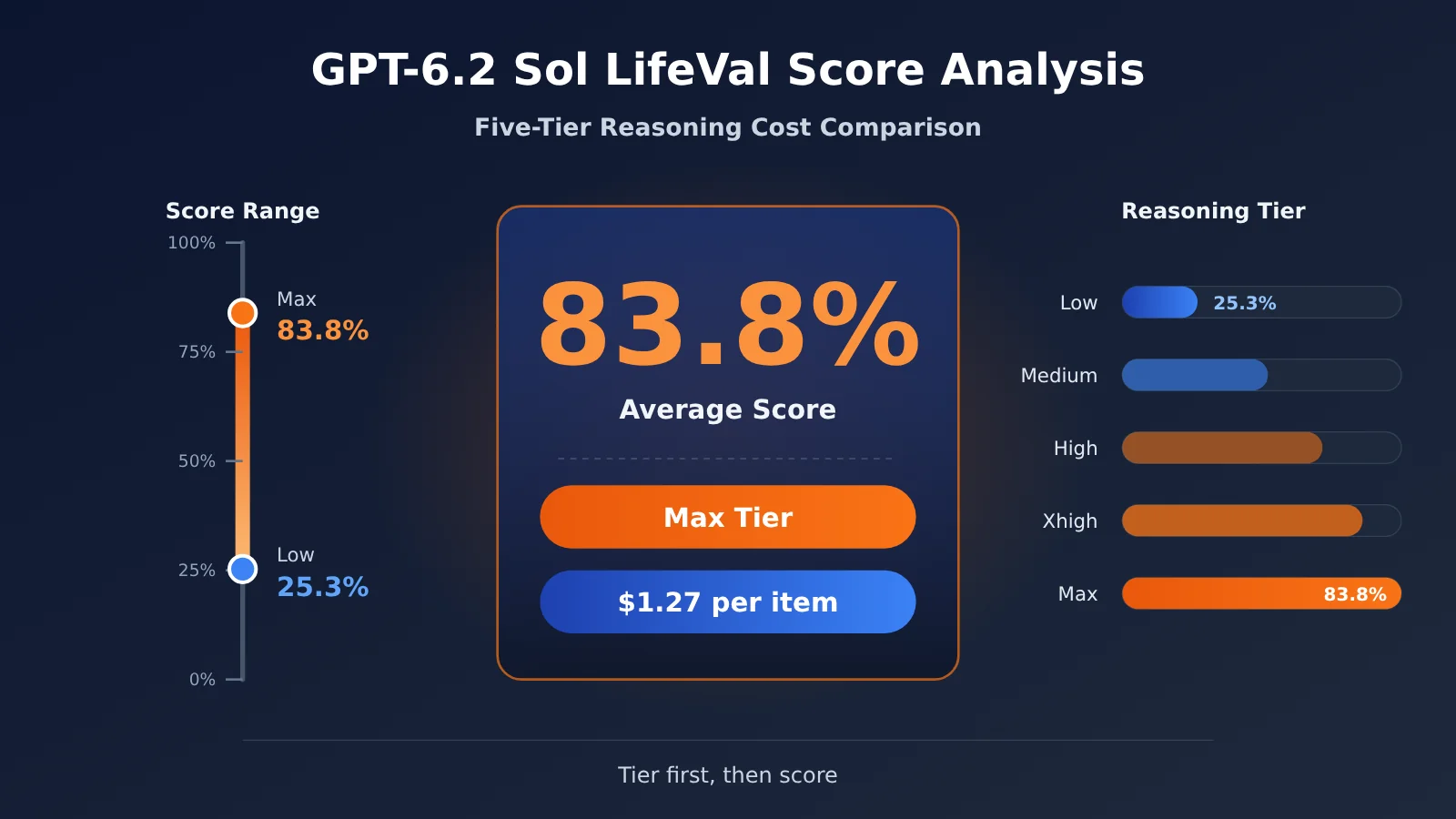
83.8% isn’t “83.8% of tasks fully completed”—it’s GPT-6.2 Sol’s average LifeVal score at the Max reasoning tier. This score is calculated by summing item-by-item scores against each task’s rubric, and the corresponding average cost per task is $1.27. The same model at the Low tier scores only 25.3%; at the High tier, it averages 80.8% with a per-task cost of $0.65. So when discussing GPT-6.2 Sol’s LifeVal performance, you first have to specify which tier you mean.
The takeaway is this: the official leaderboard presents a score-and-cost combination under specific tasks and a specific environment, not an overall ranking you can transplant directly into your product. In this LifeVal dataset, the High tier is the starting point worth testing first. Which tier you ultimately use still has to be validated against your own tasks, based on outputs and real-world state.
What you’ll learn from this article
- What tasks LifeVal measures, and how to correctly phrase 83.8%.
- GPT-6.2 Sol’s scores and costs across five reasoning tiers, plus same-tier comparisons with GPT-6.1 Sol, GPT-6 Astra, and GPT-6.2 Astra.
- Why the official claim of “about one-seventh the cost” and “a sharp drop at the Low tier” can both be true.
- How to borrow LifeVal’s validation approach to design repeatable evaluation tasks for your own everyday assistant.
Index: The To Know table first explains the evaluation terms used later, while Impact at a Glance explains what everyday users and developers should each focus on. The objective facts section then walks through LifeVal’s task sources and scoring method, followed by the tiered data in the November 17 release chart. The analysis and judgment section first unpacks the denominators behind several comparisons, then provides a route-and-schedule assistant acceptance example you can adapt directly, and explains the limits of transferring the findings.
To Know: Key Concepts for Understanding GPT-6.2 Sol LifeVal Scores
| Concept | Brief explanation |
|---|---|
| LifeVal | An OpenAI benchmark for measuring how well AI assistants complete personalized everyday digital tasks |
| Personalized context | Information such as user preferences, history, and task-specific conditions that changes what counts as an acceptable answer |
| Rubric | A task’s completion broken down into individual, checkable requirements |
| Controlled environment | An evaluation environment with preconfigured apps, data, and starting state, making it easier to verify action results |
| Backend state diff | App state changes recorded before and after a test, used to confirm whether tool operations actually took effect |
| Average reward | A summary metric after scoring each task against its rubric; the percentages in the published charts are this kind of “average score” |
| Reasoning effort | The setting that controls how much reasoning the model invests; this article compares Low, Medium, High, Xhigh, and Max |
| Per-task cost | The average cost per task in the evaluation charts, which varies with model usage and pricing |
GPT-6.2 Sol LifeVal Impact at a Glance
- Everyday users: When you see “83.8%”, read it as “the average score on a set of everyday tasks for US English-speaking users,” not as a success rate. Also note that the same model varies widely across reasoning settings, so the product experience depends on which setting the app developer chooses.
- Product managers: The Low setting has the lowest price, but this time its LifeVal score falls well behind the previous-generation Sol’s Low setting. If you reuse the old version’s setting configuration when upgrading, you may run into a case where “the new model actually performs worse.”
- API developers: What’s worth borrowing is LifeVal’s acceptance design, which scores deliverables, environment state, and responses separately. Comparing Low, Medium, and High settings side by side on the same set of your own tasks is more reliable than citing leaderboard numbers directly.
The Objective Facts: What Tasks Does GPT-6.2 Sol LifeVal Use to Test Models
Where LifeVal Comes From and Its Release Timeline
LifeVal is OpenAI’s evaluation for measuring personalized everyday agent tasks. The OpenAI research page is dated November 2, 2026, and the accompanying paper is dated November 3. On November 17, OpenAI released GPT-6.2 Astra and GPT-6.2 Sol, and included a LifeVal chart on the release page with tiered scores for the new models (chart ID lifeval-v2).
The paper’s task distribution comes from time-use studies in the US and several other countries, along with a paid survey on willingness to pay among the US population, ultimately grouping daily activities into 148 categories. The paper’s experiments use 169 tasks. Note that the models evaluated in the paper itself stop at GPT-6 Astra; the tiered numbers for the GPT-6.2 series only appear in the later official release chart.
By official positioning, Sol targets high-frequency daily work, routine programming, and scalable multi-step agents, while Astra targets harder reasoning and professional deliverables. That positioning lines up with the “everyday assistant tasks” that LifeVal measures.
LifeVal’s task design: one request, different valid answers for different users
LifeVal’s defining feature is “personalization.” Take comparing schools after a move, for example: users differ in their children’s ages, commute routes, and school district preferences, so the valid answer changes too. Similarly, when searching for a home by weighing budget against commute time, the budget cap and acceptable commute length directly determine which listings count as valid results.
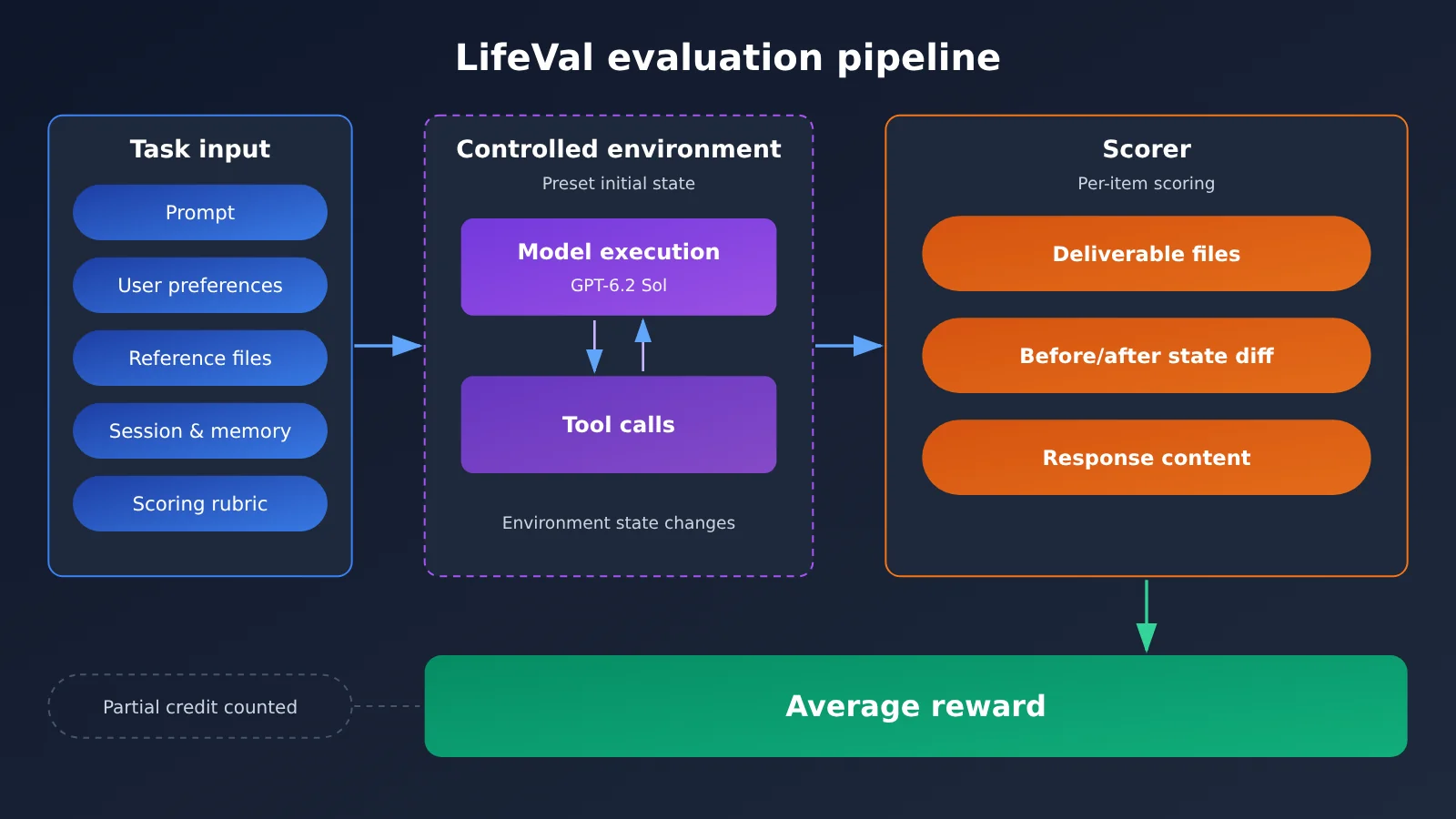
As defined in the paper, each task includes a prompt, user preferences, reference files, relevant conversations and memory, a scoring rubric, and a controlled environment with a preset state. After execution, the grader can check three things: the files the model delivers, the before-and-after state of the environment manipulated by tools, and the model’s response, then assign scores separately against each task requirement.
Why 83.8% can only be called an “average score”
The vertical axis of the paper’s results chart is average reward. So 83.8% should be described as an “average score,” not as “83.8% of tasks were fully executed successfully.” Even if a task meets only some of the scoring criteria, it still contributes partial credit.
The paper also notes several limitations: some information in the offline environment and cached web pages still changes over time, and the sample is mainly English-speaking users in the US. That means the scores can’t be directly generalized to other regions, languages, or application ecosystems.
GPT-6.2 Sol LifeVal Release Chart: Five-Tier Scores and Per-Task Cost
The table below is based on publicly available data from the interactive LifeVal chart on OpenAI’s release page dated November 17, 2026. Each cell shows “average score / average cost per task (USD).” These are OpenAI’s self-reported public benchmark figures, not independent third-party measurements.
| Model | Low | Medium | High | Xhigh | Max |
|---|---|---|---|---|---|
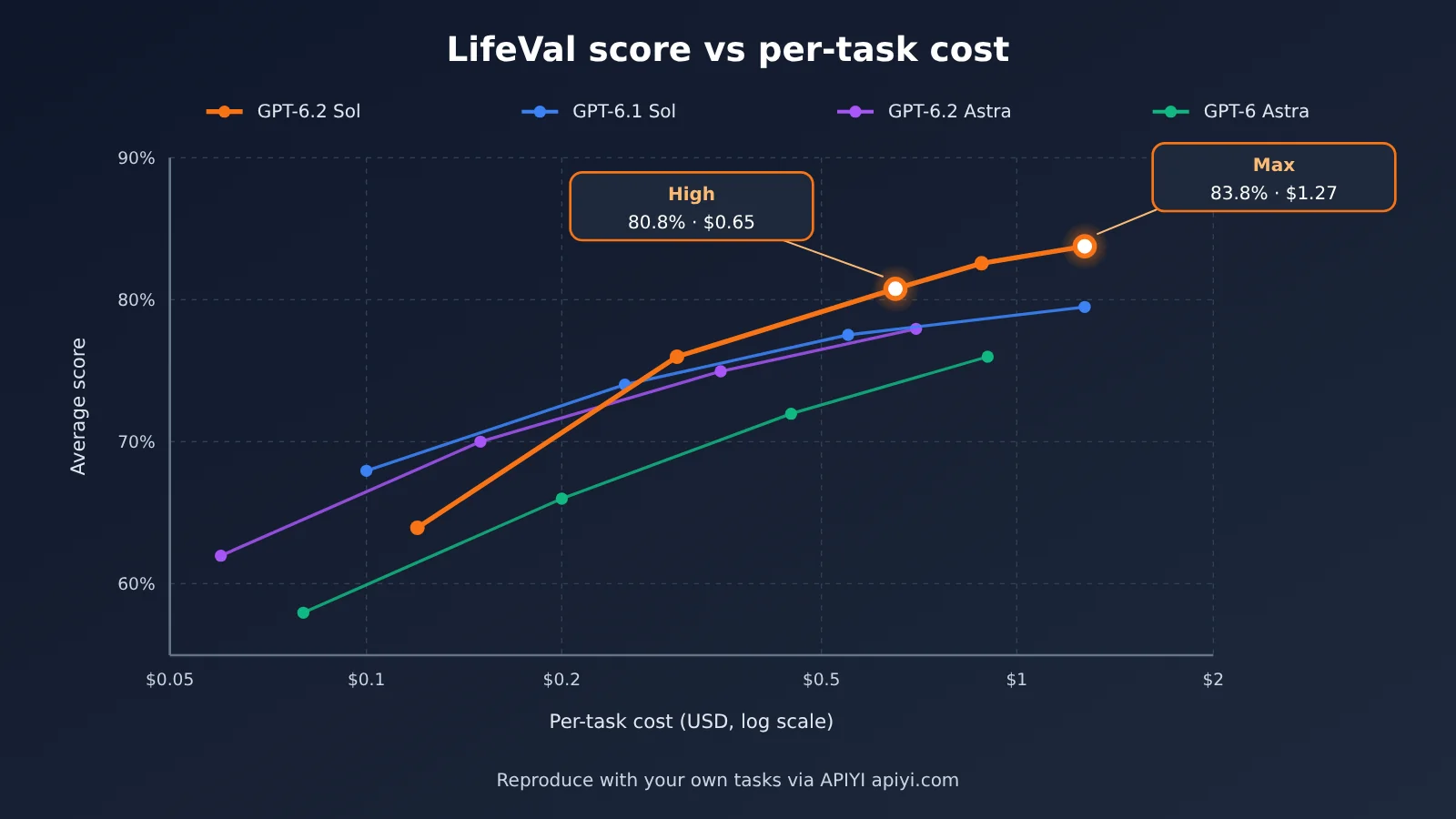
| GPT-6.2 Sol | 25.3% / $0.089 | 70.3% / $0.38 | 80.8% / $0.65 | 82.6% / $0.88 | 83.8% / $1.27 |
| GPT-6.1 Sol | 66.8% / $0.52 | 75.5% / $0.73 | 77.1% / $0.88 | 77.8% / $0.96 | 79.5% / $1.27 |
| GPT-6.2 Astra | 46.3% / $0.59 | 78.9% / $1.56 | 83.1% / $2.41 | 83.7% / $2.94 | 86.1% / $4.23 |
| GPT-6 Astra | 67.5% / $3.51 | 74.3% / $5.30 | 76.0% / $6.52 | 77.5% / $6.94 | 79.8% / $9.04 |
The release announcement itself says that in LifeVal, Sol scores higher than GPT-6 Astra at roughly one-seventh the cost. The comparison here is against the previous-generation flagship GPT-6 Astra, not the GPT-6.2 Astra from the same release. The separate FrontierCode 2.0 comparison in the announcement is the one that uses GPT-6.2 Astra, so don’t mix the two sets of conclusions when reading.
📌 Data caveat: The “cost per task” figures in the table are averages from the official benchmark chart and are affected by the benchmark’s input length, output length, and tool use. To get your own task costs, you’ll need to retest with real requests. You can use APIYI apiyi.com to run Sol’s different tiers in sequence with the same API key and compare the bills directly.
GPT-6.2 Sol API Access Information
The API model ID is gpt-6.2-sol. It can be called through Responses and Chat Completions. Function calling and built-in tools go through the Responses path, and neither endpoint accepts the none reasoning tier. Official short-context Standard pricing is $2.00 for input and $10.00 for output (USD / million tokens; output already includes reasoning tokens), the same as GPT-6.1 Sol.
As of November 20, 2026, APIYI’s public model master list and pricing interface both list gpt-6.2-sol, with responses and chat entry points marked. Short-tier pricing matches the official pricing. Actual available groups, parameter ranges, and billing are subject to the current configuration and bills on APIYI apiyi.com.
Analysis: How “One-Seventh the Cost” and the Low Decline Can Both Hold in GPT-6.2 Sol LifeVal
First, Align the Comparison Targets and Denominators
The same chart can leave you with two completely different impressions — “huge progress” or “clear regression” — and the root cause is that the comparison target and the tier are different. The differences and ratios in the table below are all calculated from officially published values.
| Comparison pair | Values | Score difference | Cost relationship |
|---|---|---|---|
| 6.2 Sol Max vs previous-gen flagship GPT-6 Astra Max | 83.8%/$1.27 vs 79.8%/$9.04 | +4.0 percentage points | about 14.0%, i.e. “roughly one-seventh” |
| 6.2 Sol Max vs 6.1 Sol Max | 83.8%/$1.27 vs 79.5%/$1.27 | +4.3 percentage points | same cost |
| 6.2 Sol Low vs 6.1 Sol Low | 25.3%/$0.089 vs 66.8%/$0.52 | −41.5 percentage points | lower cost, but the score drops sharply |
| 6.2 Sol Medium vs 6.1 Sol Medium | 70.3%/$0.38 vs 75.5%/$0.73 | −5.2 percentage points | about half the cost |
| 6.2 Sol High vs 6.1 Sol Max | 80.8%/$0.65 vs 79.5%/$1.27 | +1.3 percentage points | about half |
| 6.2 Sol Max vs 6.2 Astra Max | 83.8%/$1.27 vs 86.1%/$4.23 | −2.3 percentage points | about 30% |
Among these numbers, “percentage points” describe the difference in average score, while the “cost ratio” describes the ratio of average per-item cost — the two can’t be converted into each other. “One-seventh” only holds for the “6.2 Sol Max vs GPT-6 Astra Max” pair. Swap in the same-period GPT-6.2 Astra, and Sol at the Max tier actually comes out 2.3 percentage points lower.
💡 Selection tip: The gap between different tiers of the same model can be bigger than the gap between different models. We’d suggest running one round of tier-by-tier comparison on a fixed task set at APIYI apiyi.com before you settle on a default tier — don’t just carry over the tier configuration from your old model.
The Low Tier Signal: Upgrades Can’t Be a “Blind Swap”
6.2 Sol’s Low tier scores only 25.3% on LifeVal — 41.5 percentage points below 6.1 Sol Low. The official release materials mention that Sol burns fewer output tokens on several tasks, and that the Low tier’s average per-task cost is just $0.089. A reasonable guess: on personalized multi-step tasks, low reasoning effort isn’t enough to cover preference constraints and tool operations. But that’s only a guess — the official materials never explain the Low tier’s drop.
For product teams, the implications are pretty direct. If your app was running the Low tier on 6.1 Sol to save money, switching the model ID without adjusting the tier could noticeably degrade quality on complex everyday tasks. Max, by contrast, lands 4.3 percentage points above the previous generation’s Sol at the same per-task cost — a sign the new model’s ceiling really has moved up.
Why High Is the Tier Worth Testing First in This Evaluation
Going from High to Xhigh to Max, 6.2 Sol gains only 1.8 and then 1.2 percentage points, while average per-task cost climbs by $0.23 and $0.39. High already reaches 80.8% at $0.65 — higher than 6.1 Sol’s Max tier and GPT-6 Astra’s Max tier. On LifeVal alone, High is the starting point that best balances quality and cost.
That said, this judgment rests on three assumptions: your task distribution is close to LifeVal, your language and application environment resemble U.S. English user scenarios, and your cost structure resembles this evaluation’s input/output ratio. If any one of those doesn’t hold, the conclusion can shift. In practice, the safer route is to start at High, then use pass rates on your own tasks to decide whether to drop down to Medium or step up to Xhigh or Max.
Analysis: Validate Your Own GPT-6.2 Sol Assistant the LifeVal Way
Build a low-risk family itinerary task
The most valuable lesson from LifeVal isn’t the score itself—it’s the method of validating by artifacts and state. Here’s a family itinerary example: give the assistant three hard constraints up front—origin and destination, accessible travel requirements, and a budget ceiling—and ask it to deliver candidate plans with verifiable routes, plus an editable schedule draft.
| Scoring item | Verification method | Automatable? |
|---|---|---|
| Are location constraints met? | The start and end points in the plan match the input | Can be checked automatically |
| Are accessibility requirements met? | The route description explicitly covers accessibility requirements | Partially automatic; manual spot check needed |
| Is the budget within the limit? | Parse the amount in the plan and compare it with the ceiling | Can be checked automatically |
| Do the links support the information? | The links are accessible and their content matches the plan | Manual review needed |
| Does the schedule draft file exist? | Check the before/after state of the output file or calendar entry | Can be checked automatically |
| Does it ask when key information is missing? | Deliberately omit details such as the date, and see whether it proactively asks | Manual judgment needed |
These scoring items map to LifeVal’s three validation tracks: deliverables (the schedule draft), state changes (whether files or entries are actually written), and answer quality (constraint satisfaction and proactive follow-up). Run the same batch of tasks at Low, Medium, and High, then use the pass rate and cost to decide the initial tier.
Minimal Example: Calling GPT-6.2 Sol and Tracking Reasoning Usage
The example below calls gpt-6.2-sol through the Responses API and reads both the output token count and the reasoning tokens within it, so you can calculate per-item costs later.
from openai import OpenAI

client = OpenAI(
    api_key="YOUR_API_KEY",
    base_url="https://api.apiyi.com/v1"  # APIYI OpenAI-compatible endpoint
)

resp = client.responses.create(
    model="gpt-6.2-sol",
    reasoning={"effort": "high"},
    input="请为我规划周六的家庭出行:从家到市立博物馆,需全程无障碍,交通预算不超过 200 元,并给出日程草稿。"
)
print(resp.output_text)
print(resp.usage.output_tokens, resp.usage.output_tokens_details.reasoning_tokens)
View the tier comparison script (Low / Medium / High)
import re
from openai import OpenAI

client = OpenAI(
    api_key="YOUR_API_KEY",
    base_url="https://api.apiyi.com/v1"  # One key lets you compare multiple tiers
)

# Short-context Standard list price, USD per million tokens (output already includes reasoning tokens)
PRICE_IN, PRICE_OUT = 2.00, 10.00

TASKS = [
    {
        "prompt": "从家到市立博物馆,周六上午出发,全程无障碍,交通预算不超过 200 元。"
                  "请给出带路线说明的候选方案,并输出一份日程草稿。",
        "budget": 200,
        "must_include": ["无障碍", "博物馆"],
    },
    {
        # Deliberately omit the date to test whether it proactively asks a follow-up question
        "prompt": "帮我安排一次带老人去公园的出行,预算 100 元以内,需要无障碍路线。",
        "budget": 100,
        "must_include": ["无障碍"],
        "expect_question": True,
    },
]

def check(task, text):
    """Score each rubric item and return a score from 0 to 1"""
    items = []
    items += [kw in text for kw in task["must_include"]]
    amounts = [float(x) for x in re.findall(r"(\d+(?:\.\d+)?)\s*元", text)]
    items.append(bool(amounts) and max(amounts) <= task["budget"])
    if task.get("expect_question"):
        items.append("?" in text or "?" in text)
    return sum(items) / len(items)

for effort in ["low", "medium", "high"]:
    scores, cost = [], 0.0
    for task in TASKS:
        resp = client.responses.create(
            model="gpt-6.2-sol",
            reasoning={"effort": effort},
            input=task["prompt"],
        )
        u = resp.usage
        cost += u.input_tokens / 1e6 * PRICE_IN + u.output_tokens / 1e6 * PRICE_OUT
        scores.append(check(task, resp.output_text))
    print(f"{effort:>6}: 平均得分 {sum(scores)/len(scores):.1%}, "
          f"平均单项费用 ${cost/len(TASKS):.4f}")
The automated checks in the script only cover rubric items that can be verified by machine; link validity and the quality of follow-up questions still need manual spot checks. For the parameter values used by reasoning tiers (especially the strings corresponding to Xhigh and Max), refer to the official current documentation and the parameter notes for the channel you’re using.
🚀 Quick start: Sign up through APIYI at apiyi.com to get free testing credits. The platform offers an OpenAI-compatible API, and the script above will run once you replace the key — a handy way to do a small-sample validation before formally choosing a tier.
Where the LifeVal Conclusions for GPT-6.2 Sol Hold — and Where They Don’t
If you’re moving LifeVal’s conclusions into your own product, there are at least three differences to think through.
The first is language and region. The paper’s samples are mostly US English-speaking users, and the ecosystem of map, payment, and calendar apps in Chinese-language scenarios is completely different.
The second is environment. LifeVal runs in a controlled setting with cached web pages, while real products hit network fluctuations, failed tool authorizations, and differences in account state.
The third is cost structure. The official per-item cost corresponds to the input-to-output ratio of that particular eval. Once a long-context request goes past 272K input tokens, the whole request switches over to a higher rate — so the per-item cost can end up much further from the chart than you’d expect.
So a saner way to use all this is: treat the official charts as a basis for narrowing down the candidate pool, and treat your own task set as the basis for the final decision. For a complex everyday assistant, you can start by establishing a baseline on the High tier, then separately test whether Medium can hold the key hard constraints, and whether Xhigh or Max noticeably cuts down on manual rework — letting the actual pass rate and the bill do the talking.
Once your task set, scoring rubric, and environment checks are ready, model upgrades stop being about “checking the leaderboard and swapping models” and become an engineering process you can re-test every single time. When you need to compare repeatedly across multiple models and tiers, you can lean on the unified interface from APIYI apiyi.com to run GPT-6.2 Sol, GPT-6.2 Astra, and the rest through the same acceptance script.
References
-
OpenAI GPT-6.2 Astra and Sol release announcement (with LifeVal tier charts)
- Link:
openai.com/zh-Hans-CN/index/introducing-gpt-6-2-astra-sol - Note: Published 2026-11-17; this is the source of the tier data used in this article
- Link:
-
LifeVal research page and paper
- Link:
openai.com/index/lifeval,cdn.openai.com/pdf/lifeval.pdf - Note: Where the tasks come from, plus the scoring method and its limitations (paper §3–§5)
- Link:
-
GPT-6.2 Sol model card and official pricing
- Link:
developers.openai.com/api/docs/models/gpt-6.2-sol - Note: Context specs, long- and short-context billing rules, and rate limits
- Link:
-
APIYI model list
- Link:
docs.apiyi.com/models.md - Note: Publicly listed models, entry points, and pricing details
- Link:
Author: APIYI Technical Team
Technical contact: You’re welcome to reach us through the APIYI official site at apiyi.com. For more integration resources, check out the docs.apiyi.com documentation center.