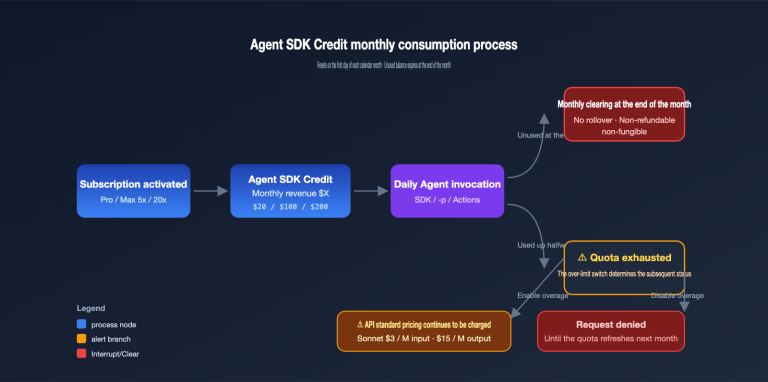
Author’s note: Once a GPT-Live-1.1 WebRTC session goes idle, the voice rate drops from $0.05 per minute to $0.02 per minute. This article explains how to configure it, how to reconcile the billing, and how much a single call can actually save.
One-sentence summary: For a GPT-Live-1.1 WebRTC session, once the required conditions are met and the session enters the idle state, the voice rate drops from $0.05 per minute to $0.02 per minute. How much you actually save depends on the split between active time and idle time, as well as on usage of backend models and tools.
The conclusion comes with a caveat. You can only get the idle rate of $0.02 per minute in WebRTC sessions that are configured to go idle and have inference paused. Under that premise, the savings rate is roughly equal to “idle time share × 60%.” If someone is talking continuously in the session, or if the session uses a WebSocket or the primary SIP connection, this price reduction basically doesn’t apply. In addition, backend inference and tool calls are billed separately; on long calls, this portion often costs more than the voice fee itself.
This isn’t a quick news piece restating a price table. Below, I break down the billing conditions and configuration fields based on OpenAI’s official documentation, and provide a calculation method you can use to reconcile the numbers. The scenario examples in this article are hypothetical, intended to illustrate the calculation method, and do not represent actual bills.
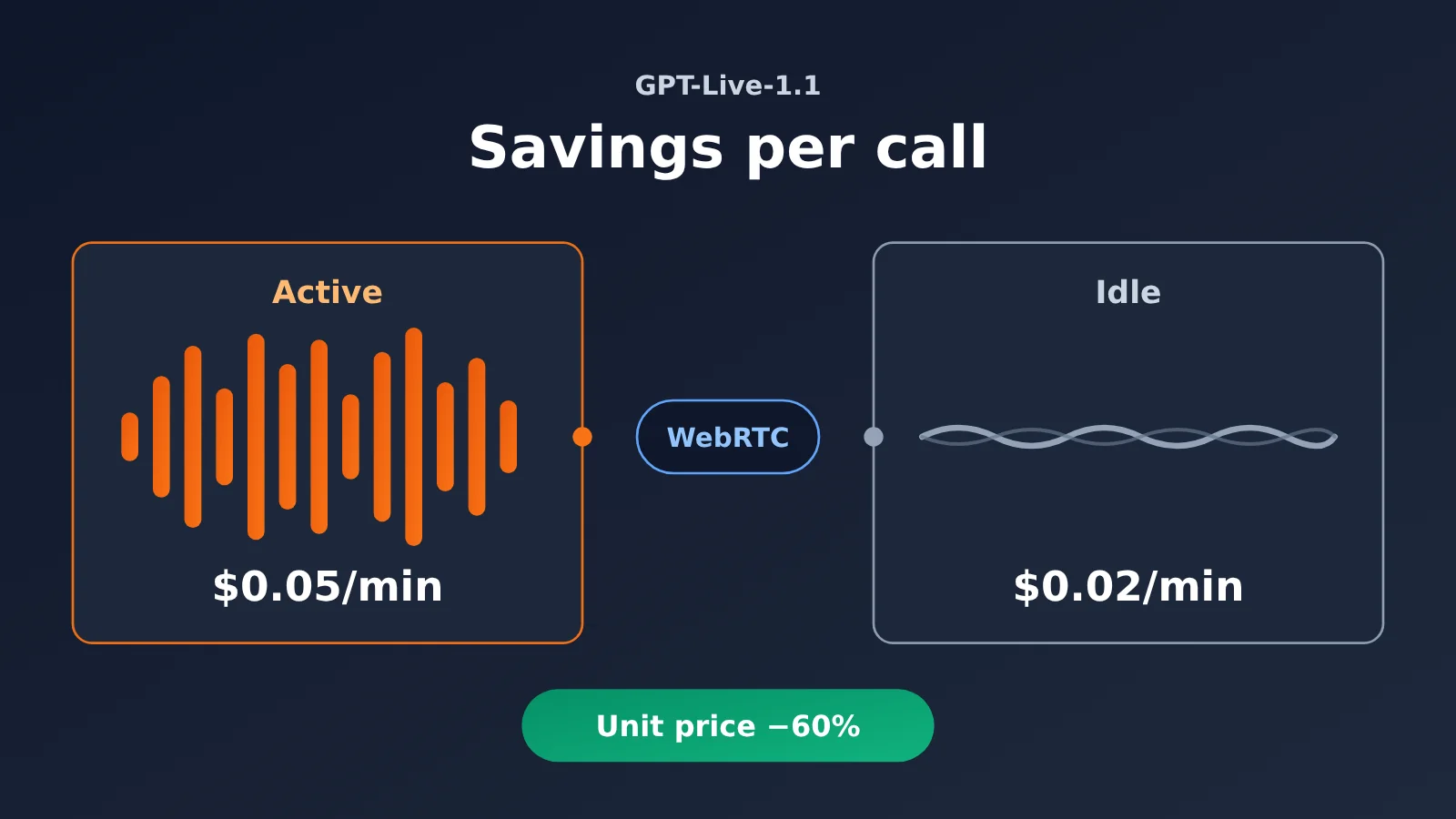
GPT-Live-1.1 WebRTC Standby Terms (To Know)
Let’s get a few terms straight first. The billing and configuration discussed later all build on these definitions:
- WebRTC: A set of communication technologies for real-time transport of audio and other media between browsers and devices—and the only transport method that works with GPT-Live native standby.
- WebSocket: A persistent, two-way connection. Apps can use it to carry audio, session events, or sideband control messages.
- SIP: A session establishment and control protocol commonly used in telephone networks. GPT-Live telephony access goes through this path.
- Standby: In this article, this specifically means the billing state in which an eligible WebRTC session stays connected but inference is stopped.
- Active time: The phase billed at the active rate; it may include the quiet period before the pause criteria are met.
- Voice wake-up: When the service detects someone speaking, it starts or resumes inference.
- Idle threshold: The configurable amount of time without speech before a session enters standby.
- Sideband connection: A connection separate from the main voice connection, used for server control and event monitoring. It’s commonly implemented as a sideband WebSocket.
GPT-Live-1.1 WebRTC Standby: Key Points
| Key point | Explanation | Value for developers |
|---|---|---|
| Two rate tiers | Active at $0.05/min; eligible WebRTC standby at $0.02/min (OpenAI Pricing) | 60% lower unit price during quiet periods |
| Per-second billing | Both rates are settled per second, not rounded to whole minutes | Short pauses still count toward savings |
| WebRTC only | The native low-price standby rate applies only to WebRTC sessions with standby configured and inference paused | Cost has to be considered when choosing a transport |
| Backend billed separately | Backend model and tool usage are billed separately | Standby optimizes only one line item on the bill |
| First-turn latency | After waking from standby, the first reply to a short utterance may be slower | You’ll need to weigh cost against experience |
Understanding the 60% denominator for GPT-Live-1.1 standby from the pricing table
First, a note on the dates. The OpenAI API Changelog records this update on 2026-11-19, while the launch announcement page in the OpenAI developer community shows 2026-11-20. The one-day difference is very likely due to different time zone conventions; I’ll cite the source whenever dates come up in this article. According to the OpenAI Pricing page, active voice usage for both GPT-Live models is $0.05/min, and eligible WebRTC standby is $0.02/min, billed per second, with backend model and tool usage billed separately.
The phrase “60% lower” is often misread as “60% off the entire call.” The denominator for the 60% figure is the active unit price: (0.05 − 0.02) ÷ 0.05 = 60%. It only describes the per-minute unit price reduction after a session enters standby. To get the savings rate for the entire call, you also need to multiply by the share of time spent in standby.
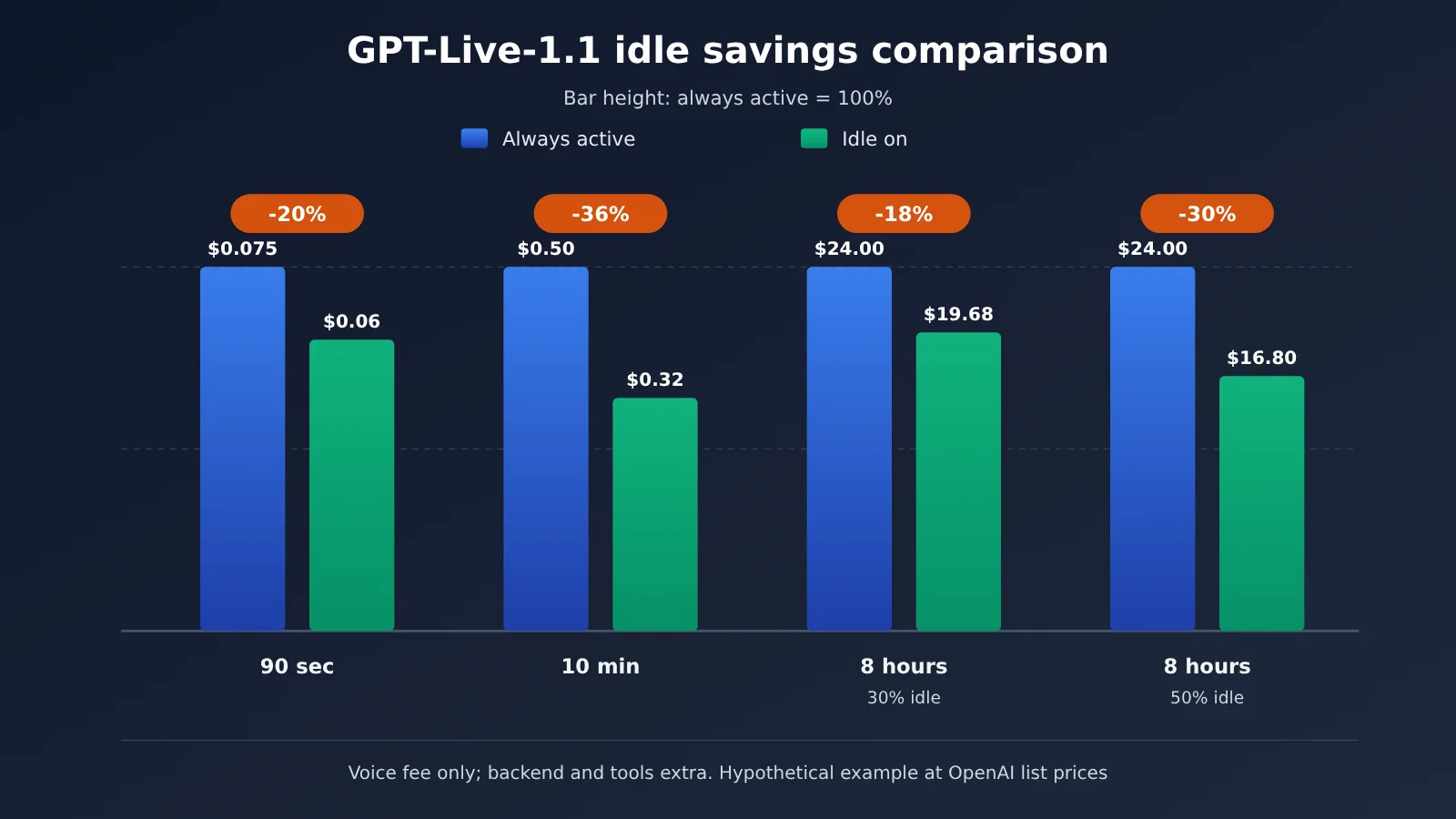
Here’s a hypothetical example. For a 10-minute session, suppose the billed time breaks down into 4 active minutes and 6 standby minutes. The voice cost is 4×0.05 + 6×0.02 = $0.32. The same 10 minutes fully active would cost $0.50. Compared with that, the voice cost drops by 36%, which is exactly 60% × the 60% standby share.
| Billing item | Unit price (OpenAI official list price) | Billing granularity | Affected by standby? |
|---|---|---|---|
| Active voice | $0.05/min | Per second | Yes, partially replaced by standby |
| WebRTC standby voice | $0.02/min | Per second | Only eligible WebRTC |
| Backend model tokens | Priced according to the selected model | Per token | No |
| Tool calls | Priced according to the tool | Per call or usage-based | No |
How to Configure GPT-Live-1.1 WebRTC Standby: From Session Setup to Billing Reconciliation
According to OpenAI’s “Managing GPT-Live sessions,” there aren’t many configuration options for WebRTC standby — but each one directly shapes how the billing phases get divided up.
| Field / Event | Value or meaning | Configuration notes |
|---|---|---|
session.wake_policy.type |
Set to "speech" |
The session waits until it detects speech before running inference; it doesn’t start inferring the moment it connects |
session.idle_timeout_s |
Integer from 5–60 (seconds) | If you leave it unset, inference stays active indefinitely after the first wake |
session.wake_policy.vad_threshold |
0–1, default 0.5 (per OrcaRouter’s write-up of the docs) | Raise it when the environment is noisy or you’re getting frequent false wakes |
session.paused |
Inference pauses after the idle timeout | Recorded as the start of standby |
session.resumed |
Inference is ready to resume; the first wake also triggers it | Recorded as the start of active |
session.closed |
Session ends, includes the final usage.seconds |
Used to reconcile against your bill |
The 4 steps to configure GPT-Live-1.1 standby
- Enable voice wake when creating the WebRTC session: set
session.wake_policy.type = "speech". - Set the idle threshold:
session.idle_timeout_stakes an integer from 5–60. The shorter the threshold, the sooner you drop into standby — but a slightly longer pause from the user can trigger it too. - Keep the microphone track active: the mic track has to stay live during standby so the service can detect speech and wake up. The connection and session ID stay the same, and conversation history comes back with the resume.
- Listen for events and log timestamps: use
session.pausedandsession.resumedto tell which phase the server is currently in.
Here’s a sample session config. The field paths come from the official docs; for the full request structure, refer to OpenAI’s “Create session”:
{
  "session": {
    "wake_policy": {
      "type": "speech",
      "vad_threshold": 0.5
    },
    "idle_timeout_s": 15
  }
}
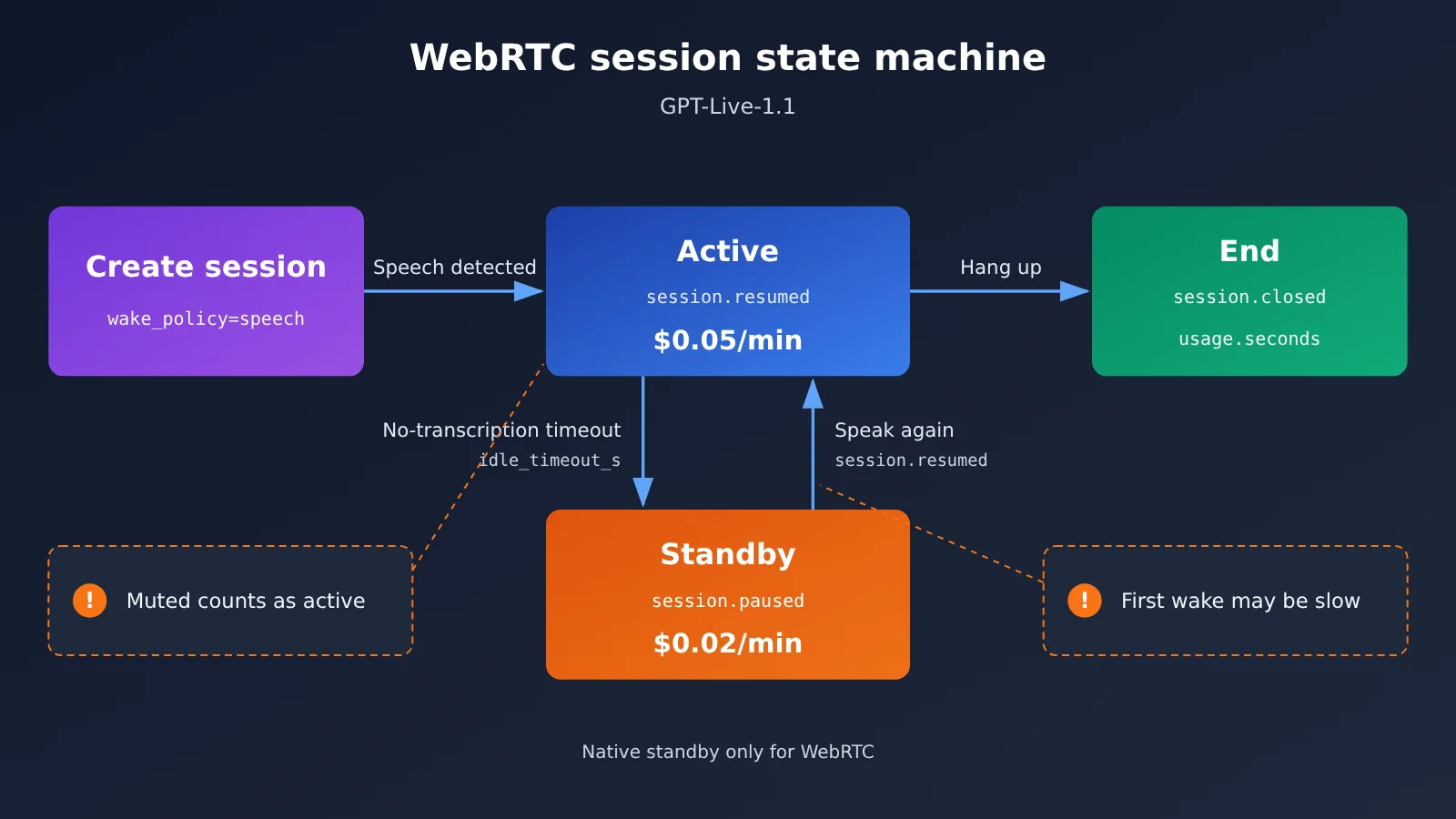
Which quiet stretches still bill at the active rate
Three kinds of “quiet” are the easiest to get wrong:
- The quiet period before timeout: from the moment the last utterance ends until
idle_timeout_sexpires, the session is still billed as active. Set the threshold to 30 seconds, and every pause costs you at least 30 seconds at the active rate. - Muted microphone: when the user hits mute on the client, the session doesn’t switch to standby — it stays active.
- Waiting on the backend: time spent waiting for a backend model or tool result, with inference still running rather than paused, is also settled at the active stage.
There’s also an initialization charge. According to OrcaRouter’s summary of the official docs, when you create a WebRTC session with POST /v1/live/sessions, 15 seconds of voice time is billed up front, then credited back against the duration charges once the session starts running. For apps that frequently create throwaway sessions to probe behavior, that’s a real cost — though OpenAI Pricing is the authoritative reference in practice.
Reconcile the bill using event timestamps
The idea is simple: estimate the duration of each stage from event timestamps, then compare the final usage.seconds in session.closed against the actual invoice. Here’s a sketch of an event recorder. Which channel the events arrive on (the WebRTC data channel or a sideband connection) is up to the official docs:
const timeline = [];
function onServerEvent(evt) {
  if (["session.resumed", "session.paused", "session.closed"].includes(evt.type)) {
    timeline.push({ type: evt.type, t: Date.now() / 1000 });
  }
  if (evt.type === "session.closed") {
    console.log("usage.seconds =", evt.usage?.seconds, timeline);
  }
}
When testing, run the same script, the same backend, and the same recording twice — once with standby on and once with it off — and additionally record when the first audio segment comes back, so you can quantify the latency penalty of the first turn after waking up.
One more reminder at the workflow level. CellCog published a set of same-configuration A/B trials: 560 scripted calls first, then a retest of 120 calls. The original script asked questions early; the old version handed 134 of 160 questions to the backend, while 1.1 handed over 91 — roughly 84% versus 57%. After the retest moved the first question to after the 10-second mark, both versions landed at 48/60 (80%). This is just one team’s delegation behavior in short meetings with a specific prompt, and it didn’t measure standby costs, but it makes one point: the number of backend delegations shifts with the script, while backend costs aren’t affected by standby.
Implementation Boundaries of GPT-Live-1.1 Standby Mode in WebSocket and SIP
OpenAI supports three kinds of Live connections — WebRTC, WebSocket, and telephone SIP — but the native low-cost standby only applies to WebRTC. One thing to keep clear: a WebRTC or SIP session can have a separate side-channel WebSocket attached for control and monitoring, and that’s a different thing from using a WebSocket to carry the main audio. Even with a side-channel WebSocket attached, the main WebRTC connection can still use standby.
| Main audio transport | Native standby $0.02 | Officially recommended idle handling | Cost caveats |
|---|---|---|---|
| WebRTC | ✅ Applies when conditions are met | wake_policy + idle_timeout_s | Quiet periods before the timeout are billed as active |
| WebRTC + side-channel WebSocket | ✅ Applies to the main connection | The side channel only handles control and events | The side channel itself doesn’t change the billing phase |
| Main WebSocket | ❌ No basis | App detects idle, closes and re-establishes | Re-establishing the session has initialization cost |
| SIP telephone | ❌ No basis | First confirm how closing the session affects incoming calls | Budget for active billing while the call is kept up |
The main WebSocket approach: manage idle state on the application side, tracking audio in and out, playback state, and backend tasks still waiting to finish. Only when things have been quiet for a long time and disconnection is allowed should you call session.close and wait for session.closed. When the user comes back, rebuild the session — you can fork an old session that’s allowed to be saved and whose records are already complete, or restore context from text state the app saved itself. If local voice wake-up is enabled, buffer the beginning of the audio first so no words are missed while the connection is being established.
The SIP approach: closing the session may affect the incoming call connection itself, so “hang up and reconnect” can’t be treated as in-place standby. If the call must stay up, let the application or the phone system handle the wait stream, and include OpenAI’s active voice cost in your budget. Another option is to build your own media bridge and actually use and verify WebRTC standby on the OpenAI side. All of the above are implementation boundaries at the transport and session-state level, and there’s no basis for assuming non-WebRTC transports can get the $0.02 standby price.
How Much a Full Call Saves: GPT-Live-1.1 Standby Costs, Quick Start
Quick Cost Estimate
The function below encodes “savings ratio = standby share × 60%” as code, with inputs in seconds:
ACTIVE, STANDBY = 0.05, 0.02  # OpenAI official list price, USD per minute

def voice_cost(active_s: float, standby_s: float) -> tuple[float, float]:
    with_standby = active_s / 60 * ACTIVE + standby_s / 60 * STANDBY
    all_active = (active_s + standby_s) / 60 * ACTIVE
    return round(with_standby, 4), round(1 - with_standby / all_active, 4)

print(voice_cost(240, 360))      # 10 minutes: 4 minutes active + 6 minutes standby
print(voice_cost(60, 30))        # 90 seconds: 60 seconds active + 30 seconds standby
| Scenario | Active / Standby | Voice cost with standby | Voice cost fully active | Voice cost reduction |
|---|---|---|---|---|
| Official example (as relayed by OrcaRouter) | 60 sec / 30 sec | $0.06 | $0.075 | 20% |
| 10-minute consultation (assumed here) | 4 min / 6 min | $0.32 | $0.50 | 36% |
| 8-hour shift, 30% standby (OrcaRouter example) | 5.6 hr / 2.4 hr | $19.68 | $24.00 | 18% |
| 8-hour shift, 50% standby (OrcaRouter example) | 4 hr / 4 hr | $16.80 | $24.00 | 30% |
The table only counts voice cost. In a real deployment, backend model and tool costs are often the bigger line item on the bill. OrcaRouter’s writeup notes that OpenAI’s docs recommend starting with gpt-6-luna and switching to gpt-6-sol for complex backend tasks, both billed at standard token rates. On long calls, backend costs can easily exceed voice costs.
💡 Estimating tip: Everything in the table above is an assumption derived from official list prices — your real bill comes down to
usage.secondsand your platform invoice. If you’re also evaluating other real-time voice options, you can use APIYI apiyi.com’s free test credits to compare token-billed Realtime models under the same script.
Treat the GPT-Live-1.1 voice layer, backend model, and API entry point as separate choices
As of the review date (2026-11-20), GPT-Live-1.1’s dedicated session endpoint and per-minute rates both come from OpenAI itself. According to a write-up from third-party OrcaRouter, GPT-Live can only be accessed through the Live sessions endpoint; it doesn’t support other endpoints such as Chat Completions, Responses, or Realtime.
On the APIYI side, the public model registry (generated on 2026-11-20 at 15:17 UTC+8, with 289 records total) does not include gpt-live-1 or gpt-live-1.1, and the dynamic archive has no corresponding launch announcement. So for now, we can’t conclude that APIYI already offers the GPT-Live series, /v1/live/sessions, or per-minute billing. Nor should we infer that it supports this kind of dedicated voice session just because APIYI is OpenAI-compatible.
The realtime voice option APIYI has already made public is a separate Realtime product:
| Option | Access method | Billing method | Standby / WebRTC / SIP | Available platform |
|---|---|---|---|---|
| GPT-Live-1.1 | /v1/live/sessions, WebRTC / WebSocket / SIP |
$0.05 active and $0.02 standby per minute, plus backend costs | WebRTC supports native standby | OpenAI official |
| gpt-realtime-2.1 | /v1/realtime WebSocket |
Audio input/output $32/$64 per million audio tokens | WebRTC and SIP not available | APIYI (apiyi.com) |
| gpt-realtime-2.1-mini | /v1/realtime WebSocket |
Audio input/output $10/$20 per million audio tokens | WebRTC and SIP not available | APIYI |
APIYI’s Realtime pricing comes from its documentation (the page notes a reconciliation date of 2026-09-14). Billing is based on text, audio, and image tokens, which can’t be directly converted to GPT-Live’s per-minute billing.
APIYI Realtime Minimal Connection Example
import os, asyncio, websockets

BASE_URL = "https://api.apiyi.com/v1"  # APIYI unified endpoint
WS_URL = BASE_URL.replace("https://", "wss://") + "/realtime?model=gpt-realtime-2.1"

async def main():
    headers = {"Authorization": f"Bearer {os.environ['APIYI_API_KEY']}"}
    async with websockets.connect(WS_URL, additional_headers=headers) as ws:
        print(await ws.recv())  # Print the first server event

asyncio.run(main())
View the full code: client-side idle shutdown for the main WebSocket
import os, time, asyncio, websockets

BASE_URL = "https://api.apiyi.com/v1"  # APIYI Realtime entrypoint
WS_URL = BASE_URL.replace("https://", "wss://") + "/realtime?model=gpt-realtime-2.1-mini"
IDLE_LIMIT_S = 45          # Client-side idle threshold; tune it to your business needs
pending_backend_tasks = 0  # Maintained by the app: number of unfinished backend tasks
is_playing = False         # Maintained by the app: whether audio is currently playing

async def run_session():
    headers = {"Authorization": f"Bearer {os.environ['APIYI_API_KEY']}"}
    last_activity = time.monotonic()
    async with websockets.connect(WS_URL, additional_headers=headers) as ws:
        async def reader():
            nonlocal last_activity
            async for _ in ws:
                last_activity = time.monotonic()  # Any server event counts as activity

        task = asyncio.create_task(reader())
        while True:
            await asyncio.sleep(1)
            idle = time.monotonic() - last_activity
            busy = pending_backend_tasks > 0 or is_playing
            if idle > IDLE_LIMIT_S and not busy:
                print(f"Idle for {idle:.0f}s, closing proactively; rebuild the session when the user comes back")
                await ws.close()
                break
        task.cancel()

asyncio.run(run_session())
Event formats and query parameters follow the APIYI “Realtime Voice (WebSocket)” documentation. This close-and-reconnect approach simply saves idle connections at the application layer — it doesn’t map to any official low-cost standby rate.
🚀 Integration advice: If you need WebRTC with GPT-Live’s native standby, connect directly to OpenAI for now. If you want to quickly prototype realtime voice over WebSocket while managing several models in one place, start by getting the flow working with
gpt-realtime-2.1-minion APIYI at apiyi.com, then choose your production setup based on cost.
FAQ
Q1: What is WebRTC standby for GPT-Live-1.1?
It’s a billing state for WebRTC sessions: once voice wake-up and an idle threshold are configured, the session stops inference during periods with no speech, but the connection stays open and is billed at $0.02/min. When someone speaks again, inference resumes with the original conversation history intact.
Q2: Does a 60% price cut mean the whole call is 60% cheaper?
No. The 60% is the drop in the standby rate relative to the active rate. The voice cost reduction for a whole call equals the standby share multiplied by 60%: if standby accounts for half the call, voice costs drop by about 30%. Backend and tool costs are unaffected.
Q3: When did GPT-Live-1.1 launch on the API?
The OpenAI API Changelog entry is dated 2026-11-19, while the OpenAI developer community announcement page shows 2026-11-20 — the difference may come from time zone conventions. GPT-Live-1 itself became generally available earlier, on 2026-09-10 (per OrcaRouter’s compilation).
Q4: Which scenarios benefit most from enabling standby?
– **Customer support queues**: customers stay connected but don’t speak for long stretches.
– **In-car or desktop assistants**: always-on connections that are only occasionally woken.
– **Long-duty agent seats**: the higher the standby share, the more you save.
For short, conversation-dense sessions, the standby share is low, and you also pay the cost of a slower first turn after wake-up — so the payoff is limited.
Q5: Can I call GPT-Live-1.1 through APIYI?
As of 2026-11-20, APIYI’s public model registry contains no GPT-Live series, and there’s been no launch announcement. If you need real-time voice, you can use the already-public `gpt-realtime-2.1` / `gpt-realtime-2.1-mini` on APIYI apiyi.com, connecting via `/v1/realtime` WebSocket and paying per audio token. New users get free test credits to validate things first.
Q6: What known limitations does GPT-Live-1.1 standby have?
– It only applies to WebRTC; there’s no basis for the $0.02 rate on WebSocket or SIP main connections.
– Quiet periods before timeout, muted microphones, and time spent waiting on the backend are all billed as active.
– After wake-up, the first reply to a short utterance may be slower.
– Third-party data on standby wake-up and billing reconciliation is currently lacking, and the scores on the Artificial Analysis leaderboard correspond only to GPT-Live-1 — they can’t be applied to 1.1.
GPT-Live-1.1 WebRTC Standby Key Takeaways
- Unit price: Active sessions are $0.05/minute, qualifying WebRTC standby is $0.02/minute, and both are billed by the second.
- The math: The voice cost reduction for a whole call equals the standby proportion multiplied by 60% — not a flat 60%.
- Configuration:
wake_policy.type="speech"plus anidle_timeout_sof 5–60 seconds, with the microphone track kept active. - Reconciling the bill: Use the paused/resumed timestamps to estimate phase durations, then check
usage.secondsagainst your invoice. - Boundaries: WebSocket and SIP can only be rebuilt after the application side closes them, so they don’t count as low-cost standby.
- Getting started: GPT-Live requires a direct connection to OpenAI; for WebSocket real-time voice, you can try the Realtime models on APIYI apiyi.com.
Summary
The core points of GPT-Live-1.1 WebRTC standby:
- The discount has conditions: Only WebRTC sessions that are configured for standby and have inference paused are billed at $0.02/minute.
- Savings depend on proportion: With 6 minutes of standby in a 10-minute call, voice cost drops from $0.50 to $0.32 — about 36% saved.
- The bill is holistic: Backend models and tools are billed separately; standby only optimizes one line item.
My suggestion: first run an A/B test with the same script, standby on versus off, recording event timestamps and first-turn latency, then decide on your idle threshold. If you’re still comparing different real-time voice options, I’d recommend getting a Realtime prototype running through APIYI apiyi.com first, and using the free quota to compare cost and experience.
📚 References
-
OpenAI API Pricing: GPT-Live active and standby rates
- Link:
developers.openai.com/api/docs/pricing - Notes: the source for the official $0.05 and $0.02 list prices
- Link:
-
OpenAI Managing GPT-Live sessions: standby configuration and events
- Link:
developers.openai.com/api/docs/guides/live-conversations - Notes: wake_policy, idle_timeout_s, and transport boundaries
- Link:
-
OpenAI API Changelog: GPT-Live-1.1 update entry
- Link:
developers.openai.com/api/docs/changelog - Notes: entry dated 2026-11-19
- Link:
-
CellCog controlled experiment: GPT-Live-1.1 vs GPT-Live-1
- Link:
cellcog.ai/blog/gpt-live-1-1-vs-gpt-live-1/ - Notes: delegation data from 680 scripted meetings, excluding standby costs
- Link:
-
OrcaRouter release writeup: GPT-Live-1.1 standby billing analysis
- Link:
orcarouter.ai/blog/gpt-live-1-1-api-release-standby-pricing - Notes: a paraphrase of the official worked example plus an 8-hour shift calculation
- Link:
Author: APIYI Technical Team
Technical contact: Feel free to get in touch through the APIYI homepage — for Realtime integration details, check the docs.apiyi.com documentation center