
API Testing is a type of software testing that verifies whether an Application Programming Interface (API) works correctly and meets functional, reliability, performance, and security requirements. It checks the communication between software components without relying on the user interface.
- Validates request and response behavior of APIs.
- Ensures data is exchanged correctly between systems.
- Helps detect issues early before UI testing starts.
API
API (Application Programming Interface) is a set of rules and protocols that allows different software applications to communicate and exchange data with each other. It acts as an intermediary that enables one system to request data or services from another system.
Example: When you use a weather app, it sends a request to a weather API to fetch live weather data from the server and display it in the app.
API Request and Response Flow in API Testing
This diagram shows how an API request moves between the client, API endpoint, server, and database. It explains how the request is processed and how the response is returned to the client.
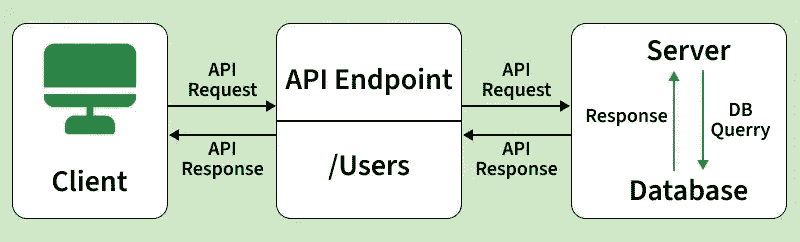
- Client Sends Request: The client sends a request to the API to access data or perform an action. This request may include method, parameters, headers, or body data.
- API Endpoint Receives the Request: The API endpoint accepts the client request and identifies the requested resource or operation. It then forwards the request to the server for processing.
- Server Processes the Request: The server handles the request by applying validation, business logic, and other required operations. It decides what action needs to be performed.
- Database Interaction: If data needs to be fetched, updated, inserted, or deleted, the server communicates with the database. The database then returns the required result to the server.
- Server Generates the Response: After processing the request, the server prepares the API response with the required data, status code, and response format such as JSON or XML.
- Response Returned to the Client: The response is sent back from the server through the API endpoint to the client. The client then displays the result or handles the success/error message.
API Testing Process
API Testing Workflow process is a structured process used to verify that APIs function correctly, perform efficiently, and remain secure. It covers all stages from requirement analysis to final reporting.
- Understand Requirements: Review API documentation (e.g., Swagger/Postman), including endpoints, HTTP methods, parameters, authentication, and expected responses.
- Set Up Testing Environment: Prepare the testing setup with required tools (Postman, JMeter, Rest Assured), test data, and authentication credentials.
- Design Test Cases: Create test cases for functional scenarios, positive and negative flows, edge cases, and security validations.
- Execute API Tests: Send API requests (GET, POST, PUT, DELETE, etc.) and record the responses for analysis.
- CI/CD Pipeline Integration: Integrate automated API tests into CI/CD pipelines (such as Jenkins, GitHub Actions, or GitLab CI/CD) to ensure continuous testing during build, deployment, and release processes.
- Validate Responses: Verify status codes, response time, headers, response structure (JSON/XML), and business logic correctness.
- Perform Different Types of Testing: Conduct functional, integration, security, performance, and load testing as required.
- Defect Logging & Retesting: Log defects, communicate them to developers, retest after fixes, and perform regression testing.
- Generate Reports: Prepare test reports including pass/fail status, test coverage, performance metrics, and key observations.
API Testing Types
Here's a breakdown of the main types of API testing:
- Functional Testing: Checks whether the API works correctly according to requirements and returns expected results.
- Integration Testing: Ensures the API works properly when combined with other systems, databases, or services.
- Load Testing: Measures API performance under expected user traffic and workload.
- Stress Testing: Tests the API beyond its limits to identify breaking points and failure behavior.
- Security Testing: Verifies that the API is protected against threats like unauthorized access and data breaches.
- Validation Testing: Confirms the API meets specifications such as data format, schema, and required fields.
- Regression Testing: Ensures recent changes do not break existing API functionality.
- Fuzz Testing: Sends random or invalid inputs to check how the API handles unexpected data.
- Contract Testing: Validates that the API follows the agreed contract between client and server.
- End-to-End Testing: Tests complete workflows involving multiple APIs and systems together.
- Mocking / Simulation Testing: Uses mock APIs or servers to test functionality without relying on real services.
API Testing Tools
There are several tools available to automate and streamline API testing. Here are a few popular ones:
- Postman: A popular tool used to send API requests, test responses, and automate API testing easily.
- SoapUI: A tool mainly used for testing SOAP and REST APIs with advanced functional and security testing features.
- JMeter: An open-source tool used for performance and load testing of APIs and web applications.
- Rest Assured: A Java-based library used for automating REST API testing with simple and readable code.
- Karate: An automation tool that combines API testing, performance testing, and UI testing in a single framework.
API Test Case Design
API test cases should be designed carefully to validate both expected behavior and error handling.
- Positive Test Cases: Verify that the API works correctly with valid inputs and returns the expected response.
- Negative Test Cases: Check how the API handles invalid, missing, or incorrect inputs and whether proper error messages are returned.
- Boundary Value & Edge Cases: Test minimum, maximum, and unusual input values to ensure the API behaves correctly under extreme conditions.
- Data-Driven Testing: Run the same test with multiple input datasets to validate behavior across different data combinations.
- Validation Checks: Ensure correct response format, required fields, status codes, and business rules.
HTTP Methods and Status Codes
HTTP Methods
HTTP methods define the type of action that a client wants to perform on the server.
| HTTP Method | Description | Example Use |
|---|---|---|
| GET | Retrieves data from the server | Fetch user details |
| POST | Sends data to create a new resource | Create a new user |
| PUT | Updates an existing resource completely | Update full user profile |
| PATCH | Updates part of an existing resource | Update only email address |
| DELETE | Deletes a resource | Delete a user record |
HTTP Status Codes
HTTP status codes indicate the result of an API request and help identify whether the request was successful, redirected, failed because of the client, or failed because of the server.
| Category | Description |
|---|---|
| 1xx – Informational | Indicates that the request was received and the process is continuing. |
| 2xx – Success | Indicates that the request was successfully received, understood, and processed. |
| 3xx – Redirection | Indicates that the client must take additional action to complete the request. |
| 4xx – Client Error | Indicates an error caused by the client, such as an invalid request or unauthorized access. |
| 5xx – Server Error | Indicates an error on the server side while processing the request. |
Common HTTP Response Codes
| HTTP Response Code | Description |
|---|---|
| 200 | Indicates a successful request. |
| 201 | Indicates that the request was successful and a new resource was created. |
| 204 | Indicates that the request was successful but no content is returned in the response. |
| 400 | Indicates a bad request due to invalid syntax or missing required parameters. |
| 401 | Indicates unauthorized access because authentication failed or credentials are missing. |
| 403 | Indicates forbidden access where the client is authenticated but does not have permission. |
| 404 | Indicates that the requested resource was not found. |
| 405 | Indicates that the HTTP method used is not allowed for the requested resource. |
| 500 | Indicates an internal server error while processing the request. |
| 503 | Indicates that the service is temporarily unavailable due to overload or maintenance. |
Structure of URL in API
In REST architecture, URIs (Uniform Resource Identifiers) are used to identify and access resources. A URL follows a structured format that helps locate and interact with specific API endpoints.
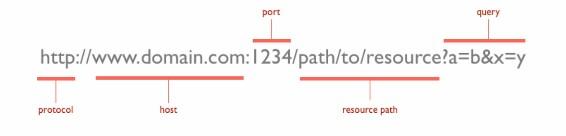
Parts of the URL Explained
- Protocol (http://): Defines how data is transferred between client and server (HTTP/HTTPS).
- Host (www.domain.com): The domain name or server where the resource is located.
- Port (1234): Specifies the communication port on the server (optional).
- Resource Path (/path/to/resource): Indicates the specific API endpoint or resource being accessed.
- Query Parameters (?a=b&x=y): Additional data sent in the request as key-value pairs.
API Documentation Standards
API documentation standards help developers and testers understand API structure, endpoints, request formats, authentication methods, and responses consistently.
- OpenAPI (Swagger): A widely used standard for designing, documenting, and testing REST APIs with interactive documentation support.
- RAML (RESTful API Modeling Language): A structured language used to model and document REST APIs in a readable format.
- API Blueprint: A markdown-based documentation standard used for designing and documenting APIs efficiently.
Benefits of API Documentation Standards
- Improve communication between developers and testers
- Simplify API integration and testing
- Ensure consistency in API development and maintenance
Real-World API Testing Example
Scenario: Weather Data Retrieval
A weather application sends a request to an API to retrieve the current weather information for a specific location.
API Request
- Endpoint: /weather
- Method: GET
Request:
GET /weather?location=New+Delhi
Sample API Response
{
"location": "New Delhi",
"temperature": "28°C",
"condition": "Cloudy"
}
Test Cases
- Verify the response contains all required fields such as location, temperature, and condition
- Check that the status code is 200 OK for a valid request
- Validate that the returned weather data matches the requested location
- Ensure the response time is within the acceptable limit
- Provide invalid input and verify proper error handling
Types of Bugs That May Occur in API Testing
API testing can reveal many defects related to functionality, performance, security, reliability, and data handling.
- Performance Issues: The API may respond slowly, show high latency, or fail under heavy traffic.
- Incorrect Response Structure: The response may not follow the expected JSON or XML format.
- Security Issues: Weak authentication, authorization flaws, or exposed sensitive data may exist.
- Input Handling Errors: The API may not handle valid, invalid, or boundary input values correctly.
- Improper Error Messages: The API may return unclear, missing, or incorrect error responses.
- Missing or Duplicate Functionality: Some expected operations may be missing or implemented incorrectly.
- Reliability Issues: The API may fail to connect, return inconsistent results, or behave unpredictably.
Challenges in API Testing
API testing involves several technical and operational challenges that can affect test accuracy, reliability, and overall software quality.
- Complex authentication mechanisms such as OAuth, JWT, API keys, or multi-level authentication can make API testing difficult.
- API endpoints, request formats, and response structures may change frequently during development, which can impact test stability.
- APIs often depend on third-party or external services that may be unavailable, slow, or unstable during testing.
- Maintaining valid, consistent, and reusable test data for different scenarios can be challenging.
- Different API versions may behave differently, leading to compatibility and maintenance issues.
The Test Pyramid
The Test Pyramid is a guideline for balancing different levels of testing in a project. It helps teams focus more on faster and stable tests while keeping expensive UI tests minimal.
- Unit Tests (70%) validate individual components and logic
- Service/API Tests (25%) verify backend APIs, integrations, and business logic
- UI Tests (5%) validate end-to-end user workflows
