The BETWEEN operator in PostgreSQL is used to filter rows where a column value falls within a specified range. The range is inclusive, meaning both the starting and ending values are included in the result.
- Can be used with numeric, text and date values.
- Can be combined with clauses such as WHERE, ORDER BY and LIMIT.
Syntax
SELECT column1, column2, ...FROM table_nameWHERE column_name BETWEEN value1 AND value2;
Where:
- column1, column2, ...: The columns to retrieve.
- table_name: The name of the table.
- column_name: The column whose values are filtered.
- value1: The lower boundary of the range.
- value2: The upper boundary of the range.
Examples of BETWEEN Operator in PostgreSQL
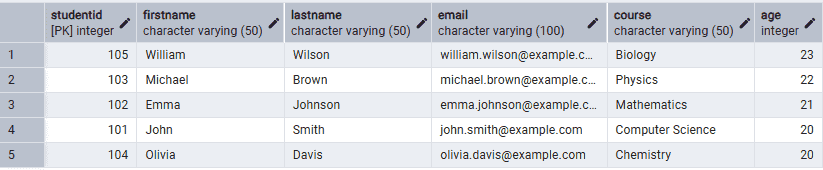
Firstly, create a Student table and insert some records into it.
CREATE TABLE Student (
    StudentID INT PRIMARY KEY,
    FirstName VARCHAR(50),
    LastName VARCHAR(50),
    Course VARCHAR(50),
    Age INT
);

INSERT INTO Student (StudentID, FirstName, LastName, Course, Age)
VALUES
(101, 'John', 'Smith', 'Computer Science', 20),
(102, 'Emma', 'Johnson', 'Mathematics', 21),
(103, 'Michael', 'Brown', 'Physics', 22),
(104, 'Olivia', 'Davis', 'Chemistry', 20),
(105, 'William', 'Wilson', 'Biology', 23);
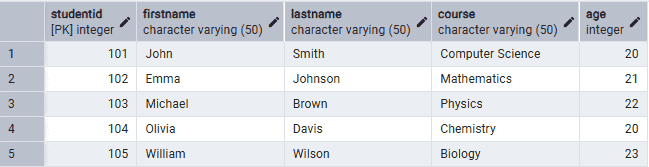
Example 1: Use BETWEEN with Numeric Values
The following query retrieves students whose age is between 20 and 22.
Query:
SELECT *
FROM Student
WHERE Age BETWEEN 20 AND 22;
Output:

Example 2: Use NOT BETWEEN
The following query retrieves students whose age is not between 20 and 22.
Query:
SELECT *
FROM Student
WHERE Age NOT BETWEEN 20 AND 22;
Output:

Example 3: Use BETWEEN with Text Values
The following query retrieves students whose first names fall alphabetically between 'E' and 'O'.
Query:
SELECT *
FROM Student
WHERE FirstName BETWEEN 'E' AND 'O';
Output:

Example 4: Use BETWEEN with Dates
Firstly, create an Employee table.
Query:
CREATE TABLE Employee (
    EmployeeID INT PRIMARY KEY,
    EmployeeName VARCHAR(50),
    HireDate DATE
);

INSERT INTO Employee (EmployeeID, EmployeeName, HireDate)
VALUES
(1, 'John Smith', '2022-01-15'),
(2, 'Emma Johnson', '2022-06-10'),
(3, 'Michael Brown', '2023-03-20'),
(4, 'Olivia Davis', '2023-08-05');
Output: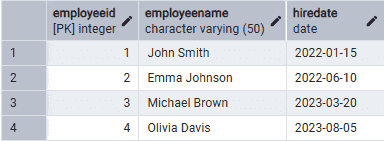
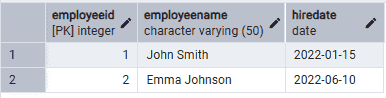
The following query retrieves employees hired between January 1, 2022 and December 31, 2022.
Query:
SELECT *
FROM Employee
WHERE HireDate BETWEEN '2022-01-01' AND '2022-12-31';
Output:
Example 5: Use BETWEEN with ORDER BY
The following query retrieves students whose age is between 20 and 23 and sorts them by age in descending order.
Query:
SELECT *
FROM Student
WHERE Age BETWEEN 20 AND 23
ORDER BY Age DESC;
Output: