
The TRUNCATE TABLE statement in PostgreSQL is used to quickly remove all rows from one or more tables while keeping the table structure, indexes and constraints unchanged.
- Faster than the
DELETEstatement because it does not scan individual rows. - Can truncate one or multiple tables in a single statement.
- Is fully transactional in PostgreSQL and can be rolled back if executed within a transaction.
Note: By default, identity (auto-increment) values are preserved, but they can be reset using RESTART IDENTITY.
Syntax
TRUNCATE TABLE table_name
[RESTART IDENTITY | CONTINUE IDENTITY]
[CASCADE | RESTRICT];
Where:
- table_name: The name of the table to be truncated.
- RESTART IDENTITY (optional): Resets identity (auto-increment) columns.
- CONTINUE IDENTITY (optional): Keeps the current identity values (default).
- CASCADE (optional): Truncates all tables that reference the specified table.
- RESTRICT (optional): Prevents truncation if foreign-key references exist (default).
Examples
Firstly, create an Employee table and insert some records into it.
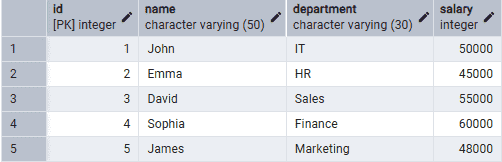
Example 1: Truncate a Single Table
The following query removes all rows from the Employee table while preserving its structure.
Query:
TRUNCATE TABLE Employee;Output:

- The Employee table becomes empty, but its structure, indexes and constraints remain unchanged.
Example 2: Truncate Multiple Tables
The following query removes all rows from the Employee and Department tables in a single statement.
Query:
TRUNCATE TABLE Employee, Department;Both tables are emptied while preserving their structures.
Example 3: Truncate a Table with RESTART IDENTITY
The following query removes all rows and resets the identity (auto-increment) values.
Query:
TRUNCATE TABLE Employee RESTART IDENTITY;All rows are removed and identity values are reset to their starting values.
Example 4: Truncate a Table with Foreign Key (CASCADE)
If another table references the Employee table through a foreign key, use the CASCADE option.
Query:
TRUNCATE TABLE Employee CASCADE;- The Employee table and all dependent tables are truncated.
Troubleshooting TRUNCATE TABLE Issues
- Foreign key dependency: Use CASCADE or truncate the child table before the parent table.
- Identity values not reset: Use RESTART IDENTITY if you want auto-increment values to start from the beginning.
- Permission denied: Ensure you have the required privileges to truncate the table.
- Data loss warning: TRUNCATE TABLE permanently removes all rows. Consider creating a backup before executing the command.
