
PostgreSQL is an open-source relational database management system (RDBMS) known for its reliability, extensibility and advanced SQL features. It is widely used for web applications, enterprise systems, data analytics and large-scale applications because of its robust performance and support for complex queries. PostgreSQL enables users to:
- Define database structures (creating databases, tables, indexes, constraints, views and schemas)
- Manipulate data (inserting, updating, deleting and modifying records)
- Query data (retrieving, filtering, joining and aggregating data using SQL)
- Improve query performance (using indexes, query planning, partitioning and other optimization techniques)
1. What Is PostgreSQL And How Does It Differ From Other SQL Databases?
PostgreSQL is an open-source database system used to store and manage data. It supports SQL for working with tables and also supports JSON for flexible data.It provides advanced features such as complex queries, foreign keys, triggers, views, stored procedures and JSON support.
2. What are the Components of PostgreSQL?
- Database: Stores related tables and other database objects.
- Schema: Organizes database objects into namespaces.
- Table: Stores data in rows and columns.
- Index: Improves query performance.
- View: A virtual table based on the result of a query
3. How to Create a New Database In PostgreSQL?
To create a new database in PostgreSQL, you can use the CREATE DATABASE command. For example:
CREATE DATABASE mydatabase;4. How to Create a New Table In PostgreSQL?
To create a new table in PostgreSQL, you can use the CREATE TABLE command. For example:
CREATE TABLE employees (
    employee_id SERIAL PRIMARY KEY,
    name VARCHAR(100),
    position VARCHAR(100),
    salary NUMERIC,
    hire_date DATE
);
5. What is a Primary Key in PostgreSQL?
A primary key is a column or a set of columns that uniquely identifies each row in a table. It ensures that the values in the primary key column(s) are unique and not null. For example:
CREATE TABLE employees (
    employee_id SERIAL PRIMARY KEY,
    name VARCHAR(100)
);
6. How to Insert Data Into a Table in PostgreSQL?
To insert data into a table, you can use the INSERT INTO command. For example:
INSERT INTO employees (name, position, salary, hire_date)
VALUES ('John Doe', 'Software Engineer', 80000, '2021-01-15');
7. How to Query Data From a Table in PostgreSQL?
To query data from a table, you can use the SELECT statement. For example:
SELECT * FROM employees;8. What is a Foreign Key in PostgreSQL?
A foreign key is a column or a set of columns that establishes a link between data in two tables. It ensures that the value in the foreign key column matches a value in the referenced column of another table, enforcing referential integrity. For example:
CREATE TABLE departments (
    department_id SERIAL PRIMARY KEY,
    department_name VARCHAR(100)
);

CREATE TABLE employees (
    employee_id SERIAL PRIMARY KEY,
    name VARCHAR(100),
    department_id INT,
    FOREIGN KEY (department_id) REFERENCES departments(department_id)
);
9. How to Update Data in a Table in PostgreSQL?
To update data in a table, you can use the UPDATE statement. For example:
UPDATE employees
SET salary = 85000
WHERE name = 'John Doe';
10. How to Delete Data From a Table in PostgreSQL?
To delete data from a table, you can use the DELETE statement.
Example:
DELETE FROM employees
WHERE name = 'John Doe';
11. What is the RETURNING Clause in PostgreSQL?
The RETURNING clause returns the affected rows after an INSERT, UPDATE or DELETE statement, eliminating the need for a separate SELECT query.
12. How to Create an Index in PostgreSQL?
To create an index in PostgreSQL, you can use the CREATE INDEX statement. Indexes improve query performance by allowing faster retrieval of records. For example:
CREATE INDEX idx_employee_name ON employees(name);13. What Is a Transaction In PostgreSQL?
A transaction is a sequence of one or more SQL statements that are executed as a single unit of work. It ensures data integrity and consistency by making sure that either all operations are completed successfully or none are applied.
Syntax:
BEGIN;
UPDATE employees
SET salary = 90000
WHERE name = 'John Doe';
COMMIT;
14. What is VACUUM in PostgreSQL?
VACUUM is a process in PostgreSQL that cleans up dead rows (tuples) created due to UPDATE and DELETE operations.
15. How to Handle Backup and Restore in PostgreSQL?
PostgreSQL provides utilities for backing up and restoring databases. The pg_dump utility is used to create a backup of a database, while the psql utility is used to restore the backup from an SQL dump file.
Example:
pg_dump mydatabase > mydatabase_backup.sql
psql mydatabase < mydatabase_backup.sql
16. What is EXPLAIN ANALYZE in PostgreSQL?
EXPLAIN ANALYZE is used to display the execution plan of a query along with its actual execution time. It helps identify performance bottlenecks and optimize slow queries by showing whether indexes are used, how tables are scanned and the cost of each operation.
Example:
EXPLAIN ANALYZE
SELECT *
FROM Employees
WHERE Salary > 50000;
PostgreSQL Intermediate Interview Questions
17. What is a Schema in PostgreSQL and How to Use It?
A schema in PostgreSQL is a way to organize and group database objects such as tables, views and functions. It helps manage namespaces, so objects with the same name can exist in different schemas. To create and use a schema, you can use the following commands:
CREATE SCHEMA myschema;
CREATE TABLE myschema.mytable (id SERIAL PRIMARY KEY, name VARCHAR(100));
SELECT * FROM myschema.mytable;
18. What Are Joins in PostgreSQL?
Joins are used to combine rows from two or more tables based on a related column. They help retrieve related data from multiple tables in a single query.
19. What Is a Subquery in PostgreSQL?
A subquery is a query written inside another SQL query. It is used to perform operations that depend on the result of another query.
20. What are Triggers in PostgreSQL and How to Create Them?
Triggers are special procedures that automatically execute when certain events (INSERT, UPDATE, DELETE) occur on a table. To create a trigger:
CREATE FUNCTION update_timestamp() RETURNS TRIGGER AS $$
BEGIN
    NEW.updated_at = NOW();
    RETURN NEW;
END;
$$ LANGUAGE plpgsql;

CREATE TRIGGER update_timestamp
BEFORE UPDATE ON employees
FOR EACH ROW
EXECUTE FUNCTION update_timestamp();
21. What Are Constraints in PostgreSQL?
Constraints are rules applied to table columns to ensure data accuracy and integrity in the database.
- PRIMARY KEY: Uniquely identifies each record and does not allow NULL values.
- FOREIGN KEY: Maintains relationships between tables.
- UNIQUE : Ensures all values in a column are different.
- NOT NULL: Prevents NULL values.
- CHECK : Ensures values meet a specific condition.
22. How to Create a View?
To create a view:
CREATE VIEW high_salary_employees AS
SELECT name, salary
FROM employees
WHERE salary > 80000;
23. How to Handle Exceptions in PL/pgSQL?
In PL/pgSQL, exceptions are handled using the EXCEPTION block, which allows you to manage errors during execution.
Example:
DO $$
BEGIN
    -- Attempt to insert a duplicate key
    INSERT INTO employees (employee_id, name) VALUES (1, 'John Doe');
EXCEPTION
    WHEN unique_violation THEN
        RAISE NOTICE 'Duplicate key error!';
END;
$$;
24. What are CTEs (Common Table Expressions) in PostgreSQL?
Common Table Expressions (CTEs) are temporary result sets that we can reference within a SELECT, INSERT, UPDATE or DELETE statement. CTEs improve query readability and organization. To use a CTE:
WITH employee_salaries AS (
    SELECT department_id, AVG(salary) AS avg_salary
    FROM employees
    GROUP BY department_id
)
SELECT * FROM employee_salaries;
25. How to Use Window Functions in PostgreSQL?
Window functions perform calculations across a set of table rows related to the current row. They are used for ranking, running totals and moving averages. For example:
SELECT name, salary,
    RANK() OVER (ORDER BY salary DESC) AS salary_rank
FROM employees;
26. Explain the Concept of JSON Data Types in PostgreSQL.
PostgreSQL supports JSON data types, which allow us to store and query JSON (JavaScript Object Notation) data. This enables semi-structured data storage. You can use json or jsonb types, where jsonb is a binary format that is more efficient for indexing. Example:
CREATE TABLE products (
    id SERIAL PRIMARY KEY,
    details JSONB
);

INSERT INTO products (details) VALUES ('{"name": "Laptop", "price": 1200}');
27. How to Implement Partitioning in PostgreSQL?
Partitioning divides a large table into smaller, more manageable pieces, improving performance and maintenance. PostgreSQL supports range and list partitioning. Example:
CREATE TABLE sales (
    sale_id SERIAL,
    sale_date DATE,
    amount NUMERIC
) PARTITION BY RANGE (sale_date);

CREATE TABLE sales_2021 PARTITION OF sales
FOR VALUES FROM ('2021-01-01') TO ('2022-01-01');
28. What Is The pg_hba.conf File and What Is Its Purpose?
The pg_hba.conf file controls client authentication in PostgreSQL. It specifies which clients are allowed to connect, their authentication methods and the databases they can access. It is essential for securing our PostgreSQL server.
29. How Do You Optimize Queries In PostgreSQL?
To optimize queries, we can:
- Use indexes to speed up data retrieval
- Analyze and vacuum tables regularly
- Write efficient SQL queries (avoid SELECT *)
- Use EXPLAIN to understand query execution plans
- Optimize joins and subqueries
30. Explain The Concept Of Table Inheritance In PostgreSQL.
Table inheritance allows a table to inherit columns from a parent table. This feature helps organize data hierarchically. Example:
CREATE TABLE employees (
    id SERIAL PRIMARY KEY,
    name VARCHAR(100)
);

CREATE TABLE managers (
    department VARCHAR(100)
) INHERITS (employees);
31. How to Perform Full-Text Search in PostgreSQL?
Full-text search allows you to search for text within a large corpus of documents. PostgreSQL supports full-text search using tsvector and tsquery types. Example:
CREATE TABLE documents (
    id SERIAL PRIMARY KEY,
    content TEXT,
    tsvector_content TSVECTOR
);

UPDATE documents SET tsvector_content = to_tsvector(content);

SELECT * FROM documents
WHERE tsvector_content @@ to_tsquery('search_term');
PostgreSQL Advanced Interview Questions
32. What Is The WAL (Write-Ahead Logging) In PostgreSQL and How Does It Work?
Write-Ahead Logging (WAL) in PostgreSQL is a method used to ensure data integrity. Before any changes are made to the database, the changes are first recorded in a log (WAL). This log helps in recovering the database to a consistent state in case of a crash. WAL operates by writing the changes to a log file before they are applied to the database, ensuring that the data is safe even if a failure occurs.
33. How to Configure Replication in PostgreSQL?
Replication in PostgreSQL involves copying data from one database server (master) to another (slave). To configure replication:
- Edit postgresql.conf on the master server to enable WAL archiving and set up replication parameters.
wal_level = replica
max_wal_senders = 3
archive_mode = on
archive_command = 'cp %p /var/lib/postgresql/wal_archive/%f'
- Create a replication user on the master.
CREATE ROLE replication_user WITH REPLICATION PASSWORD 'password' LOGIN;- Set up pg_hba.conf to allow replication connections from the slave.
host replication replication_user 192.168.1.10/32 md5- On the slave, set up recovery.conf with the connection information
standby_mode = 'on'
primary_conninfo = 'host=192.168.1.1 port=5432 user=replication_user password=password'
trigger_file = '/tmp/postgresql.trigger'
- Start the slave server and it will begin replicating data from the master.
34. What are the Different Types of Indexes Available in PostgreSQL?
PostgreSQL provides different types of indexes to improve query performance by enabling faster data retrieval.
- B-Tree Index: Default index type, suitable for most queries and comparisons.
- Hash Index: Used for equality comparisons (
=operator). - GiST Index: Supports complex data types like geometric data and full-text search.
- SP-GiST Index: Handles partitioned data structures efficiently.
- GIN Index: Optimized for full-text search and JSONB data.
- BRIN Index: Efficient for large tables with naturally ordered data.
35. Explain the Concept of MVCC (Multi-Version Concurrency Control) in PostgreSQL.
Multi-Version Concurrency Control (MVCC) in PostgreSQL is a method to handle concurrent transactions without locking. It allows multiple transactions to access the database simultaneously by maintaining multiple versions of data. Each transaction sees a consistent snapshot of the database, ensuring isolation. MVCC helps avoid conflicts and improves performance in a multi-user environment.
36. How to Use the pg_stat_activity View to Monitor PostgreSQL?
The pg_stat_activity view provides information about the current activity in the PostgreSQL database. It includes details like active queries, process IDs, user information and query start times. To use it:
SELECT pid, usename, application_name, state, query
FROM pg_stat_activity;
This query lists all active connections and their current state.
37. What are the Different Isolation Levels in PostgreSQL?
PostgreSQL supports four isolation levels to control how transactions interact:
- Read Uncommitted: Same as Read Committed; dirty reads are not allowed.
- Read Committed: Each query sees only committed data.
- Repeatable Read: Transaction sees the same data throughout (no changes from others).
- Serializable: Highest level; transactions behave as if run one by one.
38. How to Handle Deadlocks in PostgreSQL?
Deadlocks occur when two or more transactions block each other. PostgreSQL automatically detects deadlocks and terminates one of the transactions to resolve the conflict.To minimize deadlocks:
- Access tables in a consistent order.
- Keep transactions short and simple.
- Use explicit locking carefully.
- To investigate deadlocks, check the pg_locks view and PostgreSQL logs.
39. Explain the Concept of the Query Planner and Optimizer in PostgreSQL.
The query planner and optimizer in PostgreSQL analyze SQL queries to determine the most efficient execution plan. The planner uses statistics about the tables and indexes to estimate the cost of different execution strategies and chooses the one with the lowest cost. The optimizer considers factors like join methods, index usage and query rewriting to improve performance.
40. How Do You Implement Sharding In PostgreSQL?
Sharding involves partitioning data across multiple servers to distribute load and improve performance. PostgreSQL doesn't have built-in sharding but can be implemented using logical replication, partitioning and custom routing logic in the application.Extensions such as Citus can also be used to implement distributed PostgreSQL clusters.
41. What are the Different Types of Backup Strategies in PostgreSQL?
PostgreSQL supports several backup strategies:
- SQL Dump: Using pg_dump to create a logical backup of the database.
- File System Level Backup: Using tools like rsync to copy the data directory while the server is offline.
- Continuous Archiving: Using WAL archiving and pg_basebackup for continuous backups.
- Logical Replication: Setting up logical replication for real-time data backup and recovery.
42. What are Temporary Tables in PostgreSQL?
A Temporary Table is a table that exists only for the duration of a database session or transaction. It is useful for storing intermediate data during query processing without affecting permanent tables.
Example:
CREATE TEMP TABLE temp_employees (
    employee_id INT,
    name VARCHAR(100)
);

INSERT INTO temp_employees
VALUES (1, 'John Doe');

SELECT * FROM temp_employees;
PostgreSQL Query-Based Interview Questions
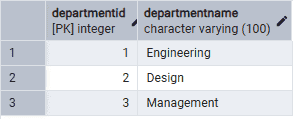
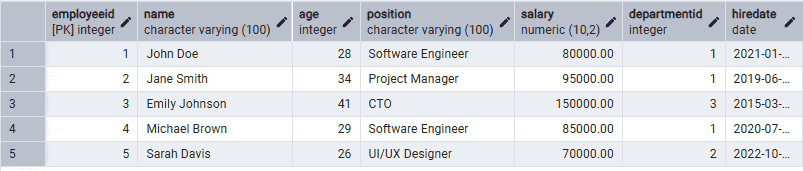
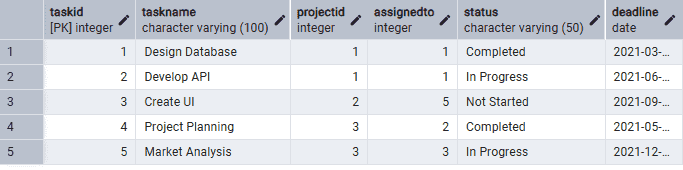
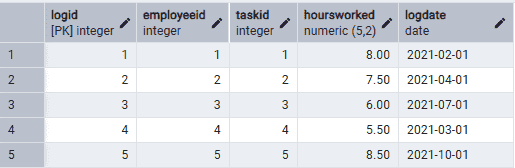
We have created some table for the reference of the questions like: Departments Table, Projects Table, Employees Table, Tasks Table and TimeLogs Table

43. List the Total Hours Worked by Each Employee on All Projects
Query:
SELECT E.Name, SUM(TL.HoursWorked) AS TotalHoursWorked
FROM Employees E
JOIN TimeLogs TL ON E.EmployeeID = TL.EmployeeID
GROUP BY E.Name;
Output:
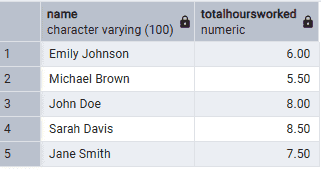
Explanation: This query sums the total hours worked by each employee by grouping the results by the employee name.
44. Find the Average Salary of Employees in Each Department Where the Average Salary is Greater Than 75,000
Query:
SELECT D.DepartmentName, AVG(E.Salary) AS AvgSalary
FROM Departments D
JOIN Employees E ON D.DepartmentID = E.DepartmentID
GROUP BY D.DepartmentName
HAVING AVG(E.Salary) > 75000;
Output:
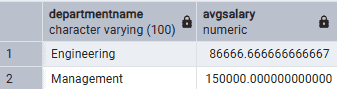
Explanation: This query calculates the average salary of employees in each department and filters the results to show only those departments where the average salary is greater than 75,000.
45. Retrieve the Details of Projects That Have More Than 2 Tasks Assigned
Query:
SELECT P.ProjectName, P.Budget, P.StartDate, P.EndDate, D.DepartmentName
FROM Projects P
JOIN Tasks T ON P.ProjectID = T.ProjectID
JOIN Departments D ON P.DepartmentID = D.DepartmentID
GROUP BY P.ProjectName, P.Budget, P.StartDate, P.EndDate, D.DepartmentName
HAVING COUNT(T.TaskID) > 2;
Output

Explanation: This query groups the tasks by project and filters the results to show projects that have more than 2 tasks assigned.
46. List the Employees Who Have Not Been Assigned to Any Tasks
Query:
SELECT E.Name
FROM Employees E
LEFT JOIN Tasks T ON E.EmployeeID = T.AssignedTo
WHERE T.AssignedTo IS NULL;
Output:
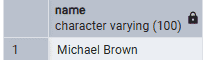
Explanation: This query performs a left join between the Employees and Tasks tables and filters the results to show employees who have not been assigned to any tasks.
47. Find the Project with the Highest Total Budget and Display Its Department Name
Query:
SELECT P.ProjectName, P.Budget, D.DepartmentName
FROM Projects P
JOIN Departments D ON P.DepartmentID = D.DepartmentID
ORDER BY P.Budget DESC
LIMIT 1;
Output:

Explanation: This query orders the projects by budget in descending order and limits the result to show only the project with the highest budget, along with its department name.
48. Calculate the Total Budget Allocated to Each Department
Query:
SELECT D.DepartmentName, SUM(P.Budget) AS TotalBudget
FROM Departments D
JOIN Projects P ON D.DepartmentID = P.DepartmentID
GROUP BY D.DepartmentName;
Output:
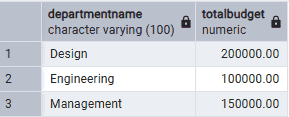
Explanation: This query sums the total budget allocated to each department by grouping the results by the department name.
49. List the Names of Employees Who Have Worked on 'Project Alpha'
Query:
SELECT DISTINCT E.Name
FROM Employees E
JOIN Tasks T ON E.EmployeeID = T.AssignedTo
JOIN Projects P ON T.ProjectID = P.ProjectID
WHERE P.ProjectName = 'Project Alpha';
Output:
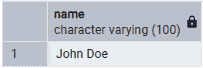
Explanation: This query joins the Employees, Tasks and Projects tables and filters the results to show employees who have worked on 'Project Alpha'.
50. Find the Department with the Most Employees and Display the Number of Employees
Query:
SELECT D.DepartmentName, COUNT(E.EmployeeID) AS NumberOfEmployees
FROM Departments D
JOIN Employees E ON D.DepartmentID = E.DepartmentID
GROUP BY D.DepartmentName
ORDER BY NumberOfEmployees DESC
LIMIT 1;
Output

Explanation: This query counts the number of employees in each department, orders the results by the number of employees in descending order and limits the result to show only the department with the most employees.
