
System Testing is a software testing level in which the complete and integrated application is tested as a whole to ensure it meets the specified requirements. It is performed after Integration Testing and before Acceptance Testing to verify the system's overall functionality, performance, and reliability.
- Tests the entire software system in a production-like environment.
- Verifies both functional and non-functional requirements.
- Ensures the application is ready for Acceptance Testing and deployment.
Example: An Online Shopping Application is tested as a complete system by verifying user registration, product search, shopping cart, payment processing, and order confirmation. This ensures that all integrated modules work together correctly and meet user requirements.
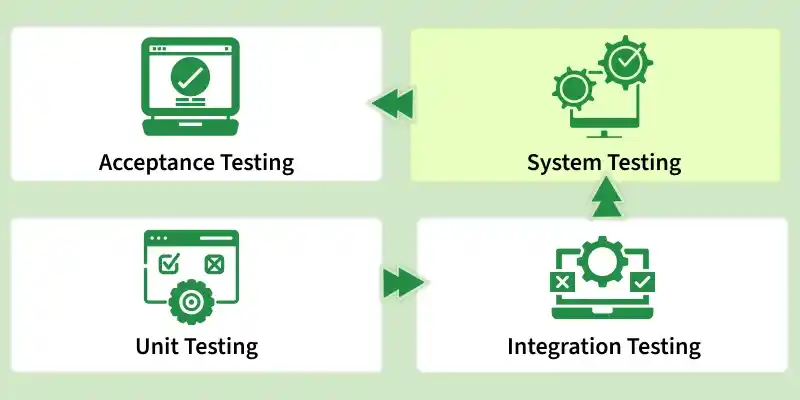
System Testing Process
System Testing is performed in the following steps:
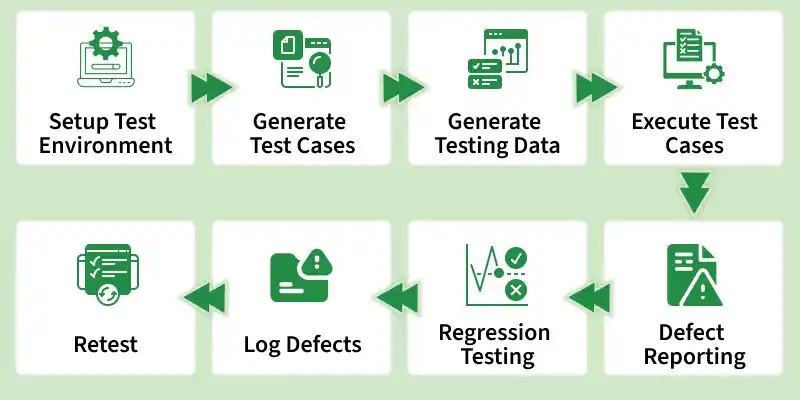
- Setup Test Environment: Prepare the required hardware, software, network, and testing tools. The environment should closely resemble the production setup.
- Generate Test Cases: Create test cases based on system requirements and specifications. These test cases help verify the application's functionality.
- Generate Testing Data: Prepare the data required to execute test cases effectively. It should include both valid and invalid inputs.
- Execute Test Cases: Run the test cases on the application and record the results. Compare actual outcomes with expected results.
- Defect Reporting: Identify and report any defects found during testing. Detailed reports help developers understand and fix issues.
- Regression Testing: Re-execute previously passed test cases after changes or bug fixes. This ensures existing functionality remains unaffected.
- Log Defects: Record defects in a defect tracking system for monitoring and management. This helps track the status of each issue.
- Retest: Execute failed test cases again after defects have been fixed. This confirms that the issues have been successfully resolved.
Types of System Testing
System Testing includes various testing types that evaluate different aspects of a software system to ensure it functions correctly, performs efficiently, and meets user requirements. Each type focuses on a specific area of the application.
- Functional Testing: Verifies that all features and functions work according to the specified requirements.
- Performance Testing: Evaluates the system's speed, responsiveness, and stability under different workloads.
- Load Testing: Checks how the application performs under expected user and transaction loads.
- Stress Testing: Determines the system's behavior when subjected to extreme workloads beyond normal limits.
- Security Testing: Identifies vulnerabilities and ensures data protection, authentication, and authorization mechanisms are effective.
- Usability Testing: Assesses the application's ease of use and overall user experience.
- Compatibility Testing: Verifies that the software works correctly across different devices, browsers, operating systems, and networks.
- Recovery Testing: Ensures the system can recover from failures such as crashes, hardware issues, or data loss.
- Installation Testing: Validates the installation, upgrade, and uninstallation processes of the software.
- Reliability Testing: Measures the system's ability to perform consistently without failures over a specified period.
Important: Acceptance Testing is not a type of System Testing. It is a separate testing level performed after System Testing to validate business requirements and customer expectations.
Tools Used for System Testing
Various tools are used in System Testing to automate test execution, manage test cases, track defects, and evaluate application performance
- TestRail: A test case management tool used for planning, organizing, and tracking testing efforts.
- HP ALM (Quality Center): Helps manage requirements, test cases, test execution, and defect tracking.
- Apache JMeter: Used for performance, load, and stress testing of web applications.
- Postman: A tool used for API testing and validating web services.
- LoadRunner: Used to evaluate application performance under different user loads.
- Bugzilla: An open-source defect tracking tool used for managing and monitoring bugs.
Advantages of System Testing
System Testing helps ensure that the complete software application functions correctly and meets specified requirements. It improves overall software quality by identifying defects before the product is released.
- Validates the complete integrated application to ensure all modules work together properly.
- Helps identify defects and inconsistencies before the software is released to end users.
- Ensures the system meets both functional and non-functional requirements.
- Verifies that the application performs reliably under expected operating conditions.
- Detects issues caused by interactions between different modules.
Limitations of System Testing
Although System Testing helps ensure software quality, it has certain limitations related to time, cost, and test coverage.
- System testing is time-consuming because the entire application is tested as a whole.
- It can be costly due to the need for a complete test environment, tools, and resources.
- Detecting the exact root cause of a defect can be difficult since multiple integrated modules are involved.
- It is usually performed after integration testing, so defects found at this stage may be more expensive to fix.
Best Practices for System Testing
To make System Testing more effective and efficient, follow these best practices:
- Understand the system requirements clearly before designing test cases.
- Prepare a realistic test environment that closely matches the production setup.
- Create comprehensive test cases covering both functional and non-functional requirements.
- Use well-defined test data to validate different scenarios, including valid and invalid inputs.
- Prioritize critical business workflows and high-risk areas during testing.
Read More: System Testing Vs Integration Testing
