

Test execution is the process of running test cases to verify that the application works as expected and meets business requirements. It is an important phase of the Software Testing Life Cycle (STLC) that ensures quality and correctness.
- Ensures application meets requirements and works correctly.
- Helps identify defects and improves overall quality.
- Validates proper implementation of design and functionality.
Test Execution Process
The Test Execution Process is the step in Software Testing Life Cycle (STLC) where prepared test cases are actually run on the application to verify its functionality and detect defects.
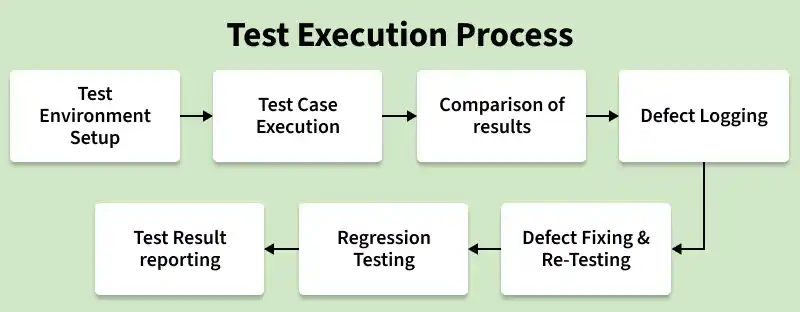
- Test Environment Setup: The required hardware, software, network, and test data are prepared to execute test cases smoothly.
- Test Case Execution: Test cases are executed step by step as per the test plan and actual results are recorded.
- Comparison of Results: Actual results are compared with expected results to verify whether the application is working correctly.
- Defect Logging: If any mismatch is found, defects are logged with proper details like steps, severity, and screenshots.
- Defect Fixing & Re-testing: Developers fix the reported defects and testers re-execute failed test cases to verify the fixes.
- Regression Testing: Testing is performed to ensure that new changes or fixes have not affected existing functionality.
- Test Result Reporting: Final execution status such as Pass, Fail, or Blocked is recorded and shared with stakeholders.
Example of an E-Commerce Website
Test cases specially designed for the login functionality of an e-commerce website:
Test Case 1: Valid Login (TC_LOGIN_01)
Verify that a registered user can log in successfully with valid credentials
- Precondition User must be registered
- Steps Enter valid username and password and click on Login
- Expected Result User is redirected to homepage or dashboard
- Status Pass
Test Case 2: Invalid Login (TC_LOGIN_02)
Verify that the system shows an error message for invalid credentials.
- Precondition None
- Steps Enter invalid username and password and click on Login
- Expected Result Error message is displayed and login is denied
- Status Pass
Here, Selenium WebDriver and TestNG are used within a Java project to execute the test cases practically:
BaseTestMain.java (Base class for WebDriver setup and teardown)
package automatedfunctional;

import org.openqa.selenium.WebDriver;
import org.openqa.selenium.chrome.ChromeDriver;
import org.testng.annotations.AfterMethod;
import org.testng.annotations.BeforeMethod;

public class BaseTestMain {

    protected WebDriver driver;
    protected String url = "https://ecommerce.artoftesting.com/";

    // Configure and initialize ChromeDriver
    @BeforeMethod
    public void setUp() {

        // Set the path to the ChromeDriver executable
        System.setProperty(
                "webdriver.chrome.driver",
                "C:\\Users\\path of the chromedriver\\drivers\\chromedriver.exe"
        );

        // Initialize ChromeDriver
        driver = new ChromeDriver();

        // Maximize browser window
        driver.manage().window().maximize();
    }

    // Close the browser and end the WebDriver session
    @AfterMethod
    public void tearDown() {

        if (driver != null) {
            driver.quit();
        }
    }
}
LoginTest.java (Test Cases Execution)
package automatedfunctional;

import org.testng.Assert;
import org.testng.annotations.Test;

public class LoginTest extends BaseTestMain {

    @Test
    public void testLoginWithValidCredentials() {

        // Step 1: Navigate to the login page
        driver.get(url);

        // Step 2: Create a LoginPage object
        LoginPage loginPage = new LoginPage(driver);

        // Step 3: Enter valid username and password
        loginPage.enterUsername("valid_user");
        loginPage.enterPassword("valid_password");

        // Step 4: Click the login button
        loginPage.clickLogin();

        // Step 5: Verify that login was successful
        Assert.assertTrue(
                loginPage.isLoginSuccessful(),
                "Login was not successful with valid credentials."
        );
    }

    @Test
    public void testLoginWithInvalidCredentials() {

        // Step 1: Navigate to the login page
        driver.get(url);

        // Step 2: Create a LoginPage object
        LoginPage loginPage = new LoginPage(driver);

        // Step 3: Enter invalid username and password
        loginPage.enterUsername("invalid_user");
        loginPage.enterPassword("wrong_password");

        // Step 4: Click the login button
        loginPage.clickLogin();

        // Step 5: Verify that login failed
        Assert.assertEquals(
                driver.getCurrentUrl(),
                "https://ecommerce.artoftesting.com/",
                "Unexpected URL after invalid login attempt."
        );
    }
}
Test Execution Summary
- Test Case 1 (Valid Login): Passed successfully, and user is redirected to the homepage.
- Test Case 2 (Invalid Credentials): Passed successfully, and error message is displayed.
Output:
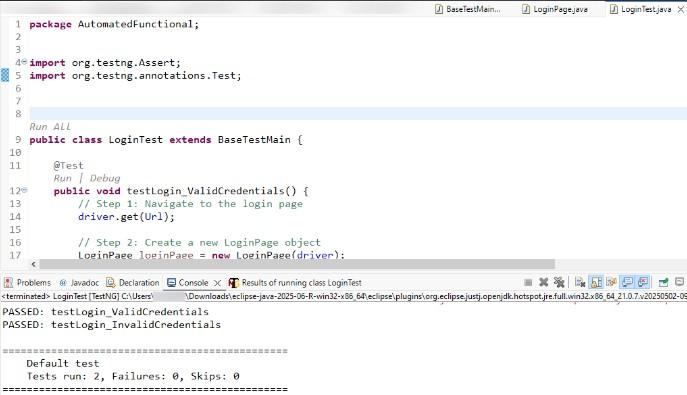
Test execution was successful, confirming that the login functionality works correctly. All test cases passed for both valid and invalid scenarios, with any discrepancies noted for review.
Activities Under Execution
Activities under execution include the key tasks performed during testing to identify defects, validate fixes, and ensure software quality
- Defect Finding and Reporting Identify bugs during testing and report them to developers
- Defect Mapping Link defects with test cases and track their fixes
- Re Testing Re run failed test cases to verify fixes
- Regression Testing Ensure new changes do not affect existing features
- System Integration Testing Test all modules together to validate overall system functionality
Test Execution Priorities
Test execution priorities refer to organizing and executing test cases based on their importance, risk, and impact. It ensures that critical and high-risk functionalities are tested first, improving efficiency and software quality.
- Complexity: Test cases with higher complexity, multiple conditions, and critical logic should be executed first to avoid major issues.
- Risk Covered: Test cases that involve higher risk, such as time-sensitive or resource-intensive scenarios, should be prioritized.
- Platforms Covered: Test cases covering important platforms like Windows, Mac, and Mobile should be given priority.
- Depth: Ensures that test cases deeply cover all possible conditions within a specific functionality or module.
- Breadth: Ensures that test cases cover the entire application, including all functionalities and modules.
Test Execution States
Test execution states represent the outcome or status of test cases after execution. They help testers track progress and identify issues during testing.
- Pass: Test case executed successfully and results match expected output.
- Fail: Test case did not meet expected results.
- Not Run: Test case has not been executed yet.
- Partially Executed: Some steps passed while others failed.
- Inconclusive: Execution completed but needs further analysis.
- In Progress: Test case is currently being executed.
- Unexpected Result: Test passed but produced unexpected output.
Test Execution Report
A Test Execution Report is a document that provides a detailed summary of test execution activities and their outcomes. It helps stakeholders understand test progress, defects found, and the overall quality of the software.
- Test Summary: Includes total test cases, executed, passed, failed, and pending test cases.
- Defect Details: Provides information about defects, including severity, priority, and current status.
- Execution Status: Shows progress of testing activities and completion percentage.
- Environment & Observations: Details test environment and any important observations during testing.
- Conclusion: Final evaluation of software quality and readiness for release.
Guidelines for Test Execution
Test execution guidelines provide best practices to ensure effective and accurate testing. They help testers perform testing in a structured and efficient manner.
- Follow Test Plan Execute test cases as per the defined plan and strategy
- Use Proper Test Data Ensure correct and relevant data is used during testing
- Record Results Clearly Document actual results and observations properly
- Report Defects Promptly Log issues with complete details for quick resolution
- Re-test and Verify Validate fixes and update test status accordingly
