Static Site Generation (SSG) in Next.js is a rendering technique where HTML pages are generated at build time and served as static files. Since the pages are pre-built before deployment, they load quickly and improve SEO.
- Generates HTML at build time before deployment.
- Delivers pre-rendered static pages for faster loading.
- Improves SEO by serving fully rendered HTML.
- Best suited for content that changes infrequently.
Working of Static Site Generation
In the App Router, pages are statically generated by default when they do not use dynamic data. During the build process, Next.js generates the HTML for these pages and serves the pre-built files on every request.
Steps to Implement Static Site Generation (SSG)
Step 1: Create a new Next.js application using the following commands.
npx create-next-app@latest my-next-app
cd my-next-app
Project Structure
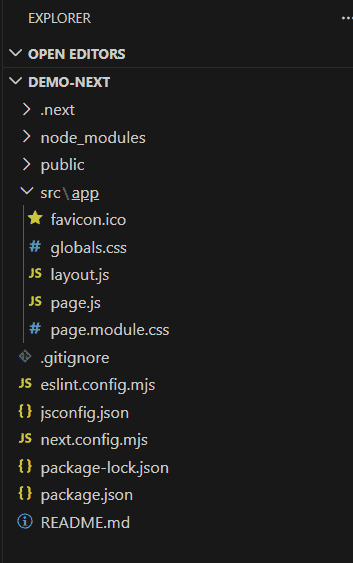
Step 2: Create a Static Page
Open the src/app/page.js file and replace its content with the following code.
// Filename - src/app/page.js
export default function Home() {
  return (
    <main>
      <h1>Welcome to GeeksforGeeks</h1>
      <p>This page is statically generated using Next.js.</p>
    </main>
  );
}
Step 3: Build the Application
Run the following command to create the production build.
npm run buildDuring the build process, Next.js pre-renders the page as static HTML.
Step 4: Start the Production Server
Run the production server using the following command.
npm startAfter clicking the http://localhost:3000 The statically generated page will be served without generating HTML on every request.
Steps 5: Run the development server
npm run devOutput: