

API Testing with Rest Assured is a technique used to test RESTful web services in Java. It allows testers to send HTTP requests and validate responses easily using simple and readable code. It is widely used in automation testing for backend validation.
- Used for testing RESTful APIs in Java-based automation frameworks.
- Provides a simple and readable syntax using the
given-when-thenapproach. - Supports validation of response data, headers, status codes, and authentication.
- Integrates easily with TestNG, JUnit, and CI/CD tools.
Prerequisites for Rest Assured Setup
Before using Rest Assured for API testing, you need to set up a proper Java development environment with required tools and dependencies. This ensures smooth execution of API automation scripts.
- Install Java (JDK 8 or above)
- Set up an IDE like Eclipse or IntelliJ IDEA
- Install Maven or Gradle for dependency management
- Add Rest Assured dependency in pom.xml or build.gradle
- Basic knowledge of REST APIs and HTTP methods
- Familiarity with JUnit or TestNG framework
- Internet access to test public APIs or endpoints
Performing CRUD Operations with REST Assured
GET Request
A GET request is used to retrieve data from an API. Here’s how you can test it with REST Assured.
Response response = given()
.baseUri("https://api.example.com/v2")
.when()
.get("/pet/1")
.then()
.statusCode(200)
.extract()
.response();
POST Request
A POST request is used to create a new resource. In this example, we are sending a payload to create a new pet.
String requestBody = "{ \"id\": 123, \"name\": \"Buddy\", \"status\": \"available\" }";
given()
.baseUri("https://api.example.com/v2")
.header("Content-Type", "application/json")
.body(requestBody)
.when()
.post("/pet")
.then()
.statusCode(200);
PUT Request
PUT is used to update a resource. For instance, changing the pet’s status:
String updatedBody = "{ \"id\": 123, \"name\": \"Buddy\", \"status\": \"sold\" }";
given()
.baseUri("https://api.example.com/v2")
.header("Content-Type", "application/json")
.body(updatedBody)
.when()
.put("/pet")
.then()
.statusCode(200);
DELETE Request
To delete a resource, you would use the DELETE request method:
given()
.baseUri("https://api.example.com/v2")
.when()
.delete("/pet/123")
.then()
.statusCode(200);
Combined Example of CRUD Operation using the Rest Assured:
package crud;

import org.testng.Assert;
import org.testng.annotations.Test;
import io.restassured.RestAssured;
import io.restassured.response.Response;

public class CRUDOperationsTest {

    // Base URI
    private static final String BASE_URL = "https://jsonplaceholder.typicode.com/posts";

    /**
     * Create (POST Request)
     */
    @Test
    public void testCreate() {
        // JSON request body
        String requestBody = """
                {
                    "title": "foo",
                    "body": "bar",
                    "userId": 1
                }
                """;

        // Sending POST request
        Response response = RestAssured.given()
                .header("Content-Type", "application/json")
                .body(requestBody)
                .when()
                .post(BASE_URL);

        // Printing and validating the response
        System.out.println("Create Response: " + response.getBody().asString());
        Assert.assertEquals(response.getStatusCode(), 201, "Status Code Check");
        Assert.assertTrue(response.getBody().asString().contains("foo"), "Response Body Check");
    }

    /**
     * Read (GET Request)
     */
    @Test
    public void testRead() {
        // Sending GET request
        Response response = RestAssured.given()
                .when()
                .get(BASE_URL + "/1");

        // Printing and validating the response
        System.out.println("Read Response: " + response.getBody().asString());
        Assert.assertEquals(response.getStatusCode(), 200, "Status Code Check");
        Assert.assertTrue(response.getBody().asString().contains("id"), "Response Body Check");
    }

    /**
     * Update (PUT Request)
     */
    @Test
    public void testUpdate() {
        // JSON request body
        String requestBody = """
                {
                    "id": 1,
                    "title": "updated title",
                    "body": "updated body",
                    "userId": 1
                }
                """;

        // Sending PUT request
        Response response = RestAssured.given()
                .header("Content-Type", "application/json")
                .body(requestBody)
                .when()
                .put(BASE_URL + "/1");

        // Printing and validating the response
        System.out.println("Update Response: " + response.getBody().asString());
        Assert.assertEquals(response.getStatusCode(), 200, "Status Code Check");
        Assert.assertTrue(response.getBody().asString().contains("updated title"), "Response Body Check");
    }

    /**
     * Delete (DELETE Request)
     */
    /**
     * Delete (DELETE Request)
     */
    @Test
    public void testDelete() {
        // Sending DELETE request
        Response response = RestAssured.given()
                .when()
                .delete(BASE_URL + "/1");

        // Printing the response body
        System.out.println("Delete Response: " + response.getBody().asString());

        // Validating the response
        Assert.assertEquals(response.getStatusCode(), 200, "Status Code Check");

        // Checking if the response body is empty or contains an empty JSON
        String responseBody = response.getBody().asString();
        boolean isResponseEmpty = responseBody.isEmpty() || "{}".equals(responseBody.trim());
        Assert.assertTrue(isResponseEmpty, "Response Body Check");
    }

}
Output:
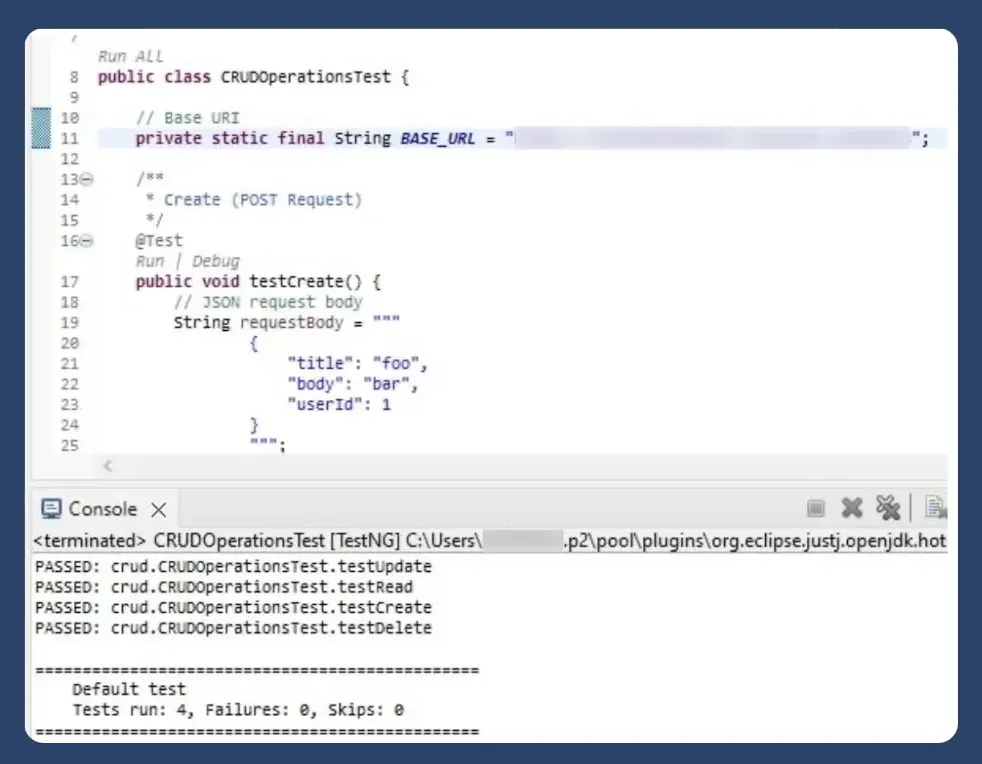
REST Assured makes API testing fast, reliable, and maintainable. Whether it’s a simple GET request or complex authentication and payload validation.
Key Validations in REST Assured
1. Status Code Validation
The HTTP status code provides insight into whether the API call succeeded or failed. Verifying the status code ensures that the API behaves as expected.
Use these web to verify the Status Code:
Example:
package io.learn.basic;
import static io.restassured.RestAssured.given;
import static org.hamcrest.Matchers.equalTo;

import org.testng.annotations.Test;

public class BasicTests {

    @Test
    public void verifyStatusCode() {
        // Verify the status code for the API request
        given()
                .baseUri("http://api.zippopotam.us") // Base URI
                .when()
                .get("/us/90210") // Endpoint with path parameter
                .then()
                .assertThat()
                .statusCode(200); // Expected status code

    }

    @Test
    public void verifyCountryDetails() {
        // Verify the country details in the response
        given()
                .baseUri("http://api.zippopotam.us") // Base URI
                .when()
                .get("/us/90210") // Endpoint with path parameter
                .then()
                .assertThat()
                .statusCode(200) // Verify status code
                .and()
                .body("country", equalTo("United States")) // Validate country field
                .body("'country abbreviation'", equalTo("US"))

        		.body("'post code'", equalTo("90210"));
//

    }


    @Test
    public void verifyPlaceDetails() {
        // Verify the country details in the response
        given()
                .baseUri("http://api.zippopotam.us") // Base URI
                .when()
                .get("/us/90210") // Endpoint with path parameter
                .then()
                .assertThat()
                .statusCode(200) // Verify status code
                .body("places[0].state", equalTo ("California"))
                .body("places[0].longitude", equalTo ("-118.4065"))
                .body("places[0].state", equalTo ("California"))
                .body("places[0].'state abbreviation'", equalTo ("CA"));
//   24 min done

    }

    @Test
    public void varifyNegativeTest() {
        // Verify the status code for the API request
        given()
                .baseUri("http://api.zippopotam.us") // Base URI
                .when()
                .get("/us/99999") // Endpoint with path parameter
                .then()
                .assertThat()
                .statusCode(404); // Expected status code

    }

    @Test
    public void varifyResponseType() {
        // Verify the status code for the API request
        given()
                .baseUri("http://api.zippopotam.us") // Base URI
                .when()
                .get("/us/90210") // Endpoint with path parameter
                .then()
                .assertThat()
                .statusCode(200) // Expected status code
        		.contentType(equalTo("application/json"));

    }
}
Output :
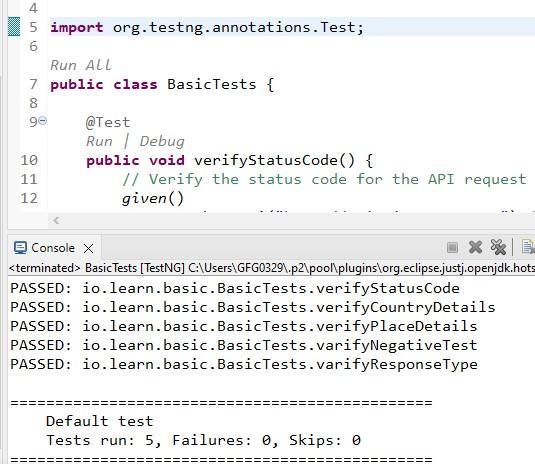
Explanation: The .statusCode(200) method verifies that the API returns a 200 OK status code, indicating a successful request.
Crud operation
package crud;

import static io.restassured.RestAssured.delete;
import static io.restassured.RestAssured.get;
import static io.restassured.RestAssured.given;
import static org.hamcrest.Matchers.equalTo;

import org.testng.annotations.BeforeClass;
import org.testng.annotations.Test;

import io.restassured.RestAssured;
import io.restassured.builder.RequestSpecBuilder;
import io.restassured.response.Response;

public class AllMethodTests {

    private String petId; // Store pet ID for reuse across tests

    @BeforeClass
    public void setUp() {
        // Configure base URI and request specification
        RestAssured.baseURI = "https://petstore.swagger.io";
        RestAssured.basePath = "/v2";

        RestAssured.requestSpecification = new RequestSpecBuilder()
                .setContentType("application/json")
                .build();
    }

    // POST: Create a new pet
    @Test(priority = 1)
    public void testPOST() {
        String requestBody = """
                {
                    "category": { "id": 1, "name": "dog" },
                    "name": "doggie-restassured",
                    "photoUrls": ["string"],
                    "tags": [{ "id": 0, "name": "string" }],
                    "status": "available"
                }
                """;

        Response response = given()
                .body(requestBody)
                .when()
                .post("/pet");

        response.then()
                .statusCode(200)
                .body("name", equalTo("doggie-restassured"));

        petId = response.path("id").toString();
        System.out.println("New pet created with ID: " + petId);
    }

 // GET: Retrieve the created pet
//    @Test(priority = 2, dependsOnMethods = "testPOST")
//    public void testGET() {
//        get("/pet/" + petId)
//                .then()
//                .statusCode(200)
//                .body("id", equalTo(Long.valueOf(petId).intValue())) // Convert petId to Long and then to int for matching
//                .body("name", equalTo("doggie-restassured"));
//    }
    // PUT: Update the pet's details
    @Test(priority = 3, dependsOnMethods = "testPOST")
    public void testPUT() {
        String requestBody = """
                {
                    "id": %s,
                    "category": { "id": 1, "name": "dog" },
                    "name": "doggie-restassured-updated",
                    "photoUrls": ["string"],
                    "tags": [{ "id": 0, "name": "string" }],
                    "status": "available"
                }
                """.formatted(petId);

        Response response = given()
                .body(requestBody)
                .when()
                .put("/pet");

        response.then()
                .statusCode(200)
                .body("name", equalTo("doggie-restassured-updated"));

        String name = response.path("name").toString();
        System.out.println("Pet with ID " + petId + " updated with name: " + name);
    }

    // DELETE: Remove the pet
    @Test(priority = 4, dependsOnMethods = "testPOST")
    public void testDELETE() {
        delete("/pet/" + petId)
                .then()
                .statusCode(200)
                .body("message", equalTo(petId));

        System.out.println("Pet with ID " + petId + " deleted.");
    }

    // GET: Verify the pet is deleted
    @Test(priority = 5, dependsOnMethods = "testDELETE")
    public void testGETAfterDelete() {
        get("/pet/" + petId)
                .then()
                .statusCode(404)
                .body("message", equalTo("Pet not found"));
    }
}
Output:
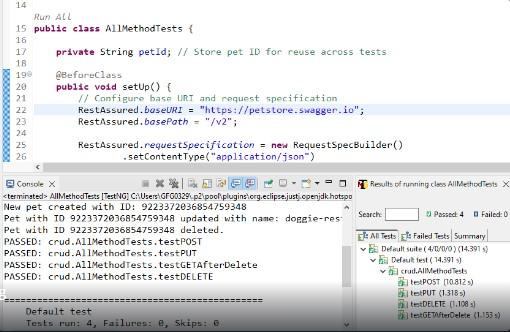
2. Response Body Validation
The response body contains important data returned by the API. Validating specific fields ensures the API returns correct and expected information. REST Assured integrates with Hamcrest matchers to validate response data easily.
Example:
import io.restassured.RestAssured;
import io.restassured.builder.ResponseSpecBuilder;
import io.restassured.specification.ResponseSpecification;

public class ResponseSpecExample {
    public static void main(String[] args) {

        // Create reusable Response Specification
        ResponseSpecification responseSpec = new ResponseSpecBuilder()
                .expectStatusCode(200)
                .expectContentType("application/json")
                .build();

        // Use the specification in a GET request
        RestAssured.given()
                .when()
                .get("https://petstore.swagger.io/v2/pet/1")
                .then()
                .spec(responseSpec);
    }
}
Explanation:
expectStatusCode(200)ensures the API returns a successful responseexpectContentType("application/json")ensures response is in JSON format.spec(responseSpec)applies all predefined validations in one step
3. Response Time Validation
Slow API responses can negatively impact user experience and system performance. Validating response time ensures the API meets expected performance benchmarks.
Example:
import static io.restassured.RestAssured.*;
import static org.hamcrest.Matchers.*;

public class ResponseTimeValidation {
    public static void main(String[] args) {

        given()
            .baseUri("https://jsonplaceholder.typicode.com")
        .when()
            .get("/posts/1")
        .then()
            .time(lessThan(2000L))  // Response time < 2 seconds
            .log().all();
    }
}
Explanation:
- .time(lessThan(2000L)) validates that the API response is returned in less than 2000 milliseconds (2 seconds)
- This helps ensure performance standards and SLA compliance
- .log().all() is optional and used to print full response details for debugging
