
User Acceptance Testing (UAT) is the final phase of software testing where end-users validate the system in real-world scenarios to ensure it meets business requirements. It focuses on verifying whether the application is ready for release from a user’s perspective.
- Ensures the software meets business needs and user expectations.
- Validates functionality, usability, and overall user experience.
- Helps identify gaps between expected and actual results before deployment.
Example: In an e-commerce application, end-users test whether they can successfully browse products, add items to the cart, and complete the checkout process before the final release.
Acceptance Criteria in UAT
Acceptance criteria define the conditions that the software must meet to be approved by end-users.
- Completeness: All required features and functionalities are implemented.
- Accuracy: The system produces correct and expected results.
- User-Friendliness: The application is easy to use and understand.
- Performance: The system performs efficiently under expected workloads.
- Reliability: The application works consistently without failures.
- Security: Data and system access are properly protected.
- Scalability: The system can handle growth in users or data.
- Compatibility: Works smoothly across different devices, browsers, and environments.
Participants in UAT
User Acceptance Testing (UAT) is performed by end-users or stakeholders who will use the software in real-world scenarios. Their role is to validate whether the application meets business requirements and is ready for deployment.
- End-Users: Actual users who interact with the system in daily operations.
- Clients or Business Stakeholders: Ensure the software aligns with business goals and expectations.
- Subject Matter Experts (SMEs): Validate domain-specific functionality and workflows.
Types of User Acceptance Testing
User Acceptance Testing can be categorized into different types based on the purpose and environment in which the testing is performed.
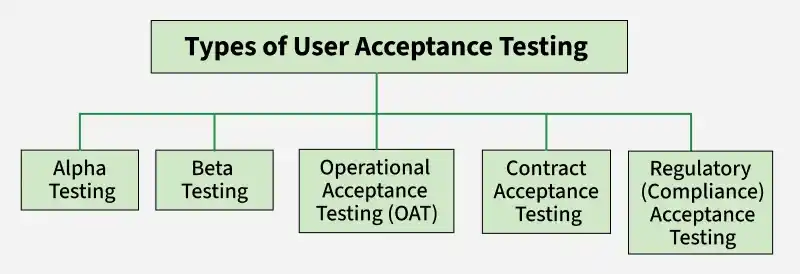
- Alpha Testing: It is done by internal developers or QA team at the development site to identify bugs before releasing the product to external users.
- Beta Testing: It is performed by real users in a real environment to gather feedback and detect remaining issues before final release.
- Operational Acceptance Testing (OAT): OAT checks whether the system is ready for production use by validating backup, recovery, performance, and operational stability.
- Contract Acceptance Testing: It verifies that the software meets all conditions and requirements defined in the contract or agreement.
- Regulatory Testing: It ensures the system complies with legal, safety, and industry standards or government regulations.
User Acceptance Testing (UAT) Process
The UAT process defines the step-by-step approach followed to validate software before release.

- Requirement Analysis: Business requirements are reviewed to understand what needs to be validated during UAT. This helps define the testing scope and objectives.
- UAT Test Plan Creation: A detailed UAT plan is prepared, outlining the testing approach, schedule, resources, and responsibilities. It ensures smooth test execution.
- Identify Test Scenarios: Real-world business scenarios are identified based on user workflows and requirements. This ensures all critical functionalities are covered.
- Create UAT Test Cases: Test cases are designed with clear steps and expected results to validate each business scenario. They help ensure consistent testing.
- Prepare Test Data: Relevant and realistic test data is prepared to simulate actual business operations. This enables accurate validation of system behavior.
- Test Run (UAT Execution): End users execute the test cases and compare actual results with expected outcomes. Any defects found are reported for resolution.
- Confirm Business Objectives: Stakeholders verify that all business requirements have been met successfully. Final approval is provided before the product is released to production.
Challenges of User Acceptance Testing (UAT)
User Acceptance Testing involves real users and business validation, which can introduce several practical challenges.
- Users may provide inconsistent, unclear, or conflicting feedback, making it difficult to identify actual issues and prioritize improvements.
- End-users are often not fully available due to business responsibilities, which can delay testing and reduce overall test coverage.
- Test scenarios may not fully reflect real-world business workflows, leading to gaps in validation of critical functionalities.
- Lack of a proper test environment or realistic data can result in inaccurate testing outcomes and missed defects.
Importance of UAT
User Acceptance Testing ensures that the software meets real user expectations and is ready for deployment in a practical environment.
- Ensures usability by validating that the application is easy to use, intuitive, and aligned with real user workflows and expectations.
- Provides a reliable feedback mechanism where end-users can identify issues, suggest improvements, and confirm whether requirements are correctly implemented.
- Helps identify real-world issues that may not be detected during earlier testing phases, improving overall product quality and reliability.
- Validates business requirements by ensuring that the software performs actual business tasks correctly before final release.
Tools for UAT
Various tools are used in UAT to collect user feedback, track behavior, and identify issues in real-world usage scenarios.
- Marker.io: Allows users and testers to report visual bugs directly from a website with screenshots and annotations, making it easier to communicate issues with developers.
- FullStory: Captures user sessions and interactions in detail, helping teams understand real user behavior, identify usability issues, and analyze user journeys.
- Hotjar: Provides heatmaps, session recordings, and feedback polls to understand how users interact with the application and improve user experience.
- Crazy Egg: Offers click tracking and heatmaps to visualize where users click and how they navigate, helping identify usability and design issues.
- Qualaroo: Collects real-time user feedback through surveys and polls, helping teams understand user expectations and improve product decisions.
- Sentry: Tracks real-time errors and performance issues in applications, helping identify problems that users face during actual usage.
Exit Criteria for (UAT)
Exit criteria define the conditions that must be satisfied before completing UAT and approving the software for production release.
- All critical and high-priority defects identified during UAT are fixed, re-tested, and verified to ensure the system works as expected without major issues.
- The application successfully meets all defined business requirements and acceptance criteria, confirming that it supports real-world user workflows.
- End-users or stakeholders validate the system and provide formal approval (sign-off), indicating their confidence in the system’s functionality and usability.
- Test scenarios and test cases are executed successfully with expected results, ensuring that key functionalities perform correctly under real usage conditions.
- No major usability issues exist, and users are able to perform tasks easily and efficiently without confusion or errors.
- UAT documentation, including test results, defect logs, and reports, is completed and reviewed for accuracy and completeness.
- The system is stable and ready for deployment, with minimal risk of failure in the production environment.
User Acceptance Testing Vs System Testing
| Feature | User Acceptance Testing (UAT) | System Testing |
|---|---|---|
| Definition | Testing performed by end users or clients to validate business requirements. | Testing performed on the complete integrated system to verify functional and non-functional requirements. |
| Objective | Ensure the software meets user needs and is ready for release. | Ensure the entire system works correctly as per specifications. |
| Performed By | End users, clients, or business stakeholders. | QA/Test Engineers. |
| Testing Focus | Business processes and user requirements. | Overall system functionality, performance, security, and reliability. |
| Testing Stage | Performed after System Testing. | Performed after Integration Testing and before UAT. |
| Environment | Real-world or production-like environment. | Dedicated testing environment. |
| Basis for Testing | Business requirements and acceptance criteria. | System requirements and design specifications. |
| Defects Found | Missing business functionality, usability issues, requirement gaps. | Functional, integration, performance, and system-level defects. |
| Outcome | User approval and acceptance of the application. | Verification that the system is stable and meets requirements. |
