

Automation Testing uses tools and scripts to automatically execute test cases and verify application functionality. It helps deliver faster, more reliable, and high-quality software by reducing manual effort and improving testing efficiency.
- Speeds up software testing and release cycles.
- Improves test accuracy and consistency.
- Supports continuous integration and continuous delivery (CI/CD).
Automation Testing Interview Questions for Freshers
These questions focus on foundational concepts to help freshers demonstrate a solid understanding of automation testing basics.
1. What is Automation Testing, and why is it important?
Automation Testing uses tools and scripts to automatically execute test cases and verify software functionality without manual intervention. It helps improve testing speed, accuracy, and efficiency.
- Saves time by executing repetitive test cases quickly.
- Improves test accuracy and reduces human errors.
- Supports regression testing and faster software delivery.
2. What are the benefits of Automation Testing over Manual Testing?
Automation testing has several benefits over manual testing:
- Faster execution: Automated test cases run much quicker than manual testing.
- Reusability: Test scripts can be reused multiple times across different builds.
- Accuracy: Reduces human errors and improves consistency in results.
- Better for regression testing: Ideal for repeated testing after code changes.
- Supports large-scale testing: Useful for load, performance, and stress testing.
- Cost-effective in long run: Saves time and effort for repetitive tasks.
- Improved test coverage: More scenarios can be executed in less time.
3. What is Selenium, and what are its components?
Selenium is an open-source automation testing tool used for testing web applications across different browsers and operating systems. It supports multiple programming languages such as Java, Python, and C#.
Components of Selenium:
- Selenium IDE: A browser extension used to record, edit, and play back test cases without coding.
- Selenium RC (Remote control): Older Selenium tool, now deprecated.
- Selenium WebDriver: A browser automation tool that directly interacts with web browsers to execute test scripts.
- Selenium Grid: A tool that runs test scripts in parallel across multiple browsers, operating systems, and machines.
4. What is the Difference Between Selenium WebDriver and Selenium IDE?
Selenium WebDriver and Selenium IDE are both components of Selenium, but they differ in terms of functionality, flexibility, and usage.
| Selenium WebDriver | Selenium IDE |
|---|---|
| Requires programming knowledge to create test scripts. | No programming knowledge is required. |
| Supports multiple programming languages such as Java, Python, and C#. | Uses a record-and-playback approach. |
| Suitable for complex and large automation projects. | Best suited for simple test cases and learning Selenium. |
| Offers greater flexibility and customization. | Provides limited customization options. |
| Supports integration with frameworks and CI/CD tools. | Limited integration capabilities. |
5. What is TestNG, and why is it used?
TestNG (Test Next Generation) is a Java-based testing framework used with Selenium to organize, execute, and manage automated test cases efficiently. It provides advanced features that simplify test execution and reporting.
Why is TestNG Used?
- Supports test annotations such as @Test, @BeforeMethod, and @AfterMethod to manage test execution.
- Enables parallel execution to run multiple test cases simultaneously and reduce execution time.
- Supports test grouping and prioritization for better organization and execution of test cases.
- Supports data-driven testing using @DataProvider to execute the same test with different input values.
- Generates built-in HTML and XML reports to analyze test execution results.
6. What is a Locator in Selenium, and What Types are Available?
A locator in Selenium is a technique used to identify and locate web elements on a webpage so that Selenium can perform actions such as clicking buttons, entering text, selecting options, or verifying content.
Types of Locators
- ID: Locates an element using its unique id attribute.
- Name: Locates an element using its name attribute.
- Class Name: Locates elements based on their CSS class.
- Tag Name: Locates elements using their HTML tag name.
- Link Text: Locates a hyperlink using its exact visible text.
- Partial Link Text: Locates a hyperlink using a portion of its visible text.
- CSS Selector: Locates elements using CSS selector patterns.
- XPath: Locates elements using XML path expressions, especially useful for complex or dynamic elements.
7. What is a Page Object Model (POM)?
Page Object Model (POM) is a design pattern in Selenium where each web page is represented by a separate class containing its web elements and methods. It improves code reusability, readability, and maintainability.
8. What is the Difference Between Implicit Wait and Explicit Wait in Selenium?
Both Implicit Wait and Explicit Wait are synchronization techniques used in Selenium to handle delays while waiting for web elements to become available.
| Implicit Wait | Explicit Wait |
|---|---|
| Applies globally to all elements. | Applies only to a specific element or condition. |
| Waits for a specified time while locating elements. | Waits until a specific condition is met before proceeding. |
| Configured once for the entire WebDriver session. | Configured whenever required in the test script. |
| Less flexible. | More flexible and efficient. |
9. When will you avoid Automation Testing?
Automation Testing should be avoided when test cases change frequently, are executed only once, or require human judgment and observation.
Scenarios to Avoid Automation Testing
- Exploratory testing
- Usability testing
- Ad-hoc testing
- Frequently changing UI or requirements
- One-time or short-term test cases
- Tests that require human observation and decision-making
10. What is a Test Environment?
A Test Environment is a setup that includes the hardware, software, network, database, and test data required to execute and validate software applications before they are released to production.
11. What is Browser Automation?
Browser automation is the process of using automation tools such as Selenium or Cypress to automatically control a web browser and perform user actions like clicking buttons, entering text, navigating pages, and verifying application behavior.
- Reduces manual testing effort.
- Executes repetitive tasks quickly and accurately.
- Supports cross-browser testing.
12. Explain Different Types of Automation Tests.
Automation testing can be applied to different types of testing based on the application's requirements.
Types of Automation Tests
- Smoke Testing: Verifies that the application's critical functionalities are working correctly.
- Regression Testing: Ensures that new changes or bug fixes do not affect existing features.
- Functional Testing: Validates that the application functions according to the specified requirements.
- Integration Testing: Verifies that different modules or components work correctly together.
- End-to-End (E2E) Testing: Tests complete user workflows from start to finish.
- API Testing: Validates the functionality, reliability, and performance of APIs.
- Cross-Browser Testing: Ensures the application works consistently across different web browsers.
- Performance Testing: Evaluates the application's speed, stability, and responsiveness under different workloads.
13. List Factors That Define the Success of Automation Testing.
The success of Automation Testing depends on selecting the right test cases, using an appropriate framework, and maintaining reliable and reusable test scripts.
Success Factors
- Selecting the right test cases for automation.
- Choosing the appropriate automation tool and framework.
- Writing stable, reusable, and maintainable test scripts.
- Using reliable locators and synchronization techniques.
- Integrating automation with CI/CD pipelines.
14. Who should be responsible for Test Automation?
Test Automation is primarily the responsibility of Automation Test Engineers or QA Automation Engineers, who design, develop, execute, and maintain automation scripts. However, developers, manual testers, and DevOps engineers may also contribute depending on the project's workflow.
15. What is a Test Automation Platform?
A Test Automation Platform is a collection of tools, frameworks, and infrastructure used to create, execute, manage, and report automated test cases efficiently across different environments.
- Supports test script creation and execution.
- Integrates with CI/CD tools like Jenkins and GitHub Actions.
- Provides test reporting and logging.
16. Is it Possible to Achieve 100% Automation? Can CAPTCHA Be Automated?
No, it is not possible to achieve 100% automation. Some test scenarios require human judgment, such as exploratory testing, usability testing, visual validation, and tests involving frequently changing requirements.
CAPTCHA is generally not automated because it is specifically designed to distinguish humans from bots. In test environments, CAPTCHA is usually disabled, bypassed, or replaced with test keys to allow automated testing.
17. What is the average number of test cases you have automated per day?
The average number of test cases depends on the length and complexity of the test scenario. In general, a QA tester can automate 2-4 test scenarios daily when the complexity is limited, and sometimes only 1-2 test scenarios can be automated when the complexity is high.
18. What are the Benefits of Automation Testing?
Automation Testing improves the speed, accuracy, and efficiency of software testing by automating repetitive test cases and reducing manual effort.
- Faster execution of test cases.
- Reduces human errors and improves accuracy.
- Reusable test scripts across multiple releases.
- Saves time and long-term testing costs.
- Improves test coverage across browsers and platforms.
19. What are the Limitations of Automation Testing?
Although Automation Testing offers many advantages, it also has certain limitations and cannot completely replace manual testing.
- High initial setup cost for tools and framework development.
- Requires programming knowledge and technical expertise.
- Regular maintenance is needed when the application changes.
- Not suitable for exploratory, usability, and ad-hoc testing.
- Test scripts may fail due to UI or requirement changes.
- Cannot automate every test scenario, such as CAPTCHA and visual validations.
- Less effective for one-time or short-term test cases.
20. What are the Prerequisites of Automation Testing?
Before starting Automation Testing, certain prerequisites should be in place to ensure successful test automation and reliable results.
- Clearly defined test cases and requirements.
- Selection of a suitable automation tool and framework.
- A properly configured test environment.
21. Why use Automation Frameworks?
An Automation Framework provides a structured approach for developing, executing, and maintaining automated test scripts. It improves the efficiency, scalability, and reliability of the automation process.
- Organizes test scripts in a structured manner.
- Simplifies test execution and reporting.
- Supports data-driven and keyword-driven testing.
22. What is an Automated Test Script?
An Automated Test Script is a set of instructions written in a programming or scripting language that automatically performs test steps, verifies expected results, and reports the outcome without manual intervention.
Automation Testing Interview Questions for Intermediate
Here in this section, we have filtered automated interview questions for intermediate candidates. Go through this section to get a hand on all the intermediate questions for an automated software tester.
23. Mention Different Parts of the Test Automation Framework.
A Test Automation Framework consists of several components that help organize, execute, and maintain automated test scripts efficiently.
Components of a Test Automation Framework
- Test Scripts: Contain the automation code used to execute test cases.
- Object Repository: Stores web element locators for easy maintenance and reuse.
- Test Data: Contains input data used for data-driven testing.
- Configuration Files: Store application URLs, browser settings, and environment details.
- Test Runner: Executes test cases using TestNG or JUnit.
- Utilities: Provide reusable functions for screenshots, waits, logging, and file handling.
- Reporting Module: Generates execution reports and logs for test analysis.
- Build and CI/CD Integration: Integrates the framework with tools like Maven, Jenkins, and Git for automated execution..
24. How do you design an automation framework from scratch?
Designing a framework involves defining the project structure, selecting tools (e.g., Selenium, TestNG), choosing a pattern like POM, integrating reporting tools (e.g., ExtentReports), and setting up CI/CD. Include reusable components, logging, and error handling.
25. What is Cross-browser Testing?
Browser compatibility or cross-browser testing is a process of evaluating whether the functionality of a web application remains consistent across different browsers and devices.
- It is also used to validate browser compatibility for desktop and web applications.
- Some of the cross-browser testing tools are Sauce Labs, Browsershots, Browsera, Selenium Box, etc.
26. List some best practices in Test Automation.
Following best practices in test automation helps create reliable, maintainable, and scalable automation frameworks.
- Automate only stable and repetitive test cases.
- Use a well-structured automation framework (such as POM or Hybrid Framework).
- Write reusable and maintainable test scripts.
- Use reliable locators such as ID or CSS Selector whenever possible.
- Implement proper synchronization using Explicit Waits.
- Store test data separately for data-driven testing.
- Keep test scripts independent and modular.
- Use version control tools like Git to manage code.
- Integrate automation with CI/CD tools such as Jenkins.
- Generate detailed reports and maintain automation scripts regularly.
27. What is Test Automation Pyramid?
The Test Automation Pyramid is a testing strategy that recommends writing more Unit Tests, fewer Integration/API Tests, and the fewest UI (End-to-End) Tests. This approach helps create a faster, more reliable, and maintainable automation suite.
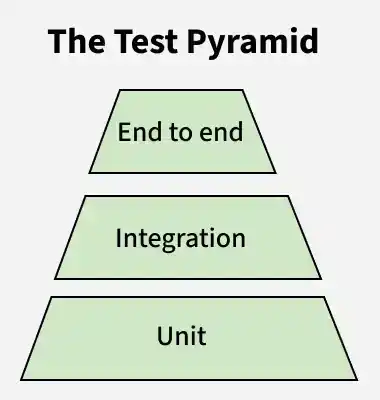
- Unit Tests (Bottom Layer): Largest number of tests because they are fast, inexpensive, and easy to maintain.
- Integration/API Tests (Middle Layer): Moderate number of tests to verify communication between components or services.
- End-to-End (UI) Tests (Top Layer): Smallest number of tests because they are slower, more complex, and require higher maintenance.
28. What is Headless Browser Testing, and When is it Used?
Headless Browser Testing is the process of running automated tests in a browser without a graphical user interface (GUI). It executes tests faster and consumes fewer system resources than a regular browser.
When is it Used?
- For faster test execution in CI/CD pipelines.
- For regression testing with large test suites.
- On servers or environments without a graphical interface.
- To reduce test execution time and resource usage.
- For automated testing in cloud and containerized environments.
29. In which scenarios would you not automate testing?
Automation testing should be avoided in scenarios where manual testing is more effective or when automation does not provide sufficient value.
- Exploratory testing.
- Usability testing.
- Ad-hoc testing.
- Frequently changing UI or requirements.
- One-time or short-term test cases.
- Features that are still under active development.
- Tests that require human judgment or visual validation.
30. How can you speed up an Auto Test Suite?
An automation test suite can be sped up by optimizing test execution, reducing unnecessary delays, and improving the overall test framework.
- Execute tests in parallel using Selenium Grid or TestNG.
- Run tests in headless mode to reduce execution time.
- Use Explicit Waits instead of unnecessary fixed waits.
- Optimize test data and avoid redundant test steps.
- Execute tests on multiple browsers or machines simultaneously.
- Integrate with CI/CD tools to run tests automatically.
31. Is Automated Testing Making Manual Testing Obsolete?
No, automated testing is not making manual testing obsolete. Automation and manual testing complement each other, and both are essential for ensuring software quality.
- Automation is ideal for repetitive, regression, and large-scale testing.
- Manual testing is essential for exploratory, usability, and ad-hoc testing.
- A combination of manual and automated testing provides the best testing coverage.
32. What is UI Testing?
UI Testing is User Interface Testing a type of software testing that ensures the UI of a website is user-friendly and meets the expected customer requirements.
- Verifies buttons, links, forms, menus, and other UI elements.
- Ensures proper layout, navigation, and responsiveness.
- Validates user interactions and expected functionality.
33. What is Protractor?
Protractor is an Automation testing framework that is written using NodeJS and offers combined end-to-end testing for web applications that are built using AngularJS. It supports both Angular and Non-Angular applications.
- The purpose is not only to test AngularJS applications but also to write automated regression tests for normal web applications.
- It automatically executes the next step in tests the moment the webpage finishes the pending tasks.
34. Is Documentation Necessary in Automation Testing?
Yes, documentation is essential in Automation Testing. It helps maintain the automation framework, improves collaboration, and makes test scripts easier to understand, update, and reuse.
- Improves code maintainability and readability.
- Helps team members understand the automation framework.
- Documents test cases, test data, and execution steps.
35. What are the Pros of Selenium?
Selenium is one of the most widely used automation testing tools due to its flexibility, cross-browser support, and integration capabilities.
- Open-source and free to use.
- Supports multiple programming languages such as Java, Python, C#, and JavaScript.
- Supports cross-browser testing on Chrome, Firefox, Edge, and Safari.
- Works on multiple operating systems, including Windows, macOS, and Linux.
- Integrates with tools like TestNG, JUnit, Maven, Jenkins, and Git.
- Supports parallel test execution using Selenium Grid.
36. What are the Limitations of Selenium?
Although Selenium is a powerful automation tool, it has some limitations that should be considered when choosing it for a project.
- Supports only web application testing (does not support desktop applications).
- Does not provide built-in reporting features.
- Requires third-party tools for reporting, logging, and build management.
- Handling dynamic elements and synchronization can be challenging.
- Requires regular script maintenance when the application's UI changes.
37. What are the features of a Good Automation Framework?
A good automation framework should be easy to use, maintain, and scale while providing reliable and efficient test execution.
- Reusable and modular test scripts.
- Supports data-driven and keyword-driven testing.
- Generates detailed test reports and logs.
- Provides proper exception handling and error reporting.
38. Is Automation Testing a Black Box Testing or White Box Testing Technique?
Automation Testing is primarily a Black Box Testing technique because it validates the application's functionality by interacting with the user interface without examining the internal source code. However, automation tools can also be used to support White Box Testing, depending on the testing approach.
39. What is Continuous Integration?
Continuous Integration (CI) is a software development practice in which developers frequently merge their code changes into a shared repository, where automated builds and tests are executed to detect issues early.
40. What is Continuous Delivery?
Continuous Delivery (CD) is a software development practice in which code changes are automatically built, tested, and prepared for deployment. The final deployment to the production environment is performed manually after approval.
41. What is the Scripting Standard Followed While Performing Automation Testing?
Scripting standards are a set of coding guidelines followed to create readable, reusable, maintainable, and scalable automation scripts.
- Follow a consistent naming convention for classes, methods, and variables.
- Write reusable and modular test scripts.
- Use the Page Object Model (POM) to separate test logic from page objects.
- Avoid hard-coded values by using configuration files and test data.
- Implement proper exception handling and logging.
- Use meaningful comments only where necessary.
42. Is it possible to conduct Automation testing without a framework?
Yes, it is possible to perform Automation Testing without a framework by writing and executing standalone automation scripts. However, this approach is suitable only for small projects or simple test cases.
- Suitable for small or short-term automation projects.
- Scripts are difficult to maintain as the project grows.
- Limited code reusability and scalability.
- Lacks structured reporting, configuration management, and test organization.
- Automation frameworks improve maintainability, reusability, and execution efficiency.
43. Why do we need Cross-Browser testing?
Cross-Browser Testing ensures that a web application works correctly and provides a consistent user experience across different web browsers, browser versions, operating systems, and devices.
- Ensures consistent functionality across multiple browsers.
- Identifies browser-specific compatibility issues.
- Improves the user experience on different platforms.
44. List the programming languages supported by Selenium Web-Driver.
Selenium WebDriver provides official language bindings that allow automation scripts to be written in different programming languages based on project requirements and team expertise.
- Java is the most widely used language in enterprise automation projects.
- Python is preferred for its simple syntax and rapid script development.
- Ruby is supported but is less commonly used today.
- C# is commonly used in .NET-based applications.
- JavaScript is used with Node.js for modern web automation.
Automation Testing Interview Questions for Experienced
Here in this section, you will find all experienced-level questions for automated testing interview questions.
45. List the differences between Manual Testing and Automation Testing.
Manual Testing and Automation Testing differ in terms of execution, speed, accuracy, cost, and suitability for different testing scenarios.
| Manual Testing | Automation Testing |
|---|---|
| Test cases are executed manually by a tester. | Test cases are executed automatically using scripts and tools. |
| Slower execution. | Faster execution. |
| Suitable for exploratory, usability, and ad-hoc testing. | Best for regression, repetitive, and large-scale testing. |
| More prone to human errors. | Provides consistent and accurate results. |
| Requires more manual effort. | Reduces manual effort after the initial setup. |
| Lower initial cost but higher long-term cost. | Higher initial setup cost but cost-effective over time. |
| Limited test coverage. | Supports wider test coverage across browsers and platforms. |
| No programming knowledge is required. | Requires programming knowledge and automation tools. |
46. List the main steps in the lifecycle of Automation Testing.
The Automation Testing Lifecycle (ATL) consists of a series of steps that help plan, develop, execute, and maintain automated test cases effectively.
Main Steps
- Feasibility Analysis: Identify the test cases that are suitable for automation.
- Tool Selection: Choose the appropriate automation tool based on project requirements.
- Framework Design: Design and set up the automation framework.
- Test Script Development: Create automation scripts for the selected test cases.
- Test Environment Setup: Configure the required hardware, software, browsers, and test data.
- Test Execution: Execute the automation scripts and monitor the results.
- Result Analysis and Reporting: Analyze test results, generate reports, and log defects.
- Maintenance: Update automation scripts to accommodate application changes and new features.
47. What Are Some Popular Tools Used for Automation Testing?
Automation testing uses various tools for web, mobile, API, and performance testing based on project requirements.
- Selenium: Web application automation.
- Cypress: End-to-end testing for modern web applications.
- Playwright: Cross-browser automation for web applications.
- Appium: Mobile application testing for Android and iOS.
- TestComplete: Automated UI testing for desktop, web, and mobile applications.
- Katalon Studio: Low-code automation testing platform.
- Robot Framework: Open-source keyword-driven automation framework.
- Ranorex: GUI automation for desktop, web, and mobile applications.
- UFT One (QTP): Enterprise automation testing tool by OpenText.
- Tricentis Tosca: Model-based automation testing tool.
48. List the criteria to select an automation tool.
Selecting the right automation tool depends on the project's requirements, technology stack, budget, and long-term maintenance needs.
Selection Criteria
- Compatibility with the application's technology stack.
- Support for multiple browsers, platforms, and operating systems.
- Ease of use and learning curve.
- Support for the required programming languages.
- Integration with CI/CD tools such as Jenkins and Git.
- Support for reporting, logging, and test management.
- Scalability and maintainability of automation scripts.
49. What is a Modular Testing Framework?
A Modular Testing Framework is an automation framework in which the application is divided into independent modules, and separate test scripts are created for each module. These modules can be reused to build complete test cases, making the framework easier to maintain and scale.
- Divides the application into independent modules.
- Promotes code reusability and modularity.
- Simplifies script maintenance and updates.
50. List the Frameworks Used in Automation Testing.
Automation frameworks provide a structured approach for developing, executing, and maintaining automated test scripts.
Types of Automation Frameworks
- Linear Framework: Executes test scripts sequentially without code reuse.
- Modular Testing Framework: Divides the application into independent modules with separate test scripts.
- Library Architecture Framework: Uses reusable libraries and functions to reduce code duplication.
- Data-Driven Framework: Reads test data from external sources such as Excel, CSV, or databases.
- Keyword-Driven Framework: Executes test cases based on predefined keywords.
- Hybrid Framework: Combines two or more frameworks, such as Data-Driven and Keyword-Driven, to improve flexibility and maintainability.
- Behavior-Driven Development (BDD) Framework: – Uses natural language to define test scenarios with tools such as Cucumber.
51. What is Data-Driven Testing?
Data-Driven Testing (DDT) is an automation testing approach in which the same test script is executed multiple times using different sets of input data stored in external sources such as Excel, CSV files, databases, or XML files.
- Separates test data from test scripts.
- Executes the same test with multiple data sets.
- Reduces code duplication and improves reusability.
52. What is Keyword-Driven Testing Framework?
Keyword-driven testing framework divides test cases as test steps, objects of test steps, actions on test steps, and data for test objects.
- It uses a table of keywords to represent the actions and inputs for each test case.
- In this, the set of keywords is identified and then actions are associated related to these keywords.
53. What is a Hybrid Testing Framework?
A Hybrid Testing Framework is an automation framework that combines two or more automation frameworks, such as Data-Driven, Keyword-Driven, and Modular Frameworks, to improve flexibility, reusability, and maintainability.
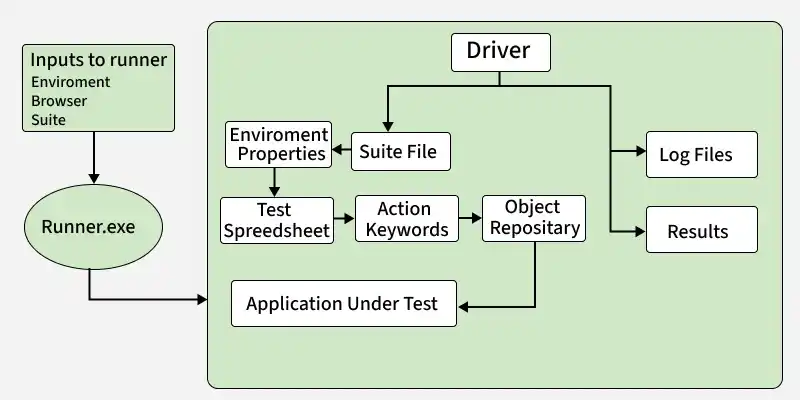
- Combines the advantages of multiple automation frameworks.
- Supports data-driven and keyword-driven testing.
- Promotes code reusability and modular design.
- Simplifies script maintenance and scalability.
- Suitable for large and complex automation projects.
54. List some features of the Cucumber framework.
Cucumber is a Behavior-Driven Development (BDD) framework that allows test scenarios to be written in simple, human-readable language, making collaboration easier between technical and non-technical stakeholders.
- Supports Behavior-Driven Development (BDD).
- Uses Gherkin syntax (Given, When, Then) for writing test scenarios.
- Test cases are easy to read and understand.
- Bridges the communication gap between developers, testers, and business analysts.
55. What is Robot Framework?
Robot Framework is an open-source, keyword-driven automation framework used for test automation and robotic process automation (RPA). It supports web, API, desktop, and mobile application testing through various libraries and tools.
- pen-source and easy to use.
- Follows a keyword-driven testing approach.
- Supports web, API, desktop, and mobile testing.
