

Manual testing interview questions help assess a candidate's understanding of software testing concepts, processes, and practical scenarios. They are useful for preparing for QA interviews at both beginner and experienced levels.
- Covers important manual testing interview questions and answers.
- Suitable for both beginners and experienced testing professionals.
- Includes testing concepts, methodologies, and real-world interview scenarios..
Manual Testing Interview questions for Freshers
1. Explain Software Testing and Manual Software Testing.
Software Testing is the process of evaluating a software application to verify that it meets specified requirements, performs as expected, and is free from defects before release.
Manual Software Testing is a testing approach in which testers manually execute test cases, observe the application's behavior, and report defects without using automation tools.
Difference Between Software Testing and Manual Software Testing
| Software Testing | Manual Software Testing |
|---|---|
| A quality assurance process for evaluating software. | A method of performing software testing manually. |
| Includes both manual and automated testing approaches. | Relies entirely on human effort. |
| Ensures the software meets quality and business requirements. | Verifies application behavior through manual test execution. |
| Covers various testing types and techniques. | Commonly used for functional, exploratory, usability, and ad-hoc testing. |
2. What are the Advantages of Manual Testing?
Manual Testing enables testers to evaluate an application manually to identify functional, usability, and visual defects from an end-user's perspective.
- No automation tools or scripting knowledge required.
- Cost-effective for small projects and short-term testing.
- Ideal for exploratory, ad-hoc, and usability testing.
- Easily adapts to frequent requirement changes.
- Detects UI, UX, and visual inconsistencies effectively.
3. What are the Limitations of Manual Testing?
Manual Testing relies on human effort, making it time-consuming, error-prone, and less suitable for repetitive or large-scale testing.
- Time-consuming for repetitive test execution.
- Prone to human errors and inconsistencies.
- Not suitable for large or complex projects.
- Requires significant manual effort and resources.
- Regression testing becomes slow and inefficient.
- Limited test coverage within a given time.
4. What is Quality Control(QC) in testing?
Quality Control (QC) is the process of identifying and correcting defects in a software product through testing and inspection to ensure it meets the required quality standards before release.
- Involves activities such as testing, reviews, and inspections.
- Ensures the software meets specified quality requirements.
- Product-oriented process that verifies the quality of the final software.
5. List the Key Challenges of Manual Testing.
Manual Testing involves several challenges because it depends on human effort, making the testing process slower and more prone to errors, especially for large and frequently changing applications.
- Time-consuming for repetitive test execution.
- Prone to human errors and inconsistencies.
- Difficult to achieve complete test coverage.
- Regression testing requires significant effort.
- Challenging to test large and complex applications.
6. How is Manual Testing different from Automated Testing?
The following table highlights the key differences between Manual Testing and Automated Testing.
| Manual Testing | Automated Testing |
|---|---|
| Test cases are executed manually by testers. | Test cases are executed using automation tools and scripts. |
| No programming knowledge is required. | Requires programming and automation skills. |
| Best for exploratory, usability, and ad-hoc testing. | Best for regression, repetitive, and performance testing. |
| Slower for repeated test execution. | Faster and more efficient for repeated execution. |
| Lower initial cost. | Higher initial setup cost but cost-effective in the long run. |
| More prone to human errors. | Provides consistent and accurate test execution. |
7. Who is a Manual Tester and What is the work they have to do?
A Manual Tester is a quality assurance professional who manually tests software applications to identify defects, verify functionality, and ensure the application meets business and user requirements before release.
Responsibilities
- Understand project requirements and specifications.
- Create and execute test cases and test scenarios.
- Perform functional, regression, smoke, and sanity testing.
- Collaborate with developers and business analysts.
- Document test results and prepare test reports.
- Ensure the application meets quality standards before deployment.
8. What is the Role of Documentation in Manual Testing?
Documentation in Manual Testing provides a structured record of testing activities, ensuring consistency, traceability, and effective communication throughout the testing process.
Roles of Documentation
- Defines test cases, test scenarios, and test plans.
- Records defects, test results, and execution status.
- Ensures complete test coverage and traceability.
- Facilitates communication among team members.
- Supports regression testing and future maintenance.
- Serves as a reference for audits and project reviews.
9. What are Priority and Severity in Software Testing?
Severity indicates the impact of a defect on the application's functionality, while Priority indicates how urgently the defect should be fixed.
| Severity | Priority |
|---|---|
| Measures the impact of a defect on the software. | Measures the urgency of fixing a defect. |
| Determined by the tester or QA team. | Determined by the project manager, product owner, or business team. |
| Focuses on technical impact. | Focuses on business needs and release schedules. |
| Categories: Critical, High, Medium, Low. | Categories: High, Medium, Low. |
10. What is Test Harness?
A Test Harness is a collection of test scripts, test data, drivers, and stubs used to execute test cases and verify that a software component works as expected. It provides a controlled environment for testing and validating software functionality.
Components
- Test Scripts: Execute predefined test cases.
- Test Data: Provides input values for testing.
- Drivers and Stubs: Simulate missing modules or external dependencies.
- Test Results: Capture and compare actual and expected outcomes.
11. What is a Test Bed?
A Test Bed is a configured testing environment that includes the required hardware, software, operating system, network, database, and test data needed to execute and validate software applications.
Components
- Hardware and software configuration.
- Operating system and network setup.
- Database and test data.
- Application build and testing tools.
12. What is Test Data?
Test Data is the set of input values used to execute test cases and verify whether a software application produces the expected results under different conditions.
- Used to validate application functionality.
- Includes valid, invalid, boundary, and edge-case inputs.
- Can be created manually or generated automatically.
13. What is Test Closure?
Test Closure is the final phase of the Software Testing Life Cycle (STLC), where all testing activities are completed, results are evaluated, and the testing process is formally concluded.
Key Activities
- Verify that all planned tests have been executed.
- Prepare the test closure report and summarize results.
- Document defects, lessons learned, and test metrics.
- Archive test artifacts for future reference and maintenance.
4. What is Random Testing?
Random Testing, also known as Monkey Testing, is a software testing technique in which random inputs and actions are used to test an application without predefined test cases. It helps uncover unexpected defects and application crashes.
- Uses random and unpredictable inputs for testing.
- Helps identify hidden defects and unexpected failures.
- Useful for testing application stability and robustness.
- Can save time by quickly exposing critical issues in complex applications.
Manual Testing Questions for Intermediate
In this section, we have compiled the top manual testing interview questions for intermediate. So if you have one or two years of experience, then this section is totally for these types of software testers.
15. What is Defect Cascading?
Defect Cascading is a situation where one unresolved defect in a software application causes multiple subsequent defects in other modules or functionalities. It occurs when the original defect is not identified or fixed early, leading to a chain of related failures throughout the system.
- One defect triggers multiple dependent defects.
- Usually caused by unresolved or poorly handled defects.
- Makes defect analysis and debugging more complex.
- Can significantly impact software quality and project timelines.
16. What is a Test Driver?
A Test Driver is a program or component used to invoke and test another software module when the calling module is not yet available. It provides test inputs, executes the module under test, and verifies the generated outputs. Test Drivers are primarily used during Unit Testing and Integration Testing.
- Simulates the calling module for the component being tested.
- Supplies test data and invokes the module under test.
- Used when higher-level modules are not yet developed.
- Commonly used in Bottom-Up Integration Testing.
17. What is a Stub?
A Stub is a temporary program that simulates the behavior of an unavailable lower-level module by returning predefined responses. It is primarily used in Top-Down Integration Testing.
- Simulates unavailable dependent modules.
- Returns predefined or dummy responses.
- Allows testing to continue before all modules are developed.
- Helps verify the interaction between software components.
18. What is Defect Triage?
Defect Triage is the process of reviewing, analyzing, and prioritizing reported defects to determine their severity, priority, ownership, and resolution timeline. It helps ensure that critical defects are addressed first and resources are used effectively.
- Reviews and prioritizes reported defects.
- Assigns defects to the appropriate team members.
- Determines defect severity, priority, and release impact.
19. What is API Testing?
API Testing is a software testing technique that verifies the functionality, reliability, performance, and security of an Application Programming Interface (API) by sending requests and validating the responses without using the user interface.
- Validates API requests, responses, and business logic.
- Verifies functionality, performance, reliability, and security.
- Ensures correct HTTP status codes, data, and error handling.
- Commonly performed using tools such as Postman, REST Assured, and Swagger.
20. What is Alpha Testing?
Alpha Testing is a type of acceptance testing performed by the internal testing team or developers at the developer's site before releasing the software to external users. Its purpose is to identify and fix defects before the product enters Beta Testing.
- Conducted by the internal QA team or developers.
- Performed before Beta Testing.
- Identifies defects before public release.
21. What is Beta Testing?
Beta Testing is a type of acceptance testing in which the software is released to a limited group of real users in a real-world environment to evaluate its functionality, usability, and reliability before the final public release.
- Conducted by real users or customers.
- Identifies defects and gathers user feedback.
- Validates the software in a real-world environment.
22. What are the types of Manual Testing?
Manual Testing consists of different testing types that help verify the functionality, quality, performance, and usability of a software application. Each type focuses on a specific aspect of software quality.
- Black box testing: Black box testing is a software testing method that focuses on testing the functionality of the software without dealing with the internal structures or workings.
- White box testing: White box testing is a software testing method that tests the internal structure of the application as opposed to its functionality.
- Unit testing: Unit testing is a software testing method in which the smallest testable parts of the application called units are tested for proper operation.
- System testing: System testing is a software testing method in which the QA team evaluates how the various components of an application interact together in a fully integrated system.
- Integration testing: Integration testing is a type of software testing method in which different modules or units of a software application are tested as a combined entity.
- Acceptance testing: Acceptance testing is a type of software testing method that is performed after system testing and before making the system available for actual use.
23. List the Roles and Responsibilities of Manual Testers.
Roles and Responsibilities
- Analyze business and functional requirements.
- Design and execute test cases and test scenarios.
- Identify, report, and track defects.
- Perform functional, regression, smoke, and sanity testing.
- Verify bug fixes through retesting.
- Maintain test documentation and prepare test reports.
- Collaborate with developers, business analysts, and stakeholders.
- Ensure the application meets quality standards before release.
24. Describe the Manual Testing Process.
The Manual Testing Process is a systematic approach followed by testers to verify that a software application meets specified requirements, identify defects, and ensure the software is ready for release.
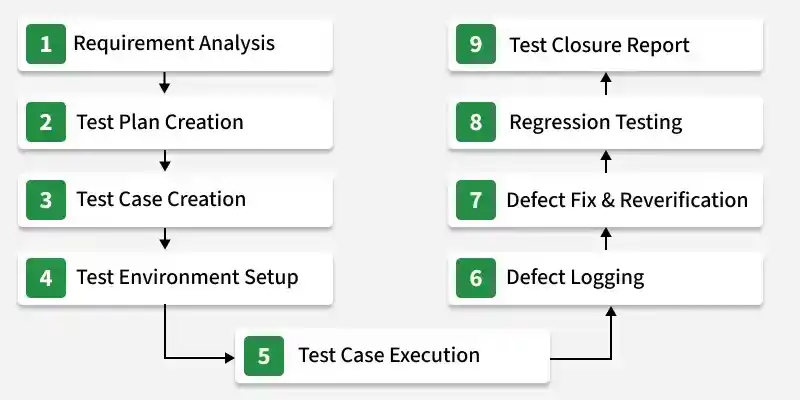
- Requirement Analysis: Understand the business and functional requirements of the application.
- Test Plan Creation: Define the testing scope, strategy, resources, and schedule.
- Test Case Creation: Prepare test cases, test scenarios, and test data.
- Test Environment Setup: Configure the required hardware, software, and testing environment.
- Test Case Execution: Execute test cases and compare actual results with expected results.
- Defect Logging: Record and report defects identified during testing.
- Retesting: Verify that the reported defects have been fixed successfully.
- Regression Testing: Ensure that recent changes have not affected existing functionality.
- Test Closure Report: Summarize testing activities, results, and lessons learned.
25. What are the Different Levels of Manual Testing?
Levels of Manual Testing define the stages at which software is tested to identify defects and ensure that each component and the complete application function correctly before release.
Levels of Manual Testing
- Unit Testing: Tests individual components or modules to verify they work correctly.
- Integration Testing: Verifies that integrated modules communicate and function correctly together.
- System Testing: Tests the complete application to ensure it meets specified requirements.
- User Acceptance Testing (UAT): Performed by end users or clients to validate that the software meets business needs and is ready for deployment.
26. What are the Skills required for Manual Testing?
Some of the important skills required for manual testing are:
- A strong analytical ability.
- Ability to report test results professionally.
- Familiarity with agile methodologies.
- Ability to write test cases for manual testing.
- Knowledge of concepts required for manual testing like SDLC, STLC, SQL, etc.
- Understanding of manual testing tools like JIRA, JMeter, etc.
- Understanding of test management tools and test tracking tools.
27. When to Use Manual Testing over Automation Testing?
Manual Testing is preferred when human observation, flexibility, and usability evaluation are required, or when automating test cases is not practical or cost-effective.
- For exploratory, usability, and ad-hoc testing.
- When requirements change frequently.
- For small projects or short-term testing.
- When testing new features for the first time.
- For visual validation of the user interface (UI/UX).
- When test cases are executed only once or infrequently.
- When automation setup costs outweigh the benefits.
28. What are Manual Testing Tools?
Manual testing is a software testing method in which the tester manually executes the test cases without the use of automated technologies. The tools that help in this process are known as manual testing tools. Some examples of manual testing tools are Bugzilla, JMeter, JIRA, etc.
Manual Testing Interview Questions for Experienced
This section contains manual testing interview questions for experienced. So, if you have years of experience and are looking for change, then explore this section. Here you will find all the interview questions for the software testing experience profile.
29. List some Manual Testing Tools.
- Jira: Used for defect tracking, Agile project management, and workflow management.
- TestRail: Used to design, organize, execute, and report manual test cases.
- HP ALM (Quality Center): Provides end-to-end test management, requirements traceability, and defect tracking.
- Azure DevOps: Integrates test planning, execution, bug tracking, and CI/CD workflows.
- Zephyr: Enterprise test management solution with seamless Jira integration.
- Bugzilla: Open-source defect management tool used for logging, tracking, and monitoring bugs.
- MantisBT: Lightweight web-based issue tracking system for managing software defects.
- Redmine: Project management and issue tracking tool with customizable workflows.
- Xray: Jira-based test management tool for managing manual and automated test cases.
- qTest: Enterprise test management platform supporting Agile, DevOps, and end-to-end test lifecycle management.
30. What are the best practices for writing test cases for Manual Testing?
Best practices for writing test cases help testers create clear, effective, and reusable test cases that improve test coverage and defect identification.
- Understand Requirements Clearly before writing test cases.
- Keep Test Cases Simple and easy to understand.
- Use a Standard Format with all necessary test details.
- Cover Positive and Negative scenarios for complete testing.
- Make Test Cases Reusable for future regression testing.
- Define Clear Expected Results for each test step.
- Avoid Duplicate Test Cases to improve efficiency.
- Prioritize Test Cases based on risk and business impact.
- Maintain Proper Test Data for accurate execution.
- Review and Update Test Cases regularly according to changes.
31. Can Automation Testing replace Manual Testing?
Automation Testing cannot completely replace Manual Testing because both are required for effective software testing.
- Automation Testing is used for repetitive, regression, and performance testing.
- Manual Testing is needed for exploratory, usability, and ad-hoc testing.
- Combining both approaches provides better test coverage and software quality.
32. List the differences between the Test Case and Test Scenario.
| Test Case | Test Scenario |
|---|---|
| Test Case is a detailed document that describes how to test a specific functionality. | Test Scenario is a high-level description of a feature or functionality to be tested. |
| It contains test steps, test data, preconditions, and expected results. | It only defines what needs to be tested. |
| Test Cases are used for actual test execution. | Test Scenarios are used for planning and identifying test coverage. |
| A single scenario can have multiple test cases. | A scenario represents a group of related test cases. |
| Example: Verify login with valid username and password. | Example: Test Login Functionality. |
33. What is Smoke Testing?
Smoke testing also known as Build Verification Testing is a software testing method that is performed at the beginning of the development process to make sure that the most critical functions of the software applications are working correctly.
- It is done to quickly identify and fix the major issues before more detailed testing is performed.
- The goal is to determine whether the build is stable enough to proceed with further testing.
33. What is Smoke Testing?
Smoke Testing is a preliminary testing process performed on a new software build to verify that the critical functionalities are working as expected and the build is stable enough for further testing.
- It is a shallow and wide testing approach that covers major application workflows.
- It helps identify build-breaking defects early in the testing cycle.
- It is usually performed after deployment of a new build or release.
- If smoke testing fails, the build is rejected and sent back to the development team for fixes.
- It saves testing time by preventing detailed testing on unstable builds.
35. List the differences between Sanity Testing and Smoke Testing.
Parameters | Sanity Testing | Smoke Testing |
|---|---|---|
Definition | Sanity testing is performed to check whether the new functionality/ bug has been fixed. | Smoke testing is performed to make sure that the critical functionality of the system is working correctly. |
Purpose | The goal of sanity testing is to verify rationality. | The goal of smoke testing is to verify stability. |
Documentation | Sanity testing isn't documented. | Smoke testing is documented. |
Who performs | Testers perform sanity testing. | Software developers or testers perform smoke testing. |
Software build stability | The software build is relatively stable at the time of sanity testing. | The software build may be either stable or unstable during smoke testing. |
36. What is Top-Down Integration Testing?
Top-down integration Testing is an Integration testing technique in which testing is done by integrating two or more modules by moving down from top to bottom through the control flow of the architecture structure.
- High-level modules are tested first and then the low-level modules are tested.
- Stubs are the modules that act as temporary replacements for the called module.
37. Differences between Regression Testing and Retesting.
| Regression Testing | Retesting |
|---|---|
| Regression Testing verifies that existing functionalities are not affected by new changes or bug fixes. | Retesting verifies that a specific defect has been fixed successfully. |
| It is performed to check the impact of code changes on the application. | It is performed by executing failed test cases again after defect resolution. |
| It covers both new and existing functionalities. | It focuses only on the reported and fixed defects. |
| Test cases can be executed manually or using automation tools. | It is usually performed manually to verify the defect fix. |
| Regression testing requires more time and wider test coverage. | Retesting requires less time as it targets specific issues. |
| Example: Testing login, payment, and other features after adding a new feature. | Example: Testing the login issue again after the developer fixes it. |
38. List some Test Management Tools.
- QACoverage: A cost-effective test management tool that improves QA productivity and provides complete traceability between requirements, test cases, and defects.
- TestRail: A web-based tool used to organize test cases, manage test execution, and generate real-time testing reports and insights.
- SpiraTest: A test management platform that helps agile teams manage requirements, test cases, and defects in one place.
- Testiny: A lightweight and user-friendly tool designed to simplify manual testing and QA management processes.
- TestMonitor: An end-to-end testing tool that supports advanced test case management, result tracking, and smart reporting features.
39. What is Bug Lifecycle?
Bug Life Cycle, also known as Defect Life Cycle, is the process through which a defect or bug passes during its entire life, from identification to closure. The diagram below represents the workflow of the Defect Life Cycle.
States in the Defect Life Cycle
- New: When a tester identifies a new defect, it is marked as New. This is the initial stage of the bug life cycle.
- Assigned: The newly identified defect is reviewed and assigned to the development team for fixing.
- Open: In this stage, developers analyze and work on fixing the defect. If the defect is not valid or cannot be fixed immediately, it may be moved to Rejected or Deferred status.
- Fixed: After making the necessary code changes, the developer marks the defect as Fixed.
- Pending Retest: Once the fix is completed, the updated application is sent to the testing team for retesting, and the defect status becomes Pending Retest.
- Retest: The tester retests the application to verify whether the defect has been fixed successfully.
- Reopened: If the defect still exists after retesting, the tester changes the status to Reopened, and the defect cycle starts again from the Open state.
- Verified: If the tester confirms that the defect is fixed and no issue remains, the defect is marked as Verified.
- Closed: This is the final stage of the Defect Life Cycle. After successful verification, the tester marks the defect as Closed.
40. List some Bug Tracking Tools.
- Jira: A widely used bug tracking and project management tool that helps teams track defects, manage workflows, generate reports, and monitor issues efficiently.
- BugHerd: A simple bug tracking tool for websites that captures screenshots, browser details, OS information, and CSS details to help reproduce and fix issues quickly.
- Bugzilla: An open-source bug tracking tool used to manage and track software defects with integration support for test management tools.
- Axosoft: A bug tracking and Scrum project management tool that supports both cloud-based and on-premises applications.
- Backlog: A web-based project management and bug tracking tool that provides features like task management, subtasks, status tracking, and mobile app support.
41. List the differences between Quality Assurance (QA) and Quality Control (QC).
| Quality Assurance (QA) | Quality Control (QC) |
|---|---|
| QA is a process-oriented approach that focuses on preventing defects. | QC is a product-oriented approach that focuses on identifying defects. |
| It ensures that proper processes and standards are followed during development. | It verifies that the final product meets the required quality standards. |
| QA activities include process improvement, audits, and defining testing standards. | QC activities include testing, defect identification, and validation. |
| QA is performed throughout the software development lifecycle. | QC is mainly performed during the testing phase. |
| QA is a proactive approach to avoid defects. | QC is a reactive approach to find and fix defects. |
| Example: Defining testing guidelines and reviewing development processes. | Example: Executing test cases and reporting bugs. |
42. What is Pesticide Paradox?
Pesticide Paradox is a testing concept that states repeating the same set of test cases again and again may fail to find new defects because the software becomes resistant to those tests.
- It highlights the need to regularly review and update test cases.
- Testers should add new test scenarios to improve defect detection.
- It helps increase test coverage and identify hidden issues.
43. What is a Critical Bug?
A Critical Bug is a high-severity defect that causes major failure of an application or prevents users from performing essential functions.
- It can cause application crashes, data loss, or system failures.
- It requires immediate attention and should be fixed with high priority.
- Critical bugs usually block further testing or product release.
44. What makes a good test engineer?
A good test engineer has strong technical knowledge, analytical skills, and the ability to identify defects while ensuring the quality and reliability of the software.
- Understands business requirements and user expectations clearly.
- Has strong knowledge of testing concepts, techniques, and tools.
- Creates effective test cases with proper coverage.
- Possesses good analytical and problem-solving skills.
- Reports defects clearly with accurate details and evidence.
- Continuously learns new technologies and testing practices.
- Communicates effectively with developers and team members.
45. List the differences between Alpha testing and Beta testing.
| Alpha Testing | Beta Testing |
|---|---|
| Alpha Testing is performed by internal teams such as developers and testers. | Beta Testing is performed by real users or customers outside the organization. |
| It is conducted at the developer's site in a controlled environment. | It is conducted at the user's location in a real-world environment. |
| It is performed before Beta Testing. | It is performed after Alpha Testing and before the final release. |
| It focuses on finding major bugs and improving product quality. | It focuses on collecting user feedback and identifying real-world issues. |
| Testing is usually done using a stable but incomplete version of the software. | Testing is done on a near-final version of the software. |
| Example: Internal testing of a mobile app before releasing it to customers. | Example: Releasing a trial version of an app to selected users for feedback. |
